吐槽一下那些MP4转gif的在线软件,真是不太好用。推荐一款在线视频转换成Gif,动图制作,视频转换为表情包简直不要太舒服
下面是实际效果,z轴中是根据小球运动坐标动态变化的。
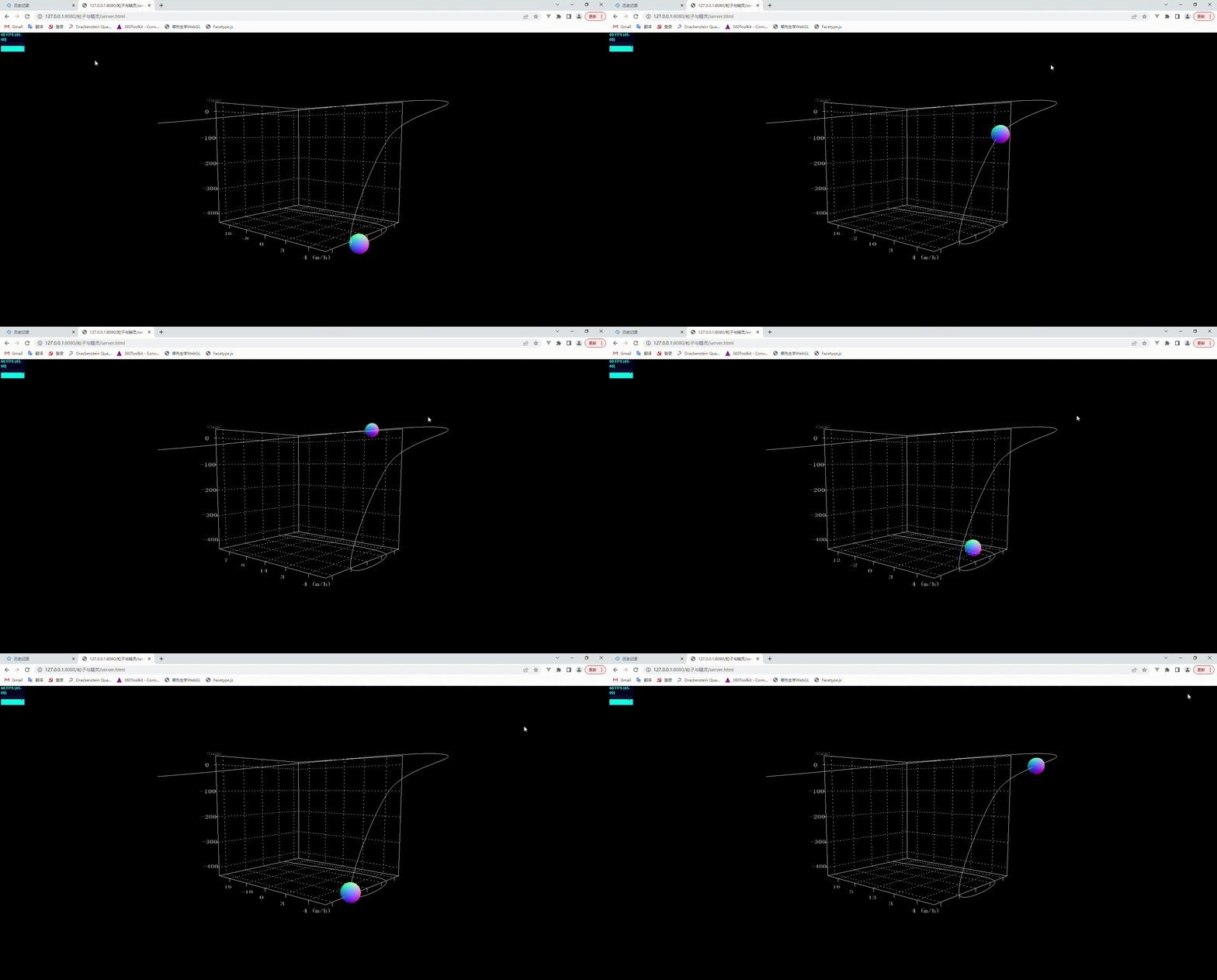
1 画一个三维坐标
利用最基本的直线作图方法:
            var material = new THREE.LineBasicMaterial( { color: 0xffffff } );

		    //这里用这个构造BufferGeometry
		    var geometry = new THREE.BufferGeometry()
            //定义一个Array数组
		    var pointsArray = new Array()
		    //加入顶点
			pointsArray.push(new THREE.Vector3( 0, 14, 0) );
			pointsArray.push(new THREE.Vector3( -14, 14, 0));
			pointsArray.push(new THREE.Vector3( -14, 13, 0));
			pointsArray.push(new THREE.Vector3( -14, 13, -0.4));
			pointsArray.push(new THREE.Vector3( -14, 13, 0));
			pointsArray.push(new THREE.Vector3( -14, 10, 0));
			pointsArray.push(new THREE.Vector3( -14, 10, -0.4));
			pointsArray.push(new THREE.Vector3( -14, 10, 0));
			pointsArray.push(new THREE.Vector3( -14, 7, 0));
			pointsArray.push(new THREE.Vector3( -14, 7, -0.4));
			pointsArray.push(new THREE.Vector3( -14, 7, 0));
			pointsArray.push(new THREE.Vector3( -14, 4, 0));
			pointsArray.push(new THREE.Vector3( -14, 4, -0.4));
			pointsArray.push(new THREE.Vector3( -14, 4, 0));
			pointsArray.push(new THREE.Vector3( -14, 1, 0));
			pointsArray.push(new THREE.Vector3( -14, 1, -0.4));
			pointsArray.push(new THREE.Vector3( -14, 1, 0));
			pointsArray.push(new THREE.Vector3( -14, 0, 0));

			pointsArray.push(new THREE.Vector3( -14, 0, 2));
			pointsArray.push(new THREE.Vector3( -14, -0.4, 2));
			pointsArray.push(new THREE.Vector3( -14, 0, 2));
			pointsArray.push(new THREE.Vector3( -14, 0, 5));
			pointsArray.push(new THREE.Vector3( -14, -0.4, 5));
			pointsArray.push(new THREE.Vector3( -14, 0, 5));
			pointsArray.push(new THREE.Vector3( -14, 0, 8));
			pointsArray.push(new THREE.Vector3( -14, -0.4, 8));
			pointsArray.push(new THREE.Vector3( -14, 0, 8));
			pointsArray.push(new THREE.Vector3( -14, 0, 11));
			pointsArray.push(new THREE.Vector3( -14, -0.4, 11));
			pointsArray.push(new THREE.Vector3( -14, 0, 11));
			pointsArray.push(new THREE.Vector3( -14, 0, 14));
			pointsArray.push(new THREE.Vector3( -14, -0.4, 14));
			pointsArray.push(new THREE.Vector3( -14, 0, 14));
			pointsArray.push(new THREE.Vector3( -14, 0, 16));

			pointsArray.push(new THREE.Vector3( -13, 0, 16));
			pointsArray.push(new THREE.Vector3( -13, -0.4, 16));
			pointsArray.push(new THREE.Vector3( -13, 0, 16));
			pointsArray.push(new THREE.Vector3( -10, 0, 16));
			pointsArray.push(new THREE.Vector3( -10, -0.4, 16));
			pointsArray.push(new THREE.Vector3( -10, 0, 16));
			pointsArray.push(new THREE.Vector3( -7, 0, 16));
			pointsArray.push(new THREE.Vector3( -7,-0.4, 16));
			pointsArray.push(new THREE.Vector3( -7, 0, 16));
			pointsArray.push(new THREE.Vector3( -4, 0, 16));
			pointsArray.push(new THREE.Vector3( -4, -0.4, 16));
			pointsArray.push(new THREE.Vector3( -4, 0, 16));
			pointsArray.push(new THREE.Vector3( -1, 0, 16));
			pointsArray.push(new THREE.Vector3( -1, -0.4, 16));
			pointsArray.push(new THREE.Vector3( -1, 0, 16));
			pointsArray.push(new THREE.Vector3( -1, 0, 16));
			pointsArray.push(new THREE.Vector3( 0, 0, 16));

			pointsArray.push(new THREE.Vector3( 0, 14, 16));
			pointsArray.push(new THREE.Vector3( 0, 14, 0));
			pointsArray.push(new THREE.Vector3( 0, 0, 0));
			pointsArray.push(new THREE.Vector3( -14, 0, 0));
			pointsArray.push(new THREE.Vector3( 0, 0, 0));
			pointsArray.push(new THREE.Vector3( 0, 0, 16));

		    //用这个api传入顶点数组setFromPoints是geometry
            //通过该方法可以把数组points中顶点数据提取出来赋值给几何体的顶点位置属性
             //geometry.vertices,
		    geometry.setFromPoints(pointsArray)

		    var line1 = new THREE.Line( geometry, material );
		    scene.add( line1 );
(2)画虚线(同实线基本相同)
         var lines = new THREE.Geometry();
		 lines.vertices.push(new THREE.Vector3(0, 1, 0));
		 lines.vertices.push(new THREE.Vector3(-14, 1, 0));
		 lines.vertices.push(new THREE.Vector3(-14, 4, 0));
		 lines.vertices.push(new THREE.Vector3(0, 4, 0));
		 lines.vertices.push(new THREE.Vector3(0, 7, 0));
		 lines.vertices.push(new THREE.Vector3(-14, 7, 0));
		 lines.vertices.push(new THREE.Vector3(-14, 10, 0));
		 lines.vertices.push(new THREE.Vector3(0, 10, 0));
		 lines.vertices.push(new THREE.Vector3(0, 13, 0));
		 lines.vertices.push(new THREE.Vector3(-14, 13, 0));
		 lines.vertices.push(new THREE.Vector3(0, 13, 0));
		 lines.vertices.push(new THREE.Vector3(0, 13, 16));
		 lines.vertices.push(new THREE.Vector3(0, 10, 16));
		 lines.vertices.push(new THREE.Vector3(0, 10, 0));
		 lines.vertices.push(new THREE.Vector3(0, 7, 0));
		 lines.vertices.push(new THREE.Vector3(0, 7, 16));
		 lines.vertices.push(new THREE.Vector3(0, 4, 16));
		 lines.vertices.push(new THREE.Vector3(0, 4, 0));
		 lines.vertices.push(new THREE.Vector3(0, 1, 0));
		 lines.vertices.push(new THREE.Vector3(0, 1, 16));
		 lines.vertices.push(new THREE.Vector3(0, 0, 16));

		 lines.vertices.push(new THREE.Vector3(-1, 0, 16));
		 lines.vertices.push(new THREE.Vector3(-1, 0, 0));
		 lines.vertices.push(new THREE.Vector3(-1, 14, 0));
		 lines.vertices.push(new THREE.Vector3(-4, 14, 0));
		 lines.vertices.push(new THREE.Vector3(-4, 0, 0));
		 lines.vertices.push(new THREE.Vector3(-4, 0, 16));
		 lines.vertices.push(new THREE.Vector3(-7, 0, 16));
		 lines.vertices.push(new THREE.Vector3(-7, 0, 0));
		 lines.vertices.push(new THREE.Vector3(-7, 14, 0));
		 lines.vertices.push(new THREE.Vector3(-10, 14, 0));
		 lines.vertices.push(new THREE.Vector3(-10, 0, 0));
		 lines.vertices.push(new THREE.Vector3(-10, 0, 16));
		 lines.vertices.push(new THREE.Vector3(-13, 0, 16));
		 lines.vertices.push(new THREE.Vector3(-13, 0, 0));
		 lines.vertices.push(new THREE.Vector3(-13, 14, 0));
		 lines.vertices.push(new THREE.Vector3(-14, 14, 0));
		 lines.vertices.push(new THREE.Vector3(-14, 0, 0));
		 lines.vertices.push(new THREE.Vector3(-14, 0, 2));
		 lines.vertices.push(new THREE.Vector3(0, 0, 2));
		 lines.vertices.push(new THREE.Vector3(0, 14, 2));
		 lines.vertices.push(new THREE.Vector3(0, 14, 5));
		 lines.vertices.push(new THREE.Vector3(0, 0, 5));
		 lines.vertices.push(new THREE.Vector3(-14, 0, 5));
		 lines.vertices.push(new THREE.Vector3(-14, 0, 8));
		 lines.vertices.push(new THREE.Vector3(0, 0, 8));
		 lines.vertices.push(new THREE.Vector3(0, 14, 8));
		 lines.vertices.push(new THREE.Vector3(0, 14, 11));
		 lines.vertices.push(new THREE.Vector3(0, 0, 11));
		 lines.vertices.push(new THREE.Vector3(-14, 0, 11));
		 lines.vertices.push(new THREE.Vector3(-14, 0, 14));
		 lines.vertices.push(new THREE.Vector3(0, 0, 14));
		 lines.vertices.push(new THREE.Vector3(0, 14, 14));

		 var materials = new THREE.LineDashedMaterial({
		     color: 0xffffff,
		     dashSize: 0.15,   //定义间距以及虚线大小
		     gapSize: 0.3,

		 });
		 var line2 = new THREE.Line(lines, materials);
		 //必须添加识别为虚线
		 line2.computeLineDistances();
		 scene.add(line2);
2 添加坐标
(1)创建一个画布,添加数字
        let canvas = document.createElement("canvas");
		canvas.width =700;
		canvas.height = 200;
		let ctx = canvas.getContext("2d");
		ctx.fillStyle = "#ffffff";
		ctx.font = "Bold 250px 宋体";
		ctx.lineWidth = 10;
		ctx.fillText("-400",0,204);
(2)canvas作为属性添加入精灵材质中进行放缩(保证不失真)
            var canvasMap = new THREE.Texture(canvas);

			canvasMap.needsUpdate = true ;

		    var mat = new THREE.SpriteMaterial();
		    mat.map = canvasMap;
			var text = new THREE.Sprite(mat);
			text.scale.set(0.5 * 5,0.25 * 2 ,0.75 * 10 );
            //根据需要,自己设置位置即可
            text.position.set(-14, -0.7, 3);
			scene.add(text);
(3)动态可根据自己的需要在render中自己设置函数变化
3 添加Curve曲线根据轨迹自动移动
曲线Curve 拥有getPoint()方法可以从圆弧线按照一定的细分精度返回沿着圆弧线分布的顶点坐标
方案来源:Three.js电子书《Three.js零基础入门教程》_郭隆邦 (yanhuangxueyuan.com)
大佬就是牛蛙,直接copy上就能用
        function motion (){
			var geometry3 = new THREE.Geometry(); //声明一个几何体对象Geometry
			curve = new THREE.CatmullRomCurve3([
			          new THREE.Vector3(-3, 0, 0),
			          new THREE.Vector3(-3, 0, 16) ,
			          new THREE.Vector3(-10, 0, 16) ,
			          new THREE.Vector3(-3, 10, 16) ,
			          new THREE.Vector3(13, 15, 16) ,
			          new THREE.Vector3(-13, 12, -16) ,

			       ]);
			points = curve.getPoints(100);

			geometry3.setFromPoints(points);
			//材质对象
			var material3 = new THREE.LineBasicMaterial({
			color: 0xffffff
			});
			//线条模型对象
			line4 = new THREE.Line(geometry3, material3);
			scene.add(line4);

			var arr = [];
				for (let i = 0; i < 101; i++) {
					arr.push(i)
				}
			var times = new Float32Array(arr);

			var posArr = []
			points.forEach(elem => {
			  posArr.push(elem.x, elem.y, elem.z)
			})
			var values = new Float32Array(posArr);

			var posTrack = new THREE.KeyframeTrack('.position', times, values);
			let duration = 101;
			let clip = new THREE.AnimationClip("default", duration, [posTrack]);
			mixer = new THREE.AnimationMixer(box);
			let AnimationAction = mixer.clipAction(clip);
			AnimationAction.timeScale = 20;
			AnimationAction.play();
		    clock = new THREE.Clock();//声明一个时钟对象
		}
function render() {
stats.update();
...
mixer.update(clock.getDelta());
}注意自己在写代码时局部变量的定义。
版权声明:本文为weixin_51236754原创文章,遵循CC 4.0 BY-SA版权协议,转载请附上原文出处链接和本声明。