Oracle的SYS用户登录报权限不足(insufficient privileges)
D:\Users\xiaomaimiao>sqlplus sys/lhr@192.168.1.31/orastrac as sysdba
SQL*Plus: Release 11.2.0.1.0 Production on Sat Jul 15 11:36:54 2017
Copyright (c) 1982, 2010, Oracle. All rights reserved.
ERROR:
ORA-01031: insufficient privileges
注意多个数据库实例时候,set ORACLE_SID='',
、检查 ( 下位于 目录)是否包含这句: ,没有的话加上 linux SQLNET.AUTHENTICATION_SERVICES = (ALL)
、检查登陆 的用户 或安装 时候使用的用户 是不是在包含在 组中,域用户没有连上域服务器时就可能出现这种现象。
3要保证 参数 、orapassw , 口令文件是否存在
C:\Users\Administrator> orapwd file="E:\oracle\ora8i\DATABASE\PWDortest.ORA" password=lhr
[oracle@robinson dbs]$ orapwd file=$ORACLE_HOME/dbs/orapworcl password=oracle force=y
一种解决方法案例:
1、检查系统参数:
SQL> show parameter password
NAME TYPE VALUE
------------------------------------ ----------- ------------------------------
remote_login_passwordfile string EXCLUSIVE
2、
select * from v$pwfile_users;
SQL>
为空
3、
SQL> grant sysdba to sys;
grant sysdba to sys
*
ERROR at line 1:
ORA-01994: GRANT failed: password file missing or disabled
4、建立password文件
D:/>orapwd file="D:/oracle/product/10g/db_1/database/PWDoratest.ora" password=gp oswong entries=10
5、
SQL> select * from v$pwfile_users;
USERNAME SYSDB SYSOP
------------------------------ ----- -----
SYS TRUE TRUE
SYS正常显示出来。
6、重新在远程以SYSDBA登录,可正常使用。
如果口令文件创建的有问题,也是会报如下的错误:
ora-01031:insufficient privileges
口令文件的命名格式应为orapwsid,并且sid是区分大小写的。由于Target Database连接Auxiliary Database时需要验证口令,
如果违反了以上规则,将会提示ORA-01031: insufficient privileges。
我在用linux创建duplicate数据库的时候 就是因为口令文件创建的路径和名称不对才遇到这个错误
windows 下 sqlplus / as sysdba 登录报权限不足
系统是xp系统的虚拟机,由于之前是在Administrator用户下登陆的,后边换了个用户名lhr,登陆进去后发现sqlplus连不上了,具体:
Microsoft Windows XP [版本5.1.2600]
(C)版权所有 1985-2001 Microsoft Corp.
C:\Documents and Settings\lhr>sqlplus "/as sysdba"
SQL*Plus: Release 11.2.0.1.0 Production on 星期四7月10 00:02:59 2014
Copyright (c) 1982, 2010, Oracle. All rights reserved.
ERROR:
ORA-01031: insufficient privileges
请输入用户名:
ERROR:
ORA-01017:无效的用户名/口令;拒绝登录
请输入用户名:
ERROR:
ORA-01017:无效的用户名/口令;拒绝登录
SP2-0157:在3次尝试之后无法CONNECT到ORACLE,退出SQL*Plus
C:\Documents and Settings\lhr>sqlplus "sys/lhras sysdba"
SQL*Plus: Release 11.2.0.1.0 Production on 星期四7月10 00:04:06 2014
Copyright (c) 1982, 2010, Oracle. All rights reserved.
连接到:
Oracle Database 11g Enterprise Edition Release 11.2.0.3.0 - 64bit Production
With the Partitioning, Automatic Storage Management, OLAP, Data Mining
and Real Application Testing options
SQL>
不能直接"/as sysdba"登录,可以输入用户名跟密码登录。
判断应为用户与组策略的问题。
解决办法:
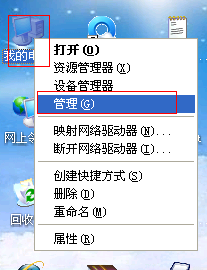
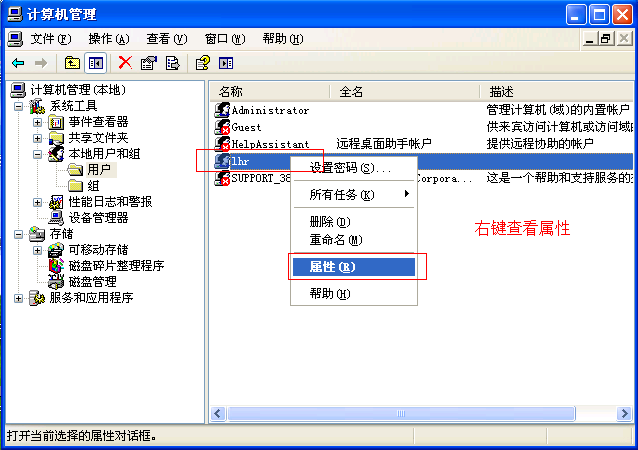
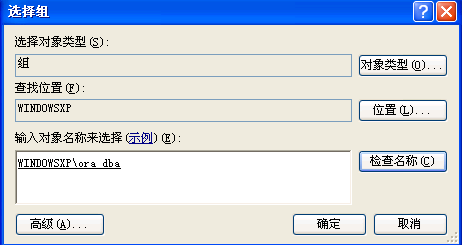
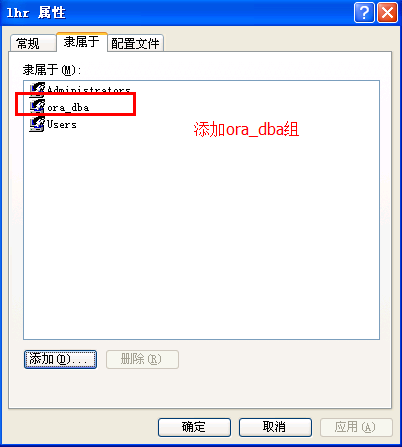
重新登陆:
C:\Documents and Settings\lhr>sqlplus / as sysdba
SQL*Plus: Release 11.2.0.1.0 Production on 星期四 7月 10 00:06:18 2014
Copyright (c) 1982, 2010, Oracle. All rights reserved.
连接到:
Oracle Database 11g Enterprise Edition Release 11.2.0.3.0 - 64bit Production
With the Partitioning, Automatic Storage Management, OLAP, Data Mining
and Real Application Testing options
SQL>