一、go环境安装
1、下载 golang.google.cn![[图片]](https://img-blog.csdnimg.cn/31d24a476de049b686bb644f349e04dd.png)
2、下载并安装,然后配置环境变量。我将压缩包下载到D盘的自己建立的go文件夹,然后解压缩生成go,在自己建立的go文件夹的同级目录下建立go_work文件夹。
3、添加系统变量
4、编辑path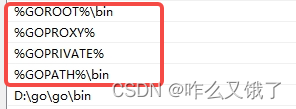
over
二、下载并配置protoc.exe
1、下载Release Protocol Buffers v3.19.4 · protocolbuffers/protobuf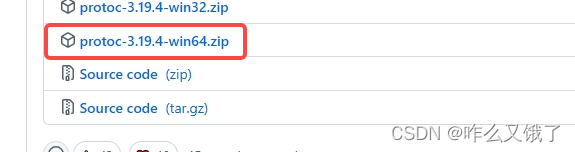
2、 选择最新的 protoc-3.19.0-win64.zip,解压缩,找到bin目录下的protoc.exe,将protoc.exe放到go环境的bin目录下。
3、 为了确保能找到protoc.exe,需要在系统环境变量的PATH设置。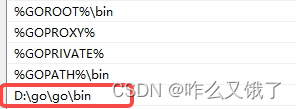
4、可以使用命令查看版本 protoc --version
三、安装protobuf和grpc
1、安装protobuf
1)执行 go get -u github.com/golang/protobuf/proto
报错:go get: module github.com/golang/protobuf/protoc-gen-go: Get
“https://proxy.golang.org/github.com/golang/protobuf/protoc-gen-go/@v/list”:
dial tcp 142.251.42.241:4 43: connectex: A connection attempt failed
because the connected party did not properly respond after a period of
time, or established connection failed because connected host has
failed to respond.
解决办法,先执行如下两条命令:
go env -w GO111MODULE=on
go env -w GOPROXY=https://goproxy.cn,direct
再执行go get下载(如果还继续报错,那看看是不是下面的错误)
2) 执行go get -u github.com/golang/protobuf/protoc-gen-go
报错: go: module github.com/golang/protobuf is deprecated: Use the
“google.golang.org/protobuf” module instead. go get: installing
executable with ‘go get’ in module mode is deprecated.
Use ‘go install pkg@version’ instead.
For more information, see https://golang.org/doc/go-get-install-deprecation
or run ‘go help get’ or ‘go help install’.
解决办法,报了两个错误:
现在想要拉取protoc-gen-go需要去google.golang.org/protobuf拉取,原来的路径已经废弃了。
使用的go版本是1.17。而Go1.17版使用go install安装依赖。所以应该按照它下面的格式go install pkg@version进行拉取。
所以拉取命令如下:
go install google.golang.org/protobuf/cmd/protoc-gen-go@latest
报错: go install: google.golang.org/protobuf/cmd/proto@latest: module
google.golang.org/protobuf@latest found (v1.28.0), but does not
contain package google.golang.org/protobuf/cmd/proto
解决办法:
找到GOPATH/src目录,新建google.golang.org文件夹。(如果有,可以把里面的内容删除)在google.golang.org目录下打开cmd,执行:
git clone https://e.coding.net/robinqiwei/googleprotobuf.git protobuf

安装完后,会在bin目录下生成protoc-gen-go.exe
使用命令安装grpc
go get -u google.golang.org/grpc
如果不行
- 下载net包: git clone https://github.com/golang/net.git $GOPATH/src/golang.org/x/net#
- 下载text包:git clone https://github.com/golang/text.git $GOPATH/src/golang.org/x/text
- 下载go-genproto包:git clone https://github.com/google/go-genproto.git $GOPATH/src/google.golang.org/genproto
- 下载grpc-go包:git clone https://github.com/grpc/grpc-go.git $GOPATH/src/google.golang.org/grpc
切换到GOPATH/src目录,执行如下命令: go installgoogle.golang.org/grpc
四、测试
1、 www.grpc.io(进入网站可看到如下页面)
绿色框的内容我们已经完成了,可以将红色框的内容执行一遍。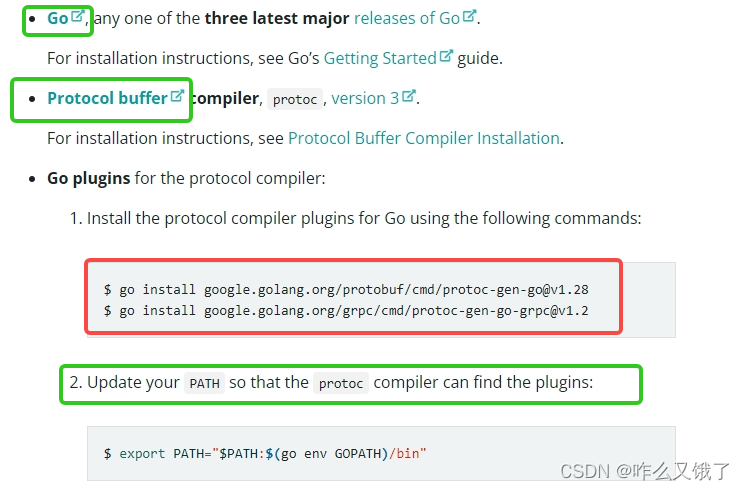
2、下载grpc实例
git clone -b v1.46.0 --depth 1 https://github.com/grpc/grpc-go

3、运行实例
1)可以用编译器打开其中的examples文件夹
2)启动终端执行:go run greeter_server/main.go
3)另起终端编译并执行:go run greeter_client/main.go
4)其中最重要的文件是这两个pb.go文件,但是我们下载下来的例子其实是自带这两个文件的。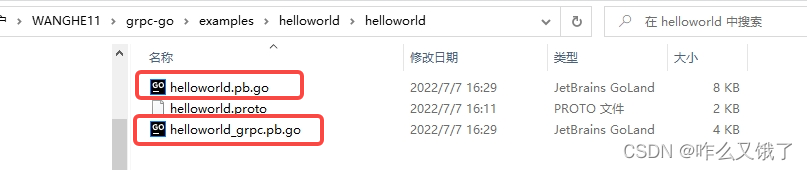 将这两个文件删除后就会发现我们的程序不好用了。
重新编译生成pb.go文件
protoc --go_out=. --go_opt=paths=source_relative --go-grpc_out=. --go-grpc_opt=paths=source_relative helloworld/helloworld.proto //一整行的命令