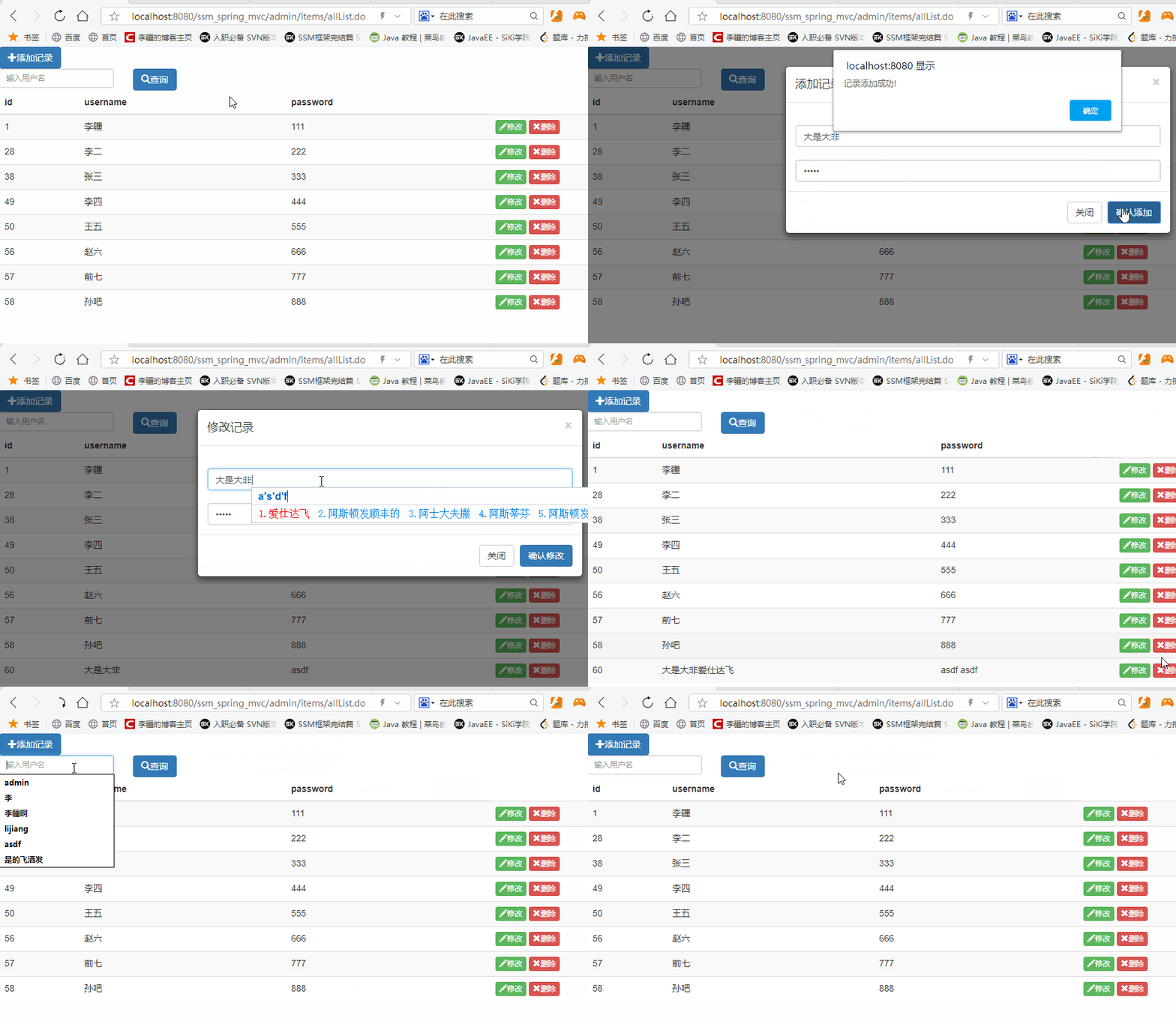
效果图如下:
HTML结构
<!-- 模态窗 -->
<div class="modal">
<div class="form">
<input type="hidden" value="" class="active">
<div><span>记录</span><span class="closeModal">x</span></div>
<hr>
<div><input type="text" class="username"" name=" username" placeholder="用户名"></div>
<div><input type="password" class="pwd" name="pwd" placeholder="密码"></div>
<div><button class="closeModal">关闭</button>  <button class="addInfo">确认</button></div>
</div>
</div>
<div class="wrapper">
<div>
<input type="search" class="ser" value="">
<button class="search">查询</button>
<button class="add">添加记录</button>
</div>
<div class="tb">
<table width="100%">
<thead>
<ul>
<li>Id</li>
<li>UserName</li>
<li>PassWord</li>
<li></li>
</ul>
</thead>
<tbody>
<!-- <tr>
<td>1</td>
<td>张三</td>
<td>123456</td>
<td>
<button class="update">修改</button>
<button class="del">删除</button>
</td>
</tr> -->
</tbody>
</table>
</div>
</div>JQuery内容
函数入口
$(function () {
//...以下所有代码
}
按钮绑定点击事件
增加关闭按钮
				//点击增加按钮
				$(".add").click(function() {
					showModal();
				})
				//点击关闭按钮
				$(".closeModal").click(function() {
					closeModal();
				})
确认按钮
				//点击确认按钮
				$(".addInfo").click(function() {
					//判断是添加操作还是修改
					var id = $(".active").val();
					if (id == "") {
						if ($(".username").val() == "" || $(".pwd").val() == "") {
							alert("用户名密码不能为空~")
						} else {
							alert("添加成功~")
							addInfo(); //添加操作
							//关闭
							closeModal();
						}
					} else { //修改操作
						if ($(".username").val() == "" || $(".pwd").val() == "") {
							alert("用户名密码不能为空~")
						} else {
							alert("修改成功~")
							updateInfo(id)
							closeModal();
						}
					}
					showInfo();
				})
删除按钮
				//点击删除
				$("tbody").on("click", ".del", function() {
					var id = $(this).parent().parent().children().eq(0).text();
					//删除方法
					delInfo(id);
					//渲染
					showInfo();
				})
修改按钮
				//点击修改
				$("tbody").on("click", ".update", function() {
					//显示模态窗
					showModal();
					//根据id获取对应的对象
userArr = localStorage.userList == undefined ? [] : JSON.parse(localStorage.userList);
					var id = $(this).parent().parent().children().eq(0).text();
					var user = userArr.find(obj => {
						return obj.id == id;
					})
					//反写
					$(".username").val(user.username);
					$(".pwd").val(user.password);
					$(".active").val(user.id);
				})
查询按钮
				//点击查询
				$(".search").click(function() {
					//获取用户输入的关键词
					var keywords = $("input[type=search]").val();
					//查询后渲染
					showInfo(keywords);
					//清空
					$("input[type=search]").val("");
				})
函数
				//显示模态窗
				function showModal() {
					$(".modal").fadeIn()
				}
				//关闭模态窗
				function closeModal() {
					$(".modal").fadeOut()
					$(".username").val("");
					$(".pwd").val("");
					$(".active").val("");
				}

				//获取当前最新的唯一标识
				var nextId = localStorage.nextId == undefined ? 0 : localStorage.nextId * 1;
				var userArr; //列表数组

				//添加操作
				function addInfo() {
					userArr = localStorage.userList == undefined ? [] : JSON.parse(localStorage.userList);
					var username = $(".username").val();
					var password = $(".pwd").val();
					//封装为对象放入数组
					var obj = {
						id: nextId++,
						username: username,
						password: password
					}
					//添加到数组
					userArr.push(obj);
					//重新更新到本地
					localStorage.userList = JSON.stringify(userArr);
					//更新id
					localStorage.nextId = nextId;
				}

				//渲染操作
				showInfo(); //第一次进来渲染
				function showInfo(keywords) {
					//每次渲染前先清空
					$("tbody").html("");
					userArr = localStorage.userList == undefined ? [] : JSON.parse(localStorage.userList);
					//如果是条件查询,就过滤出符合条件的数组
					if (keywords != undefined) {
						userArr = userArr.filter(obj => {
							return obj.username.includes(keywords);
						})
					}
					userArr.forEach(obj => {
						$("tbody").append(`	<ul>
								<li>${obj.id}</li>
								<li>${obj.username}</li>
								<li>${obj.password}</li>
								<li><button class="update">修改</button>
								<button class="del">删除</button></li>
							</ul>`)
					})

				}

				//删除操作
				function delInfo(id) {
					if (confirm("确认删除吗?")) {
						userArr = localStorage.userList == undefined ? [] : JSON.parse(localStorage.userList);
						//根据id找到对应的index
						var index = userArr.findIndex(obj => {
							return obj.id == id;
						})
						//根据index删除
						userArr.splice(index, 1);
						//重新更新到本地
						localStorage.userList = JSON.stringify(userArr);
					}
				}

				//修改操作
				function updateInfo(id) {
					userArr = localStorage.userList == undefined ? [] : JSON.parse(localStorage.userList);
					var user = userArr.find(obj => {
						return obj.id == id;
					})
					user.username = $(".username").val();
					user.password = $(".pwd").val();

					//重新更新到本地
					localStorage.userList = JSON.stringify(userArr);
				}
代码段:
<!DOCTYPE html>
<html>
<head>
<meta charset="utf-8">
<title></title>
<style>
* {
margin: 0;
padding: 0;
list-style: none;
}
.wrapper {
width: 100%;
height: auto;
margin: 0 auto;
}
ul {
width: 100%;
display: flex;
line-height: 50px;
font-size: 30px;
border-bottom: 1px solid;
justify-content: space-around;
}
ul li {
width: 450px;
text-align: center;
}
button {
background-color: #286090;
color: white;
border: none;
padding: 10px;
font-size: 15px;
border-radius: 3px;
}
.modal {
width: 100%;
height: 100vh;
background-color: rgba(0, 0, 0, 0.5);
position: absolute;
display: none;
}
.modal .form {
width: 500px;
height: 260px;
background-color: #fff;
position: absolute;
left: 0;
top: 0;
right: 0;
bottom: 0;
margin: auto;
padding: 20px;
box-sizing: border-box;
border-radius: 5px;
}
.modal .form input {
width: 100%;
height: 35px;
margin-bottom: 20px;
}
.modal div span:nth-of-type(2) {
float: right;
}
.modal .form div:nth-of-type(4) {
text-align: right;
}
.form button{
width: 100px;
}
.form button:nth-of-type(1){
color: black;
background-color: white;
border: 1px solid lightgray;
}
.ser{
height:40px;
width: 400px;
}
.update{
background-color:#5CB75C ;
width: 80px;
color: white;
}
.del{
background-color:#D9534F ;
width: 80px;
color: white;
}
</style>
</head>
<body>
<!-- 模态窗 -->
<div class="modal">
<div class="form">
<input type="hidden" value="" class="active">
<div><span>记录</span><span class="closeModal">x</span></div>
<hr>
<div><input type="text" class="username"" name=" username" placeholder="用户名"></div>
<div><input type="password" class="pwd" name="pwd" placeholder="密码"></div>
<div><button class="closeModal">关闭</button>  <button class="addInfo">确认</button></div>
</div>
</div>
<div class="wrapper">
<div>
<input type="search" class="ser" value="">
<button class="search">查询</button>
<button class="add">添加记录</button>
</div>
<div class="tb">
<table width="100%">
<thead>
<ul>
<li>Id</li>
<li>UserName</li>
<li>PassWord</li>
<li></li>
</ul>
</thead>
<tbody>
<!-- <tr>
<td>1</td>
<td>张三</td>
<td>123456</td>
<td>
<button class="update">修改</button>
<button class="del">删除</button>
</td>
</tr> -->
</tbody>
</table>
</div>
</div>
<script src="jquery-3.6.0.js"></script>
<script>
$(function() {
//点击增加按钮
$(".add").click(function() {
showModal();
})
//点击关闭按钮
$(".closeModal").click(function() {
closeModal();
})
//点击确认按钮
$(".addInfo").click(function() {
//判断是添加操作还是修改
var id = $(".active").val();
if (id == "") {
if ($(".username").val() == "" || $(".pwd").val() == "") {
alert("用户名密码不能为空~")
} else {
alert("添加成功~")
addInfo(); //添加操作
//关闭
closeModal();
}
} else { //修改操作
if ($(".username").val() == "" || $(".pwd").val() == "") {
alert("用户名密码不能为空~")
} else {
alert("修改成功~")
updateInfo(id)
closeModal();
}
}
showInfo();
})
//点击删除
$("tbody").on("click", ".del", function() {
var id = $(this).parent().parent().children().eq(0).text();
//删除方法
delInfo(id);
//渲染
showInfo();
})
//点击修改
$("tbody").on("click", ".update", function() {
//显示模态窗
showModal();
//根据id获取对应的对象
userArr = localStorage.userList == undefined ? [] : JSON.parse(localStorage.userList);
var id = $(this).parent().parent().children().eq(0).text();
var user = userArr.find(obj => {
return obj.id == id;
})
//反写
$(".username").val(user.username);
$(".pwd").val(user.password);
$(".active").val(user.id);
})
//点击查询
$(".search").click(function() {
//获取用户输入的关键词
var keywords = $("input[type=search]").val();
//查询后渲染
showInfo(keywords);
//清空
$("input[type=search]").val("");
})
//显示模态窗
function showModal() {
$(".modal").fadeIn()
}
//关闭模态窗
function closeModal() {
$(".modal").fadeOut()
$(".username").val("");
$(".pwd").val("");
$(".active").val("");
}
//获取当前最新的唯一标识
var nextId = localStorage.nextId == undefined ? 0 : localStorage.nextId * 1;
var userArr; //列表数组
//添加操作
function addInfo() {
userArr = localStorage.userList == undefined ? [] : JSON.parse(localStorage.userList);
var username = $(".username").val();
var password = $(".pwd").val();
//封装为对象放入数组
var obj = {
id: nextId++,
username: username,
password: password
}
//添加到数组
userArr.push(obj);
//重新更新到本地
localStorage.userList = JSON.stringify(userArr);
//更新id
localStorage.nextId = nextId;
}
//渲染操作
showInfo(); //第一次进来渲染
function showInfo(keywords) {
//每次渲染前先清空
$("tbody").html("");
userArr = localStorage.userList == undefined ? [] : JSON.parse(localStorage.userList);
//如果是条件查询,就过滤出符合条件的数组
if (keywords != undefined) {
userArr = userArr.filter(obj => {
return obj.username.includes(keywords);
})
}
userArr.forEach(obj => {
$("tbody").append(` <ul>
<li>${obj.id}</li>
<li>${obj.username}</li>
<li>${obj.password}</li>
<li><button class="update">修改</button>
<button class="del">删除</button></li>
</ul>`)
})
}
//删除操作
function delInfo(id) {
if (confirm("确认删除吗?")) {
userArr = localStorage.userList == undefined ? [] : JSON.parse(localStorage.userList);
//根据id找到对应的index
var index = userArr.findIndex(obj => {
return obj.id == id;
})
//根据index删除
userArr.splice(index, 1);
//重新更新到本地
localStorage.userList = JSON.stringify(userArr);
}
}
//修改操作
function updateInfo(id) {
userArr = localStorage.userList == undefined ? [] : JSON.parse(localStorage.userList);
var user = userArr.find(obj => {
return obj.id == id;
})
user.username = $(".username").val();
user.password = $(".pwd").val();
//重新更新到本地
localStorage.userList = JSON.stringify(userArr);
}
})
</script>
</body>
</html>