Hexo配置命令运行出错:hexo init 博客名 解决办法
报错信息:
D:\SanLangBlog>hexo init SanLang
INFO  Cloning hexo-starter https://github.com/hexojs/hexo-starter.git
fatal: unable to access 'https://github.com/hexojs/hexo-starter.git/': Failed to connect to github.com port 443: Timed out
WARN  git clone failed. Copying data instead
FATAL {
  err: [Error: ENOENT: no such file or directory, scandir 'C:\Users\sanlang\AppData\Roaming\npm\node_modules\hexo-cli\assets'] {
    errno: -4058,
    code: 'ENOENT',
    syscall: 'scandir',
    path: 'C:\\Users\\sanlang\\AppData\\Roaming\\npm\\node_modules\\hexo-cli\\assets'
  }
} Something's wrong. Maybe you can find the solution here: %s http://hexo.io/docs/troubleshooting.html
我的解决办法在环境变量path中新建三个变量:如下
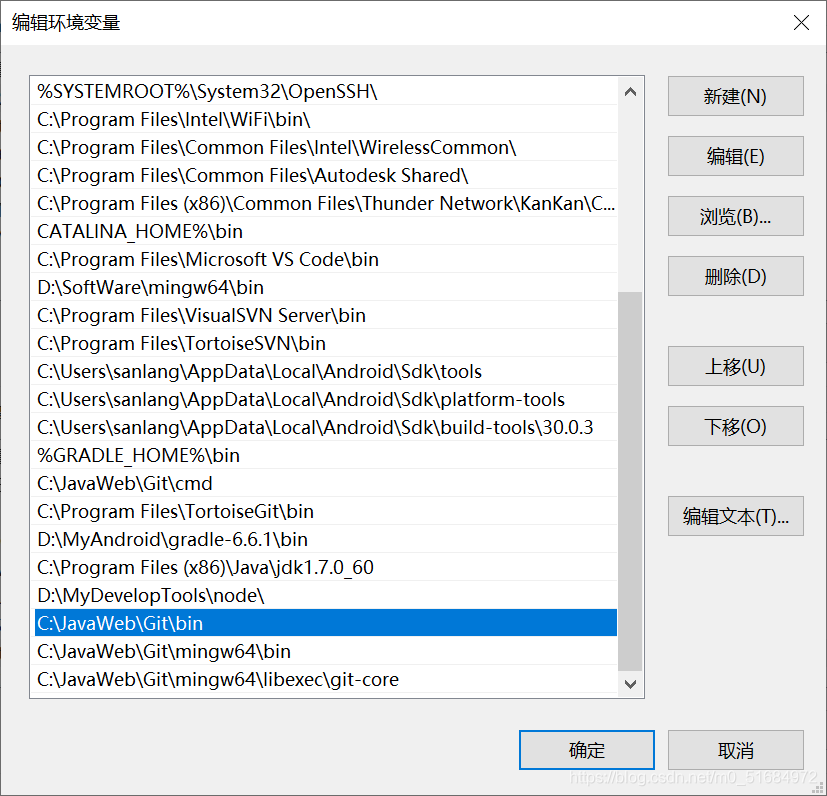
配置完成之后在运行 命令成功
D:\SanLangBlog>hexo init SanLang
INFO  Cloning hexo-starter https://github.com/hexojs/hexo-starter.git
[32mINFO [39m Install dependencies
added 190 packages from 159 contributors and audited 196 packages in 30.055s

15 packages are looking for funding
  run `npm fund` for details

found 0 vulnerabilities

INFO  Start blogging with Hexo!
版权声明:本文为m0_51684972原创文章,遵循CC 4.0 BY-SA版权协议,转载请附上原文出处链接和本声明。