el-tree默认展开第二节点 且第一节点默认高亮,同时添加滚动条并设置样式
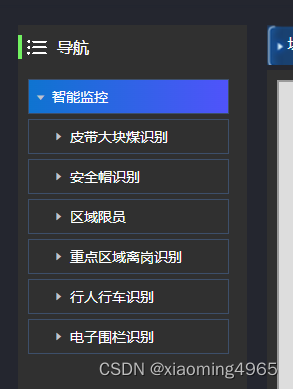
1、默认展开二级
html部分
 <div class="left-top-tree">
          <el-tree
            class="side-btn"
            :highlight-current="true"  //高亮
            :data="areaOptions"      //获取树形数据
            :props="defaultProps"
            :current-node-key="currentNodekey"  //默认选中节点树
            node-key="id"    //id值必写
            :default-expanded-keys="twoKeys"  //二级展开设置
            ref="treeRef"
            @node-click="handleNodeClick"
          ></el-tree>
  </div>
js部分
data() {
    return {

      // 区域树选项
      areaOptions: [],
      defaultProps: {
        children: "children",
        label: "label",
      },
      // 二级展示节点
      twoKeys:[],
      //默认选中的节点树
      currentNodekey: "",
}
/** 查询区域下拉树结构 对接接口展示 */
getTreeselect() {
treeselect().then((response) => {
console.log(response,"tree结构")
this.areaOptions = response.data;
// 默认展开二级菜单
this.areaOptions.forEach(m=>{
this.twoKeys.push(m.id)
})
// 默认第一节点高亮
if (this.areaOptions.length > 0) {
this.currentNodekey = this.areaOptions[0].id;
this.$nextTick(() => {
this.$refs.treeRef.setCurrentKey(this.currentNodekey);
});
}
});
},3、滚动条设置

     // 树形背景设置
        ::v-deep .el-tree {
          margin-top: 20px;
          background-color: transparent;
          color: #fff;
          overflow: scroll;
          height: 550px;
        }

         ::v-deep .side-btn::-webkit-scrollbar {
           width: 8px; // 横向滚动条
           height:0px; // 纵向滚动条 必写
         }
         //滚动条样式
         ::v-deep .side-btn::-webkit-scrollbar-thumb {
           box-shadow:0 0 0px 2px  #606266 inset;
           border-radius: 3px;
         }
版权声明:本文为xiaoming4965原创文章,遵循CC 4.0 BY-SA版权协议,转载请附上原文出处链接和本声明。