问题描述:
学习django框架,执行python3.8  manage.py migrate创建数据库时,产生报错
System check identified some issues:

WARNINGS:
?: (mysql.W002) MySQL Strict Mode is not set for database connection 'default'
        HINT: MySQL's Strict Mode fixes many data integrity problems in MySQL, such as data truncation upon insertion, by escalating warnings into errors. It is strongly recommended you activate it. See: https://docs.djangoproject.com/en/3.2/ref/databases/#mysql-sql-mode
Operations to perform:
  Apply all migrations: admin, auth, contenttypes, polls, sessions
Running migrations:
Traceback (most recent call last):
  File "/usr/local/lib/python3.8/site-packages/django/db/backends/utils.py", line 82, in _execute
    return self.cursor.execute(sql)
  File "/usr/local/lib/python3.8/site-packages/django/db/backends/mysql/base.py", line 73, in execute
    return self.cursor.execute(query, args)
  File "/usr/local/lib/python3.8/site-packages/pymysql/cursors.py", line 148, in execute
    result = self._query(query)
  File "/usr/local/lib/python3.8/site-packages/pymysql/cursors.py", line 310, in _query
    conn.query(q)
  File "/usr/local/lib/python3.8/site-packages/pymysql/connections.py", line 548, in query
    self._affected_rows = self._read_query_result(unbuffered=unbuffered)
  File "/usr/local/lib/python3.8/site-packages/pymysql/connections.py", line 775, in _read_query_result
    result.read()
  File "/usr/local/lib/python3.8/site-packages/pymysql/connections.py", line 1156, in read
    first_packet = self.connection._read_packet()
  File "/usr/local/lib/python3.8/site-packages/pymysql/connections.py", line 725, in _read_packet
    packet.raise_for_error()
  File "/usr/local/lib/python3.8/site-packages/pymysql/protocol.py", line 221, in raise_for_error
    err.raise_mysql_exception(self._data)
  File "/usr/local/lib/python3.8/site-packages/pymysql/err.py", line 143, in raise_mysql_exception
    raise errorclass(errno, errval)
pymysql.err.ProgrammingError: (1064, "You have an error in your SQL syntax; check the manual that corresponds to your MySQL server version for the right syntax to use near '(6) NOT NULL)' at line 1")

The above exception was the direct cause of the following exception:

Traceback (most recent call last):
  File "/usr/local/lib/python3.8/site-packages/django/db/migrations/recorder.py", line 68, in ensure_schema
    editor.create_model(self.Migration)
  File "/usr/local/lib/python3.8/site-packages/django/db/backends/base/schema.py", line 331, in create_model
    self.execute(sql, params or None)
  File "/usr/local/lib/python3.8/site-packages/django/db/backends/base/schema.py", line 145, in execute
    cursor.execute(sql, params)
  File "/usr/local/lib/python3.8/site-packages/django/db/backends/utils.py", line 98, in execute
    return super().execute(sql, params)
  File "/usr/local/lib/python3.8/site-packages/django/db/backends/utils.py", line 66, in execute
    return self._execute_with_wrappers(sql, params, many=False, executor=self._execute)
  File "/usr/local/lib/python3.8/site-packages/django/db/backends/utils.py", line 75, in _execute_with_wrappers
    return executor(sql, params, many, context)
  File "/usr/local/lib/python3.8/site-packages/django/db/backends/utils.py", line 84, in _execute
    return self.cursor.execute(sql, params)
  File "/usr/local/lib/python3.8/site-packages/django/db/utils.py", line 90, in __exit__
    raise dj_exc_value.with_traceback(traceback) from exc_value
  File "/usr/local/lib/python3.8/site-packages/django/db/backends/utils.py", line 82, in _execute
    return self.cursor.execute(sql)
  File "/usr/local/lib/python3.8/site-packages/django/db/backends/mysql/base.py", line 73, in execute
    return self.cursor.execute(query, args)
  File "/usr/local/lib/python3.8/site-packages/pymysql/cursors.py", line 148, in execute
    result = self._query(query)
  File "/usr/local/lib/python3.8/site-packages/pymysql/cursors.py", line 310, in _query
    conn.query(q)
  File "/usr/local/lib/python3.8/site-packages/pymysql/connections.py", line 548, in query
    self._affected_rows = self._read_query_result(unbuffered=unbuffered)
  File "/usr/local/lib/python3.8/site-packages/pymysql/connections.py", line 775, in _read_query_result
    result.read()
  File "/usr/local/lib/python3.8/site-packages/pymysql/connections.py", line 1156, in read
    first_packet = self.connection._read_packet()
  File "/usr/local/lib/python3.8/site-packages/pymysql/connections.py", line 725, in _read_packet
    packet.raise_for_error()
  File "/usr/local/lib/python3.8/site-packages/pymysql/protocol.py", line 221, in raise_for_error
    err.raise_mysql_exception(self._data)
  File "/usr/local/lib/python3.8/site-packages/pymysql/err.py", line 143, in raise_mysql_exception
    raise errorclass(errno, errval)
django.db.utils.ProgrammingError: (1064, "You have an error in your SQL syntax; check the manual that corresponds to your MySQL server version for the right syntax to use near '(6) NOT NULL)' at line 1")

During handling of the above exception, another exception occurred:

Traceback (most recent call last):
  File "manage.py", line 22, in <module>
    main()
  File "manage.py", line 18, in main
    execute_from_command_line(sys.argv)
  File "/usr/local/lib/python3.8/site-packages/django/core/management/__init__.py", line 419, in execute_from_command_line
    utility.execute()
  File "/usr/local/lib/python3.8/site-packages/django/core/management/__init__.py", line 413, in execute
    self.fetch_command(subcommand).run_from_argv(self.argv)
  File "/usr/local/lib/python3.8/site-packages/django/core/management/base.py", line 354, in run_from_argv
    self.execute(*args, **cmd_options)
  File "/usr/local/lib/python3.8/site-packages/django/core/management/base.py", line 398, in execute
    output = self.handle(*args, **options)
  File "/usr/local/lib/python3.8/site-packages/django/core/management/base.py", line 89, in wrapped
    res = handle_func(*args, **kwargs)
  File "/usr/local/lib/python3.8/site-packages/django/core/management/commands/migrate.py", line 244, in handle
    post_migrate_state = executor.migrate(
  File "/usr/local/lib/python3.8/site-packages/django/db/migrations/executor.py", line 91, in migrate
    self.recorder.ensure_schema()
  File "/usr/local/lib/python3.8/site-packages/django/db/migrations/recorder.py", line 70, in ensure_schema
    raise MigrationSchemaMissing("Unable to create the django_migrations table (%s)" % exc)
django.db.migrations.exceptions.MigrationSchemaMissing: Unable to create the django_migrations table ((1064, "You have an error in your SQL syntax; check the manual that corresponds to your MySQL server version for the right syntax to use near '(6) NOT NULL)' at line 1"))
原因分析:
可以看到提示sql语句错误,进行查看sql语句执行异常的原因
 此时可以根据  python3.8  manage.py sqlmigrate polls 0001 获取到对应执行语句
--
-- Create model Permission
--
CREATE TABLE `auth_permission` (`id` integer AUTO_INCREMENT NOT NULL PRIMARY KEY, `name` varchar(50) NOT NULL, `content_type_id` integer NOT NULL, `codename` varchar(100) NOT NULL);
--
-- Create model Group
--
CREATE TABLE `auth_group` (`id` integer AUTO_INCREMENT NOT NULL PRIMARY KEY, `name` varchar(80) NOT NULL UNIQUE);
CREATE TABLE `auth_group_permissions` (`id` bigint AUTO_INCREMENT NOT NULL PRIMARY KEY, `group_id` integer NOT NULL, `permission_id` integer NOT NULL);
--
-- Create model User
--
CREATE TABLE `auth_user` (`id` integer AUTO_INCREMENT NOT NULL PRIMARY KEY, `password` varchar(128) NOT NULL, `last_login` datetime(6) NOT NULL, `is_superuser` bool NOT NULL, `username` varchar(30) NOT NULL UNIQUE, `first_name` varchar(30) NOT NULL, `last_name` varchar(30) NOT NULL, `email` varchar(75) NOT NULL, `is_staff` bool NOT NULL, `is_active` bool NOT NULL, `date_joined` datetime(6) NOT NULL);
CREATE TABLE `auth_user_groups` (`id` bigint AUTO_INCREMENT NOT NULL PRIMARY KEY, `user_id` integer NOT NULL, `group_id` integer NOT NULL);
CREATE TABLE `auth_user_user_permissions` (`id` bigint AUTO_INCREMENT NOT NULL PRIMARY KEY, `user_id` integer NOT NULL, `permission_id` integer NOT NULL);
ALTER TABLE `auth_permission` ADD CONSTRAINT `auth_permission_content_type_id_codename_01ab375a_uniq` UNIQUE (`content_type_id`, `codename`);
ALTER TABLE `auth_permission` ADD CONSTRAINT `auth_permission_content_type_id_2f476e4b_fk_django_co` FOREIGN KEY (`content_type_id`) REFERENCES `django_content_type` (`id`);
ALTER TABLE `auth_group_permissions` ADD CONSTRAINT `auth_group_permissions_group_id_permission_id_0cd325b0_uniq` UNIQUE (`group_id`, `permission_id`);
ALTER TABLE `auth_group_permissions` ADD CONSTRAINT `auth_group_permissions_group_id_b120cbf9_fk_auth_group_id` FOREIGN KEY (`group_id`) REFERENCES `auth_group` (`id`);
ALTER TABLE `auth_group_permissions` ADD CONSTRAINT `auth_group_permissio_permission_id_84c5c92e_fk_auth_perm` FOREIGN KEY (`permission_id`) REFERENCES `auth_permission` (`id`);
ALTER TABLE `auth_user_groups` ADD CONSTRAINT `auth_user_groups_user_id_group_id_94350c0c_uniq` UNIQUE (`user_id`, `group_id`);
ALTER TABLE `auth_user_groups` ADD CONSTRAINT `auth_user_groups_user_id_6a12ed8b_fk_auth_user_id` FOREIGN KEY (`user_id`) REFERENCES `auth_user` (`id`);
ALTER TABLE `auth_user_groups` ADD CONSTRAINT `auth_user_groups_group_id_97559544_fk_auth_group_id` FOREIGN KEY (`group_id`) REFERENCES `auth_group` (`id`);
ALTER TABLE `auth_user_user_permissions` ADD CONSTRAINT `auth_user_user_permissions_user_id_permission_id_14a6b632_uniq` UNIQUE (`user_id`, `permission_id`);
ALTER TABLE `auth_user_user_permissions` ADD CONSTRAINT `auth_user_user_permissions_user_id_a95ead1b_fk_auth_user_id` FOREIGN KEY (`user_id`) REFERENCES `auth_user` (`id`);
ALTER TABLE `auth_user_user_permissions` ADD CONSTRAINT `auth_user_user_permi_permission_id_1fbb5f2c_fk_auth_perm` FOREIGN KEY (`permission_id`) REFERENCES `auth_permission` (`id`);
找到出错的语句到sql命令行执行,在mysql5.5中发现也存在异常。
mysql:root@localhost [test]> CREATE TABLE `auth_user` (`id` integer AUTO_INCREMENT NOT NULL PRIMARY KEY, `password` varchar(128) NOT NULL, `last_login` datetime(6) NOT NULL, `is_superuser` bool NOT NULL, `username` varchar(30) NOT NULL UNIQUE, `first_name` varchar(30) NOT NULL, `last_name` varchar(30) NOT NULL, `email` varchar(75) NOT NULL, `is_staff` bool NOT NULL, `is_active` bool NOT NULL, `date_joined` datetime(6) NOT NULL);
ERROR 1064 (42000): You have an error in your SQL syntax; check the manual that corresponds to your MySQL server version for the right syntax to use near '(6) NOT NULL, `is_superuser` bool NOT NULL, `username` varchar(30) NOT NULL UNIQ' at line 1
查看相关文档发现,mysql5.5版本不支持字段类型为datetime且默认值为NOW()的字段
需要使用 timestamp来进行替代。或者变更datetime(6)--》datetime
mysql:root@localhost [test]> CREATE TABLE `auth_user` (`id` integer AUTO_INCREMENT NOT NULL PRIMARY KEY, `password` varchar(128) NOT NULL, `last_login` datetime NOT NULL, `is_superuser` bool NOT NULL, `username` varchar(30) NOT NULL UNIQUE, `first_name` varchar(30) NOT NULL, `last_name` varchar(30) NOT NULL, `email` varchar(75) NOT NULL, `is_staff` bool NOT NULL, `is_active` bool NOT NULL, `date_joined` datetime NOT NULL);
Query OK, 0 rows affected (0.03 sec)
使用mysql5.7正常执行。
mysql:root@localhost [ceshi]> CREATE TABLE `auth_user` (`id` integer AUTO_INCREMENT NOT NULL PRIMARY KEY, `password` varchar(128) NOT NULL, `last_login` datetime(6) NOT NULL, `is_superuser` bool NOT NULL, `username` varchar(30) NOT NULL UNIQUE, `first_name` varchar(30) NOT NULL, `last_name` varchar(30) NOT NULL, `email` varchar(75) NOT NULL, `is_staff` bool NOT NULL, `is_active` bool NOT NULL, `date_joined` datetime(6) NOT NULL);
解决方案:
由于处于测试学习环境下。为了了解django新版本差异。故升级了mysql到5.7用于使用新版django版本。
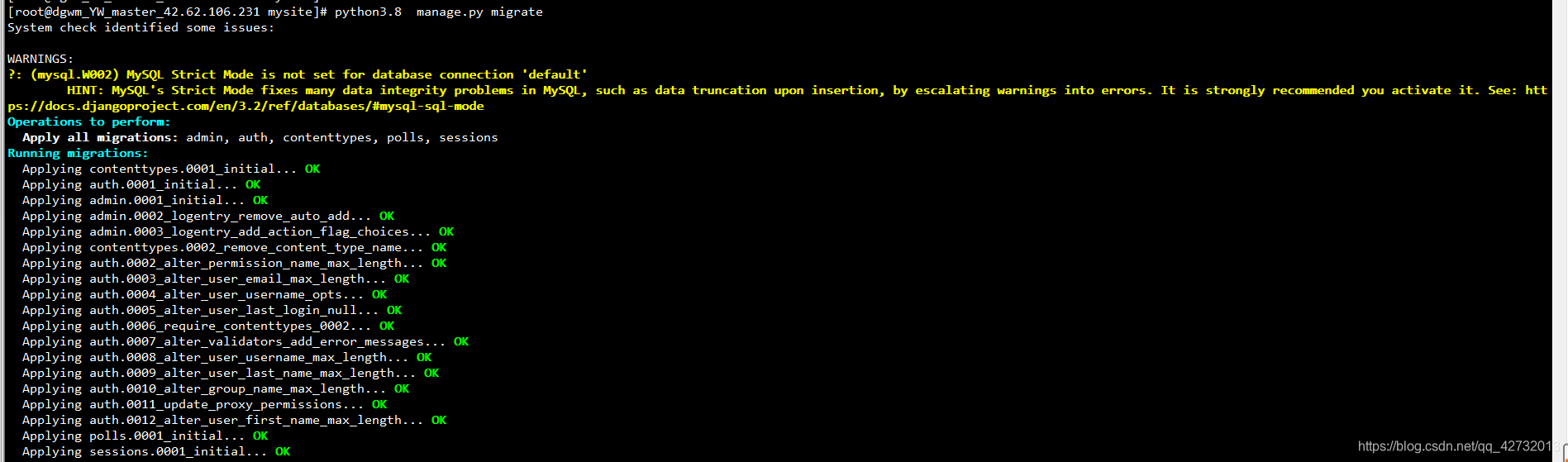
问题解决,以此记录
版权声明:本文为qq_42732013原创文章,遵循CC 4.0 BY-SA版权协议,转载请附上原文出处链接和本声明。