简介
Mysql版本为8.0,在windows下进行学习。
Select
以sql_store.customers的表为例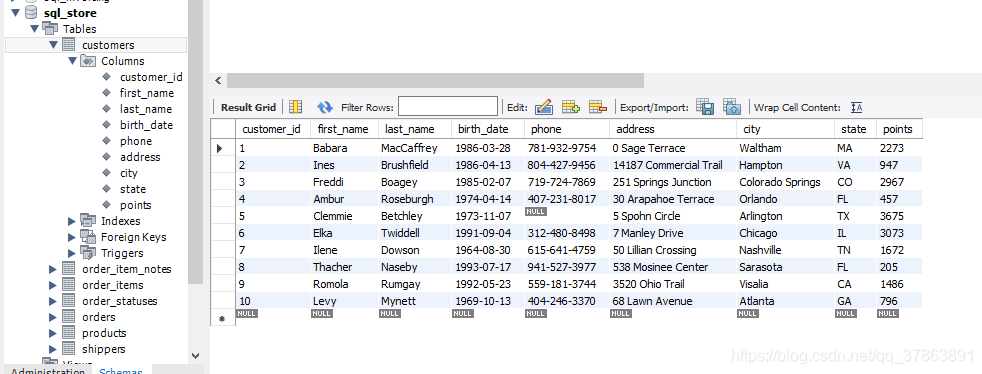
- 选择数据库中一张表的所有内容
SELECT *			//为了方便理解,所有子句都换行,
FROM sql_store.customers;
- 通过条件判定并排序(默认是升序)
use sql_store;
select *
from  customers
where points > 100		//显示points大于100的
order by first_name 	//按照first_name升序排练
- 固定选择某些列
select
	first_name,
    last_name,
    points,
from  customers
- 当然也可以对某一列数据进行数学运算形成新列
select
	first_name,
    last_name,
    points,
    (points + 10) * 100 as discount 	// as为取别名
from  customers

- 当有些列中有重复的数据而有想获得唯一状态值
select distinct state	//只显示state列中不重复的值。
from customers
where
where的条件判断语句可以用于筛选自己想要的数据
支持 >, <, = , >=, <= ,!= ,<>(与!=同等)
当需要支持多种条件判断语句时,使用 AND,OR,NOT逻辑语句(即与或非),其后AND优先级最高,不过为了方便阅读,建议加括号。
select *
from Customers
where not (birth_data > '1990-01-01' or points > 1000)	//注意日期的固定写法
//等同于where birth_data <= '1990-01-01' and points <= 1000
- where 中支持数学运算
select *
from order_items
where order_id = 6 and unit_price * quantity > 30 	//订单编号为6,总价大于30的数据
- in的使用,当多个散列条件同时存在比较方便
select *
from Customers
where state = 'VA' or state = 'FL' or state = 'GA'
//可以使用 where state in ('VA','FL','GA')
//同时in与not支持连用 where state not in ('VA','FL','GA')
- between的用法,不止用于数字也可以用于日期
select *
from Customers
where points between 1000 and 3000
//等同于where points >= 1000 and point <= 3000
// 日期 : where birth_data between  '1990-01-01' and '2000-01-01'
- like的用法:用于查询相似的字符串,like也可以与not连用
select *
from customers
where last_name like 'b%'	//last_name列以b开头的数据
//where last_name like 'b_'	//last_name列以b开头两个字符的数据
%代表任意数量的字符
_代表一个任意字符
- regexp :where同样支持正则表达式,简单记录几种
^begin //以begin为开头的字符串
end$   //以end为结尾的字符串
abc|def|gh//包含abc或def或gh的字符串,注意管道符中不要加空格
[a-d]	//a-d的任意一个字符
- 关键词NULL,用于查询哪一个为空,可以与not连用
select *
from customers
where phone is null
order by
- 排序默认为升序,可以使用 desc来实现降序
select *
from customers
order by first_name desc	//以first_name 降序显示
- 也可以选择多个排序标准,同时des也可以增加到每个标准后
select *
from customers
order by state desc, first_name	//先根据state降序排序,state相同的在根据first_name升序排序
- 也可以自定义别名排序,在mysql中选择排序的不一定要在select中,也可以用数字指代被select选择的项(尽量使用名称)。
select first_name, last_name , 10 as points  //此时points不在是表中的points
from customers
order by points,first_name
//order by 1, 2这个等同于 order by first_name,last_name(不推荐)
limit
用于限制显示的数量
- 显示前n项
select *
from customers
limit 10		//显示前10项,不足全部显示
- 显示特定位置开始的n项
select *
from customers
limit 6, 3		//显示第六项后面的三项
总结
注意select,from,where.order by,limit的顺序
select *
from customers
where points > 100
order by points desc
limit 3
版权声明:本文为qq_37863891原创文章,遵循CC 4.0 BY-SA版权协议,转载请附上原文出处链接和本声明。