写老师布置的作业从机房copy到自己的电脑上发现报错了,以下是报错信息:
 Multiple annotations found at this line:- String cannot be resolved to a type 在该行中找到的多个注释:-string不能解析为类型
- The method getParameter(String) from the type ServletRequest refers to the missing tye string -从ServletRequest类型中获取参数(String)的方法引用缺少的Tye字符
解决方法:
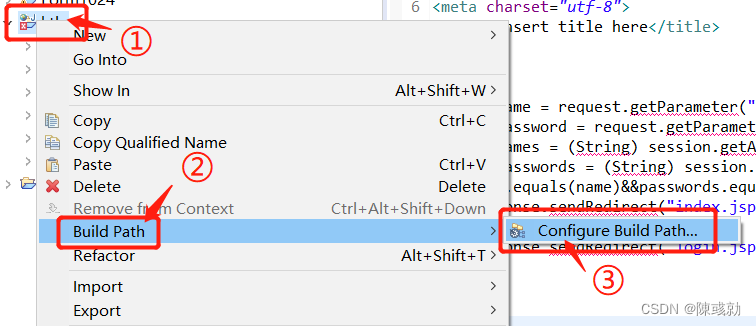
首先,右击该项目 - Build Path - Configure Build Path。
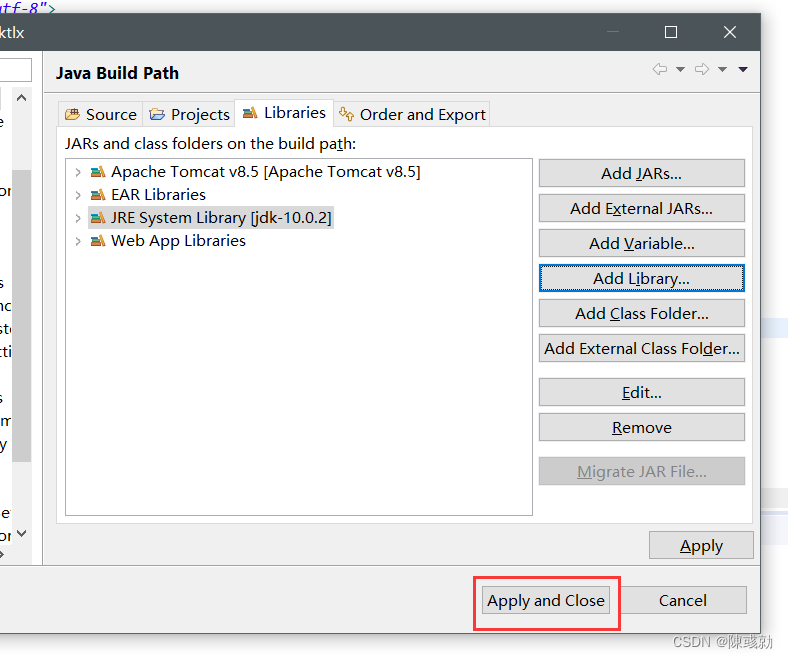
在 Libraries 选项下,会发现有个出错的jre Libraries,将其Remove掉,然后点击Apply。接下来点击Add Library, 选择JRE System Library,选择Workspace defaulr JRE(jdk-10.0.2)(此前JDK已成功安装并配置好), 然后Finish 。
最后,Apply and Close即可。
步骤如下图所示:


版权声明:本文为qq_46422457原创文章,遵循CC 4.0 BY-SA版权协议,转载请附上原文出处链接和本声明。