一:官方说法:
Windows
Download and install a C++ compiler, for example:
Visual Studio C++ Express or Visual Studio Community
Download and install Qt from qt.io (see supported platforms):
Download for example the online installer file
qt-opensource-windows-x86-5.13.2.exe
Install Qt by running the installer and following the instructions on screen
If available, download and extract Teigha (e.g. Kernel_vc14_amd64md.zip and Drawings_vc14_amd64md.zip) into qcadpro/src/io/dwg/opendesign and copy OdActivationInfo to qcadpro/src/io/dwg/opendesign/ThirdParty/activation.
Configure QCAD. Optional modules installed side-by-side with the qcad directory are configured automatically:
cd c:\Users\me\qcad\qcad
c:\Qt\Qt5.13.2\5.13\msvc2015_64\bin\qmake -r CONFIG+=ractivated
Compile QCAD. For example on cygwin:
nmake release
Alternatively, you may want to use jom, an nmake clone which speeds up compilation significantly by using all available CPU cores.
Launch QCAD. For example with:
release\qcad.exe
(Optional) For code signing, open certlm.msc, click on "Personal" folder, choose Action > All Tasks > Import and select P12 file to import.
但我按这做法不成功。
二:第二种网上说法:
与第一种说法的区别是构造visual studio 方案
qmake -r -spec win32-msvc2012 -tp vc
这个会报错,win32-msvc2012 改为2109 也一样,后来改为全路径,
qmake -r -spec C:\Qt\5.15.2\msvc2019\mkspecs\win32-msvc -tp vc
这样就可以产生工程了,并且可以编译链接成功。我想找64 位版本,应该是winrt-x64-msvc2019,可是不成功。

三:QT的下载和编译参考了这个链接:
https://www.cnblogs.com/fzu-Z9h/p/16587964.html
我不喜欢qt的下载器安装,想做点改变都不行,要重新来。我就下载了QT5.14, Qt5.13,发现没有vc2019 的项目,只好还是用下载器下了Qt5.15.2版本。
第一次装的Qt5.15.2 ,但是没有选择Qt Scripts(Deprecated),看了该文就做了这个选择。
主要的问题是
This application failed to start because no Qt platform plugin could be initialized. Reinstalling the application may fix this problem.
编译可以成功,但执行qcad会出现上面错误,在运动好的qcad里替换qcad可以成功运行。结果上面方式还是环境错误没解决。
四: 工程形成的方式还可以这样:
参考:https://blog.csdn.net/weixin_43953829/article/details/120528041
安装好Qt VS Tools后,
菜单:Extensions->Qt VS Tools-> Open Qt Project File(.pro)
选择Qcad 下的qcad.pro

然后对每个工程右键-> Qt->convert custom build steps to Qt/MSBuild
这样编译完后,报错 找到一个或多个重定义符号,报错的项目是qcadscripts。
右键该项目,打开"属性---链接器--命令行"增加代码:/FORCE:MULTIPLE ,之后点击生成,生成解决方案,完成编译
编译是好,但有上面报错。
五:复制一些文件
把qcad 下的目录复制到release 目录, qcad可以正常运行了。
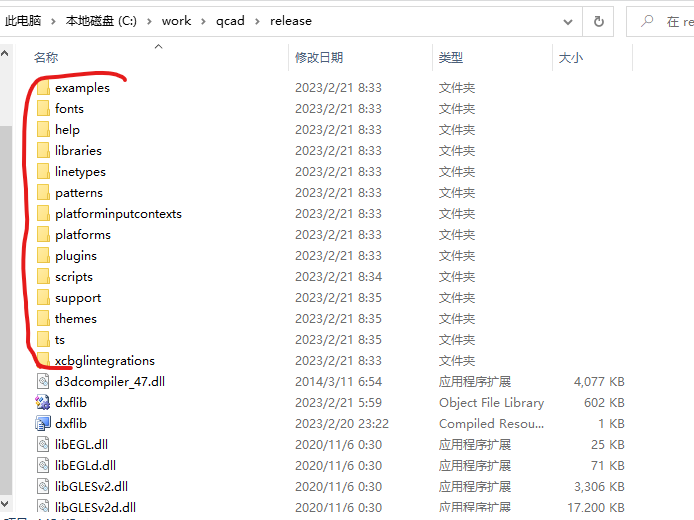
不清楚哪些是必要的,就是 work/qcad --> work/qcad/release
这样并不是很好,但编译后总算运行起来了。可能是设置的问题,运行很正常。