1.添加pom依赖
<dependency>
	<groupId>org.springframework.boot</groupId>
	<artifactId>spring-boot-starter-websocket</artifactId>
</dependency>
2.添加webSocket配置类
import org.springframework.context.annotation.Bean;
import org.springframework.context.annotation.Configuration;
import org.springframework.web.socket.server.standard.ServerEndpointExporter;

@Configuration
public class WebSocketConfig {
	@Bean
	public ServerEndpointExporter serverEndpointExporter() {
		return new ServerEndpointExporter();
	}
}
3.WebSocket业务逻辑类
import java.io.IOException;
import java.util.HashMap;
import java.util.Map;
import java.util.concurrent.CopyOnWriteArraySet;

import javax.websocket.OnClose;
import javax.websocket.OnError;
import javax.websocket.OnMessage;
import javax.websocket.OnOpen;
import javax.websocket.Session;
import javax.websocket.server.PathParam;
import javax.websocket.server.ServerEndpoint;

import org.apache.log4j.Logger;
import org.springframework.stereotype.Component;

@ServerEndpoint(value = "/webSocket/{userId}")
@Component
public class MyWebSocket {
	static Logger log = Logger.getLogger(MyWebSocket.class);
	// 静态变量,用来记录当前在线连接数。应该把它设计成线程安全的。
	private static int onlineCount = 0;
	// concurrent包的线程安全Set,用来存放每个客户端对应的MyWebSocket对象。
	private static CopyOnWriteArraySet<MyWebSocket> webSocketSet = new CopyOnWriteArraySet<MyWebSocket>();
	// 与某个客户端的连接会话,需要通过它来给客户端发送数据
	private Session session;
	/** 接收userId */
	private String userId = "";
	private static Map<String, MyWebSocket> webSocketMap = new HashMap<>();

	/**
	 * 连接建立成功调用的方法
	 */
	@OnOpen
	public void onOpen(Session session, @PathParam("userId") String userId) {
		this.session = session;
		this.userId = userId;
		webSocketSet.add(this);
		if (webSocketMap.containsKey(userId)) {
			webSocketMap.remove(userId);
			webSocketMap.put(userId, this);
		} else {
			webSocketMap.put(userId, this);// 加入set中
			addOnlineCount();// 在线数加1
		}
		log.info(userId + "加入");
		log.info("当前在线人数为:" + getOnlineCount());
		try {
			sendMessage("欢迎" + userId + "加入");
		} catch (IOException e) {
			System.out.println("IO异常");
		}
	}

	/**
	 * 连接关闭调用的方法
	 */
	@OnClose
	public void onClose() {
		webSocketSet.remove(this); // 从set中删除
		subOnlineCount(); // 在线数减1
		System.out.println("有一连接关闭!当前在线人数为" + getOnlineCount());
	}

	/**
	 * 收到客户端消息后调用的方法
	 *
	 * @param message 客户端发送过来的消息
	 */
	@OnMessage
	public void onMessage(String message, Session session) {
		message = "来自"+userId+"的消息:" + message;
		log.info("onMessage:"+message);
		// 群发消息
		for (MyWebSocket item : webSocketSet) {
			try {
				item.sendMessage(message);
			} catch (IOException e) {
				e.printStackTrace();
			}
		}
	}

	/**
	 * 发生错误时调用
	 *
	 */
	@OnError
	public void onError(Session session, Throwable error) {
		System.out.println("发生错误");
		error.printStackTrace();
	}

	public void sendMessage(String message) throws IOException {
		this.session.getBasicRemote().sendText(message);
		// this.session.getAsyncRemote().sendText(message);
	}

	/**
	 * 群发自定义消息
	 */
	public static void sendInfo(String message) throws IOException {
		for (MyWebSocket item : webSocketSet) {
			try {
				item.sendMessage(message);
			} catch (IOException e) {
				continue;
			}
		}
	}

	/**
	 * 发送自定义消息
	 * 按userid发送消息
	 */
	public static void sendInfo(String message, @PathParam("userId") String userId) throws IOException {
		log.info("发送消息到:" + userId + ",报文:" + message);
		if (webSocketMap.containsKey(userId)) {
			webSocketMap.get(userId).sendMessage(message);
		} else {
			log.error("用户" + userId + ",不在线!");
		}
	}

	/**
	 * 获取在线客户端数量
	 *
	 * @return
	 */
	public static synchronized int getOnlineCount() {
		return onlineCount;
	}

	/**
	 * 添加线上链接的客户端数量
	 */
	public static synchronized void addOnlineCount() {
		MyWebSocket.onlineCount++;
	}

	/**
	 * 客户端下载是调用将在线数量减1
	 */
	public static synchronized void subOnlineCount() {
		MyWebSocket.onlineCount--;
	}
}
4.web测试代码
<!DOCTYPE HTML>
<html>
<head>
    <title>My WebSocket</title>
</head>

<body>
Welcome<br/>
<input id="text" type="text" /><button onclick="send()">Send</button>    <button onclick="closeWebSocket()">Close</button>
<div id="message">
</div>
</body>

<script type="text/javascript">
    var websocket = null;

    //判断当前浏览器是否支持WebSocket
    if('WebSocket' in window){
        websocket = new WebSocket("ws://localhost:8888/websocket");
    }
    else{
        alert('Not support websocket')
    }

    //连接发生错误的回调方法
    websocket.onerror = function(){
        setMessageInnerHTML("error");
    };

    //连接成功建立的回调方法
    websocket.onopen = function(event){
        setMessageInnerHTML("open");
    }

    //接收到消息的回调方法
    websocket.onmessage = function(event){
        setMessageInnerHTML(event.data);
    }

    //连接关闭的回调方法
    websocket.onclose = function(){
        setMessageInnerHTML("close");
    }

    //监听窗口关闭事件,当窗口关闭时,主动去关闭websocket连接,防止连接还没断开就关闭窗口,server端会抛异常。
    window.onbeforeunload = function(){
        websocket.close();
    }

    //将消息显示在网页上
    function setMessageInnerHTML(innerHTML){
        document.getElementById('message').innerHTML += innerHTML + '<br/>';
    }

    //关闭连接
    function closeWebSocket(){
        websocket.close();
    }

    //发送消息
    function send(){
        var message = document.getElementById('text').value;
        websocket.send(message);
    }
</script>
</html>
5.在接口调用MyWebsocket中的sendInfo方法发送消息到客户端
import java.io.IOException;
import java.util.HashMap;
import java.util.List;
import java.util.Map;

import org.springframework.beans.factory.annotation.Autowired;
import org.springframework.stereotype.Controller;
import org.springframework.web.bind.annotation.RequestMapping;
import org.springframework.web.bind.annotation.RequestMethod;
import org.springframework.web.bind.annotation.ResponseBody;
import org.springframework.web.bind.annotation.RestController;

import com.example.demo.bean.UserInfo;
import com.example.demo.service.MyService;
import com.example.demo.websocket.MyWebSocket;
import com.google.gson.Gson;

@Controller
@RequestMapping(value = "/test")
public class MyController {

	@Autowired
	private MyService Service;

	@ResponseBody
	@RequestMapping(value = "/hello", method = RequestMethod.GET)
	public String test() {
		Gson gson = new Gson();
		try {
			MyWebSocket.sendInfo("大家好");//发送消息到clientsocket
		} catch (IOException e) {
			e.printStackTrace();
		}
		Map<String,Object> map = new HashMap<>();
		map.put("result","Hello");
		return gson.toJson(map);
	}
}
6.实现效果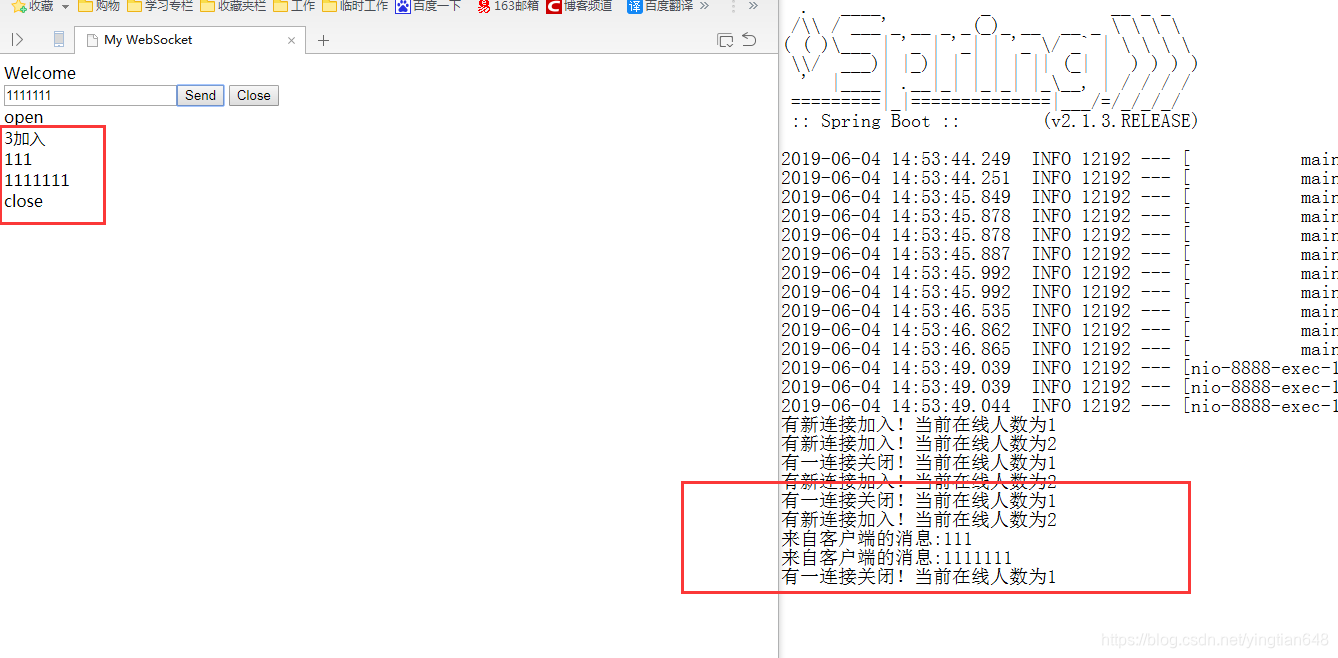
版权声明:本文为yingtian648原创文章,遵循CC 4.0 BY-SA版权协议,转载请附上原文出处链接和本声明。