1. 插值器
1、作用:设置属性值从开始值到结束值的变化规律(加速、匀速等)。
2、系统内置的插值器类型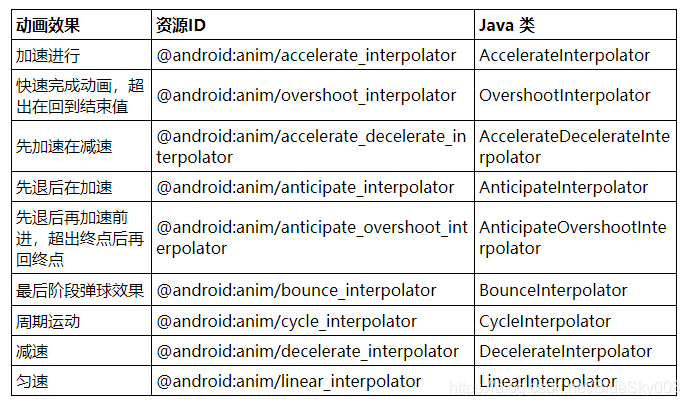
3、使用方法
// xml 设置
 android:interpolator="@android:anim/overshoot_interpolator"

 // Java 设置
 OvershootInterpolator overshootInterpolator = new OvershootInterpolator();
 anim.setInterpolator(overshootInterpolator);
4、自定义插值器
注:根据 input 值(动画的进度 0%-100%),计算出当前属性值改变的百分比。
// 自定义先减速后加速 插值器
public class DecelerateAccelerateInterpolator implements Interpolator {

    @Override
    public float getInterpolation(float input) {
        float fraction;
        if(input<=0.5){
            fraction= (float) (Math.sin(Math.PI*input))/2;
        }else{
            fraction= (float) (2-Math.sin(Math.PI*input))/2;
        }
        return fraction;
    }
}
5、差值器函数详解:https://blog.csdn.net/xiaochuanding/article/details/73200149
2. 估值器
1、作用:设置属性值从开始值到结束值,变化的具体数值。
2、自定义估值器
public class Height {

    private int height;

    public Height(int height){
        this.height = height;
    }

    public int getHeight(){
        return height;
    }

    public void setHeight(int height){
        this.height = height;
    }
}
public class HeightEvaluator implements TypeEvaluator {

    @Override
    public Object evaluate(float fraction, Object startValue, Object endValue) {
        Height startHeight = (Height)startValue;
        Height endHeight = (Height)endValue;

        float height = startHeight.getHeight()+fraction*(endHeight.getHeight()-startHeight.getHeight());
        return new Height((int)height);
    }
}
ValueAnimator objAnim = ValueAnimator.ofObject(new HeightEvaluator(), startHeight, endHeight);
版权声明:本文为BlueSky003原创文章,遵循CC 4.0 BY-SA版权协议,转载请附上原文出处链接和本声明。