一 概述
- 通过NSURLConnection发送异步网络请求
- 异步网络请求解析示例
二 概念
2.1 解析来自服务器的JSON
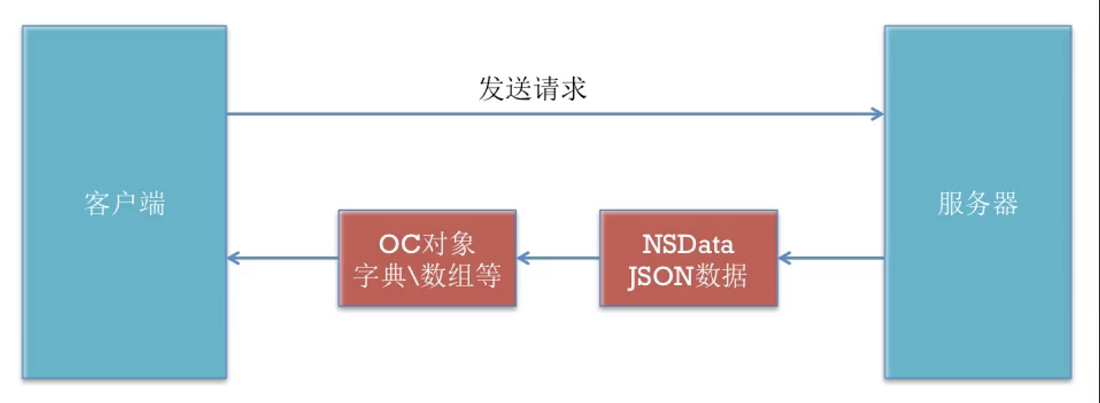
2.2 NSURLConnection发送请求
NSURLConnection常见的发送请求方法有以下几种
同步请求
+(NSData *)sendSynchronousRequest:(NSURLRequest *)request returningResponse:(NSURLResponse **)response error:(NSError **)error;
异步请求
block回调
+(void)sendAsynchronousRequest:(NSURLRequest *)request queue:(NSOperationQueue*)queue completionHandler:(void(^)(NSURLResponse* response,NSData* data,NSError* connectionError))handler;
2.3 注意事项
- 要想异步请求有数据,请求队列(queue)不要为空
- 异步完成后的请求队列一定是主线程(mainQueue),不然会出错
三 异步网络请求解析示例
3.1 代码
   //3-发送用户名和密码给服务器
    //NSLog(@"发送用户名和密码给服务器");
    NSString *urlStr=[NSString stringWithFormat:@"http://localhost:8080/MJServer/login?username=%@&pwd=%@",usernameText,pwdText];
    NSURL *url=[NSURL URLWithString:urlStr];
    //创建一个请求
    NSURLRequest *request=[NSURLRequest requestWithURL:url];
    NSLog(@"begin---");
    //发送一个同步请求(在主线程发送请求)
    NSOperationQueue *queue=[NSOperationQueue mainQueue];
    [NSURLConnection sendAsynchronousRequest:request queue:queue completionHandler:^(NSURLResponse * _Nullable response, NSData * _Nullable data, NSError * _Nullable connectionError) {
       NSLog(@"请求完成----");
       if (connectionError||data==nil) {
           [MBProgressHUD showError:@"请求失败"];
           return;
       }
       //解析服务器返回到JSON数据
       NSDictionary *dict= [NSJSONSerialization JSONObjectWithData:data options:NSJSONReadingMutableLeaves error:nil];
       //{"error":"用户名不存在"}
       //{"error":"密码不正确"}
       //{"success":"登陆成功"}
       NSLog(@"解析后数据:%@",dict);
       NSString *error=dict[@"error"];
       if (error) {
           [MBProgressHUD showError:error];
       }else{
           NSString *successs=dict[@"success"];
           [MBProgressHUD showSuccess:successs];
       }
    }];
    NSLog(@"end---");
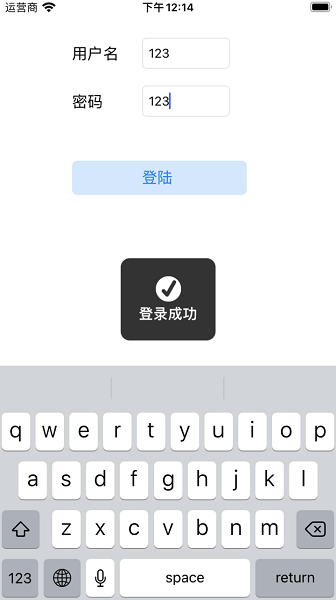
3.2 效果图
版权声明:本文为Calvin_zhou原创文章,遵循CC 4.0 BY-SA版权协议,转载请附上原文出处链接和本声明。