项目说明
本项目采用dubbo来是实现消费者来远程调用生产者的服务。
原本生产者应该连接数据库,service服务来对dao层进行业务逻辑实现,但是为了更好的理解,项目将省略数据库操作,采用模拟实现。
如果你对微服务感兴趣可参考博主以前写的SpringCould系列文章:Spring Could
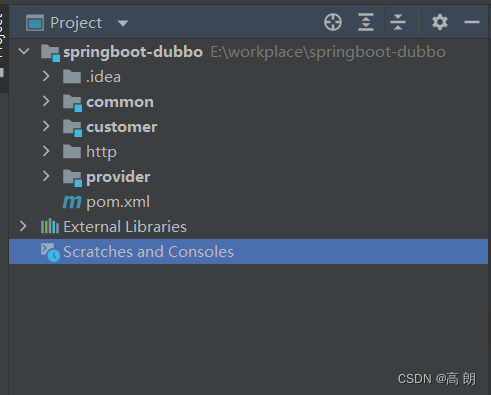
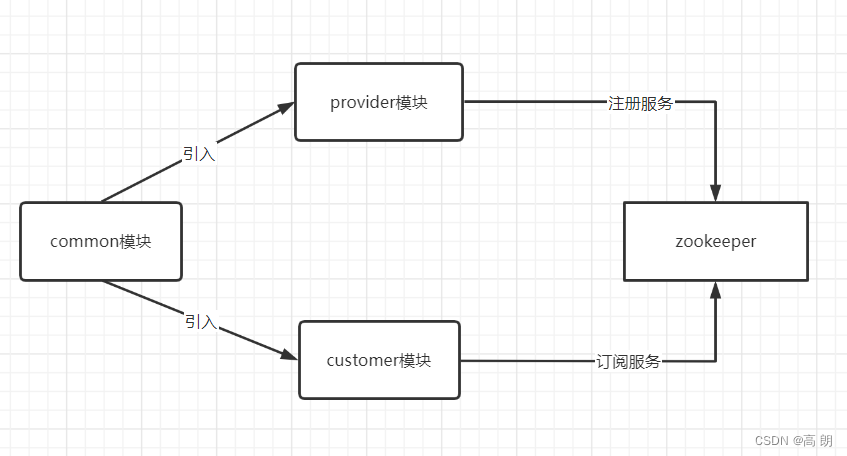
项目有3个模块:
- common:存放实体类,interface接口,以及其他一些公共部分
- provider:生产者,提供服务:实现common模块的interface接口
- customer:消费者,远程调用product的服务。
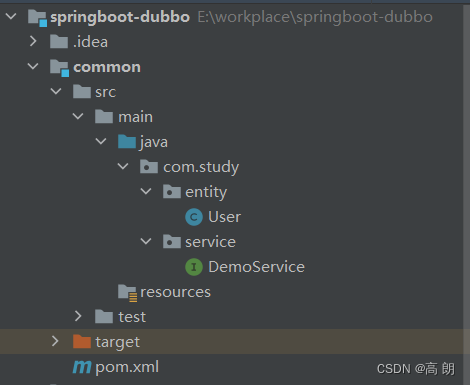
common模块
- pom.xml【引入springboot、dubbo、zk相关依赖】
    <dependencies>
        <!--springboot相关依赖-->
        <dependency>
            <groupId>org.springframework.boot</groupId>
            <artifactId>spring-boot-starter-web</artifactId>
            <version>2.5.1</version>
        </dependency>

        <dependency>
            <groupId>org.springframework.boot</groupId>
            <artifactId>spring-boot-starter-test</artifactId>
            <version>2.5.2</version>
        </dependency>

        <!--dubbo-->
        <dependency>
            <groupId>com.alibaba.boot</groupId>
            <artifactId>dubbo-spring-boot-starter</artifactId>
            <version>0.1.0</version>
        </dependency>
        <!--zk-->
        <dependency>
            <groupId>com.101tec</groupId>
            <artifactId>zkclient</artifactId>
            <version>0.6</version>
        </dependency>
    </dependencies>
- 实体类User
/**
 * <h3>User</h3>
 * <p>用户实体类</p>
 *
 * @author : he zhe
 * @date : 2022-07-29 10:09
 **/
public class User implements Serializable {
    /**
     * 用户名
     */
    private String username;
    /**
     * 昵称
     */
    private String nick;
    /**
     * 年龄
     */
    private Integer age;
    //构造器,get、set方法 省略
}
- 服务接口UserService
public interface DemoService {

    /**
     * 获取全部用户
     * @return
     */
    List<User> getUser();
}
common模块是一个公共模块,把生产者消费者都需要的依赖,都统一导入common模块,然后其他模块引入common模块,还有都需要用到的实体类,需要远程调用的服务接口都统一放在common模块。
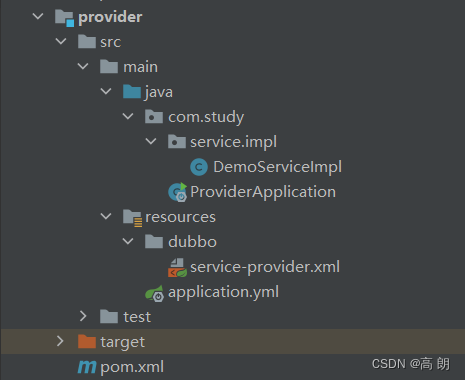
provider模块
- pom.xml 【引入common模块即可】
    <dependencies>
        <!--引入 common模块-->
        <dependency>
            <groupId>org.example</groupId>
            <artifactId>common</artifactId>
            <version>1.0-SNAPSHOT</version>
        </dependency>
    </dependencies>
- DemoServiceImpl【实现common模块的接口】
/**
 * <h3>DemoServiceImpl</h3>
 * <p>demo服务实现类</p>
 *
 * @author : he zhe
 * @date : 2022-07-29 10:12
 **/
@Service("demoService")
public class DemoServiceImpl implements DemoService {
    @Override
    public List<User> getUser() {
        //暂不连接数据库 采用模拟数据
        User user = new User("小明","明明",18);
        User user2 = new User("小菜","菜菜",20);
        List<User> list = new ArrayList<>();
        list.add(user);
        list.add(user2);
        return list;
    }
}
- service-provide.xml【dubbo配置,把借口暴露给消费者】
<?xml version="1.0" encoding="UTF-8"?>
<beans xmlns="http://www.springframework.org/schema/beans" xmlns:xsi="http://www.w3.org/2001/XMLSchema-instance"
       xmlns:dubbo="http://code.alibabatech.com/schema/dubbo"
       xsi:schemaLocation="http://www.springframework.org/schema/beans http://www.springframework.org/schema/beans/spring-beans-2.5.xsd
	http://code.alibabatech.com/schema/dubbo http://code.alibabatech.com/schema/dubbo/dubbo.xsd">
    <!--    服务器名,要唯一-->
<!--    <dubbo:application name="product" ></dubbo:application>-->
    <!--    定义注册中心-->
<!--    <dubbo:registry address="zookeeper://127.0.0.1:2181"></dubbo:registry>-->
    <!--用dubbo协议在端口20880暴露服务-->
<!--    <dubbo:protocol port="20880" name="dubbo"></dubbo:protocol>-->


    <!-- 按自己需求写出自己想要暴露给customer消费者的接口和实现类,按照下面格式自定义   声明暴露服务的接口,和导入使用的实现类-->
    <dubbo:service ref="demoService" interface="com.study.service.DemoService" />

</beans>
关于dubbo标签解释,在文章最后有介绍。
- application.yml
dubbo:
  #服务器名称唯一
  application:
    name: provider
  #注册中心配置,使用zookeeper做注册中心
  registry:
    address: zookeeper://127.0.0.1:2181
  protocol:
    #    使用dubbo协议,端口默认20880
    port: 20880
    name: dubbo
  monitor:
    address: registry

server:
  port: 8081
关于dubbo的配置,你可以放到service-provide.xml里面,也可以在application.yml里面配置,但是最好不要两个地方都配置,不然到时候会报dubbo服务器名称不唯一的错误,启动不起来。
- ProductApplication 【启动类,需要
@ImportResource扫描到dubbo的配置,不然不会生效】
/**
 * <h3>ProductApplication</h3>
 * <p>提供者 启动类</p>
 *
 * @author : he zhe
 * @date : 2022-07-29 09:41
 **/
@SpringBootApplication
@ImportResource({"classpath:/dubbo/service-provider.xml"})
public class ProviderApplication {

    public static void main(String[] args) {
        SpringApplication.run(ProviderApplication.class, args);
        System.out.println("生产者启动成功");
    }
}
customer模块
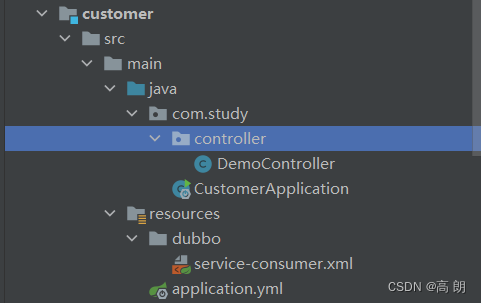
- service-consumer.xml【dubbo,接受生产者暴露的服务】
<?xml version="1.0" encoding="UTF-8"?>
<beans xmlns="http://www.springframework.org/schema/beans" xmlns:xsi="http://www.w3.org/2001/XMLSchema-instance"
       xmlns:dubbo="http://code.alibabatech.com/schema/dubbo"
       xsi:schemaLocation="http://www.springframework.org/schema/beans http://www.springframework.org/schema/beans/spring-beans-2.5.xsd
	http://code.alibabatech.com/schema/dubbo http://code.alibabatech.com/schema/dubbo/dubbo.xsd">
    <dubbo:application name="customer"/>
    <dubbo:registry address="zookeeper://127.0.0.1:2181"></dubbo:registry>
    <!-- 生成远程服务代理,可以和本地bean一样使用demoService -->
    <dubbo:reference id="demoService" interface="com.study.service.DemoService" />
</beans>
- application.yml
server:
  port: 8088
- DomeController
/**
 * <h3>DemoController</h3>
 * <p>demo controller</p>
 *
 * @author : he zhe
 * @date : 2022-07-29 09:36
 **/
@RestController
@RequestMapping("/user")
public class DemoController {

    @Autowired
    private DemoService demoService;

    @RequestMapping(value = "/get", method = RequestMethod.POST)
    public List<User> getUsers(){
        return demoService.getUser();
    }
}
- CustomerApplication
/**
 * <h3>CustomerApplication</h3>
 * <p>消费者 启动类</p>
 *
 * @author : he zhe
 * @date : 2022-07-29 09:36
 **/
@SpringBootApplication
@ImportResource({"classpath:/dubbo/service-consumer.xml"})
public class CustomerApplication {

    public static void main(String[] args) {
        SpringApplication.run(CustomerApplication.class, args);
        System.out.println("消费者启动成功");
    }
}
小结
先在本地启动zookeeper服务,然后启动生产者(product),再启动消费者(customer)。
访问POST http://localhost:8088/user/get,最好不要用浏览器访问,浏览器默认的是get请求方式,可能会报405错误,可以修改Controller请求的方法,改为get方式。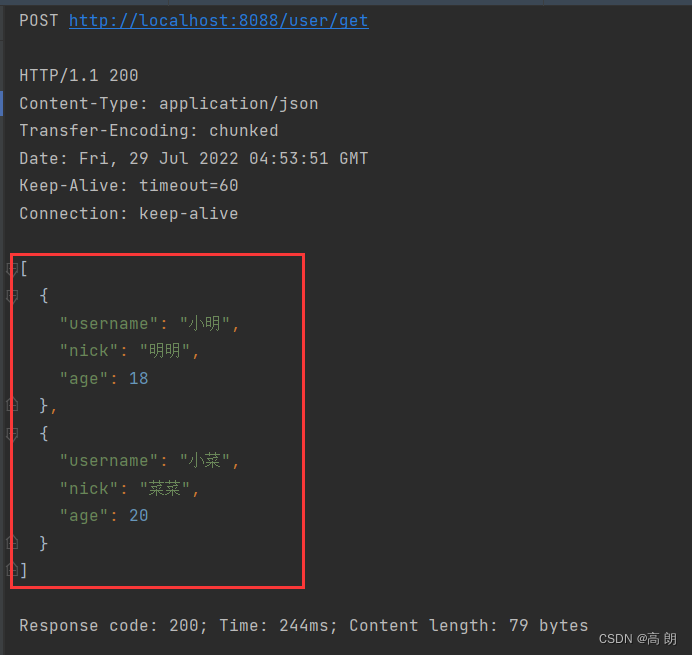
Dubbo配置标签属性说明
参考官方网址:https://dubbo.apache.org/zh/docs/references/xml/dubbo-provider/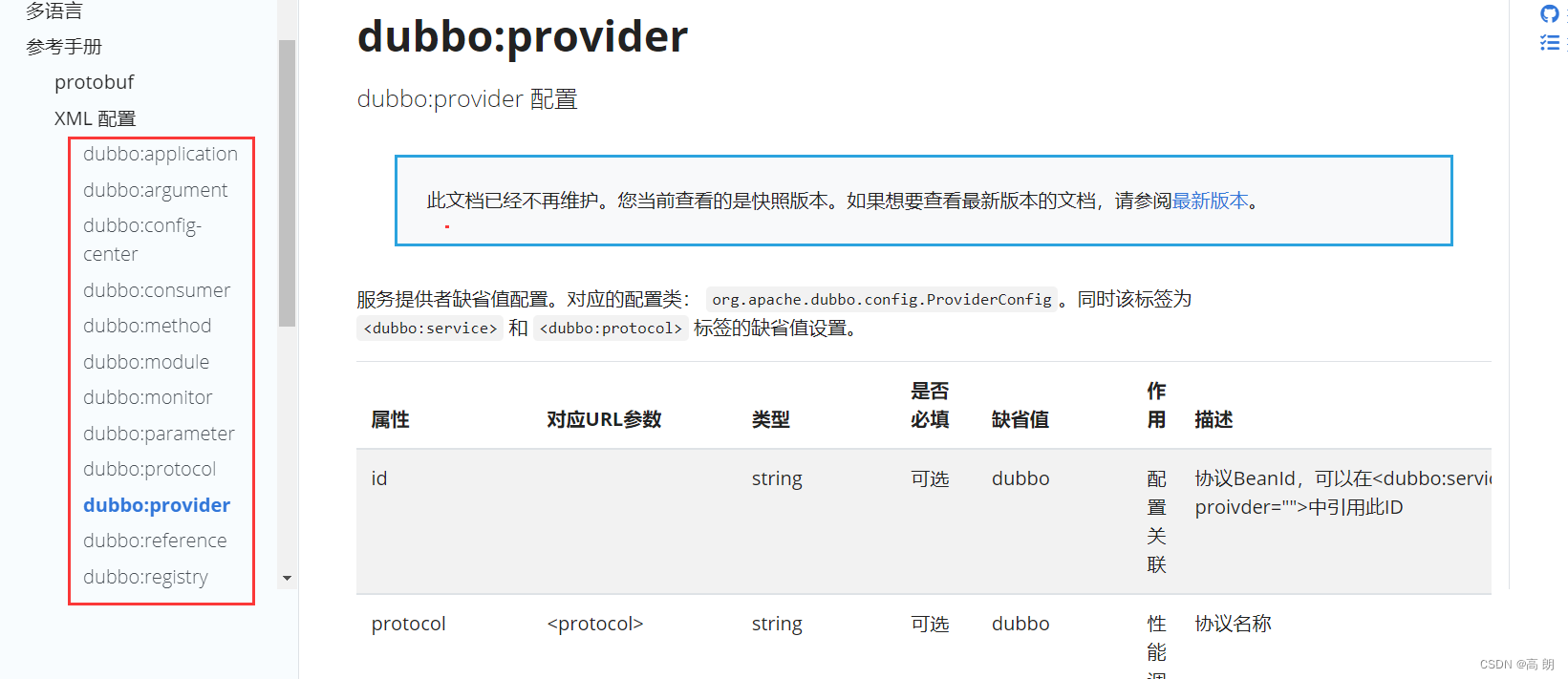
版权声明:本文为qq_43466788原创文章,遵循CC 4.0 BY-SA版权协议,转载请附上原文出处链接和本声明。