es在没有优化之前,用spark-sql给es的新index中入数据qps顶峰为17w/s,在优化之后首次插入index中,顶峰的qps为40w/s
es的集群规模为: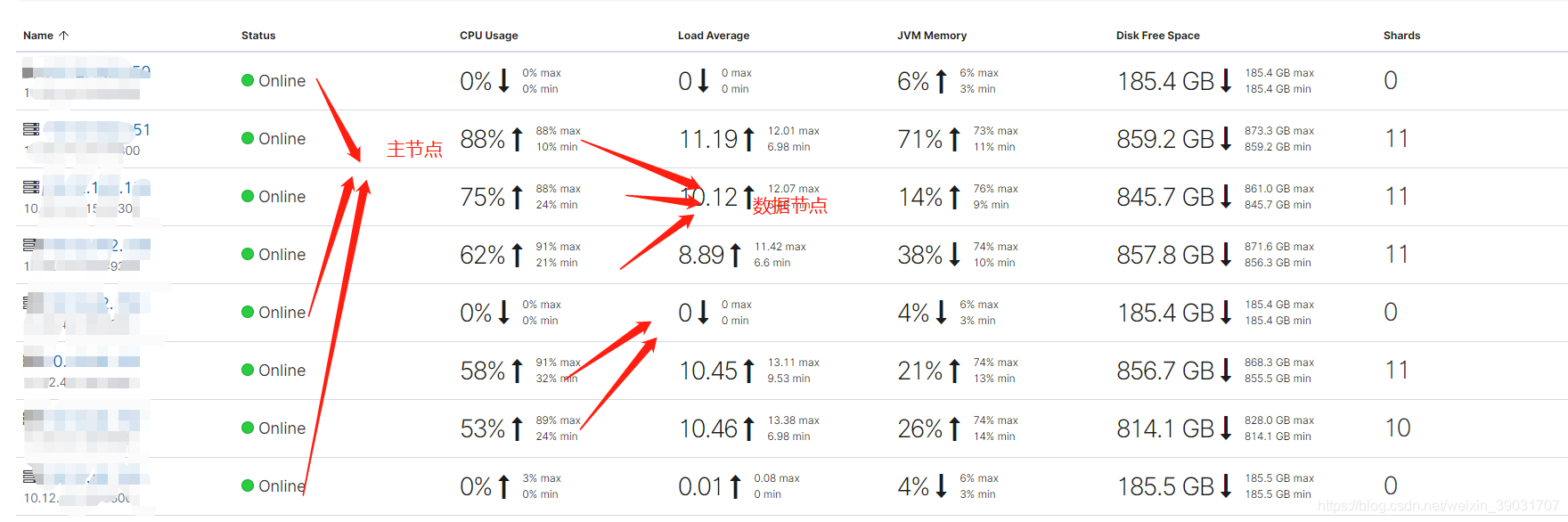
集群配置
主节点 m5.large 数据节点m5.2xlarge aws的机器
主节点2core8g,数据节点8core32g
优化后的插入速度:
优化后的插入CPU负载:
优化点:
因为appuid是作为指定的_id,所以没有必要再mapping中再出现了,一个分片数一般为30G-50G比较合适,我们的index为900G内容大小,所以设置分片为20比较合适
没有优化钱的mapping为:
PUT /t_dmp_idfa_bundle_country_array_tbl
{
  "settings":{
    "number_of_shards":5,
    "number_of_replicas":0
  },
  "mappings":{
      "properties":{
        "appuid":{"type":"keyword"},
      "bundles":{"type":"keyword"},
      "countrys":{"type":"keyword"}
      }

  }
}
优化后的mapping为:
PUT /t_dmp_idfa_bundle_country_array_tbl
{
  "settings":{
    "number_of_shards":20,
    "number_of_replicas":0
  },
  "mappings":{
      "properties":{
      "bundles":{"type":"keyword"},
      "countrys":{"type":"keyword"}
      }

  }
}
优化点1.5:
修改代码让appuid不入到mapping中核心修改两处;
val esOptions=Map(
  "es.mapping.id" -> "appuid",
  "es.write.operation"->"index",
  "es.mapping.exclude"->"appuid",
  "es.batch.size.entries"->"1000000")
优化点2.
elasticsearch.yml 文件的队列数
优化前: 队列数为默认的200
优化后的队列为20000
优化的代码为:
script.painless.regex.enabled: truethread_pool: write: queue_size: 20000
优化点3.修改对应的刷新时间和刷新大小
PUT /t_dmp_idfa_bundle_country_array_tbl_1/_settings{ "refresh_interval": "60s", "index.translog.flush_threshold_size": "1024mb"}
版权声明:本文为weixin_39031707原创文章,遵循CC 4.0 BY-SA版权协议,转载请附上原文出处链接和本声明。