上次把使用httpurlconnection提交参数_get案例给演示了,这次主要演示使用httpurlconnection提交参数_post案例。下面是布局代码和java代码。
首先是布局代码
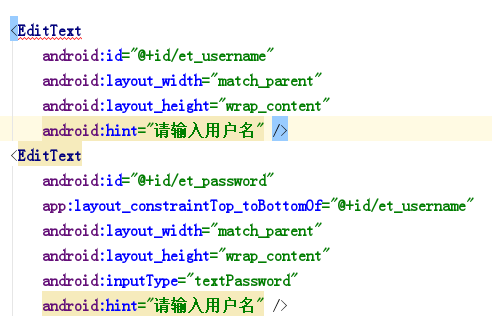
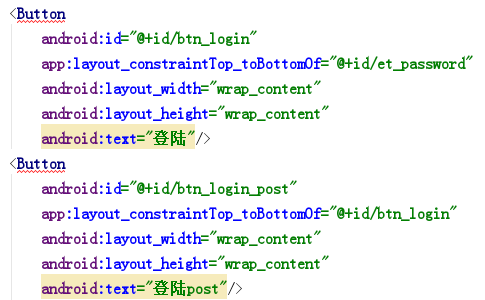
下面是java代码
package cn.xhhkj.xhhkjtest;
import android.os.Bundle;
import android.view.View;
import android.widget.Button;
import android.widget.EditText;
import android.widget.Toast;
import androidx.appcompat.app.AppCompatActivity;
import java.io.InputStream;
import java.net.HttpURLConnection;
import java.net.URL;
import java.net.URLEncoder;
public class MainActivity extends AppCompatActivity implements View.OnClickListener {
private String path = "http://192.168.0.101/index/index/login";
private EditText et_username;
private EditText et_pwd;
private Button btn_login;
@Override
protected void onCreate(Bundle savedInstanceState) {
super.onCreate(savedInstanceState);
setContentView(R.layout.activity_main);
et_username = (EditText) findViewById(R.id.et_username);
et_username.setText("兴弘海科技");
et_pwd = (EditText) findViewById(R.id.et_password);
btn_login = (Button) findViewById(R.id.btn_login);
Button btn_post = (Button) findViewById(R.id.btn_login_post);
btn_login.setOnClickListener(this);
btn_post.setOnClickListener(this);
}
@Override
public void onClick(View v) {
if(v.getId()==R.id.btn_login){
new Thread(){
public void run() {
String username = et_username.getText().toString();
String pwd = et_pwd.getText().toString();
try {
String tempUrl = path+"?username="+ URLEncoder.encode(username, "utf-8")+"&password="+URLEncoder.encode(pwd, "utf-8");
URL url = new URL(tempUrl);
HttpURLConnection connection = (HttpURLConnection) url.openConnection();
connection.setRequestMethod("GET");
connection.setConnectTimeout(10000);
int code = connection.getResponseCode();
if(code==200){
InputStream inputStream = connection.getInputStream();
String result = Utils.getStringFromStream(inputStream);
showToast(result);
}
} catch (Exception e) {
// TODO Auto-generated catch block
e.printStackTrace();
}
};
}.start();
}else if(v.getId()==R.id.btn_login_post){
new Thread(){
public void run(){
String username = et_username.getText().toString();
String pwd = et_pwd.getText().toString();
try{
String params = "username="+URLEncoder.encode(username,"utf-8")+"&password="+URLEncoder.encode(pwd,"utf-8");
URL url = new URL(path);
HttpURLConnection connection = (HttpURLConnection) url.openConnection();
connection.setRequestMethod("POST");
connection.setConnectTimeout(10000);
connection.setRequestProperty("Content-Type", "application/x-www-form-urlencoded");
connection.setRequestProperty("Content-Length", String.valueOf(params.length()));
connection.setDoOutput(true);
connection.getOutputStream().write(params.getBytes());
int code = connection.getResponseCode();
if(code==200){
InputStream inputStream = connection.getInputStream();
String rusult = Utils.getStringFromStream(inputStream);
showToast(rusult);
}
}catch (Exception e){
e.printStackTrace();
}
}
}.start();
}
}
private void showToast(final String str){
runOnUiThread(new Runnable() {
@Override
public void run() {
Toast.makeText(getApplicationContext(), str, Toast.LENGTH_SHORT).show();
}
});
}
}
在这里总结下,其中get提交和post提交可以使用if判断来进行区别,根据v.getId()的获取来得到。post提交比get提交要多几个步骤,其中connection.setRequestMethod("POST");和connection.setRequestProperty("Content-Type", "application/x-www-form-urlencoded");和connection.setRequestProperty("Content-Length", String.valueOf(params.length()));个人感觉还是get方式比较简单,在app中,post并不比get提交保密,因为app中根本看不出url携带的参数是多少,因为移动端并没有url地址栏。