场景:
ubuntu系统
问题描述:
使用conda activate pytorch想激活虚拟环境pytorch时报错:
CommandNotFoundError: Your shell has not been properly configured to use 'conda activate'.
To initialize your shell, run

    $ conda init <SHELL_NAME>

Currently supported shells are:
  - bash
  - fish
  - tcsh
  - xonsh
  - zsh
  - powershell

See 'conda init --help' for more information and options.

IMPORTANT: You may need to close and restart your shell after running 'conda init'.
然而,按他的推荐先退出并重启shell再执行conda init后仍无法解决。
原因分析:
未正确退出环境,会导致这样的报错。
解决方法:
运行:
source activate
conda deactivate
就可以成功解决啦!
如图: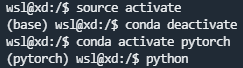
参考链接:
版权声明:本文为weixin_44211968原创文章,遵循CC 4.0 BY-SA版权协议,转载请附上原文出处链接和本声明。