学习来源:https://www.bilibili.com/video/BV1HJ41147DG
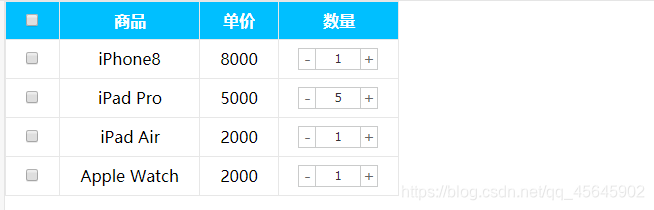
思路
1.首先声明一个变量,当我们点击+号(increment),就让这个值++,然后赋值给文本框。
2.注意1:只能增加本商品的数量, 就是当前+号的兄弟文本框(itxt)的值。
3.修改表单的值是val()方法
4.注意2:这个变量初始值应该是这个文本框的值,在这个值的基础上++。要获取表单的值
5.减号(decrement)思路同理,但是如果文本框的值是1,就不能再减了。
<!DOCTYPE html>
<html lang="zh-CN">

<head>
    <meta charset="UTF-8">
    <meta name="viewport" content="width=device-width, initial-scale=1.0">
    <meta http-equiv="X-UA-Compatible" content="ie=edge">
    <title>模拟购物车案例</title>
    <script src="../jquery.min.js"></script>
    <style>
        * {
            margin: 0;
            padding: 0;
        }

        table {
            border: 1px solid #e7e7e7;
            border-right: none;
            border-collapse: collapse;
        }

        th,
        td {
            text-align: center;
            padding: 8px 20px;
            border-bottom: 1px solid #e7e7e7;
            border-right: 1px solid #e7e7e7;
        }

        th {
            color: #fff;
            background-color: deepskyblue;
        }

        input[type=checkbox] {
            cursor: pointer;
        }

        a {
            color: #666;
            text-decoration: none;
        }

        a:hover {
            color: #e33333;
        }

        .decrement,
        .increment {
            float: left;
            border: 1px solid #cacbcb;
            height: 18px;
            line-height: 18px;
            padding: 1px 0;
            width: 16px;
            text-align: center;
            color: #666;
            margin: 0;
            background: #fff;
            margin-left: -1px;
        }

        .itxt {
            float: left;
            border: 1px solid #cacbcb;
            width: 42px;
            height: 18px;
            line-height: 18px;
            text-align: center;
            padding: 1px;
            margin: 0;
            margin-left: -1px;
            font-size: 12px;
            font-family: verdana;
            color: #333;
            -webkit-appearance: none;
        }
    </style>
    <script>
            // 增减商品数量
            $('.increment').click(function () {
                // 得到当前兄弟文本框的值
                var num = $(this).siblings('.itxt').val();
                num++;
                // 修改文本框内的数量
                $(this).siblings('.itxt').val(num)
            })
            $('.decrement').click(function () {
                // 得到当前兄弟文本框的值
                var num = $(this).siblings('.itxt').val();
                num--;
                // 控制商品数量,不能让商品为0或出现负值
                // 也可以设置商品数量上限哦
                if (num < 1) {
                    num = 1;
                    // 或 return false;
                }
                // 修改文本框内的数量
                $(this).siblings('.itxt').val(num);
            })
        })
    </script>
</head>

<body>
    <table>
        <thead>
            <tr>
                <th><input type="checkbox" id="checkall"></th>
                <th>商品</th>
                <th>单价</th>
                <th>数量</th>
            </tr>
        </thead>
        <tbody>
            <tr>
                <td><input type="checkbox" class="j-checkbox"></td>
                <td>iPhone8</td>
                <td>8000</td>
                <td class="quantity-form">
                    <a href="javascript:;" class="decrement">-</a>
                    <input type="text" class="itxt" value="1">
                    <a href="javascript:;" class="increment">+</a>
                </td>
            </tr>
            <tr>
                <td><input type="checkbox" class="j-checkbox"></td>
                <td>iPad Pro</td>
                <td>5000</td>
                <td class="quantity-form">
                    <a href="javascript:;" class="decrement">-</a>
                    <input type="text" class="itxt" value="1">
                    <a href="javascript:;" class="increment">+</a>
                </td>
            </tr>
            <tr>
                <td><input type="checkbox" class="j-checkbox"></td>
                <td>iPad Air</td>
                <td>2000</td>
                <td class="quantity-form">
                    <a href="javascript:;" class="decrement">-</a>
                    <input type="text" class="itxt" value="1">
                    <a href="javascript:;" class="increment">+</a>
                </td>
            </tr>
            <tr>
                <td><input type="checkbox" class="j-checkbox"></td>
                <td>Apple Watch</td>
                <td>2000</td>
                <td class="quantity-form">
                    <a href="javascript:;" class="decrement">-</a>
                    <input type="text" class="itxt" value="1">
                    <a href="javascript:;" class="increment">+</a>
                </td>
            </tr>
        </tbody>
    </table>
</body>

</html>
版权声明:本文为qq_45645902原创文章,遵循CC 4.0 BY-SA版权协议,转载请附上原文出处链接和本声明。