使用Android Studio4.0.1导入Android项目,遇到gradle编译问题,一般来说主要改以下两部分:
1、gradle版本号
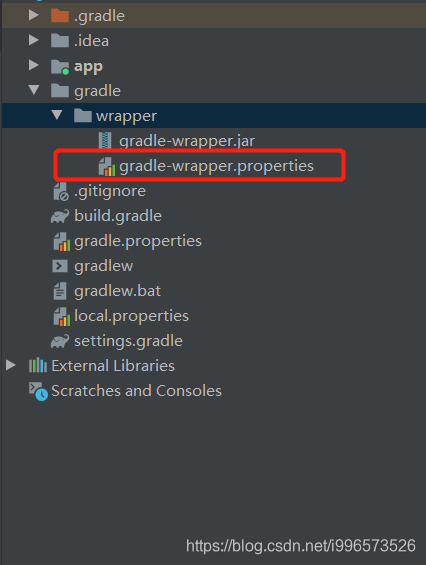
#Sun Aug 25 15:32:02 BST 2019
distributionBase=GRADLE_USER_HOME
distributionPath=wrapper/dists
zipStoreBase=GRADLE_USER_HOME
zipStorePath=wrapper/dists
distributionUrl=https\://services.gradle.org/distributions/gradle-6.1.1-all.zip
2、classpath "..."部分
// Top-level build file where you can add configuration options common to all sub-projects/modules.
buildscript {
    repositories {
        google()
        jcenter()
        mavenCentral()
        maven { url 'https://maven.google.com'}
    }
    dependencies {
        classpath "com.android.tools.build:gradle:4.0.1"

        // NOTE: Do not place your application dependencies here; they belong
        // in the individual module build.gradle files
    }
}

...
标题中的问题就是classpath的配置和gradle版本号没对上,出现的报错:
Gradle sync failed: Cause: org/gradle/api/internal/java/usagecontext/LazyConfigurationUsageContext解决方法也很简单======》
Switch to gradle version 5.6.4. LazyConfigurationUsageContext doesn't have support in gradle versions 6.0+.
1、将gradle版本号改为5.6.4,即:
#Sun Aug 25 15:32:02 BST 2019
distributionBase=GRADLE_USER_HOME
distributionPath=wrapper/dists
zipStoreBase=GRADLE_USER_HOME
zipStorePath=wrapper/dists
distributionUrl=https\://services.gradle.org/distributions/gradle-5.6.4-all.zip
2、将classpath改为:
// Top-level build file where you can add configuration options common to all sub-projects/modules.
buildscript {
    repositories {
        google()
        jcenter()
        mavenCentral()
        maven { url 'https://maven.google.com'}
    }
    dependencies {
        classpath "com.android.tools.build:gradle:3.6.0"

        // NOTE: Do not place your application dependencies here; they belong
        // in the individual module build.gradle files
    }
}

...
重新编译运行即可解决!!!
附上Android Gradle 插件版本说明
链接地址:https://developer.android.com/studio/releases/gradle-plugin
在更新 Android Studio 时,您可能会收到一并将 Gradle 更新为最新可用版本的提示。您可以选择接受该更新,也可以根据项目的构建要求手动指定版本。
下表列出了各个 Android Gradle 插件版本所需的 Gradle 版本。要获得最佳性能,您应该使用 Gradle 和插件这两者的最新版本。
| 插件版本 | 所需的 Gradle 版本 |
|---|---|
| 1.0.0 - 1.1.3 | 2.2.1 - 2.3 |
| 1.2.0 - 1.3.1 | 2.2.1 - 2.9 |
| 1.5.0 | 2.2.1 - 2.13 |
| 2.0.0 - 2.1.2 | 2.10 - 2.13 |
| 2.1.3 - 2.2.3 | 2.14.1+ |
| 2.3.0+ | 3.3+ |
| 3.0.0+ | 4.1+ |
| 3.1.0+ | 4.4+ |
| 3.2.0 - 3.2.1 | 4.6+ |
| 3.3.0 - 3.3.2 | 4.10.1+ |
| 3.4.0 - 3.4.1 | 5.1.1+ |
| 3.5.0-3.5.3 | 5.4.1+ |
| 3.6.0+ | 5.6.4+ |
您可以在 Android Studio 的 File > Project Structure > Project 菜单中指定 Gradle 版本,也可以通过在 gradle/wrapper/gradle-wrapper.properties 文件(即本文第一张图片)中修改 Gradle 分发引用来指定。
版权声明:本文为i996573526原创文章,遵循CC 4.0 BY-SA版权协议,转载请附上原文出处链接和本声明。