1.先创建一个maven项目,什么也不需要勾选,只需要修改相应的项目信息即可。
然后删除src整个包
test
- .idea
- pom.xml
- test.iml
pom.xml配置:
<?xml version="1.0" encoding="UTF-8"?>
<project xmlns="http://maven.apache.org/POM/4.0.0"
         xmlns:xsi="http://www.w3.org/2001/XMLSchema-instance"
         xsi:schemaLocation="http://maven.apache.org/POM/4.0.0 http://maven.apache.org/xsd/maven-4.0.0.xsd">
    <modelVersion>4.0.0</modelVersion>

    <groupId>org.example</groupId>
    <artifactId>test</artifactId>
    <packaging>pom</packaging>
    <version>1.0-SNAPSHOT</version>

    <modules>  <!--(后续创建Module时会自动配置 )-->
        <module>mainModule</module>
        <module>childModule</module>
    </modules>

    <dependencyManagement>
        <dependencies>
            <dependency>
                <groupId>org.springframework.boot</groupId>
                <artifactId>spring-boot-starter-web</artifactId>
                <version>2.3.12.RELEASE</version>
            </dependency>
        </dependencies>
    </dependencyManagement>
</project>
2.创建Module
在test上创建Module选择maven项目,会发现在创建过程中配置模块信息时Parent会默认选择test。
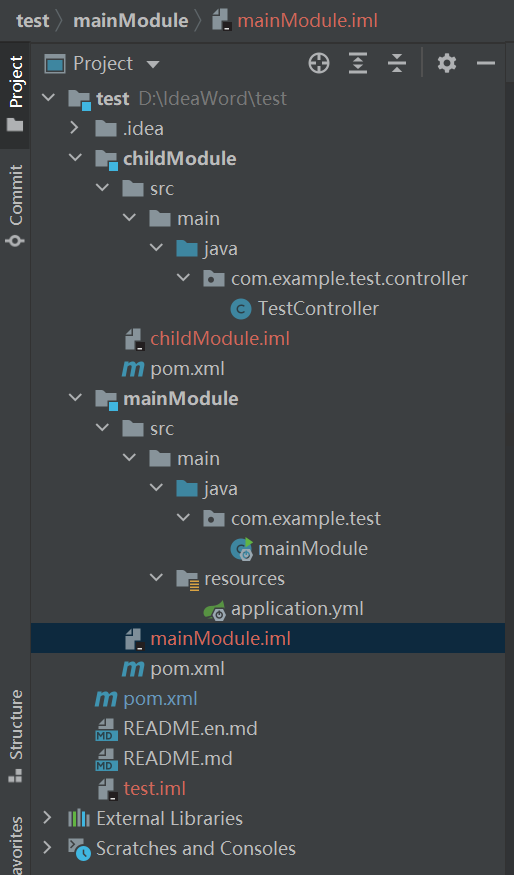
如果创建的是主启动模块的话需要添加主启动类和application.yml。主启动类的位置需要注意
当创建好多个module后会发现最外层的pom.xml中添加了相应的配置信息。
<modules>  <!--(后续创建Module时会自动配置 )-->
        <module>mainModule</module>
        <module>childModule</module>
    </modules>
3.模块之间的调用
主启动类:
<?xml version="1.0" encoding="UTF-8"?>
<project xmlns="http://maven.apache.org/POM/4.0.0"
         xmlns:xsi="http://www.w3.org/2001/XMLSchema-instance"
         xsi:schemaLocation="http://maven.apache.org/POM/4.0.0 http://maven.apache.org/xsd/maven-4.0.0.xsd">
    <parent>
        <artifactId>test</artifactId>
        <groupId>org.example</groupId>
        <version>1.0-SNAPSHOT</version>
    </parent>
    <modelVersion>4.0.0</modelVersion>

    <artifactId>mainModule</artifactId>

    <dependencies>
        <dependency>
            <groupId>org.springframework.boot</groupId>
            <artifactId>spring-boot-starter-web</artifactId>
        </dependency>
        <dependency>
            <groupId>org.example</groupId>
            <artifactId>childModule</artifactId>
            <version>1.0-SNAPSHOT</version>
        </dependency>
    </dependencies>
</project>
子模块:
<?xml version="1.0" encoding="UTF-8"?>
<project xmlns="http://maven.apache.org/POM/4.0.0"
         xmlns:xsi="http://www.w3.org/2001/XMLSchema-instance"
         xsi:schemaLocation="http://maven.apache.org/POM/4.0.0 http://maven.apache.org/xsd/maven-4.0.0.xsd">
    <parent>
        <artifactId>test</artifactId>
        <groupId>org.example</groupId>
        <version>1.0-SNAPSHOT</version>
    </parent>
    <modelVersion>4.0.0</modelVersion>

    <artifactId>childModule</artifactId>

    <dependencies>
        <dependency>
            <groupId>org.springframework.boot</groupId>
            <artifactId>spring-boot-starter-web</artifactId>
        </dependency>
    </dependencies>
</project>
在主模块的pom中引用子模块即可。
需要注意的是主启动类所处的路径应该和子模块中的被调用路径相同。不然会调用失败。
childModule:com.example.test,controller
mainModule:com.example.test
解决办法:
(1)在主启动类上使用注解来识别相应的路径。
@ComponentScan(basePackages = {"",""})(2)直接将子模块打包放到maven仓库直接调用......
项目路径:
版权声明:本文为weixin_51296247原创文章,遵循CC 4.0 BY-SA版权协议,转载请附上原文出处链接和本声明。