seata cloud Started
- seata-service:1.4.1
- zookeeper:3.6.2
- mysql:8.0
开源框架调研
seata 支持 AT模式 TCC模式
AT模式 强依赖本地DB事物 且对oracle 有兼容问题
#优点:
实现简单,基本0代码耦合,只需要在TM的地方加一个全局事务注解即可。
性能优秀,第一阶段则释放本地锁
TC可单独集群部署,架构清晰,高可用保证
使用简单,学习成本低,微服务可直接集成进来。
应用层基于SQL解析实现了自动补偿,从而最大程度的降低业务侵入性;
将分布式事务中TC(事务协调者)独立部署,负责事务的注册、回滚;
通过全局锁实现了写隔离与读隔离。
#缺点:
回滚的时候 会发生等待锁 响应时间比较长 性能消耗比较高
对于部分采用Seata的应用,如何保证数据不脏读、幻读?
Seata提供了一个@GlobalLock的注解,可以提供轻量级全局锁判定的功能(不生成undo log),但还是需要集成使用Seata。
TC在逻辑上是单点,如何做到高可用、高性能还是需要后续版本不断优化。
单机多数据源跨服务目前不支持。
###TCC的调研
TCC不依赖DB的是本地事物 主要场景 作用与MongoDB
TCC 事务分为3个阶段,也称为三阶段提交
T:try
C:confirm
C:cancle
一般会引入ByteTcc之类的框架,然后针对同一个接口的,写出对应上述的三种实现方式。
例如扣减库存业务,按照正常只直接扣除。
做了TCC后,需要拆解为3个步骤:
try : 先不要直接减库存,可以用某个字段表示先冻结调需要扣减的部分
confirm:如果try成功,则执行confirm逻辑,confirm里面则开始真正的扣减库存
cancle: 如果try失败,则执行cancle实现代码,回滚之前的冻结数据。
这3个步骤均在ByteTcc 框架的协调下执行。
#优点:
严格保证分布式事务的执行,严格保证数据的准确性。当然,前提是三个阶段的的代码实现你得写对。适合绝对不能出错的金融业务。
#缺点:
方案落地实现麻烦,业务代码耦合超高。每个需要加事务的地方都都手写这3段代码。存在 空回滚,冥等,悬挂问题
还有LCN 消息一致性分布式 实现起来比较繁琐 有兴趣可以学习一下
seata-cloud sql 初始化sql
DROP TABLE IF EXISTS `storage_tbl`;
CREATE TABLE `storage_tbl` (
`id` int(11) NOT NULL AUTO_INCREMENT,
`commodity_code` varchar(255) DEFAULT NULL,
`count` int(11) DEFAULT 0,
PRIMARY KEY (`id`),
UNIQUE KEY (`commodity_code`)
) ENGINE=InnoDB DEFAULT CHARSET=utf8;


DROP TABLE IF EXISTS `order_tbl`;
CREATE TABLE `order_tbl` (
`id` int(11) NOT NULL AUTO_INCREMENT,
`user_id` varchar(255) DEFAULT NULL,
`commodity_code` varchar(255) DEFAULT NULL,
`count` int(11) DEFAULT 0,
`money` int(11) DEFAULT 0,
PRIMARY KEY (`id`)
) ENGINE=InnoDB DEFAULT CHARSET=utf8;


DROP TABLE IF EXISTS `account_tbl`;
CREATE TABLE `account_tbl` (
`id` int(11) NOT NULL AUTO_INCREMENT,
`user_id` varchar(255) DEFAULT NULL,
`money` int(11) DEFAULT 0,
PRIMARY KEY (`id`)
) ENGINE=InnoDB DEFAULT CHARSET=utf8;
每个DB都需要初始化undo_log
CREATE TABLE `undo_log` (
`id` bigint(20) NOT NULL AUTO_INCREMENT,
`branch_id` bigint(20) NOT NULL,
`xid` varchar(100) NOT NULL,
`context` varchar(128) NOT NULL,
`rollback_info` longblob NOT NULL,
`log_status` int(11) NOT NULL,
`log_created` datetime NOT NULL,
`log_modified` datetime NOT NULL,
`ext` varchar(100) DEFAULT NULL,
PRIMARY KEY (`id`),
UNIQUE KEY `ux_undo_log` (`xid`,`branch_id`)
) ENGINE=InnoDB AUTO_INCREMENT=1 DEFAULT CHARSET=utf8;
seata-service 初始化sql
https://github.com/seata/seata/blob/master/script/server/db/mysql.sql
SET FOREIGN_KEY_CHECKS=0;
DROP TABLE IF EXISTSbranch_table;
CREATE TABLEbranch_table(
branch_idbigint(20) NOT NULL,
xidvarchar(128) NOT NULL,
transaction_idbigint(20) DEFAULT NULL,
resource_group_idvarchar(32) DEFAULT NULL,
resource_idvarchar(256) DEFAULT NULL,
branch_typevarchar(8) DEFAULT NULL,
statustinyint(4) DEFAULT NULL,
client_idvarchar(64) DEFAULT NULL,
application_datavarchar(2000) DEFAULT NULL,
gmt_createdatetime(6) DEFAULT NULL,
gmt_modifieddatetime(6) DEFAULT NULL,
PRIMARY KEY (branch_id),
KEYidx_xid(xid)
) ENGINE=InnoDB DEFAULT CHARSET=utf8;DROP TABLE IF EXISTS
global_table;
CREATE TABLEglobal_table(
xidvarchar(128) NOT NULL,
transaction_idbigint(20) DEFAULT NULL,
statustinyint(4) NOT NULL,
application_idvarchar(32) DEFAULT NULL,
transaction_service_groupvarchar(32) DEFAULT NULL,
transaction_namevarchar(128) DEFAULT NULL,
timeoutint(11) DEFAULT NULL,
begin_timebigint(20) DEFAULT NULL,
application_datavarchar(2000) DEFAULT NULL,
gmt_createdatetime DEFAULT NULL,
gmt_modifieddatetime DEFAULT NULL,
PRIMARY KEY (xid),
KEYidx_gmt_modified_status(gmt_modified,status),
KEYidx_transaction_id(transaction_id)
) ENGINE=InnoDB DEFAULT CHARSET=utf8;DROP TABLE IF EXISTS
lock_table;
CREATE TABLElock_table(
row_keyvarchar(128) NOT NULL,
xidvarchar(96) DEFAULT NULL,
transaction_idbigint(20) DEFAULT NULL,
branch_idbigint(20) NOT NULL,
resource_idvarchar(256) DEFAULT NULL,
table_namevarchar(32) DEFAULT NULL,
pkvarchar(36) DEFAULT NULL,
gmt_createdatetime DEFAULT NULL,
gmt_modifieddatetime DEFAULT NULL,
PRIMARY KEY (row_key),
KEYidx_branch_id(branch_id)
) ENGINE=InnoDB DEFAULT CHARSET=utf8;
seata-service 下载
解压seata-service 如图
[外链图片转存失败,源站可能有防盗链机制,建议将图片保存下来直接上传(img-EnUGGp6f-1608543167186)(img.png)]
集群配置修改
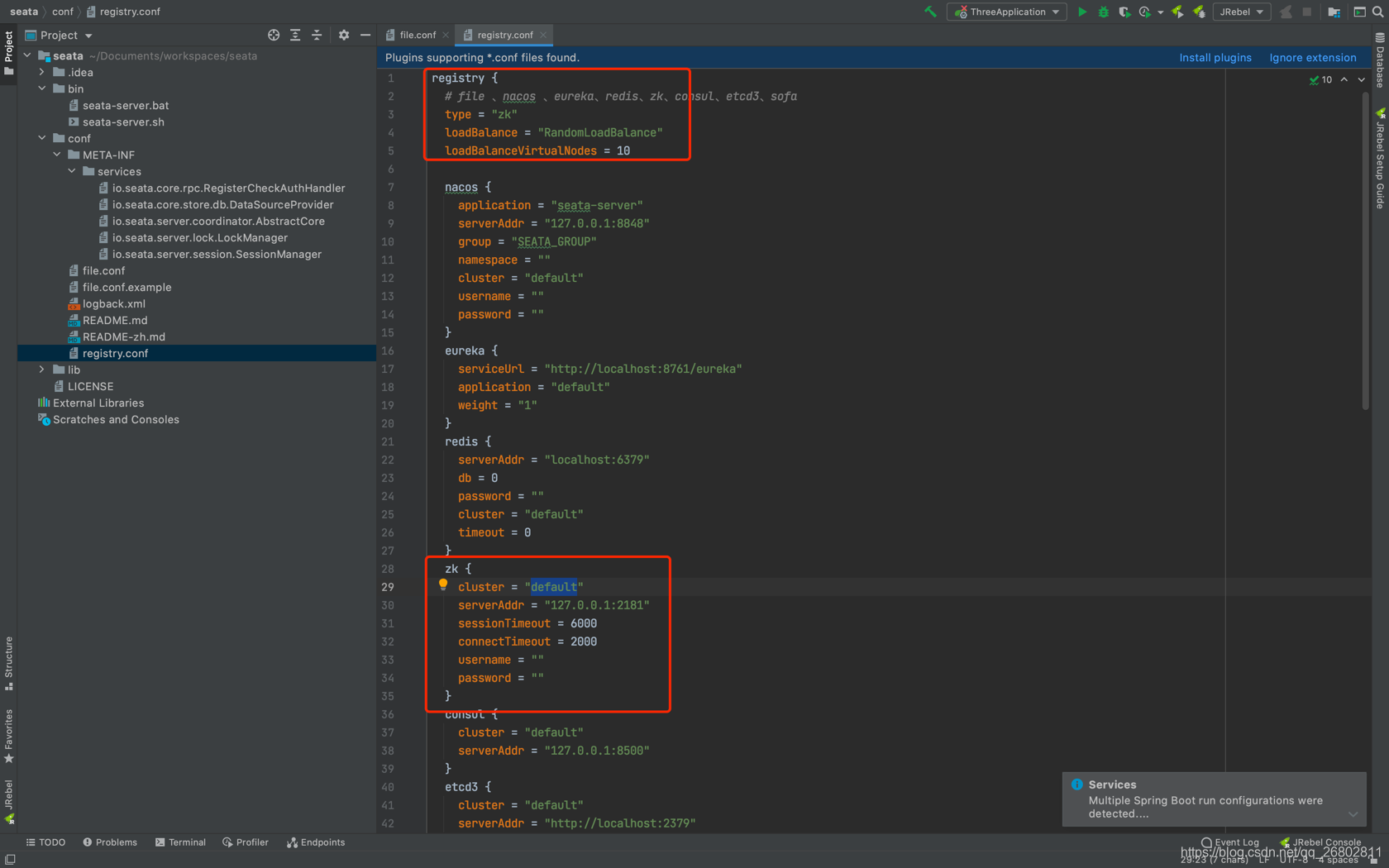
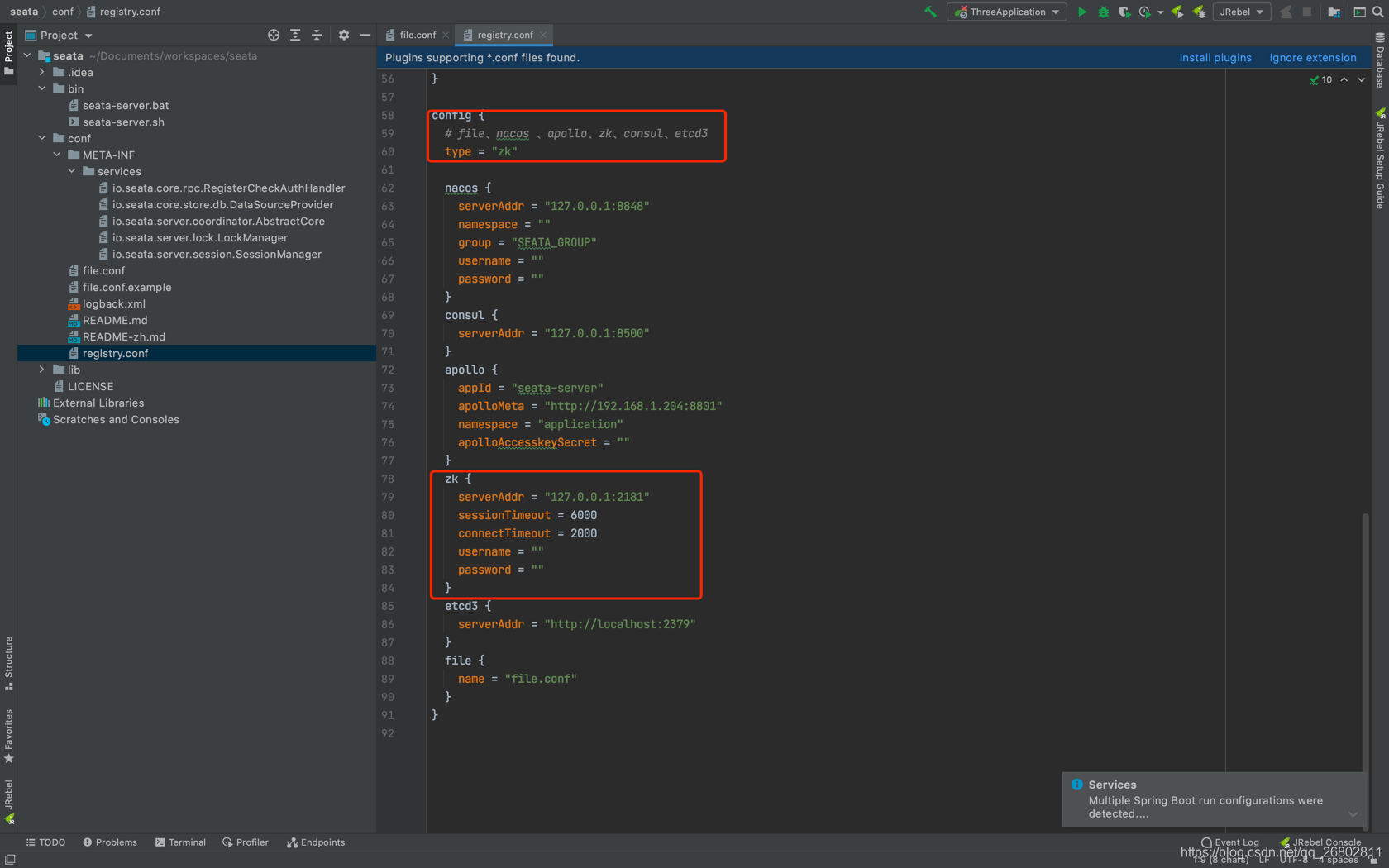
registry.conf
registry{}
config{}
seata-servcie 配置修改结束
zk 集群脚本修改
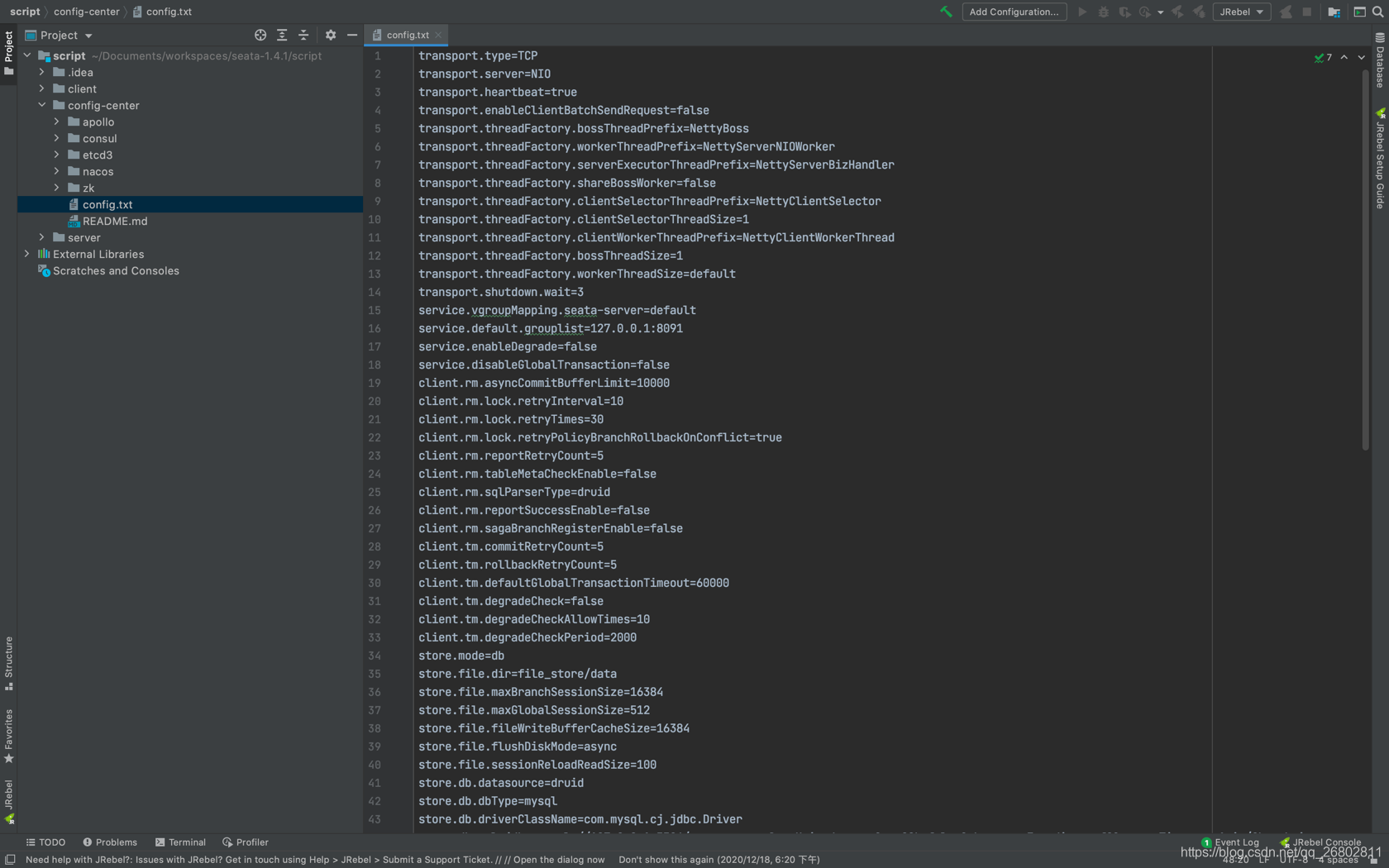
编辑 script/config-center/config.txt
service.vgroupMapping.seata-server=default
store.db.dbType=mysql
store.db.driverClassName=com.mysql.cj.jdbc.Driver
store.db.url=jdbc:mysql://127.0.0.1:3306/seata-server?useUnicode=true&useSSL=false&characterEncoding=utf8&serverTimezone=Asia/Shanghai
store.db.user=root
store.db.password=123456service.vgroupMapping.seata-server(一定注意.seata-server在yml 文件中要用到)
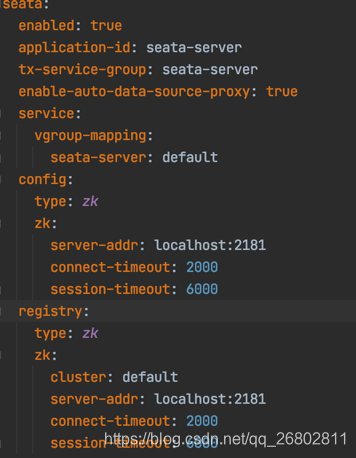
client application.yml 文件配置
seata:
enabled: true
application-id: seata-server
tx-service-group: seata-server
enable-auto-data-source-proxy: true
service:
  vgroup-mapping:
    seata-server: default
config:
type: zk
  zk:
  server-addr: localhost:2181
  connect-timeout: 2000
  session-timeout: 6000
registry:
  type: zk
  zk:
   cluster: default
   server-addr: localhost:2181
   connect-timeout: 2000
   session-timeout: 6000
seata集群模式
seata 分为单机和集群2中 单机默认为file 集群需要0.6版本开始支持,tc使用db模式共享全局事务会话信息,注册中心使用非file的seata支持的第三方注册中心
集群注册中心用zk : wget https://downloads.apache.org/zookeeper/zookeeper-3.6.2/apache-zookeeper-3.6.2-bin.tar.gz
编辑script -> config-center -> config.txt文件,修改store.mode=db,修改store.db相关的数据库连接信息,其它默认即可
注意driverClassName和jar包对应
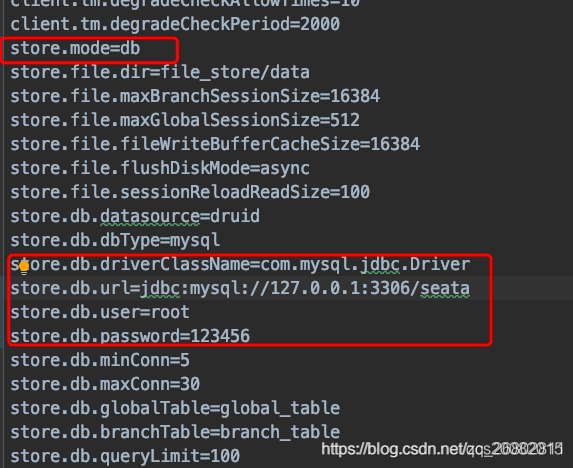
sh zk-config.sh -h localhost -p 2181 -z /Users/ext.baixiaojie/soft/zookeeper (zk 安装目录)
上面命令会将config.txt中的配置信息写入zk的/seata节点下。
sh seata-server.sh -p 8092 -h eureka-7900 -m db -n 2
sh seata-server.sh -p 8091 -h eureka-7901 -m db -n 1
pom 文件
<?xml version="1.0" encoding="UTF-8"?>
<project xmlns="http://maven.apache.org/POM/4.0.0"
     xmlns:xsi="http://www.w3.org/2001/XMLSchema-instance"
     xsi:schemaLocation="http://maven.apache.org/POM/4.0.0 http://maven.apache.org/xsd/maven-4.0.0.xsd">
<modelVersion>4.0.0</modelVersion>

<parent>
    <groupId>org.springframework.boot</groupId>
    <artifactId>spring-boot-starter-parent</artifactId>
    <version>2.3.2.RELEASE</version>
    <relativePath/> <!-- lookup parent from repository -->
</parent>

<groupId>com.mashibing</groupId>
<artifactId>seata-cloud</artifactId>
<version>1.0-SNAPSHOT</version>

<properties>
    <java.version>1.8</java.version>
    <spring-cloud.version>Finchley.M9</spring-cloud.version>
    <maven.compiler.source>8</maven.compiler.source>
    <maven.compiler.target>8</maven.compiler.target>
</properties>
<packaging>pom</packaging>

<modules>
    <module>seata-eureka-service</module>
    <module>seata-order-service</module>
    <module>seata-storage-servcie</module>
    <module>seata-account-service</module>
    <module>seata-api-pojo</module>
    <module>seata-api-service</module>
</modules>

<dependencyManagement>
    <dependencies>
        <dependency>
            <groupId>org.apache.curator</groupId>
            <artifactId>curator-recipes</artifactId>
            <version>4.2.0</version>
            <exclusions>
                <exclusion>
                    <groupId>org.apache.zookeeper</groupId>
                    <artifactId>zookeeper</artifactId>
                </exclusion>
            </exclusions>
        </dependency>
        <dependency>
            <groupId>org.apache.zookeeper</groupId>
            <artifactId>zookeeper</artifactId>
            <version>3.6.2</version>
            <exclusions>
                <exclusion>
                    <groupId>org.slf4j</groupId>
                    <artifactId>slf4j-api</artifactId>
                </exclusion>
                <exclusion>
                    <groupId>org.slf4j</groupId>
                    <artifactId>slf4j-log4j12</artifactId>
                </exclusion>
            </exclusions>
        </dependency>

        <dependency>
            <groupId>com.101tec</groupId>
            <artifactId>zkclient</artifactId>
            <version>0.3</version>
        </dependency>

        <dependency>
            <groupId>io.seata</groupId>
            <artifactId>seata-spring-boot-starter</artifactId>
            <version>1.4.0</version>
        </dependency>

        <dependency>
            <groupId>com.alibaba</groupId>
            <artifactId>fastjson</artifactId>
            <version>1.2.75</version>
        </dependency>

        <dependency>
            <groupId>com.mashibing</groupId>
            <artifactId>seata-api-service</artifactId>
            <version>0.0.1-SNAPSHOT</version>
        </dependency>
        <dependency>
            <groupId>org.springframework.cloud</groupId>
            <artifactId>spring-cloud-starter-openfeign</artifactId>
            <version>2.2.6.RELEASE</version>
        </dependency>
        <dependency>
            <groupId>com.mashibing</groupId>
            <artifactId>seata-api-pojo</artifactId>
            <version>0.0.1-SNAPSHOT</version>
        </dependency>
        <dependency>
            <groupId>org.mybatis.spring.boot</groupId>
            <artifactId>mybatis-spring-boot-starter</artifactId>
            <version>2.0.0</version>
        </dependency>

        <!-- mysql:mysql驱动 -->
        <dependency>
            <groupId>mysql</groupId>
            <artifactId>mysql-connector-java</artifactId>
            <version>8.0.22</version>
        </dependency>

        <!-- mysql:阿里巴巴数据库连接池 -->
        <dependency>
            <groupId>com.alibaba</groupId>
            <artifactId>druid</artifactId>
            <version>1.1.12</version>
        </dependency>

        <dependency>
            <groupId>com.alibaba.cloud</groupId>
            <artifactId>spring-cloud-alibaba-seata</artifactId>
            <version>2.2.0.RELEASE</version>
            <exclusions>
                <exclusion>
                    <groupId>io.seata</groupId>
                    <artifactId>seata-spring-boot-starter</artifactId>
                </exclusion>
            </exclusions>

        </dependency>
    </dependencies>
</dependencyManagement>

<build>
    <plugins>
        <plugin>
            <groupId>org.springframework.boot</groupId>
            <artifactId>spring-boot-maven-plugin</artifactId>
            <version>2.3.7.RELEASE</version>
            <configuration>
                <excludes>
                    <exclude>
                        <groupId>org.projectlombok</groupId>
                        <artifactId>lombok</artifactId>
                    </exclude>
                </excludes>
            </configuration>
        </plugin>
    </plugins>
</build>