<!--前面部分是公共文件所在路径及文件名,没有文件名后缀::后面是公共文件内th:fragment的值,冒号前后要有空格-->
<div th:insert="/test/common2 :: res_common"></div>

<div th:replace="/test/common2 :: res_common"></div>

<div th:include="/test/common2 :: res_common"></div>
th:insert会保留当前引入标签
th:replace会替换当前引入标签
common2.html文件
<div th:fragment="res_common">
    common2
</div>
文件目录
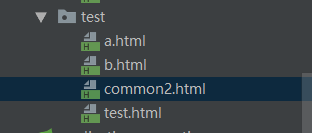
如果还渲染不出来看看aplication中自己对thymeleaf文件路径配置
th:replace引入公共js,css等部分
被引用的公共文件
<!--title:标题参数(形参)-->
<head th:fragment="res_common(title)">
    <meta charset="UTF-8">

    <title th:replace="${title}"></title>

    <script type="text/javascript" src="/js/jquery.min.js"></script>
    <link type="text/css" rel="stylesheet" href="/css/layui.css">
    <link type="text/css" rel="stylesheet" href="/layui/css/layui.mobile.css">
    <script type="text/javascript" src="/layui/layui.all.js"></script>

</head>
引用文件:
头部部分:
<!DOCTYPE html>

<html lang="en" xmlns:th="http://www.thymeleaf.org">
<!--将title传递给公共部分文件-->
<head th:replace="/common/common :: res_common(~{::title})">
    <title>测试</title>

</head>
<body>
版权声明:本文为test_00原创文章,遵循CC 4.0 BY-SA版权协议,转载请附上原文出处链接和本声明。