良好的单元测试习惯可以大大减少Bug,这里将会详细展示如何进行单元测试并且生成覆盖率报告等。
(1)创建压测类
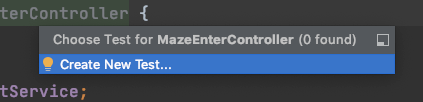
注意!⚠️
与启动类同级的test下的Java目录下!!!与项目的层级结构必须一样!!完全一样!(否则无法生成覆盖率报告: No coverage results)
(2)导入依赖!!!
<dependency>
            <groupId>org.testng</groupId>
            <artifactId>testng</artifactId>
            <version>6.9.10</version>
            <scope>test</scope>
  </dependency>
<!—这个可加可不加,看自己需要—>
<dependency>
    <groupId>net.sf.json-lib</groupId>
    <artifactId>json-lib</artifactId>
    <version>2.4</version>
    <classifier>jdk15</classifier>
</dependency>
(3)添加注解
(4)创建工具类(使用的时候不能New!!!!不能new!!)
package com.example.maze.test.java.com.example.maze.controller;

import com.example.maze.MazeApplication;
import org.apache.commons.lang.StringUtils;
import org.junit.BeforeClass;
import org.springframework.beans.factory.annotation.Autowired;
import org.springframework.beans.factory.annotation.Value;
import net.sf.json.JSONObject;
import org.springframework.boot.test.autoconfigure.web.servlet.AutoConfigureMockMvc;
import org.springframework.boot.test.context.SpringBootTest;
import org.springframework.http.HttpMethod;
import org.springframework.http.MediaType;
import org.springframework.test.context.testng.AbstractTestNGSpringContextTests;
import org.springframework.test.web.servlet.MockMvc;
import org.springframework.test.web.servlet.MvcResult;
import org.springframework.test.web.servlet.request.MockHttpServletRequestBuilder;
import org.springframework.test.web.servlet.request.MockMvcRequestBuilders;
import org.springframework.test.web.servlet.result.MockMvcResultMatchers;
import org.springframework.test.web.servlet.setup.MockMvcBuilders;
import org.springframework.web.context.WebApplicationContext;

import java.util.HashMap;
import java.util.Map;

import static org.springframework.test.web.servlet.result.MockMvcResultHandlers.print;

@SpringBootTest(classes = MazeApplication.class, webEnvironment = SpringBootTest.WebEnvironment.MOCK)
@AutoConfigureMockMvc
public class BaseCover extends AbstractTestNGSpringContextTests {
    @Autowired
    protected MockMvc mockMvc;
    @Autowired
    protected WebApplicationContext webApplicationContext;

    @BeforeClass
    public void before() {
        mockMvc = MockMvcBuilders.webAppContextSetup(webApplicationContext)
                .alwaysExpect(MockMvcResultMatchers.status().is(200))
                .alwaysExpect(MockMvcResultMatchers.content().contentType(MediaType.APPLICATION_JSON))
                .alwaysDo(print())
                .build();
    }

    protected String put(String data, HttpMethod method, String url) {
        MvcResult result = null;
        try {
            result = mockMvc.perform(
                    MockMvcRequestBuilders.request(method,url)
                            .contentType(MediaType.APPLICATION_JSON)
                            .header("X-Auth0-Token", "")
                            .header("X-Engine-AppId","")
                            .content(data))
                    //  .andExpect(MockMvcResultMatchers.jsonPath("$.code").value(0))
                    .andReturn();
            return result.getResponse().getContentAsString();
        } catch (Exception e) {
            return null;
        }
    }
}
(5)被测试的controller方法: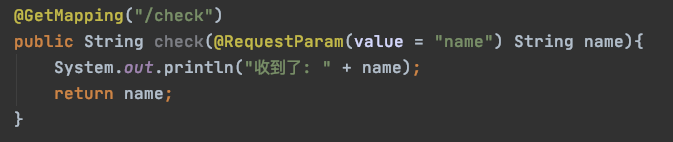
(6)执行单元测试方法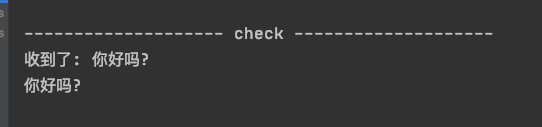
测试成功!
(7)如何导出报告?
先执行一下整个测试类
或者直接点击这个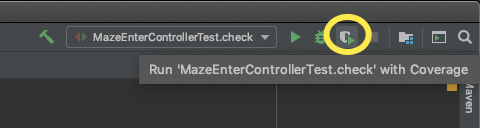
开始执行测试并且生成: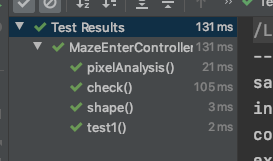

选择自己本地的一个文件夹存放单元测试覆盖率报告即可

版权声明:本文为whiteBearClimb原创文章,遵循CC 4.0 BY-SA版权协议,转载请附上原文出处链接和本声明。