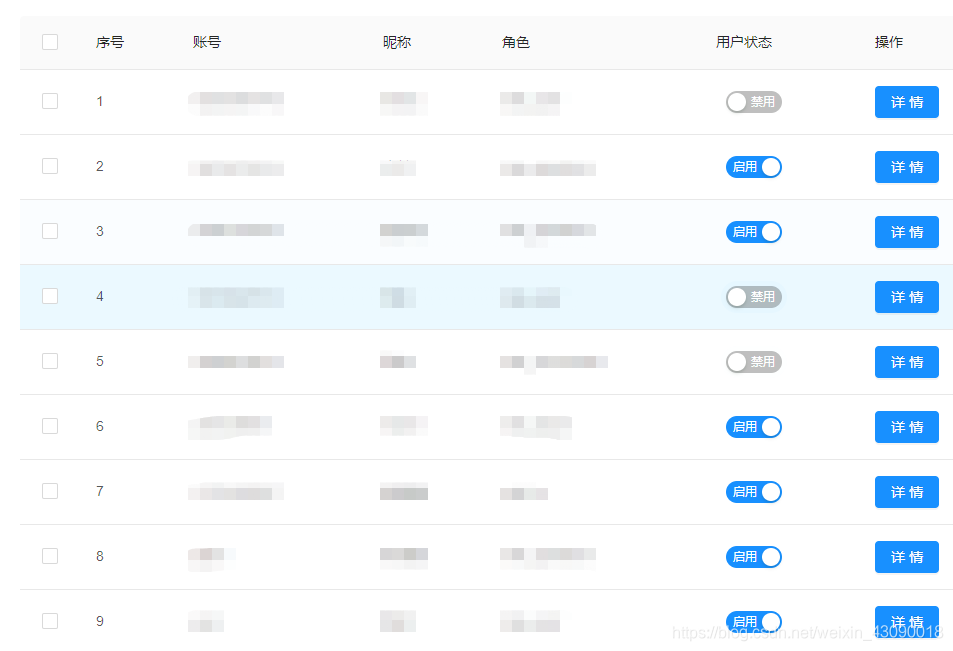
1、先来看一下效果,第一个是嵌套表格的,第二张图片是带checkbox的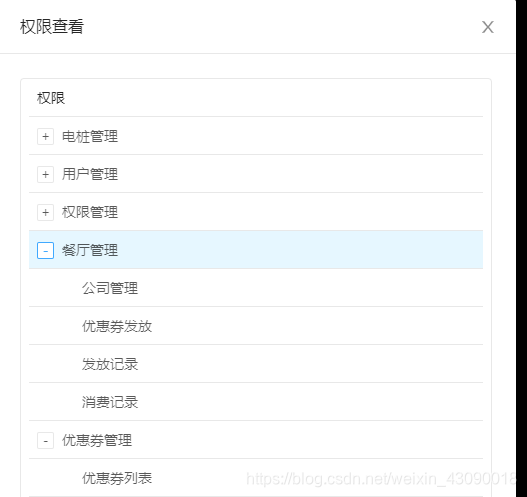
嵌套子表格核心代码(用到的数据提前在data中定义好)
点击查看权限后弹出嵌套子表格,也就是第一张图片的样子
data() {
    return {
      showAuthVisible: false,
      isVisible: false,
      visible: false, //是否显示modal
      isLoading: true,
      confirmLoading: false,//是否显示确定按钮loading
      roleList: [],//成员列表
      myData: [],
      childrenRoleList: [],//成员列表下的子成员列表
      buttonText: "角色查看", //设置传给自定义组件的按钮名(查看角色内的成员)
      menuColumns: [
        {
          dataIndex: "menuName",
          key: "menuName",
          title: "权限",
        }
      ],
      //权限菜单
      menuData: [],
      columns: [
        {
          dataIndex: "name",
          key: "name",
          title: "角色名称",
        },
        {
          dataIndex: "detail",
          key: "detail",
          title: "角色说明",
        },
        {
          dataIndex: "mems",
          key: "mems",
          title: "角色成员",
          scopedSlots: { customRender: "mems" },
        },
        {
          dataIndex: "labelName",
          key: "labelName",
          title: "权限",
          scopedSlots: { customRender: "auth" },
        },
        {
          dataIndex: "action",
          title: "操作",
          scopedSlots: { customRender: "action" },
        },
      ],
    };
  },
<a-spin tip="Loading..." :spinning="isLoading">
      <a-table row-key="id" :columns="columns" :data-source="roleList">
        <span slot="action" slot-scope="text, data">
          <a-button type="danger" @click="deleteRole(data)">删除</a-button>
          <!-- 删除弹层 -->
          <a-modal
            v-model="isVisible"
            :confirm-loading="confirmLoading"
            ok-text="确定"
            cancel-text="取消"
            @ok="handleDeleteOk"
            @cancel="hideModal"
          >
            <p>确定要删除{{ data.name }}吗?</p>
          </a-modal>
        </span>
        <!-- 角色权限弹层 -->
        <span slot="auth" slot-scope="text, data">
          <a-button size="small" style="height:28px;margin-right: 10px;color: rgb(22, 155, 213)" @click="editPower(text, data)">编辑权限</a-button>
          <a-button size="small" style="height:28px;color: rgb(22, 155, 213)" @click="lookPower(data)">查看权限</a-button>
          <a-modal
            v-model="showAuthVisible"
            title="权限查看"
            cancel-text="关闭"
            ok-text="确定"
            @ok="hideAuthModal"
          >
            <a-table
              style="white-space: pre;"
              :dataSource="menuData"
              :columns="menuColumns"
              :pagination="false"
              size="small"
            ></a-table>
          </a-modal>
        </span>
        <!-- 查看角色弹层 -->
        <span slot="mems" slot-scope="text, data">
          <a-button @click="showMems(text, data)">查看角色</a-button>
          <a-modal
            v-model="visible"
            :title="data.name + '成员'"
            cancel-text="关闭"
            ok-text="确定"
            @ok="hideModal"
          >
            <p v-for="(item,index) in childrenRoleList" :key="index">成员名:{{item.userName}}</p>
          </a-modal>
        </span>
      </a-table>
    </a-spin>
js部分代码
	//点击查看权限
    lookPower(data){
      // console.log(data)
      if(data.id){
      //获取权限及其子菜单列表
        this.httpRequest.httpGetRequest('menuInfo/menuRole',{
          roleId: data.id
        }).then((res) => {
          if(res.data.code == 20000){
            console.log(res.data)
            if (res.data.data) {
              this.myData = res.data.data;
              this.setTreeData(this.myData);
              this.menuData = this.myData;
            }
            console.log(this.myData)
            setTimeout(() => {
              this.showAuthVisible = true
            }, 300);
          }
        })
      }
    },
    setTreeData(myData) {
      for (var i in myData) {
        myData[i].key = myData[i].id;
        myData[i].children = myData[i].menu;
        if (myData[i].menu) {
          this.setTreeData(myData[i].menu);
        }
      }
    },
后台返回数据截图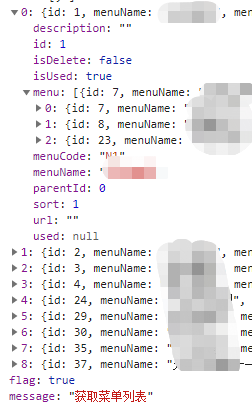
带复选框表格
data () {
      return {
        isLoading: false,
        selectedRowKeys: [],
        selectedUserIds: [],//选择的用户账号id
        userAccountList: [],
        columns: [
          {
            dataIndex: "indexNum",
            key: "indexNum",
            title: "序号",
          },
          {
            dataIndex: "name",
            key: "name",
            title: "账号",
          },
          {
            dataIndex: "accountName",
            key: "accountName",
            title: "昵称",
          },
          {
            dataIndex: "character",
            key: "character",
            title: "角色",

          },
          {
            dataIndex: "state",
            key: "state",
            title: "用户状态",
            scopedSlots: { customRender: "state" },
          },
          {
            dataIndex: "action",
            title: '操作',
            scopedSlots: { customRender: 'action' },
          },
        ]
      }
    },
	<a-spin tip="Loading..." :spinning="isLoading">
      <!-- selectedRowKeys:指定选中项的 key 数组; onChange:选中项发生变化时的回调 -->
      <a-table
        row-key="orderNo"
        :columns="columns"
        :data-source="userAccountList"
        :row-selection="{ selectedRowKeys: selectedRowKeys, onChange: onSelectChange }"
        :pagination="false">
        <span slot="action" slot-scope="text,data">
          <a-button type="primary" @click="clickDetail(data)">详情</a-button>
        </span>
        <template slot="state" slot-scope="text, record">
          <div style="display:flex;justify-content:start">
            <div v-if="record.state == 1">
              <a-switch
                checked-children="启用"
                un-checked-children="禁用"
                style="margin-left:10px"
                default-checked
              />
            </div>
            <div v-else>
              <a-switch
                checked-children="启用"
                un-checked-children="禁用"
                style="margin-left:10px"
              />
            </div>
          </div>
        </template>
      </a-table>
    </a-spin>
		//批量选择
        onSelectChange(selectedRowKeys, records) {
            console.log(selectedRowKeys)
            console.log(records)
            this.selectedRowKeys = selectedRowKeys
            this.selectedUserIds = records
        },
        //获取用户数据
        getUserAccount(){
            this.httpRequest.httpGetRequest('adminInfo/queryAccountNum',{
                current: 1,
                size: 10
            }).then((res) => {
                if(res.data.code == 20000){
                    console.log(res.data)
                    if(res.data.data){
                        res.data.data.records.forEach((item,index) => {
                            let state = ''
                            if (item.isUsed) {
                                state = 1
                            } else {
                                state = 2
                            }
                            this.$set(this.userAccountList,index,{
                                key: item.adminId,
                                indexNum: index + 1,
                                id: item.adminId,
                                name: item.username,
                                character: item.roleName.toLowerCase(),
                                accountName:item.accountName,
                                roleId: item.roleId,
                                state: state,
                            })
                        })
                    }
                }
            }).catch((err) => {
                console.log(err)
            })
        }
版权声明:本文为weixin_43090018原创文章,遵循CC 4.0 BY-SA版权协议,转载请附上原文出处链接和本声明。