简介:
任务一:rsyslog 系统日志管理:关心问题:哪类程序—》产生的什么日志----》放到什么地方
任务二:logrotate日志轮转:将大量的日志,分割管理,删除旧日志。
任务一详解
一、处理日志的进程:第一类
rsyslogd: 系统专职日志程序。
处理绝大部分日志记录,系统操作有关的信息,如登录信息,程序启动关闭信息,错误信息
第二类:
httpd/nginx/mysql: 各类应用程序,可以以自己的方式记录日志.
讲解对应程序时会逐步介绍
观察 rsyslogd程序
[root@localhost ~]# ps aux | grep rsyslogd
root       1836  0.0  0.2 226904  2932 ?        Ssl  03:19   0:04 /usr/sbin/rsyslogd -n
root       7217  0.0  0.0 112808   968 pts/0    R+   12:55   0:00 grep --color=auto rsyslogd
You have new mail in /var/spool/mail/root
[root@localhost ~]#
二、常见的日志文件
查看系统日志文件
[root@localhost log]# tail messages
Aug  7 18:49:01 localhost NetworkManager[770]: <info>  [1596797341.1099] dhcp4 (ens33): state changed bound -> bound
Aug  7 18:49:01 localhost dbus[710]: [system] Activating via systemd: service name='org.freedesktop.nm_dispatcher' unit='dbus-org.freedesktop.nm-dispatcher.service'
Aug  7 18:49:01 localhost systemd: Starting Network Manager Script Dispatcher Service...
Aug  7 18:49:01 localhost dhclient[8316]: bound to 192.168.87.132 -- renewal in 873 seconds.
Aug  7 18:49:01 localhost dbus[710]: [system] Successfully activated service 'org.freedesktop.nm_dispatcher'
Aug  7 18:49:01 localhost systemd: Started Network Manager Script Dispatcher Service.
Aug  7 18:49:01 localhost nm-dispatcher: req:1 'dhcp4-change' [ens33]: new request (2 scripts)
Aug  7 18:49:01 localhost nm-dispatcher: req:1 'dhcp4-change' [ens33]: start running ordered scripts...
Aug  7 18:55:34 localhost systemd: Started Session 782 of user root.
Aug  7 18:55:34 localhost systemd-logind: New session 782 of user root.
[root@localhost log]#
//动态查看日志文件的尾部
[root@localhost log]# tailf messages
Aug  7 18:49:01 localhost NetworkManager[770]: <info>  [1596797341.1099] dhcp4 (ens33): state changed bound -> bound
Aug  7 18:49:01 localhost dbus[710]: [system] Activating via systemd: service name='org.freedesktop.nm_dispatcher' unit='dbus-org.freedesktop.nm-dispatcher.service'
Aug  7 18:49:01 localhost systemd: Starting Network Manager Script Dispatcher Service...
Aug  7 18:49:01 localhost dhclient[8316]: bound to 192.168.87.132 -- renewal in 873 seconds.
Aug  7 18:49:01 localhost dbus[710]: [system] Successfully activated service 'org.freedesktop.nm_dispatcher'
Aug  7 18:49:01 localhost systemd: Started Network Manager Script Dispatcher Service.
Aug  7 18:49:01 localhost nm-dispatcher: req:1 'dhcp4-change' [ens33]: new request (2 scripts)
Aug  7 18:49:01 localhost nm-dispatcher: req:1 'dhcp4-change' [ens33]: start running ordered scripts...
Aug  7 18:55:34 localhost systemd: Started Session 782 of user root.
Aug  7 18:55:34 localhost systemd-logind: New session 782 of user root.
//认证、安全
[root@localhost log]# tail secure
Aug  6 15:01:04 localhost polkitd[700]: Registered Authentication Agent for unix-process:1865:344098 (system bus name :1.142 [/usr/bin/pkttyagent --notify-fd 5 --fallback], object path /org/freedesktop/PolicyKit1/AuthenticationAgent, locale en_US.UTF-8)
Aug  6 15:01:04 localhost polkitd[700]: Unregistered Authentication Agent for unix-process:1865:344098 (system bus name :1.142, object path /org/freedesktop/PolicyKit1/AuthenticationAgent, locale en_US.UTF-8) (disconnected from bus)
Aug  6 15:01:10 localhost polkitd[700]: Registered Authentication Agent for unix-process:1871:344692 (system bus name :1.143 [/usr/bin/pkttyagent --notify-fd 5 --fallback], object path /org/freedesktop/PolicyKit1/AuthenticationAgent, locale en_US.UTF-8)
Aug  6 15:01:10 localhost polkitd[700]: Unregistered Authentication Agent for unix-process:1871:344692 (system bus name :1.143, object path /org/freedesktop/PolicyKit1/AuthenticationAgent, locale en_US.UTF-8) (disconnected from bus)
Aug  6 20:46:07 localhost sshd[1357]: pam_unix(sshd:session): session closed for user root
Aug  7 09:06:54 localhost sshd[5064]: Accepted password for root from 192.168.87.1 port 50127 ssh2
Aug  7 09:06:54 localhost sshd[5064]: pam_unix(sshd:session): session opened for user root by (uid=0)
Aug  7 16:58:25 localhost sshd[5064]: pam_unix(sshd:session): session closed for user root
Aug  7 18:55:33 localhost sshd[8791]: Accepted password for root from 192.168.87.1 port 58360 ssh2
Aug  7 18:55:34 localhost sshd[8791]: pam_unix(sshd:session): session opened for user root by (uid=0)
[root@localhost log]#
yum
[root@localhost log]#  tail yum.log
Aug 05 09:48:53 Installed: zlib-devel-1.2.7-18.el7.x86_64
Aug 05 09:48:53 Installed: libverto-devel-0.2.5-4.el7.x86_64
Aug 05 09:48:54 Installed: keyutils-libs-devel-1.5.8-3.el7.x86_64
Aug 05 09:48:54 Installed: krb5-devel-1.15.1-46.el7.x86_64
Aug 05 09:48:55 Installed: 1:openssl-devel-1.0.2k-19.el7.x86_64
Aug 05 14:29:24 Installed: at-3.1.13-24.el7.x86_64
Aug 06 11:16:42 Installed: mailcap-2.1.41-2.el7.noarch
Aug 06 11:16:42 Installed: httpd-tools-2.4.6-93.el7.centos.x86_64
Aug 06 11:16:43 Installed: httpd-2.4.6-93.el7.centos.x86_64
Aug 06 14:59:41 Updated: rsyslog-8.24.0-52.el7_8.2.x86_64
//跟邮件postfix相关
[root@localhost log]# tail maillog
Aug  7 15:06:01 localhost postfix/pickup[8182]: 57A8010A82AA: uid=0 from=<root>
Aug  7 15:06:01 localhost postfix/cleanup[7814]: 57A8010A82AA: message-id=<20200807070601.57A8010A82AA@localhost.localdomain>
Aug  7 15:06:01 localhost postfix/qmgr[1180]: 57A8010A82AA: from=<root@localhost.localdomain>, size=723, nrcpt=1 (queue active)
Aug  7 15:06:01 localhost postfix/local[7817]: 57A8010A82AA: to=<root@localhost.localdomain>, orig_to=<root>, relay=local, delay=0.01, delays=0.01/0/0/0, dsn=2.0.0, status=sent (delivered to mailbox)
Aug  7 15:06:01 localhost postfix/qmgr[1180]: 57A8010A82AA: removed
Aug  7 15:07:01 localhost postfix/pickup[8182]: 60C8F10A82AA: uid=0 from=<root>
Aug  7 15:07:01 localhost postfix/cleanup[7814]: 60C8F10A82AA: message-id=<20200807070701.60C8F10A82AA@localhost.localdomain>
Aug  7 15:07:01 localhost postfix/qmgr[1180]: 60C8F10A82AA: from=<root@localhost.localdomain>, size=723, nrcpt=1 (queue active)
Aug  7 15:07:01 localhost postfix/local[7817]: 60C8F10A82AA: to=<root@localhost.localdomain>, orig_to=<root>, relay=local, delay=0.01, delays=0.01/0/0/0, dsn=2.0.0, status=sent (delivered to mailbox)
Aug  7 15:07:01 localhost postfix/qmgr[1180]: 60C8F10A82AA: removed
//crond、at进程产生的日志
[root@localhost log]# tail cron
Aug  7 16:01:01 localhost run-parts(/etc/cron.hourly)[8451]: finished 0anacron
Aug  7 17:01:01 localhost CROND[8571]: (root) CMD (run-parts /etc/cron.hourly)
Aug  7 17:01:01 localhost run-parts(/etc/cron.hourly)[8571]: starting 0anacron
Aug  7 17:01:01 localhost run-parts(/etc/cron.hourly)[8580]: finished 0anacron
Aug  7 18:01:01 localhost CROND[8692]: (root) CMD (run-parts /etc/cron.hourly)
Aug  7 18:01:01 localhost run-parts(/etc/cron.hourly)[8692]: starting 0anacron
Aug  7 18:01:01 localhost run-parts(/etc/cron.hourly)[8701]: finished 0anacron
Aug  7 19:01:01 localhost CROND[8817]: (root) CMD (run-parts /etc/cron.hourly)
Aug  7 19:01:01 localhost run-parts(/etc/cron.hourly)[8817]: starting 0anacron
Aug  7 19:01:01 localhost run-parts(/etc/cron.hourly)[8826]: finished 0anacron
//和系统启动相关
[root@localhost log]# tail dmesg
[   13.003487] AES CTR mode by8 optimization enabled
[   13.008944] Adding 2097148k swap on /dev/mapper/centos-swap.  Priority:-2 extents:1 across:2097148k FS
[   13.012718] ppdev: user-space parallel port driver
[   13.024565] alg: No test for __gcm-aes-aesni (__driver-gcm-aes-aesni)
[   13.024598] alg: No test for __generic-gcm-aes-aesni (__driver-generic-gcm-aes-aesni)
[   15.106321] floppy0: no floppy controllers found
[   15.106378] work still pending
[   16.904393] XFS (sda1): Starting recovery (logdev: internal)
[   16.972568] XFS (sda1): Ending recovery (logdev: internal)
[   17.732832] type=1305 audit(1596693840.616:4): audit_pid=676 old=0 auid=4294967295 ses=4294967295 subj=system_u:system_r:auditd_t:s0 res=1
需要了解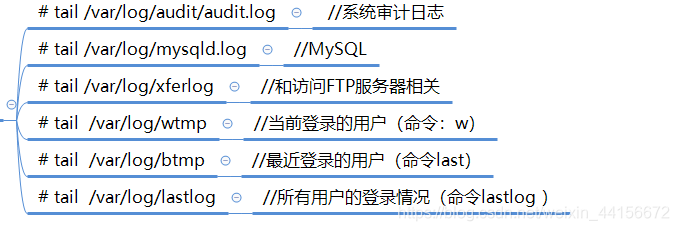
三、rsyslogd配置
1.相关程序
默认已经安装
[root@localhost ~]#  yum install rsyslog   logrotate
Loaded plugins: fastestmirror
Loading mirror speeds from cached hostfile
 * base: mirrors.aliyun.com
 * extras: mirrors.aliyun.com
 * updates: mirrors.aliyun.com
Package rsyslog-8.24.0-52.el7_8.2.x86_64 already installed and latest version
Package logrotate-3.8.6-19.el7.x86_64 already installed and latest version
Nothing to do
2、启动程序
[root@localhost ~]# systemctl  start    rsyslog.service
[root@localhost ~]# systemctl  status    rsyslog.service
● rsyslog.service - System Logging Service
   Loaded: loaded (/usr/lib/systemd/system/rsyslog.service; enabled; vendor preset: enabled)
   Active: active (running) since Thu 2020-08-06 14:59:41 CST; 1 day 4h ago
     Docs: man:rsyslogd(8)
           http://www.rsyslog.com/doc/
 Main PID: 1836 (rsyslogd)
   CGroup: /system.slice/rsyslog.service
           └─1836 /usr/sbin/rsyslogd -n

Aug 06 14:59:41 localhost.localdomain systemd[1]: Stopped System Logging Service.
Aug 06 14:59:41 localhost.localdomain systemd[1]: Starting System Logging Service...
Aug 06 14:59:41 localhost.localdomain rsyslogd[1836]:  [origin software="rsyslogd" swVersion="8.24.0-52.el7_8.2...tart
Aug 06 14:59:41 localhost.localdomain systemd[1]: Started System Logging Service.
Aug 06 17:27:01 localhost.localdomain rsyslogd[1836]: imjournal: journal reloaded... [v8.24.0-52.el7_8.2 try ht.../0 ]
Aug 07 12:39:01 localhost.localdomain rsyslogd[1836]: imjournal: journal reloaded... [v8.24.0-52.el7_8.2 try ht.../0 ]
Hint: Some lines were ellipsized, use -l to show in full.
[root@localhost ~]#
配置文件
[root@localhost ~]# cat /etc/rsyslog.conf
# rsyslog configuration file

# For more information see /usr/share/doc/rsyslog-*/rsyslog_conf.html
# If you experience problems, see http://www.rsyslog.com/doc/troubleshoot.html

#### MODULES ####

# The imjournal module bellow is now used as a message source instead of imuxsock.
$ModLoad imuxsock # provides support for local system logging (e.g. via logger command)
$ModLoad imjournal # provides access to the systemd journal
#$ModLoad imklog # reads kernel messages (the same are read from journald)
#$ModLoad immark  # provides --MARK-- message capability

# Provides UDP syslog reception
#$ModLoad imudp
#$UDPServerRun 514

# Provides TCP syslog reception
#$ModLoad imtcp
#$InputTCPServerRun 514


#### GLOBAL DIRECTIVES ####

# Where to place auxiliary files
$WorkDirectory /var/lib/rsyslog

# Use default timestamp format
$ActionFileDefaultTemplate RSYSLOG_TraditionalFileFormat

# File syncing capability is disabled by default. This feature is usually not required,
# not useful and an extreme performance hit
#$ActionFileEnableSync on

# Include all config files in /etc/rsyslog.d/
$IncludeConfig /etc/rsyslog.d/*.conf

# Turn off message reception via local log socket;
# local messages are retrieved through imjournal now.
$OmitLocalLogging on

# File to store the position in the journal
$IMJournalStateFile imjournal.state


#### RULES ####

# Log all kernel messages to the console.
# Logging much else clutters up the screen.
#kern.*                                                 /dev/console

# Log anything (except mail) of level info or higher.
# Don't log private authentication messages!
*.info;mail.none;authpriv.none;cron.none                /var/log/messages

# The authpriv file has restricted access.
authpriv.*                                              /var/log/secure

# Log all the mail messages in one place.
mail.*                                                  -/var/log/maillog


# Log cron stuff
cron.*                                                  /var/log/cron

# Everybody gets emergency messages
*.emerg                                                 :omusrmsg:*

# Save news errors of level crit and higher in a special file.
uucp,news.crit                                          /var/log/spooler

# Save boot messages also to boot.log
local7.*                                                /var/log/boot.log


# ### begin forwarding rule ###
# The statement between the begin ... end define a SINGLE forwarding
# rule. They belong together, do NOT split them. If you create multiple
# forwarding rules, duplicate the whole block!
# Remote Logging (we use TCP for reliable delivery)
#
# An on-disk queue is created for this action. If the remote host is
# down, messages are spooled to disk and sent when it is up again.
#$ActionQueueFileName fwdRule1 # unique name prefix for spool files
#$ActionQueueMaxDiskSpace 1g   # 1gb space limit (use as much as possible)
#$ActionQueueSaveOnShutdown on # save messages to disk on shutdown
#$ActionQueueType LinkedList   # run asynchronously
#$ActionResumeRetryCount -1    # infinite retries if host is down
# remote host is: name/ip:port, e.g. 192.168.0.1:514, port optional
#*.* @@remote-host:514
# ### end of the forwarding rule ###
可以用vi命令修改
相关文件
[root@localhost ~]# rpm -qc rsyslog
/etc/logrotate.d/syslog
/etc/rsyslog.conf
/etc/sysconfig/rsyslog
[root@localhost ~]#
四、主配置文件
告诉rsyslogd进程什么日志,应该存到哪里。
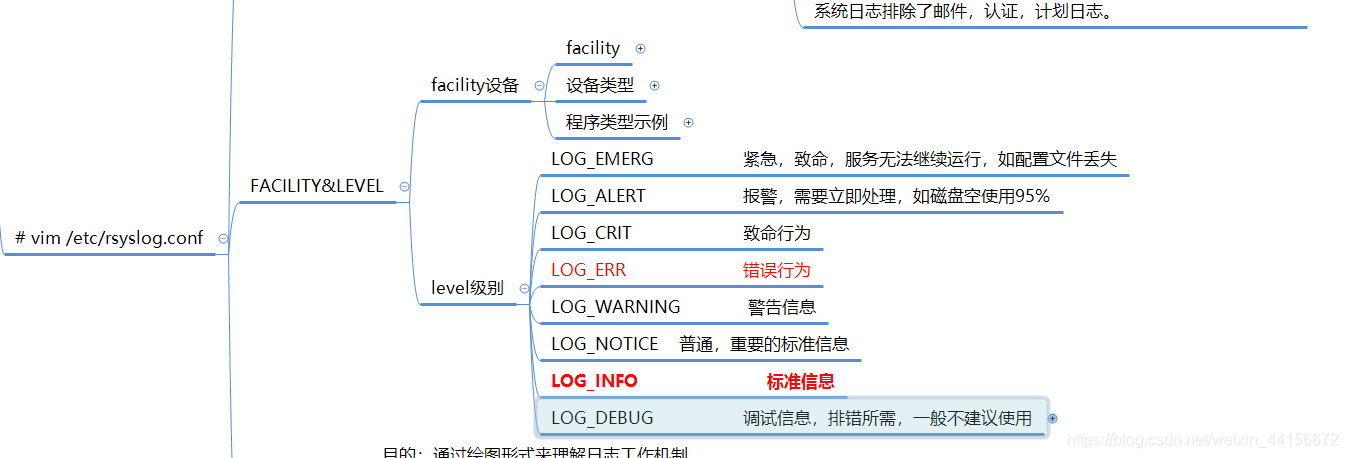
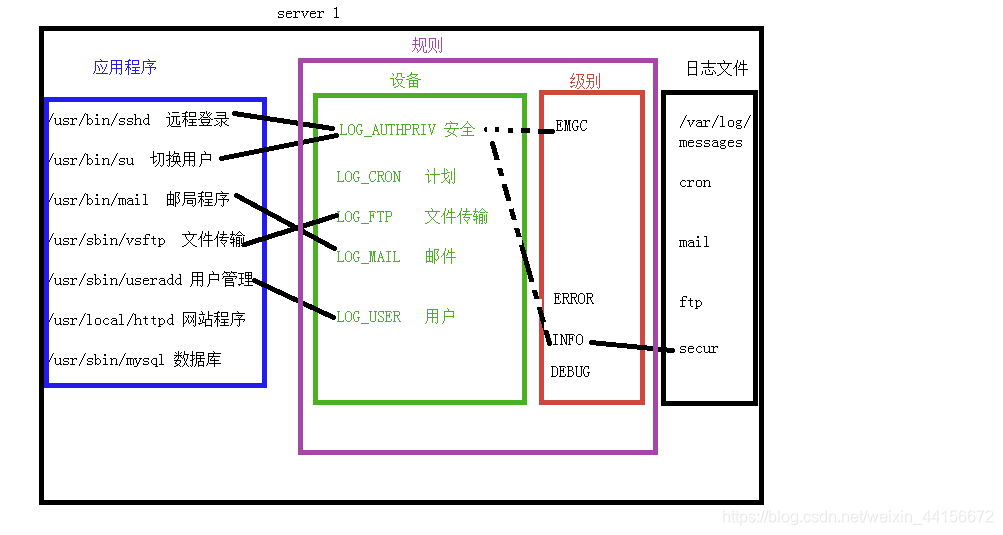
logrotate日志轮转
日志 记录了程序运行时各种信息。
通过日志可以分析用户行为,记录运行轨迹,查找程序问题。
可惜磁盘的空间是有限的
日志轮转就像飞机里的黑匣子,记录的信息再重要也只能记录最后一段时间发生的事。
为了节省空间和整理方便,日志文件经常需要按!时间或!大小等维度分成多份,删除时间久远的日志文件。
工作原理:
按照配置进行轮转
配置文件种类
主配置文件:/etc/logrotate.conf (决定每个日志文件如何轮转)
子配置文件夹:/etc/logrotate.d/* 自定义配置 便于管理
观察主文件和子文件
[root@localhost ~]# cat /etc/logrotate.conf /etc/logrotate.d/*
# see "man logrotate" for details
# rotate log files weekly
weekly

# keep 4 weeks worth of backlogs
rotate 4

# create new (empty) log files after rotating old ones
create

# use date as a suffix of the rotated file
dateext

# uncomment this if you want your log files compressed
#compress

# RPM packages drop log rotation information into this directory
include /etc/logrotate.d

# no packages own wtmp and btmp -- we'll rotate them here
/var/log/wtmp {
    monthly
    create 0664 root utmp
	minsize 1M
    rotate 1
}

/var/log/btmp {
    missingok
    monthly
    create 0600 root utmp
    rotate 1
}

# system-specific logs may be also be configured here.
/var/log/boot.log
{
    missingok
    daily
    copytruncate
    rotate 7
    notifempty
}
/var/log/httpd/*log {
    missingok
    notifempty
    sharedscripts
    delaycompress
    postrotate
        /bin/systemctl reload httpd.service > /dev/null 2>/dev/null || true
    endscript
}
/var/log/cron
/var/log/maillog
/var/log/messages
/var/log/secure
/var/log/spooler
{
    missingok
    sharedscripts
    postrotate
	/bin/kill -HUP `cat /var/run/syslogd.pid 2> /dev/null` 2> /dev/null || true
    endscript
}
/var/log/wpa_supplicant.log {
    missingok
    notifempty
    size 30k
    create 0600 root root
}
/var/log/yum.log {
    missingok
    notifempty
    maxsize 30k
    yearly
    create 0600 root root
}
主配置文件介绍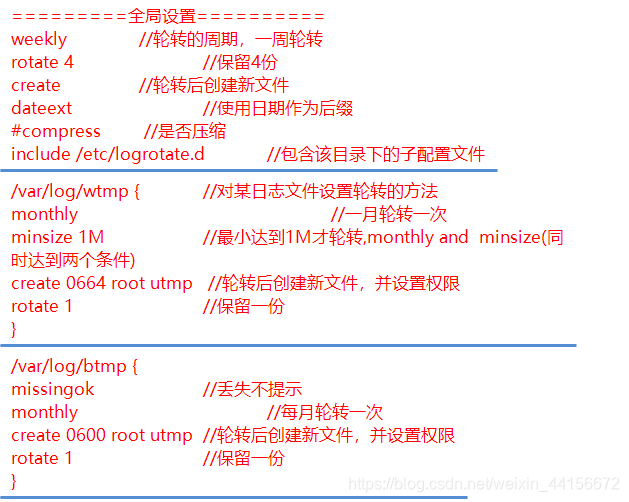
实例:轮转的目标文件/var/log/yum.log
/var/log/yum.log {
    missingok
   #notifempty
    #maxsize 30k
    #yearly
        daily
        rotate 3
    create 0777 root root
}
测试
[root@localhost ~]# vim /etc/logrotate.d/yum
[root@localhost ~]# ls /var/log/yum*
/var/log/yum.log
[root@localhost ~]# # /usr/sbin/logrotate  -s /var/lib/logrotate/logrotate.status /etc/logrotate.conf
[root@localhost ~]# /usr/sbin/logrotate  -s /var/lib/logrotate/logrotate.status /etc/logrotate.conf
[root@localhost ~]# # date 09011000
[root@localhost ~]# /usr/sbin/logrotate  -s /var/lib/logrotate/logrotate.status /etc/logrotate.conf
[root@localhost ~]# ls /var/log/yum*
/var/log/yum.log  /var/log/yum.log-20200807
版权声明:本文为weixin_44156672原创文章,遵循CC 4.0 BY-SA版权协议,转载请附上原文出处链接和本声明。