背景:
一直以来都是做的Vue项目,这次使用Vue框架,结合appWeb的框架(登录、上传等不变)来将之前的项目改为前后端分离式开发。
碰到的需求点是,在html写的登录页面中,做简单的多语言。
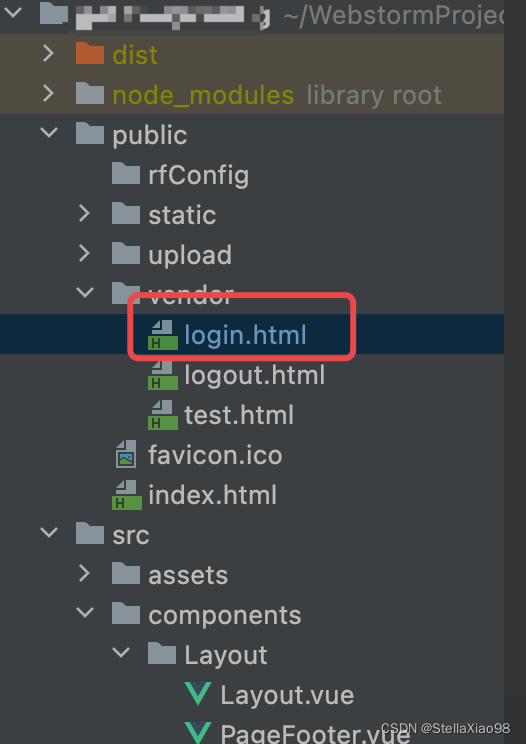
项目结构如下:需求:在login.html中可以根据浏览器或cookie缓存的语言状态来改变页面文字。
代码:
<head>
    <meta charset="utf-8">
    <script language="javascript" type="text/javascript">
        function loadLang() {
            var isCh
            let arr = document.cookie.split('LANG=')
            if (!arr || arr.length != 2) {
                isCh = window.navigator.language=='zh-CN'
            }else{
                isCh = arr[1] == 'zh'
            }

            document.getElementById('system').innerHTML = isCh ? '网关配置系统' : 'Gateway Configuration'
            document.getElementById('formTitle').innerHTML = isCh ? '用户登录' : 'Login'
            document.getElementById('username').placeholder = isCh ? '请输入账号' : 'username'
            document.getElementById('password').placeholder = isCh ? '请输入密码' : 'password'
            document.getElementById('loginBtn').innerHTML = isCh ? '登录' : 'Login'

        }


    </script>
<style>
//......
</style>
</head>


<body onload="loadLang()">

<noscript><strong>We're sorry but gatewayconfig doesn't work properly without JavaScript enabled. Please enable it to
    continue.</strong></noscript>
<div id="container">
    <div class="flex-row j-center "
         style="width: 100%; height: 100vh; ">
        <div class="login-board flex-row j-between a-center">
            <div style="width: 50%;">
                <div id="system" style="font-size: 25px;font-weight:bold; margin-bottom: 40px; color: #32BBDC;">
                </div>
                <div></div>
                <div style="margin: auto; width: 70%;"><img src="../static/net1.png" style="width:100%"><!----></div>
            </div>
            <div style="width: 35%; margin-top:-30px">
                <div style="margin: auto;" method="post">
                    <div class="bold" id="formTitle"
                         style="font-size: 20px; margin-bottom: 30px; color:#32BBDC;">
                    </div>
                    <div style="margin-right: 0 !important; width: auto;">
                        <!---->
                        <div>
                            <div><!----><input type="text" id="username"
                                               autocomplete="off"><span></span><!---->
                                <!----><!----></div><!----></div>
                    </div>
                    <div style="margin-right: 0px !important; width: auto;">
                        <!---->
                        <div>
                            <div><!----><input
                                    id="password"
                                    type="password" autocomplete="off"><span
                            ></span><span
                            ><span><!----><!----><!---->
                                <!----></span><!----></span><!----><!----></div><!----></div>
                    </div>
                    <button class="is-round" onclick="login()" id="btn"
                            style="width: 100%; background: linear-gradient(0deg, #32d5f6, #32BBDC);border:none; color: rgb(255, 255, 255); margin-top: 20px;">
                        <span id="loginBtn"> </span></button>
                </div>
            </div>
        </div>
        <div style="position: fixed; bottom: 0px;">
            <div><span>Copyright © <a style="color:#333333;text-decoration: none" id="footer"
                                      href="www.rejeee.com"
                                      target="_blank"> </a></span></div>
        </div>
    </div>
</div>
</body>版权声明:本文为StellaXiao98原创文章,遵循CC 4.0 BY-SA版权协议,转载请附上原文出处链接和本声明。