R16 LCD Development
R16 LCD 开发
1.initial preparation work
前期准备工作
- Enter the tina SDK directory and configure the environment parameters.
进入tina SDK目录,并配置好环境参数。
cd ~/tinaV2.1
source build/envsetup.sh
lunch astar_parrot-tina
- Enter the configuration page
进入配置页面
make menuconfig
- Check the kernel module->video support->kmod-fb, kmod-sunxi-disp, kmod-lcd options
选择 fb sunxi-disp lcd三个驱动
[外链图片转存失败,源站可能有防盗链机制,建议将图片保存下来直接上传(img-J7dvmKzh-1598487968609)(https://i.loli.net/2020/08/26/Dqe8tkyYVPKji3R.jpg)]
- Check the freetype library
勾选freetype库
- Modify LCD hardware parameters
修改LCD的硬件参数
The path of the hardware parameter configuration file is as follows
/home/book/R16/tinaV2.1/target/allwinner/astar-parrot/configs/sys_config.fex
Modify according to the screen, mainly modify disp_init and lcd config
按照屏幕不同修改,主要是对disp_init和lcd config进行修改
- Burn to the development board after compilation
编译完后烧录到板子上
- Use ls /dev/ to check whether the driver is installed successfully
使用ls /dev 命令查看驱动是否安装成功
- Check whether the freetype library is successfully installed
查看freetype库是否安装成功
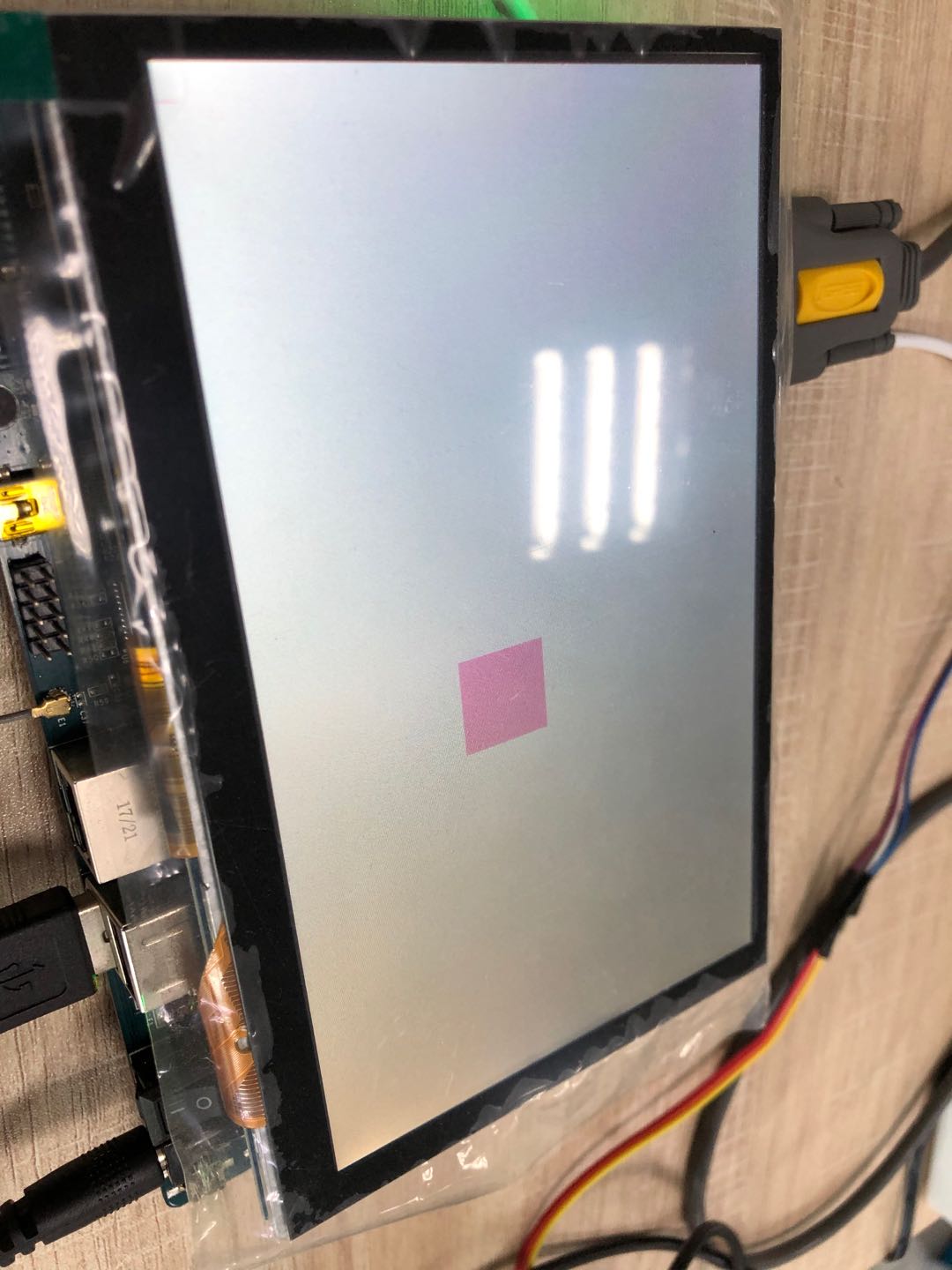
2.Display red pixels
显示红色像素点
- The source code is as follows
源码如下
#include <sys/mman.h>
#include <sys/types.h>
#include <sys/stat.h>
#include <unistd.h>
#include <linux/fb.h>
#include <fcntl.h>
#include <stdio.h>
#include <string.h>
#include <sys/ioctl.h>

static int fd_fb;
static struct fb_var_screeninfo var;	/* Current var */
static int screen_size;
static unsigned char *fb_base;
static unsigned int line_width;
static unsigned int pixel_width;

/**********************************************************************
 * 函数名称: lcd_put_pixel
 * 功能描述: 在LCD指定位置上输出指定颜色(描点)
 * 输入参数: x坐标,y坐标,颜色
 * 输出参数: 无
 * 返 回 值: 会
 * 修改日期        版本号     修改人	      修改内容
 * -----------------------------------------------
 * 2020/08/18	   V1.0	  levi    	      创建
 ***********************************************************************/
void lcd_put_pixel(int x, int y, unsigned int color)
{
	unsigned char *pen_8 = fb_base+y*line_width+x*pixel_width;
	unsigned short *pen_16;
	unsigned int *pen_32;

	unsigned int red, green, blue;

	pen_16 = (unsigned short *)pen_8;
	pen_32 = (unsigned int *)pen_8;

	switch (var.bits_per_pixel)
	{
		case 8:
		{
			*pen_8 = color;
			break;
		}
		case 16:
		{
			/* 565 */
			red   = (color >> 16) & 0xff;
			green = (color >> 8) & 0xff;
			blue  = (color >> 0) & 0xff;
			color = ((red >> 3) << 11) | ((green >> 2) << 5) | (blue >> 3);
			*pen_16 = color;
			break;
		}
		case 32:
		{
			*pen_32 = color;
			break;
		}
		default:
		{
			printf("can't surport %dbpp\n", var.bits_per_pixel);
			break;
		}
	}
}

int main(int argc, char **argv)
{
	int i,j;

	fd_fb = open("/dev/fb0", O_RDWR);
	if (fd_fb < 0)
	{
		printf("can't open /dev/fb0\n");
		return -1;
	}
	if (ioctl(fd_fb, FBIOGET_VSCREENINFO, &var))
	{
		printf("can't get var\n");
		return -1;
	}

	line_width  = var.xres * var.bits_per_pixel / 8;
	printf("var.xres=%u\n",var.xres);
	printf("var.bits_per_pixel=%u\n",var.bits_per_pixel);
	printf("var.yres=%u\n",var.yres);
	printf("line_width=%u\n",line_width);
	pixel_width = var.bits_per_pixel / 8;
	printf("pixel_width=%u\n",pixel_width);
	screen_size = var.xres * var.yres * var.bits_per_pixel / 8;
	printf("screen_size=%d\n",screen_size);
	fb_base = (unsigned char *)mmap(NULL , screen_size, PROT_READ | PROT_WRITE, MAP_SHARED, fd_fb, 0);
	if (fb_base == (unsigned char *)-1)
	{
		printf("can't mmap\n");
		return -1;
	}

	/* 清屏: 全部设为白色 */
	memset(fb_base, 0xff, screen_size);

	/* 随便设置出100个为红色 */
	for (j = 0; j< 100; j++)
	{
	 for (i = 0; i < 100; i++)
		lcd_put_pixel(var.xres/2+i, var.yres/2+j, 0xFFddee);
	}
	munmap(fb_base , screen_size);
	close(fd_fb);

	return 0;
}
- Compile and test
编译并测试
- The compile and pull script is as follows
编译和上传的脚本如下
#!/bin/bash
arm-openwrt-linux-muslgnueabi-gcc -o show_pixel show_pixel.c
adb push show_pixel /tmp/
- Run on development board
开发板上运行
root@TinaLinux:/tmp# ./show_pixel
- View effect
查看效果
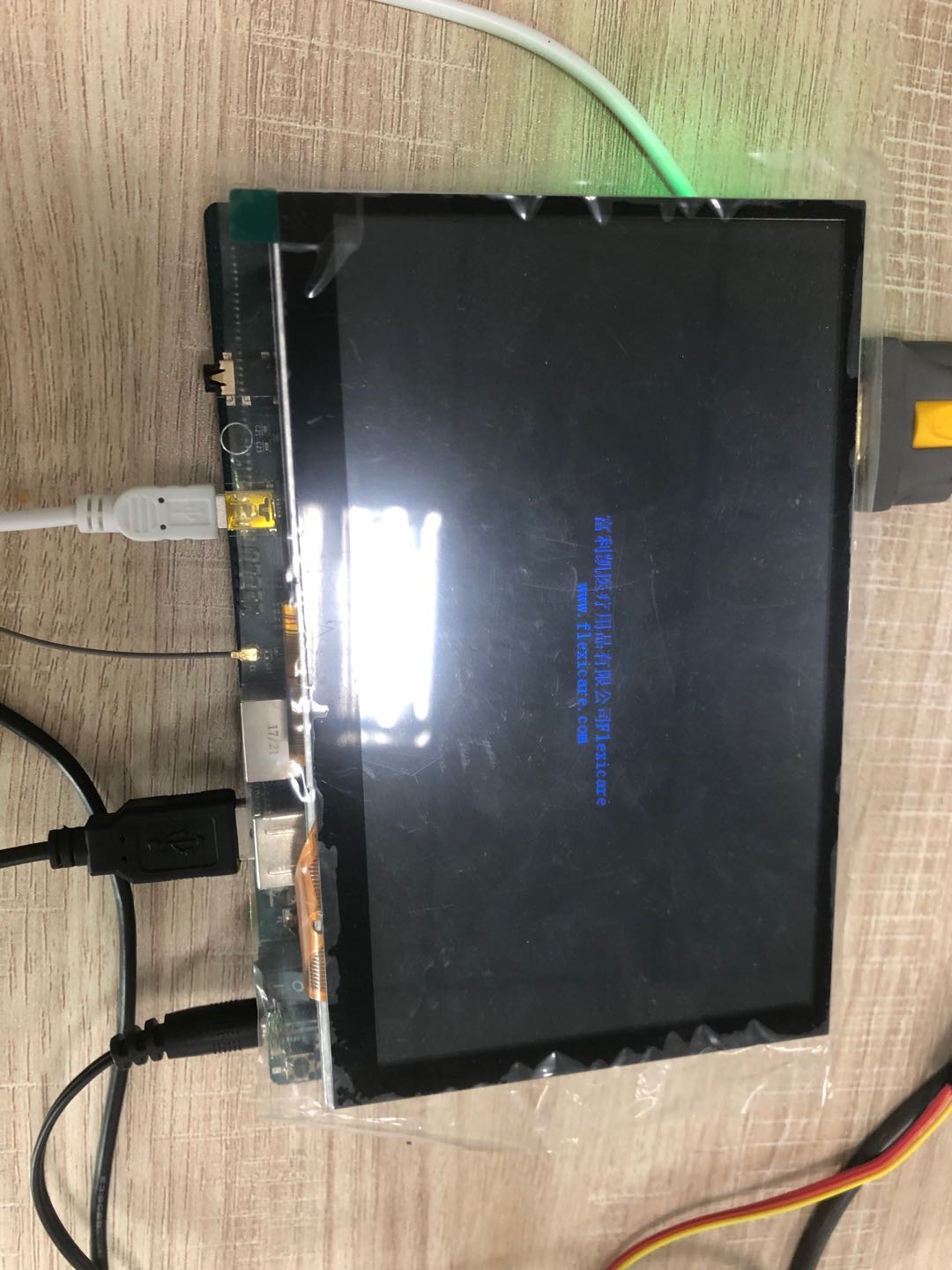
3.Show two lines
显示两行字
- The source code is as follows
源码如下
#include <sys/mman.h>
#include <sys/types.h>
#include <sys/stat.h>
#include <unistd.h>
#include <linux/fb.h>
#include <fcntl.h>
#include <stdio.h>
#include <string.h>
#include <math.h>
#include <wchar.h>

#include <ft2build.h>
#include FT_FREETYPE_H
#include FT_GLYPH_H

typedef struct TGlyph_ {
	FT_UInt index; /* glyph index */
	FT_Vector pos; /* glyph origin on the baseline */
	FT_Glyph image; /* glyph image */
} TGlyph, *PGlyph;


#define MAX_GLYPHS  100

int fd_fb;
struct fb_var_screeninfo var;	/* Current var */
struct fb_fix_screeninfo fix;	/* Current fix */
int screen_size;
unsigned char *fbmem;
unsigned int line_width;
unsigned int pixel_width;


/* color : 0x00RRGGBB */
void lcd_put_pixel(int x, int y, unsigned int color)
{
	unsigned char *pen_8 = fbmem+y*line_width+x*pixel_width;
	unsigned short *pen_16;
	unsigned int *pen_32;

	unsigned int red, green, blue;

	pen_16 = (unsigned short *)pen_8;
	pen_32 = (unsigned int *)pen_8;

	switch (var.bits_per_pixel)
	{
		case 8:
		{
			*pen_8 = color;
			break;
		}
		case 16:
		{
			/* 565 */
			red   = (color >> 16) & 0xff;
			green = (color >> 8) & 0xff;
			blue  = (color >> 0) & 0xff;
			color = ((red >> 3) << 11) | ((green >> 2) << 5) | (blue >> 3);
			*pen_16 = color;
			break;
		}
		case 32:
		{
			*pen_32 = color;
			break;
		}
		default:
		{
			printf("can't surport %dbpp\n", var.bits_per_pixel);
			break;
		}
	}
}


/* Replace this function with something useful. */

void
draw_bitmap( FT_Bitmap*  bitmap,
             FT_Int      x,
             FT_Int      y)
{
  FT_Int  i, j, p, q;
  FT_Int  x_max = x + bitmap->width;
  FT_Int  y_max = y + bitmap->rows;

	//printf("x = %d, y = %d\n", x, y);

  for ( i = x, p = 0; i < x_max; i++, p++ )
  {
    for ( j = y, q = 0; j < y_max; j++, q++ )
    {
      if ( i < 0      || j < 0       ||
           i >= var.xres || j >= var.yres )
        continue;

      //image[j][i] |= bitmap->buffer[q * bitmap->width + p];
      lcd_put_pixel(i, j, bitmap->buffer[q * bitmap->width + p]);
    }
  }
}


int Get_Glyphs_Frm_Wstr(FT_Face face, wchar_t * wstr, TGlyph glyphs[])
{
	int n;
	PGlyph glyph = glyphs;
	int pen_x = 0;
	int pen_y = 0;
	int error;
	FT_GlyphSlot  slot = face->glyph;;


	for (n = 0; n < wcslen(wstr); n++)
	{
		glyph->index = FT_Get_Char_Index( face, wstr[n]);
		/* store current pen position */
		glyph->pos.x = pen_x;
		glyph->pos.y = pen_y;

		/* load时是把glyph放入插槽face->glyph */
		error = FT_Load_Glyph(face, glyph->index, FT_LOAD_DEFAULT);
		if ( error )
			continue;

		error = FT_Get_Glyph(face->glyph, &glyph->image );
		if ( error )
			continue;

		/* translate the glyph image now */
		/* 这使得glyph->image里含有位置信息 */
		FT_Glyph_Transform(glyph->image, 0, &glyph->pos );

		pen_x += slot->advance.x;  /* 1/64 point */

		/* increment number of glyphs */
		glyph++;
	}

	/* count number of glyphs loaded */
	return (glyph - glyphs);
}

void compute_string_bbox(TGlyph glyphs[], FT_UInt num_glyphs, FT_BBox *abbox )
{
	FT_BBox bbox;
	int n;

	bbox.xMin = bbox.yMin = 32000;
	bbox.xMax = bbox.yMax = -32000;

	for ( n = 0; n < num_glyphs; n++ )
	{
		FT_BBox glyph_bbox;

		FT_Glyph_Get_CBox(glyphs[n].image, FT_GLYPH_BBOX_TRUNCATE, &glyph_bbox );

		if (glyph_bbox.xMin < bbox.xMin)
			bbox.xMin = glyph_bbox.xMin;

		if (glyph_bbox.yMin < bbox.yMin)
			bbox.yMin = glyph_bbox.yMin;

		if (glyph_bbox.xMax > bbox.xMax)
			bbox.xMax = glyph_bbox.xMax;

		if (glyph_bbox.yMax > bbox.yMax)
			bbox.yMax = glyph_bbox.yMax;
	}

	*abbox = bbox;
}


void Draw_Glyphs(TGlyph glyphs[], FT_UInt num_glyphs, FT_Vector pen)
{
	int n;
	int error;

	for (n = 0; n < num_glyphs; n++)
	{
		FT_Glyph_Transform(glyphs[n].image, 0, &pen);
		/* convert glyph image to bitmap (destroy the glyph copy!) */
		error = FT_Glyph_To_Bitmap(&glyphs[n].image, FT_RENDER_MODE_NORMAL, 0, /* no additional translation */
                              		1 ); 		/* destroy copy in "image" */
		if ( !error )
		{
			FT_BitmapGlyph bit = (FT_BitmapGlyph)glyphs[n].image;
			draw_bitmap(&bit->bitmap, bit->left, var.yres - bit->top);
			FT_Done_Glyph(glyphs[n].image );
		}
	}
}

int main(int argc, char **argv)
{
	wchar_t *wstr1 = L"富利凯医疗用品有限公司Flexicare";
	wchar_t *wstr2 = L"www.flexicare.com";

	FT_Library	  library;
	FT_Face 	  face;
	int error;
    FT_Vector     pen;
	FT_GlyphSlot  slot;
	int i;
	FT_BBox bbox;

	int line_box_ymin = 10000;
	int line_box_ymax = 0;

	int line_box_width;
	int line_box_height;

	TGlyph glyphs[MAX_GLYPHS]; /* glyphs table */
	FT_UInt num_glyphs;


	if (argc != 2)
	{
		printf("Usage : %s <font_file>\n", argv[0]);
		return -1;
	}


	fd_fb = open("/dev/fb0", O_RDWR);
	if (fd_fb < 0)
	{
		printf("can't open /dev/fb0\n");
		return -1;
	}

	if (ioctl(fd_fb, FBIOGET_VSCREENINFO, &var))
	{
		printf("can't get var\n");
		return -1;
	}

	if (ioctl(fd_fb, FBIOGET_FSCREENINFO, &fix))
	{
		printf("can't get fix\n");
		return -1;
	}

	line_width  = var.xres * var.bits_per_pixel / 8;
	pixel_width = var.bits_per_pixel / 8;
	screen_size = var.xres * var.yres * var.bits_per_pixel / 8;
	fbmem = (unsigned char *)mmap(NULL , screen_size, PROT_READ | PROT_WRITE, MAP_SHARED, fd_fb, 0);
	if (fbmem == (unsigned char *)-1)
	{
		printf("can't mmap\n");
		return -1;
	}

	/* 清屏: 全部设为黑色 */
	memset(fbmem, 0, screen_size);

	/* 显示矢量字体 */
	error = FT_Init_FreeType( &library );			   /* initialize library */
	/* error handling omitted */

	error = FT_New_Face( library, argv[1], 0, &face ); /* create face object */
	/* error handling omitted */
	slot = face->glyph;

	FT_Set_Pixel_Sizes(face, 24, 0);

	/* wstr1 */
	num_glyphs = Get_Glyphs_Frm_Wstr(face, wstr1, glyphs);

	compute_string_bbox(glyphs, num_glyphs, &bbox);
	line_box_width  = bbox.xMax - bbox.xMin;
	line_box_height = bbox.yMax - bbox.yMin;

	pen.x = (var.xres - line_box_width)/2 * 64;
	pen.y = (var.yres - line_box_height)/2 * 64;

	Draw_Glyphs(glyphs, num_glyphs, pen);

	/* wstr2 */
	num_glyphs = Get_Glyphs_Frm_Wstr(face, wstr2, glyphs);

	compute_string_bbox(glyphs, num_glyphs, &bbox);
	line_box_width  = bbox.xMax - bbox.xMin;
	line_box_height = bbox.yMax - bbox.yMin;

	pen.x = (var.xres - line_box_width)/2 * 64;
	pen.y = pen.y - 24 * 64;
	Draw_Glyphs(glyphs, num_glyphs, pen);


	return 0;
}
- Compile and test
编译并测试
- The compile and pull script is as follows
编译和上传的脚本如下
#!/bin/bash
arm-openwrt-linux-muslgnueabi-gcc -finput-charset=GBK -o show_lines show_lines.c  -lfreetype -lm
adb push show_lines /tmp/
adb push simsun.ttc /tmp/
- Run on development board
开发板上运行
root@TinaLinux:/tmp# ./show_lines simsun.ttc
- View effect
查看效果
4.Show file
显示文件
- The source code path is as follows
源码位置如下
https://github.com/LeviLuoLL/R16/tree/master/Lcd_Test/show_file_final
- Compile and test
编译并测试
- makefile is as follow
makefile 如下
CROSSCOMPILE := arm-openwrt-linux-

CFLAGS 	:= -Wall -O2 -c
CFLAGS  += -I$(PWD)/include

LDFLAGS := -lm -lfreetype

CC 	:= $(CROSSCOMPILE)muslgnueabi-gcc
LD 	:= $(CROSSCOMPILE)ld

OBJS := main.o \
			display/disp_manager.o        \
			display/fb.o                  \
			encoding/ascii.o              \
			encoding/utf-16be.o           \
			encoding/encoding_manager.o   \
			encoding/utf-8.o              \
			encoding/utf-16le.o           \
			draw/draw.o                   \
			fonts/ascii.o                 \
			fonts/gbk.o                   \
			fonts/freetype.o              \
			fonts/fonts_manager.o

all: $(OBJS)
	$(CC) $(LDFLAGS) -o show_file $^

clean:
	rm -f show_file
	rm -f $(OBJS)

%.o:%.c
	$(CC) $(CFLAGS) -o $@ $<
- Run on development board
开发板上运行
root@TinaLinux:/levi/show_file# ./show_file -s 128 -d fb -f ../simsun.ttc ./text
.txt
- View effect
查看效果
5.Show picture
显示图片
- The source code is as follows
源码如下
#include <stdio.h>
#include "jpeglib.h"
#include <setjmp.h>
#include <sys/types.h>
#include <sys/stat.h>
#include <fcntl.h>
#include <sys/ioctl.h>
#include <sys/mman.h>
#include <linux/fb.h>
#include <string.h>
#include <stdlib.h>

#define FB_DEVICE_NAME "/dev/fb0"
#define DBG_PRINTF printf

static int g_fd;

static struct fb_var_screeninfo g_tFBVar;
static struct fb_fix_screeninfo g_tFBFix;
static unsigned char *g_pucFBMem;
static unsigned int g_dwScreenSize;

static unsigned int g_dwLineWidth;
static unsigned int g_dwPixelWidth;

static int FBDeviceInit(void)
{
	int ret;

	g_fd = open(FB_DEVICE_NAME, O_RDWR);
	if (0 > g_fd)
	{
		DBG_PRINTF("can't open %s\n", FB_DEVICE_NAME);
	}

	ret = ioctl(g_fd, FBIOGET_VSCREENINFO, &g_tFBVar);
	if (ret < 0)
	{
		DBG_PRINTF("can't get fb's var\n");
		return -1;
	}

	ret = ioctl(g_fd, FBIOGET_FSCREENINFO, &g_tFBFix);
	if (ret < 0)
	{
		DBG_PRINTF("can't get fb's fix\n");
		return -1;
	}

	g_dwScreenSize = g_tFBVar.xres * g_tFBVar.yres * g_tFBVar.bits_per_pixel / 8;
	g_pucFBMem = (unsigned char *)mmap(NULL , g_dwScreenSize, PROT_READ | PROT_WRITE, MAP_SHARED, g_fd, 0);
	if (0 > g_pucFBMem)
	{
		DBG_PRINTF("can't mmap\n");
		return -1;
	}

	g_dwLineWidth  = g_tFBVar.xres * g_tFBVar.bits_per_pixel / 8;
	g_dwPixelWidth = g_tFBVar.bits_per_pixel / 8;

	return 0;
}


static int FBShowPixel(int iX, int iY, unsigned int dwColor)
{
	unsigned char *pucFB;
	unsigned short *pwFB16bpp;
	unsigned int *pdwFB32bpp;
	unsigned short wColor16bpp; /* 565 */
	int iRed;
	int iGreen;
	int iBlue;

	if ((iX >= g_tFBVar.xres) || (iY >= g_tFBVar.yres))
	{
		DBG_PRINTF("out of region\n");
		return -1;
	}

	pucFB      = g_pucFBMem + g_dwLineWidth * iY + g_dwPixelWidth * iX;
	pwFB16bpp  = (unsigned short *)pucFB;
	pdwFB32bpp = (unsigned int *)pucFB;

	switch (g_tFBVar.bits_per_pixel)
	{
		case 8:
		{
			*pucFB = (unsigned char)dwColor;
			break;
		}
		case 16:
		{
			iRed   = (dwColor >> (16+3)) & 0x1f;
			iGreen = (dwColor >> (8+2)) & 0x3f;
			iBlue  = (dwColor >> 3) & 0x1f;
			wColor16bpp = (iRed << 11) | (iGreen << 5) | iBlue;
			*pwFB16bpp	= wColor16bpp;
			break;
		}
		case 32:
		{
			*pdwFB32bpp = dwColor;
			break;
		}
		default :
		{
			DBG_PRINTF("can't support %d bpp\n", g_tFBVar.bits_per_pixel);
			return -1;
		}
	}

	return 0;
}

static int FBCleanScreen(unsigned int dwBackColor)
{
	unsigned char *pucFB;
	unsigned short *pwFB16bpp;
	unsigned int *pdwFB32bpp;
	unsigned short wColor16bpp; /* 565 */
	int iRed;
	int iGreen;
	int iBlue;
	int i = 0;

	pucFB      = g_pucFBMem;
	pwFB16bpp  = (unsigned short *)pucFB;
	pdwFB32bpp = (unsigned int *)pucFB;

	switch (g_tFBVar.bits_per_pixel)
	{
		case 8:
		{
			memset(g_pucFBMem, dwBackColor, g_dwScreenSize);
			break;
		}
		case 16:
		{
			iRed   = (dwBackColor >> (16+3)) & 0x1f;
			iGreen = (dwBackColor >> (8+2)) & 0x3f;
			iBlue  = (dwBackColor >> 3) & 0x1f;
			wColor16bpp = (iRed << 11) | (iGreen << 5) | iBlue;
			while (i < g_dwScreenSize)
			{
				*pwFB16bpp	= wColor16bpp;
				pwFB16bpp++;
				i += 2;
			}
			break;
		}
		case 32:
		{
			while (i < g_dwScreenSize)
			{
				*pdwFB32bpp	= dwBackColor;
				pdwFB32bpp++;
				i += 4;
			}
			break;
		}
		default :
		{
			DBG_PRINTF("can't support %d bpp\n", g_tFBVar.bits_per_pixel);
			return -1;
		}
	}

	return 0;
}

static int FBShowLine(int iXStart, int iXEnd, int iY, unsigned char *pucRGBArray)
{
	int i = iXStart * 3;
	int iX;
	unsigned int dwColor;

	if (iY >= g_tFBVar.yres)
		return -1;

	if (iXStart >= g_tFBVar.xres)
		return -1;

	if (iXEnd >= g_tFBVar.xres)
	{
		iXEnd = g_tFBVar.xres;
	}

	for (iX = iXStart; iX < iXEnd; iX++)
	{
		/* 0xRRGGBB */
		dwColor = (pucRGBArray[i]<<16) + (pucRGBArray[i+1]<<8) + (pucRGBArray[i+2]<<0);
		i += 3;
		FBShowPixel(iX, iY, dwColor);
	}
	return 0;
}


/*
Allocate and initialize a JPEG decompression object    // 分配和初始化一个decompression结构体
Specify the source of the compressed data (eg, a file) // 指定源文件
Call jpeg_read_header() to obtain image info		   // 用jpeg_read_header获得jpg信息
Set parameters for decompression					   // 设置解压参数,比如放大、缩小
jpeg_start_decompress(...); 						   // 启动解压:jpeg_start_decompress
while (scan lines remain to be read)
	jpeg_read_scanlines(...);						   // 循环调用jpeg_read_scanlines
jpeg_finish_decompress(...);						   // jpeg_finish_decompress
Release the JPEG decompression object				   // 释放decompression结构体
*/

/* Uage: jpg2rgb <jpg_file>
 */

int main(int argc, char **argv)
{
	struct jpeg_decompress_struct cinfo;
	struct jpeg_error_mgr jerr;
	FILE * infile;
	int row_stride;
	unsigned char *buffer;

	if (argc != 2)
	{
		printf("Usage: \n");
		printf("%s <jpg_file>\n", argv[0]);
		return -1;
	}

	if (FBDeviceInit())
	{
		return -1;
	}

	FBCleanScreen(0);

	// 分配和初始化一个decompression结构体
	cinfo.err = jpeg_std_error(&jerr);
	jpeg_create_decompress(&cinfo);

	// 指定源文件
	if ((infile = fopen(argv[1], "rb")) == NULL) {
		fprintf(stderr, "can't open %s\n", argv[1]);
		return -1;
	}
	jpeg_stdio_src(&cinfo, infile);

	// 用jpeg_read_header获得jpg信息
	jpeg_read_header(&cinfo, TRUE);
	/* 源信息 */
	printf("image_width = %d\n", cinfo.image_width);
	printf("image_height = %d\n", cinfo.image_height);
	printf("num_components = %d\n", cinfo.num_components);

	// 设置解压参数,比如放大、缩小
	printf("enter scale M/N:\n");
	scanf("%d/%d", &cinfo.scale_num, &cinfo.scale_denom);
	printf("scale to : %d/%d\n", cinfo.scale_num, cinfo.scale_denom);

	// 启动解压:jpeg_start_decompress
	jpeg_start_decompress(&cinfo);

	/* 输出的图象的信息 */
	printf("output_width = %d\n", cinfo.output_width);
	printf("output_height = %d\n", cinfo.output_height);
	printf("output_components = %d\n", cinfo.output_components);

	// 一行的数据长度
	row_stride = cinfo.output_width * cinfo.output_components;
	buffer = malloc(row_stride);

	// 循环调用jpeg_read_scanlines来一行一行地获得解压的数据
	while (cinfo.output_scanline < cinfo.output_height)
	{
		(void) jpeg_read_scanlines(&cinfo, &buffer, 1);

		// 写到LCD去
		FBShowLine(0, cinfo.output_width, cinfo.output_scanline, buffer);
	}

	free(buffer);
	jpeg_finish_decompress(&cinfo);
	jpeg_destroy_decompress(&cinfo);

	return 0;
}
- Compile and test
编译并测试
- The compile and pull script is as follows
编译和上传的脚本如下
#!/bin/bash
arm-openwrt-linux-muslgnueabi-gcc -o jpg2rgb jpg2rgb.c -ljpeg
adb push jpg2rgb /tmp/
- Run on development board
开发板上运行
root@TinaLinux:/levi/show_pic# ./jpg2rgb flexicare.jpg
image_width = 1024
image_height = 600
num_components = 3
enter scale M/N:
1/1
scale to : 1/1
output_width = 1024
output_height = 600
output_components = 3
- View effect
查看效果
.output_width * cinfo.output_components;
buffer = malloc(row_stride);
// 循环调用jpeg_read_scanlines来一行一行地获得解压的数据
while (cinfo.output_scanline < cinfo.output_height)
{
	(void) jpeg_read_scanlines(&cinfo, &buffer, 1);

	// 写到LCD去
	FBShowLine(0, cinfo.output_width, cinfo.output_scanline, buffer);
}

free(buffer);
jpeg_finish_decompress(&cinfo);
jpeg_destroy_decompress(&cinfo);

return 0;
}
- **Compile and test**

> 编译并测试

- **The compile and pull script is as follows**

> 编译和上传的脚本如下

```shell
#!/bin/bash
arm-openwrt-linux-muslgnueabi-gcc -o jpg2rgb jpg2rgb.c -ljpeg
adb push jpg2rgb /tmp/
- Run on development board
开发板上运行
root@TinaLinux:/levi/show_pic# ./jpg2rgb flexicare.jpg
image_width = 1024
image_height = 600
num_components = 3
enter scale M/N:
1/1
scale to : 1/1
output_width = 1024
output_height = 600
output_components = 3
- View effect
查看效果
版权声明:本文为qq_35383699原创文章,遵循CC 4.0 BY-SA版权协议,转载请附上原文出处链接和本声明。