OpenCV的Rect矩形类用法
摘自 https://blog.csdn.net/kh1445291129/article/details/51149849
//如果创建一个Rect对象rect(100, 50, 50, 100),那么rect会有以下几个功能:
rect.area(); //返回rect的面积 5000
rect.size(); //返回rect的尺寸 [50 × 100]
rect.tl(); //返回rect的左上顶点的坐标 [100, 50]
rect.br(); //返回rect的右下顶点的坐标 [150, 150]
rect.width(); //返回rect的宽度 50
rect.height(); //返回rect的高度 100
rect.contains(Point(x, y)); //返回布尔变量,判断rect是否包含Point(x, y)点
//还可以求两个矩形的交集和并集
rect = rect1 & rect2;
rect = rect1 | rect2;
//还可以对矩形进行平移和缩放
rect = rect + Point(-100, 100); //平移,也就是左上顶点的x坐标-100,y坐标+100
rect = rect + Size(-100, 100); //缩放,左上顶点不变,宽度-100,高度+100
//还可以对矩形进行对比,返回布尔变量
rect1 == rect2;
rect1 != rect2;
//OpenCV里貌似没有判断rect1是否在rect2里面的功能,所以自己写一个吧
bool isInside(Rect rect1, Rect rect2)
{
return (rect1 == (rect1&rect2));
}
//OpenCV貌似也没有获取矩形中心点的功能,还是自己写一个
Point getCenterPoint(Rect rect)
{
Point cpt;
cpt.x = rect.x + cvRound(rect.width/2.0);
cpt.y = rect.y + cvRound(rect.height/2.0);
return cpt;
}
//围绕矩形中心缩放
Rect rectCenterScale(Rect rect, Size size)
{
rect = rect + size;
Point pt;
pt.x = cvRound(size.width/2.0);
pt.y = cvRound(size.height/2.0);
return (rect-pt);
}
Opencv 使用Rect选取与设置窗口ROI
文章链接: http://blog.csdn.net/yhl_leo/article/details/50593825
首先看一下Rect对象的定义:
typedef Rect_<int> Rect;- 再看
Rect_的定义:
/*!
  The 2D up-right rectangle class

  The class represents a 2D rectangle with coordinates of the specified data type.
  Normally, cv::Rect ~ cv::Rect_<int> is used.
*/
template<typename _Tp> class Rect_
{
public:
    typedef _Tp value_type;

    //! various constructors
    Rect_();
    Rect_(_Tp _x, _Tp _y, _Tp _width, _Tp _height);
    Rect_(const Rect_& r);
    Rect_(const CvRect& r);
    Rect_(const Point_<_Tp>& org, const Size_<_Tp>& sz);
    Rect_(const Point_<_Tp>& pt1, const Point_<_Tp>& pt2);

    Rect_& operator = ( const Rect_& r );
    //! the top-left corner
    Point_<_Tp> tl() const;
    //! the bottom-right corner
    Point_<_Tp> br() const;

    //! size (width, height) of the rectangle
    Size_<_Tp> size() const;
    //! area (width*height) of the rectangle
    _Tp area() const;

    //! conversion to another data type
    template<typename _Tp2> operator Rect_<_Tp2>() const;
    //! conversion to the old-style CvRect
    operator CvRect() const;

    //! checks whether the rectangle contains the point
    bool contains(const Point_<_Tp>& pt) const;

    _Tp x, y, width, height; //< the top-left corner, as well as width and height of the rectangle
};从上面的定义至少可以发现两点:一,类Rect_的类模板中的数据类型_Tp在Rect_<int>中被指定为整型;二,从Rect_的构造函数可以看出,其形参列表一共有6种形式:
Rect_(),形参列表为空,即定义一个空窗口(默认值为:x=y=width=height=0);Rect_(_Tp _x, _Tp _y, _Tp _width, _Tp _height),定义一个左上角点坐标为(_x, _y)的_width*_height矩形窗口;Rect_(const Rect_& r),使用其他的Rect_对象初始化;Rect_(const CvRect& r),使用CvRect对象初始化;Rect_(const Point_<_Tp>& org, const Size_<_Tp>& sz),分别将位置坐标(_x, _y)和窗口大小(_width, _height)用Point_和Size_对象初始化;Rect_(const Point_<_Tp>& pt1, const Point_<_Tp>& pt2),分别将坐标位置(_x, _y)和窗口大小(_width, _height)用Point_和Point_对象初始化。
在OpenCV库中,图像像素坐标与所在行列数的对应关系为:
x -> col, y -> row, width -> cols, height -> rows
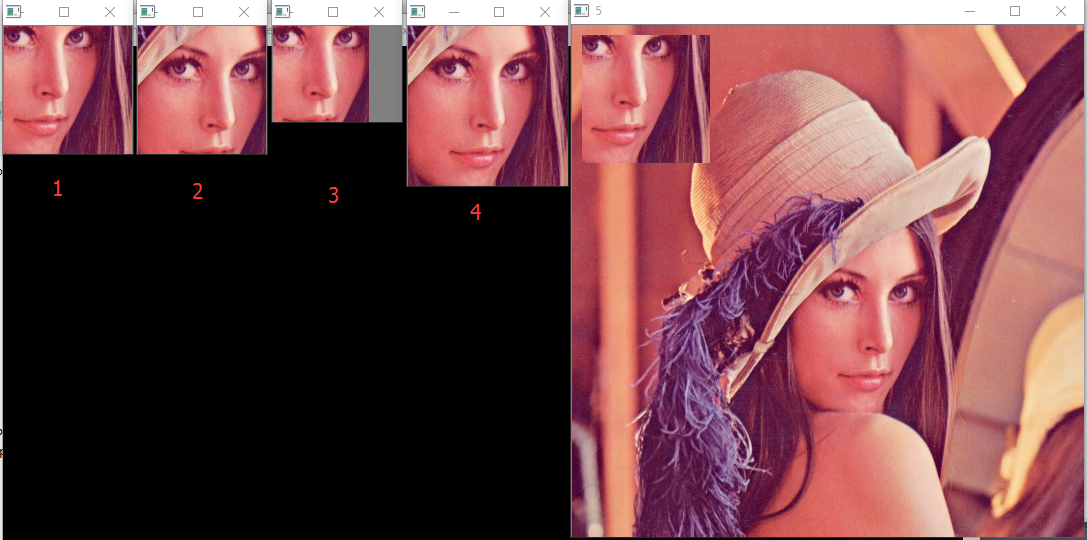
下面给出一段代码,基本可以把Rect的常见用法涵盖:
Mat image = imread("C:\\Users\\Leo\\Desktop\\lena.jpg");
Rect rect1(256, 256, 128, 128);
Rect rect2(224, 224, 128, 128);

Mat roi1;
image(rect1).copyTo(roi1); // copy the region rect1 from the image to roi1
imshow("1", roi1);
waitKey(0);

Mat roi2;
image(rect2).copyTo(roi2); // copy the region rect2 from the image to roi2
imshow("2", roi2);
waitKey(0);

cv::Rect rect3 = rect1&rect2; // intersection of the two sets
Mat roi3;
image(rect3).copyTo(roi3);
imshow("3", roi3);
waitKey(0);

Rect rect4 = rect1|rect2; // union of the two sets (the minimum bounding rectangle)
Mat roi4;
image(rect4).copyTo(roi4);
imshow("4", roi4);
waitKey(0);

Rect rect5(10, 10, 128, 128);
roi1.copyTo(image(rect5)); // copy the region rect1 to the designated region in the image
imshow("5", image);
waitKey(0);
结果为:
vector<Rect> 使用
vector<vector<Point> >
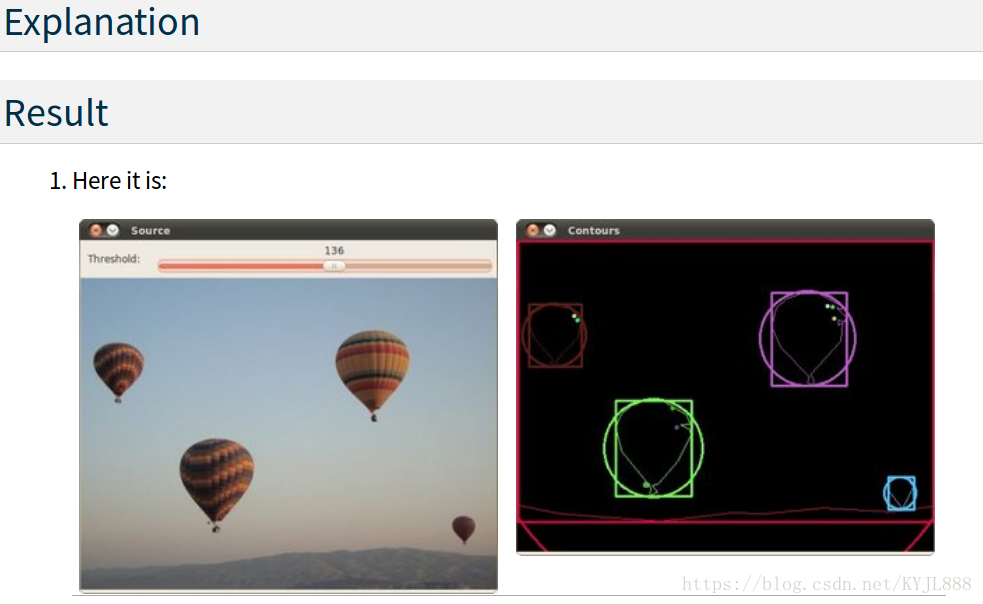
Creating Bounding boxes and circles for contours
Goal
In this tutorial you will learn how to:
- Use the OpenCV function boundingRect
- Use the OpenCV function minEnclosingCircle
Theory
Code
This tutorial code’s is shown lines below. You can also download it from here
#include "opencv2/highgui/highgui.hpp"
#include "opencv2/imgproc/imgproc.hpp"
#include <iostream>
#include <stdio.h>
#include <stdlib.h>

using namespace cv;
using namespace std;

Mat src; Mat src_gray;
int thresh = 100;
int max_thresh = 255;
RNG rng(12345);

/// Function header
void thresh_callback(int, void* );

/** @function main */
int main( int argc, char** argv )
{
  /// Load source image and convert it to gray
  src = imread( argv[1], 1 );

  /// Convert image to gray and blur it
  cvtColor( src, src_gray, CV_BGR2GRAY );
  blur( src_gray, src_gray, Size(3,3) );

  /// Create Window
  char* source_window = "Source";
  namedWindow( source_window, CV_WINDOW_AUTOSIZE );
  imshow( source_window, src );

  createTrackbar( " Threshold:", "Source", &thresh, max_thresh, thresh_callback );
  thresh_callback( 0, 0 );

  waitKey(0);
  return(0);
}

/** @function thresh_callback */
void thresh_callback(int, void* )
{
  Mat threshold_output;
  vector<vector<Point> > contours;
  vector<Vec4i> hierarchy;

  /// Detect edges using Threshold
  threshold( src_gray, threshold_output, thresh, 255, THRESH_BINARY );
  /// Find contours
  findContours( threshold_output, contours, hierarchy, CV_RETR_TREE, CV_CHAIN_APPROX_SIMPLE, Point(0, 0) );

  /// Approximate contours to polygons + get bounding rects and circles
  vector<vector<Point> > contours_poly( contours.size() );
  vector<rect> boundRect( contours.size() );
  vector<Point2f>center( contours.size() );
  vector<float>radius( contours.size() );

  for( int i = 0; i < contours.size(); i++ )
     { approxPolyDP( Mat(contours[i]), contours_poly[i], 3, true );
       boundRect[i] = boundingRect( Mat(contours_poly[i]) );
       minEnclosingCircle( (Mat)contours_poly[i], center[i], radius[i] );
     }


  /// Draw polygonal contour + bonding rects + circles
  Mat drawing = Mat::zeros( threshold_output.size(), CV_8UC3 );
  for( int i = 0; i< contours.size(); i++ )
     {
       Scalar color = Scalar( rng.uniform(0, 255), rng.uniform(0,255), rng.uniform(0,255) );
       drawContours( drawing, contours_poly, i, color, 1, 8, vector<Vec4i>(), 0, Point() );
       rectangle( drawing, boundRect[i].tl(), boundRect[i].br(), color, 2, 8, 0 );
       circle( drawing, center[i], (int)radius[i], color, 2, 8, 0 );
     }

  /// Show in a window
  namedWindow( "Contours", CV_WINDOW_AUTOSIZE );
  imshow( "Contours", drawing );
}