Canvas绘制一个时钟
Canvas:一个可以使用脚本(通常为JavaScript)在其中绘制图像的 HTML 元素。它可以用来制作照片集或者制作简单(也不是那么简单)的动画,甚至可以进行实时视频处理和渲染。
博客地址:https://xiaofly.cn/post-details?id=627b9c9b5fcf765110cdcb6e
先上效果图: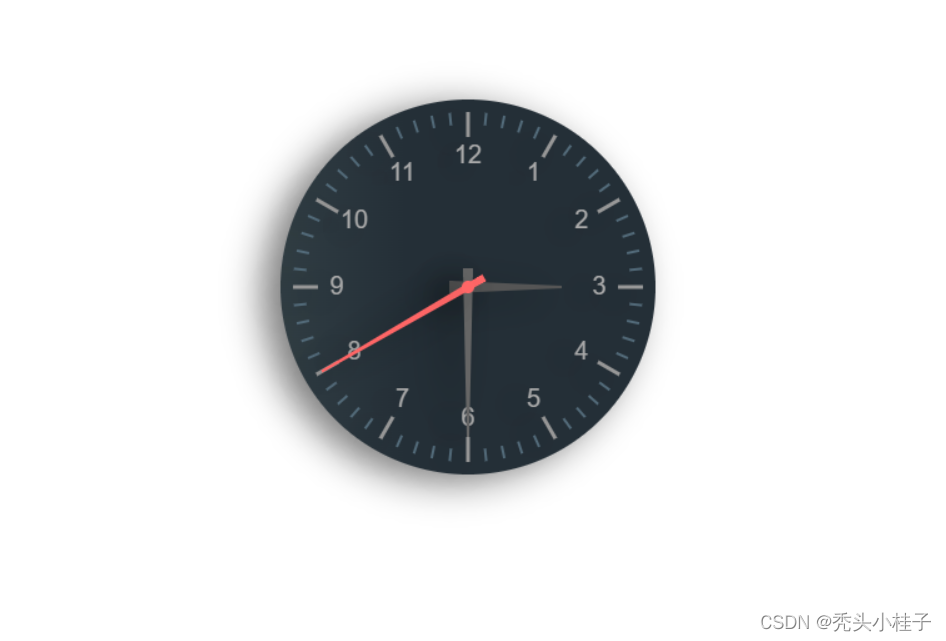
先创建一个index.html,内容如下:
<!-- index.html -->
<!DOCTYPE html>
<html>
  <head>
    <meta charset="utf-8">
    <meta name="viewport" content="width=device-width,initial-scale=1.0">
    <title>Canvas绘制一个时钟</title>
    <style>
        html, body {
            width: 100%;
            height: 100%;
            display: flex;
            align-items: center;
            justify-content: center;
        }
    </style>
  </head>
  <body>
    <canvas id="clock" width="400" height="400"></canvas>
    <!-- 引入js -->
    <script type="text/javascript" src="./index.js"></script>
  </body>
</html>
上面代码没啥好讲的,重点是下面这段代码
<canvas id="clock" width="400" height="400"></canvas>
1、首先创建一个CanvasRenderingContext2D对象作为2D渲染的上下文
const $clock = document.getElementById('clock');
// 创建ctx对象
const ctx = $clock.getContext('2d');
// 定义圆心坐标(x, y)和半径r
const x = 200, y = 200, r = 150;
2、绘制表盘
渐变色:
createLinearGradient(x0,y0,x1,y1)
创建线性的渐变对象,并使用addColorStop(stop,color)方法规定颜色和位置。
绘制圆弧:arc(x, y, r, startAngle, endAngle, anticlockwise)
加粗样式以(x, y)为圆心,以r为半径,从startAngle弧度开始到endAngle弧度结束。anticlosewise是布尔值,true表示逆时针,false表示顺时针。(默认是顺时针)
const lingrad = ctx.createLinearGradient(r, 0, -r, 0);
lingrad.addColorStop(0, '#242f37');
lingrad.addColorStop(1, '#48585c');
ctx.fillStyle = lingrad;
ctx.beginPath(); // 开始绘制
ctx.arc(x, y, r, 0, Math.PI * 2, true); // 绘制圆盘
ctx.fill(); // 填充
3、绘制时钟刻度
旋转坐标轴:
rotate(angle)
旋转的角度(angle),它是顺时针方向的,以弧度为单位的值,旋转的中心为坐标原点。
// 这里需要将坐标点移到画布中心
ctx.translate(x, y);
for (let i = 0; i < 12; i++) {
    ctx.beginPath();
    ctx.strokeStyle = '#999';
    ctx.lineWidth = 3;
    ctx.rotate(Math.PI / 6); // Math.PI = 3.14 = 180°,180°中有6个小时,所以一个小时Math.PI/6
    ctx.moveTo(r-10, 0);
    ctx.lineTo(r-30, 0);
    ctx.stroke();
}
4、绘制分钟刻数
for (let i = 0; i < 60; i++) {
    if (i % 5 !== 0) { // 去掉与小时刻度重叠的部分
        ctx.beginPath();
        ctx.strokeStyle = '#536b7a';
        ctx.lineWidth = 2;
        ctx.moveTo(r-10, 0);
        ctx.lineTo(r-20, 0);
        ctx.stroke();
    }
    ctx.rotate(Math.PI / 30); // 180°中有30分钟,所以一分钟Math.PI/30
}
5、绘制时钟数字
ctx.font = '20px Arial';
ctx.fillStyle = '#aaa';
ctx.textAlign = 'center';
ctx.textBaseline = 'middle';
for (let n = 1; n <= 12; n++) {
    const theta = (n - 3) * (Math.PI * 2) / 12;
    const x = r * 0.7 * Math.cos(theta);
    const y = r * 0.7 * Math.sin(theta);
    ctx.fillText(n, x, y);
}
6、绘制时针
save和restore方法是用来保存和恢复canvas状态的
let hour = 3; // 假设为凌晨3点
ctx.save();
const thetaH = (hour - 3) * 2 * Math.PI / 12; // 获取时针旋转角度
ctx.rotate(thetaH);
ctx.beginPath();
ctx.moveTo(-15, -5);
ctx.lineTo(-15, 5);
ctx.lineTo(r * 0.5, 1);
ctx.lineTo(r * 0.5, -1);
ctx.fillStyle = '#555';
ctx.fill();
ctx.restore();
7、绘制分针
let minute = 30; // 假设现在是30分钟
ctx.save();
const thetaMin = (minute - 15) * 2 * Math.PI / 60; // 获取分针旋转角度
ctx.rotate(thetaMin);
ctx.beginPath();
ctx.moveTo(-15, -4);
ctx.lineTo(-15, 4);
ctx.lineTo(r * 0.8, 1);
ctx.lineTo(r * 0.8, -1);
ctx.fillStyle = '#666';
ctx.fill();
ctx.restore();
8、绘制秒针
let seconds = 40; // 假设现在是40秒钟
ctx.save();
const thetaS = (seconds - 15) * 2 * Math.PI / 60; // 获取秒针旋转角度
ctx.rotate(thetaS);
ctx.beginPath();
ctx.moveTo(-15, -3);
ctx.lineTo(-15, 3);
ctx.lineTo(r * 0.9, 1);
ctx.lineTo(r * 0.9, -1);
ctx.fillStyle = '#F66';
ctx.fill();
ctx.restore();
绘制秒针原点的凸起
ctx.beginPath();
ctx.arc(x, y, 5, 0, Math.PI*2, true);
ctx.fillStyle = '#F66';
ctx.fill();
9、为了让钟表看起来更加真实,再给它加上阴影
// 阴影的x偏移
ctx.shadowOffsetX = -14;
// 阴影的y偏移
ctx.shadowOffsetY = 6;
// 阴影颜色
ctx.shadowColor = 'rgba(0,0,0,0.5)';
// 阴影的模糊半径
ctx.shadowBlur = 30;
10、现在最关键的让指针转动起来,所以我们需要用到requestAnimationFrame方法,用来重绘页面,得到连贯逐帧的动画,实现最佳的动画效果。
const $clock = document.getElementById('clock');
const ctx = $clock.getContext('2d');
const x = 200, y = 200, r = 150;

window.requestAnimationFrame(function e() {
	// 每次执行完requestAnimationFrame后需要清除画布,不然出现重叠交错的现象
    ctx.clearRect(-10, 0, ctx.canvas.width, ctx.canvas.height);

    // 获取当前时间
    let date = new Date();
    let hours = date.getHours();
    let minutes = date.getMinutes();
    let seconds = date.getSeconds();
    hours = hours > 12 ? hours - 12 : hours;
    let hour = hours + minutes / 60;
    let minute = minutes + seconds / 60;
    ctx.save();

    // 这里放我们前面写的代码
    ......

    window.requestAnimationFrame(e);
})
至此,一个能动的时钟就全部画好了。
最后附上index.js全部代码:
// index.js
const $clock = document.getElementById('clock');
const ctx = $clock.getContext('2d');
const x = 200, y = 200, r = 150;

window.requestAnimationFrame(function e() {
    ctx.clearRect(-10, 0, ctx.canvas.width, ctx.canvas.height);

    // 获取当前时间
    let date = new Date();
    let hours = date.getHours();
    let minutes = date.getMinutes();
    let seconds = date.getSeconds();
    hours = hours > 12 ? hours - 12 : hours;
    let hour = hours + minutes / 60;
    let minute = minutes + seconds / 60;
    ctx.save();

    //绘制表盘底色
    const lingrad = ctx.createLinearGradient(r, 0, -r, 0);
    lingrad.addColorStop(0, '#242f37');
    lingrad.addColorStop(1, '#48585c');
    ctx.fillStyle = lingrad;
    ctx.beginPath();
    ctx.arc(x, y, r, 0, Math.PI * 2, true);
    ctx.fill();

    ctx.translate(x, y); // 将坐标原点移到画布中心
    // 绘制时钟刻数
    for (let i = 0; i < 12; i++) {
        ctx.beginPath();
        ctx.strokeStyle = '#999';
        ctx.lineWidth = 3;
        ctx.rotate(Math.PI / 6);
        ctx.moveTo(r-10, 0);
        ctx.lineTo(r-30, 0);
        ctx.stroke();
    }

    // 绘制分钟刻数
    for (let i = 0; i < 60; i++) {
        if (i % 5 !== 0) { // 去掉与小时刻度重叠的部分
            ctx.beginPath();
            ctx.strokeStyle = '#536b7a';
            ctx.lineWidth = 2;
            ctx.moveTo(r-10, 0);
            ctx.lineTo(r-20, 0);
            ctx.stroke();
        }
        ctx.rotate(Math.PI / 30);
    }

    // 绘制时钟数字
    ctx.font = '20px Arial';
    ctx.fillStyle = '#aaa';
    ctx.textAlign = 'center';
    ctx.textBaseline = 'middle';
    for (let n = 1; n <= 12; n++) {
        const theta = (n - 3) * (Math.PI * 2) / 12;
        const x = r * 0.7 * Math.cos(theta);
        const y = r * 0.7 * Math.sin(theta);
        ctx.fillText(n, x, y);
    }

    // 绘制时针
    ctx.save();
    const thetaH = (hour - 3) * 2 * Math.PI / 12;
    ctx.rotate(thetaH);
    ctx.beginPath();
    ctx.moveTo(-15, -5);
    ctx.lineTo(-15, 5);
    ctx.lineTo(r * 0.5, 1);
    ctx.lineTo(r * 0.5, -1);
    ctx.fillStyle = '#555';
    ctx.fill();
    ctx.restore();

    // 绘制分针
    ctx.save();
    const thetaMin = (minute - 15) * 2 * Math.PI / 60;
    ctx.rotate(thetaMin);
    ctx.beginPath();
    ctx.moveTo(-15, -4);
    ctx.lineTo(-15, 4);
    ctx.lineTo(r * 0.8, 1);
    ctx.lineTo(r * 0.8, -1);
    ctx.fillStyle = '#666';
    ctx.fill();
    ctx.restore();

    // 绘制秒针
    ctx.save();
    const thetaS = (seconds - 15) * 2 * Math.PI / 60;
    ctx.rotate(thetaS);
    ctx.beginPath();
    ctx.moveTo(-15, -3);
    ctx.lineTo(-15, 3);
    ctx.lineTo(r * 0.9, 1);
    ctx.lineTo(r * 0.9, -1);
    ctx.fillStyle = '#F66';
    ctx.fill();
    ctx.restore();

    ctx.restore();

    ctx.beginPath();
    ctx.arc(x, y, 5, 0, Math.PI*2, true);
    ctx.fillStyle = '#F66';
    ctx.fill();

    // 阴影的x偏移
    ctx.shadowOffsetX = -14;
    // 阴影的y偏移
    ctx.shadowOffsetY = 6;
    // 阴影颜色
    ctx.shadowColor = 'rgba(0,0,0,0.5)';
    // 阴影的模糊半径
    ctx.shadowBlur = 30;

    window.requestAnimationFrame(e);
})
完结