一、开发前知识
1、微信开放平台与微信公众平台的区别
1.1 微信公众平台:
① 地址:https://mp.weixin.qq.com/cgi-bin/loginpage?t=wxm2-login&lang=zh_CN
② 微信公众平台面向的是普通的用户,比如自媒体和媒体,企业官方微信公众账号运营人员使用,当然你所在的团队或者公司有实力去开发一些内容,也可以调用公众平台里面的接口,比如自定义菜单,自动回复,查询功能。
1.2 微信开放平台:
① 地址:https://open.weixin.qq.com/
微信开放平台:面向的是开发者和第三方独立软件开发商。开放平台的文档似乎包含了微信开放平台文档里面的接口。
2、微信公众平台目前只支持80端口,且项目上传到服务器上面不容易debug啊?
解决方法:ngrok 工具,可以根据本地项目映射成外网可以访问的地址、端口,默认映射为80端口。
官网: https://dashboard.ngrok.com
存在问题: 每次重启,域名会变化,都需要项目中、微信公众平台配置,付费可以固定域名。。。
使用方法: ① 注册后获得一个授权码,下载 ngrok
② 》CMD 进入 ngrok 目录
》ngrok authtoken 授权码
》ngrok http 8080
③看到这个页面,ngrok就为你分配了临时访问通道成功了^^

二、配置
(每个微信号可以申请成为开发者测试账号进行微信功能开发的。)
1、在公众平台中进行配置:
地址: http://mp.weixin.qq.com/debug/cgi-bin/sandboxinfo?action=showinfo&t=sandbox/index
①:配置“接口配置信息” (Token 在项目中我是配置为"handsomeKing",没错,我就是King ^^)
url 改为自己映射的域名

② 配置“功能服务” 的 “网页帐号”。注意,是域名
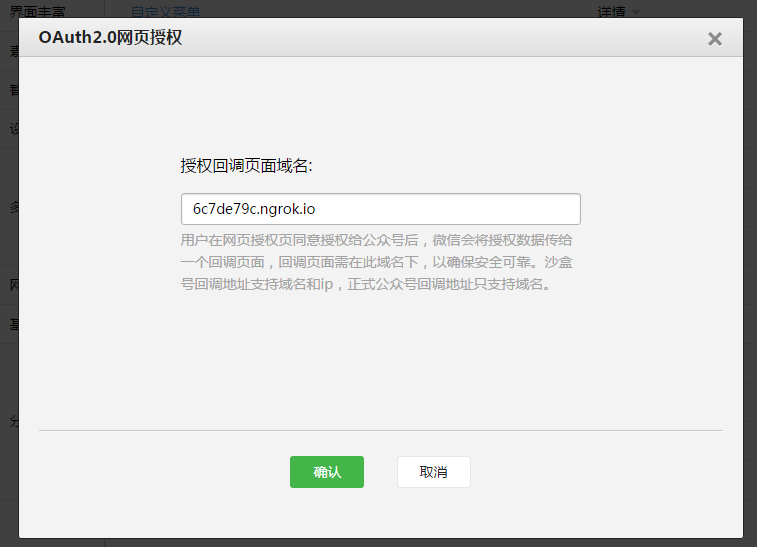
好了,可以愉快的coding 了!!!
三、可以开发啦
1、上面的 “接口配置信息” 配置得 wechat/ownerCheck 方法是验证 这个url 为我自己的,handsomeKing 就是这个方法中的一个参数。微信这个小朋友会用Get方法带上4个参数给我服务器: signature(签名)、timestamp(时间戳)、nonce(随机数)、echostr(随机字符串),再加上咱们项目中自己配置的 token ,通过检验signature对请求进行校验,若校验成功则原样返回echostr,表示接入成功,否则接入失败:(talk is cheap, show me the code *&)
1 2 3 4 5 6 7 8 9 10 11 12 13 14 15 16 17 18 19 20 21 22 23 24 25 26 27 28 29 30 31 32 33 | /**
* 微信消息接收和token验证
* @param model
* @param request
* @param response
* @throws IOException
*/
@RequestMapping ( "/ownerCheck" )
public void ownerCheck(Model model, HttpServletRequest request,HttpServletResponse response) throws IOException {
System.out.println( 111 );
boolean isGet = request.getMethod().toLowerCase().equals( "get" );
PrintWriter print;
if (isGet) {
String signature = request.getParameter( "signature" );
String timestamp = request.getParameter( "timestamp" );
String nonce = request.getParameter( "nonce" );
String echostr = request.getParameter( "echostr" );
if (signature != null && CheckoutUtil.checkSignature(signature, timestamp, nonce)) {
try {
print = response.getWriter();
print.write(echostr);
print.flush();
} catch (IOException e) {
e.printStackTrace();
}
}
}
}
|
1 2 3 4 5 6 7 8 9 10 11 12 13 14 15 16 17 18 19 20 21 22 23 24 25 26 27 28 29 30 31 32 33 34 35 36 37 38 39 40 41 42 43 44 45 46 47 48 49 50 51 52 53 54 55 56 57 58 59 60 61 62 63 64 65 66 67 68 69 70 71 72 73 74 75 76 77 78 79 80 | import java.security.MessageDigest;
import java.security.NoSuchAlgorithmException;
public class CheckoutUtil {
private static String token = "handsomeKing" ;
/**
* 验证签名
*
* @param signature
* @param timestamp
* @param nonce
* @return
*/
public static boolean checkSignature(String signature, String timestamp, String nonce) {
String[] arr = new String[] { token, timestamp, nonce };
sort(arr);
StringBuilder content = new StringBuilder();
for ( int i = 0 ; i < arr.length; i++) {
content.append(arr[i]);
}
MessageDigest md = null ;
String tmpStr = null ;
try {
md = MessageDigest.getInstance( "SHA-1" );
byte [] digest = md.digest(content.toString().getBytes());
tmpStr = byteToStr(digest);
} catch (NoSuchAlgorithmException e) {
e.printStackTrace();
}
content = null ;
return tmpStr != null ? tmpStr.equals(signature.toUpperCase()) : false ;
}
/**
* 将字节数组转换为十六进制字符串
*
* @param byteArray
* @return
*/
private static String byteToStr( byte [] byteArray) {
String strDigest = "" ;
for ( int i = 0 ; i < byteArray.length; i++) {
strDigest += byteToHexStr(byteArray[i]);
}
return strDigest;
}
/**
* 将字节转换为十六进制字符串
*
* @param mByte
* @return
*/
private static String byteToHexStr( byte mByte) {
char [] Digit = { '0' , '1' , '2' , '3' , '4' , '5' , '6' , '7' , '8' , '9' , 'A' , 'B' , 'C' , 'D' , 'E' , 'F' };
char [] tempArr = new char [ 2 ];
tempArr[ 0 ] = Digit[(mByte >>> 4 ) & 0X0F ];
tempArr[ 1 ] = Digit[mByte & 0X0F ];
String s = new String(tempArr);
return s;
}
public static void sort(String a[]) {
for ( int i = 0 ; i < a.length - 1 ; i++) {
for ( int j = i + 1 ; j < a.length; j++) {
if (a[j].compareTo(a[i]) < 0 ) {
String temp = a[i];
a[i] = a[j];
a[j] = temp;
}
}
}
}
}
|
2、用户用户同意授权,获取微信服务器传过来的俩参数: code、state。其中:
APPID: 微信开发者测试账号
REDIRECT_URI: 同意授权后跳转的 URL
1 2 3 4 5 6 7 8 9 10 11 12 13 14 | /**
* 第一步:用户同意授权,获取code(引导关注者打开如下页面:)
* 获取 code、state
*/
public static String getStartURLToGetCode() {
takenUrl= takenUrl.replace( "APPID" , Param.APPID);
takenUrl= takenUrl.replace( "REDIRECT_URI" , URL.encode(Param.REDIRECT_URI));
takenUrl= takenUrl.replace( "SCOPE" , "snsapi_userinfo" );
System.out.println(takenUrl);
return takenUrl;
}
|
3、获取微信用户的 access_token、openid
APPID:微信开发者测试账号
secret:微信开发者测试账号密码
code::上一步的 code
1 2 3 4 5 6 7 8 9 10 11 12 13 14 15 16 17 18 19 20 21 22 23 24 25 26 | /**
* 获取access_token、openid
* 第二步:通过code获取access_token
* ?appid=APPID
* &secret=SECRET
* &code=CODE
* &grant_type=authorization_code"
* */
public static OAuthInfo getAccess_token(String code){
authUrl= authUrl.replace( "APPID" , Param.APPID);
authUrl = authUrl.replace( "SECRET" , Param.SECRET);
authUrl = authUrl.replace( "CODE" , code);
String jsonString = HTTPRequestUtil.sendPost(authUrl, "" );
System.out.println( "jsonString: " + jsonString);
OAuthInfo auth = null ;
try {
auth = (OAuthInfo) JacksonUtil.parseJSONToObject(OAuthInfo. class , jsonString);
} catch (Exception e) {
e.printStackTrace();
}
return auth;
}
|
4、在数据库中查询 openid
我是定义了一个对象 OauthInfo,包括 openid(用户的标识)属性。。。
查询时库中存在就直接登录啦,不存在就先去登录页,将登录账号同 openid 绑定。
1 2 3 4 5 6 7 8 9 10 11 12 13 14 15 16 17 18 19 20 21 22 23 24 25 26 27 28 29 30 31 32 33 34 35 36 37 38 39 40 | /**
* 微信引导页进入的方法
* @return
*/
@RequestMapping ( "/loginByWeiXin" )
public String loginByWeiXin(HttpServletRequest request, Map<String, Object> map) {
String code = request.getParameter( "code" );
String state = request.getParameter( "state" );
System.out.println( "code = " + code + ", state = " + state);
if (code != null && ! "" .equals(code)) {
OAuthInfo authInfo = WeiXinUtil.getAccess_token(code);
String openid = authInfo.getOpenid();
String access_token = authInfo.getAccess_token();
if (access_token == null ) {
System.out.println( "Code 使用过 异常....." );
return "redirect:" + WeiXinUtil.getStartURLToGetCode();
}
SysUser sysUser = weiXinService.getUserByWeiXinID(openid);
if (sysUser == null ) {
String randomStr = StringUtil.getRandomString( 50 );
request.getSession().setAttribute(openid, randomStr);
System.out.println( "尚未绑定账号....." );
return "redirect:/index.jsp?openid=" + openid + "&state=" + randomStr;
}
userController.doSomeLoginWorkToHomePage(sysUser.getMcid(), map);
return "homePage" ;
}
return "redirect:" + WeiXinUtil.getStartURLToGetCode();
}
|
四、踩过的坑
1、access_token 与普通 access_token。这尼玛是啥关系?
答:access_token: 登录授权会得到一个 access_token, 这个是用于标识登录用户(没有使用次数限制),绑定流程中用的都是 登录 access_token。
普通 access_token: 调用其它微信应用接口时需要带上的 access_token,普通 access_token时效为 2H, 每个应用每天调用次数<= 2000次。(实际开发时必须加以处理。。我采用的是 quartz 调度^^)
2、uuid、openid。我该绑定uuid?不不不,openid?不不,到底绑哪个?
答:uuid:微信号绑定后才有的标识,对于任何应用该微信账号的 uuid 均相同。同一个微信账号不同的应用 uuid 相同。
openid:微信号对于每个应用均有一个不变的 openid,同一个微信账号不同的应用 openid 不同。