验证码生成与验证的逻辑图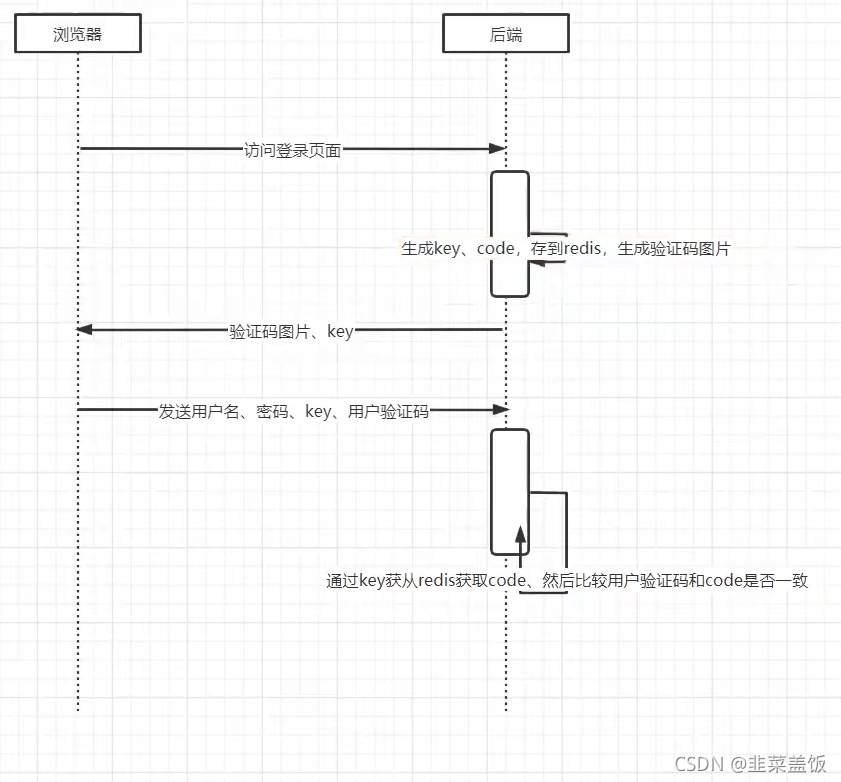
1、导入依赖
 <!--验证码        -->
        <dependency>
            <groupId>com.github.axet</groupId>
            <artifactId>kaptcha</artifactId>
            <version>0.0.9</version>
        </dependency>
2、配置验证码规则
package com.zzuli.config;

import com.google.code.kaptcha.impl.DefaultKaptcha;
import com.google.code.kaptcha.util.Config;
import org.springframework.context.annotation.Bean;
import org.springframework.context.annotation.Configuration;
import org.springframework.security.core.parameters.P;

import java.util.Properties;

/**
 * 验证码规则
 */
@Configuration
public class KaptchaConfig {

	@Bean
	DefaultKaptcha producer() {
		Properties properties = new Properties();
		properties.put("kaptcha.border", "no");
		properties.put("kaptcha.textproducer.font.color", "black");
		properties.put("kaptcha.textproducer.char.space", "4");
		properties.put("kaptcha.image.height", "40");
		properties.put("kaptcha.image.width", "120");
		properties.put("kaptcha.textproducer.font.size", "30");

		Config config = new Config(properties);
		DefaultKaptcha defaultKaptcha = new DefaultKaptcha();
		defaultKaptcha.setConfig(config);

		return defaultKaptcha;
	}

}
3、生成验证码接口
package com.zzuli.controller;

import cn.hutool.core.lang.UUID;
import cn.hutool.core.map.MapUtil;
import com.google.code.kaptcha.Producer;

import com.zzuli.common.Const;
import com.zzuli.common.api.CommonResult;
import com.zzuli.entity.SysUser;
import com.zzuli.utils.RedisUtil;
import org.springframework.beans.factory.annotation.Autowired;
import org.springframework.web.bind.annotation.GetMapping;
import org.springframework.web.bind.annotation.RestController;
import sun.misc.BASE64Encoder;

import javax.imageio.ImageIO;
import java.awt.image.BufferedImage;
import java.io.ByteArrayOutputStream;
import java.io.IOException;
import java.security.Principal;
import java.util.Map;

@RestController
public class AuthController {

	@Autowired
	Producer producer;

	@Autowired
	RedisUtil redisUtil;

	/**
	 * 生成验证码接口
	 * @return
	 * @throws IOException
	 */
	@GetMapping("/captcha")
	public CommonResult<Object> captcha() throws IOException {

		String key = UUID.randomUUID().toString();
		String code = producer.createText();

		// 为了测试
//		key = "aaaaa";
//		code = "11111";

		//转换为64位编码
		BufferedImage image = producer.createImage(code);
		ByteArrayOutputStream outputStream = new ByteArrayOutputStream();
		ImageIO.write(image, "jpg", outputStream);

		BASE64Encoder encoder = new BASE64Encoder();
		String str = "data:image/jpeg;base64,";

		String base64Img = str + encoder.encode(outputStream.toByteArray());

		//存入Redis中
		redisUtil.hset(Const.CAPTCHA_KEY, key, code, 120);

		return CommonResult.success(
				MapUtil.builder()
						.put("key", key)
						.put("captchaImg", base64Img)
						.build()
		);
	}

}
package com.zzuli.common;

/**
 * @author niuben
 */
public class Const {

    public final static String CAPTCHA_KEY = "captcha";

}
Redis的配置可以以下文章
https://blog.csdn.net/niulinbiao/article/details/120154429
4、测试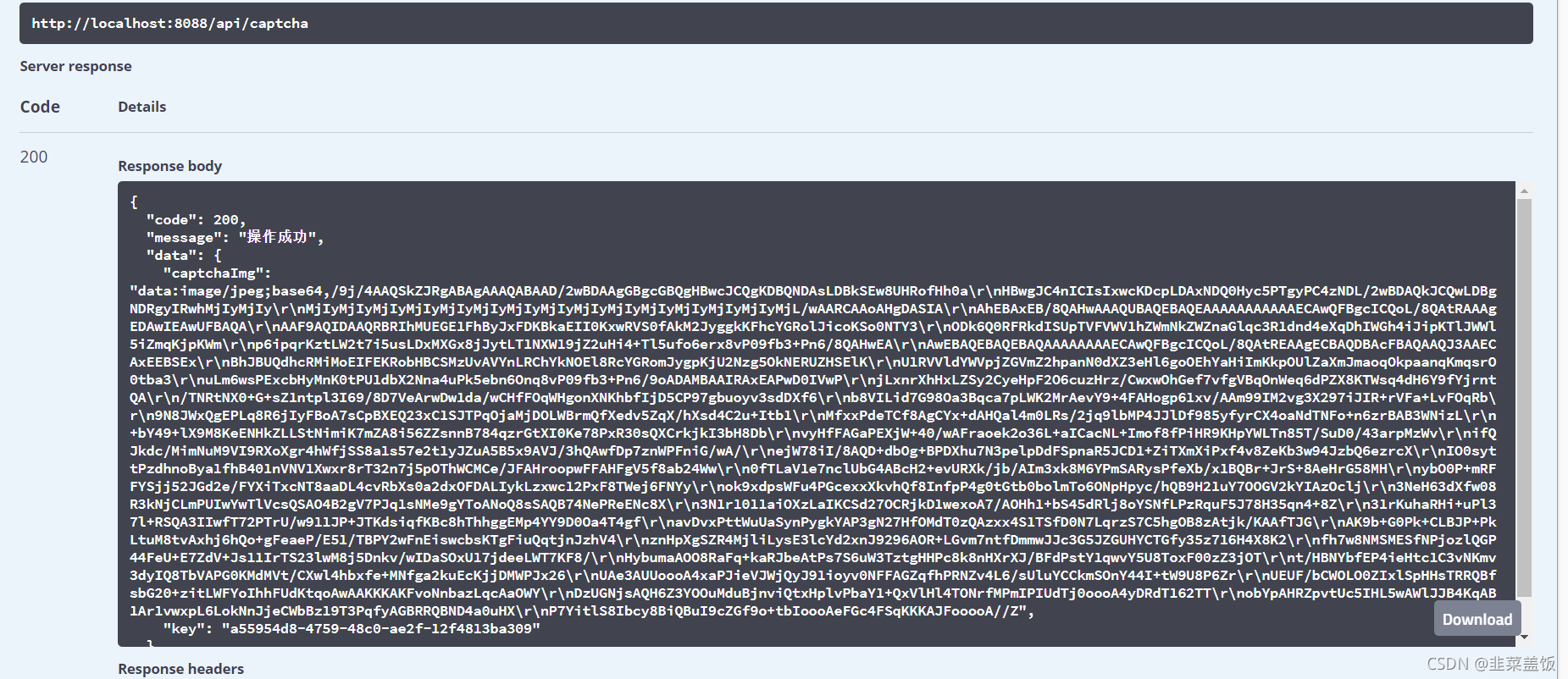
版权声明:本文为niulinbiao原创文章,遵循CC 4.0 BY-SA版权协议,转载请附上原文出处链接和本声明。