QT多线程+菜单栏+打包QT程序+其它组件
第一章 QT中的多线程 --》QThread
第一节 涉及到类和方法
回顾linux中的多线程: pthread_create(任务函数)
(1)构造函数
QThread::QThread(QObject *parent = nullptr)
(2)启动线程
void QThread::start()
(3)线程的任务函数
[virtual protected] void QThread::run()
QT中多线程的原理:程序员需要定义一个子类继承QThread,然后在子类中重写父类QThread的run()方法
因为父类QThread的run()方法代码是空的,什么事情都没有做
子类重写的run()方法就可以实现子类自己想要线程做的事情
当你调用start()启动一个线程,run()方法会被自动调用
(4)延时函数
[static]  void QThread::sleep(unsigned long secs)
参数: secs --》秒
(5)终止线程
void QThread::terminate()
(6)回收线程
bool QThread::wait()
第二节 QT工程中如何添加新的类
右键点击工程名–》选择add new–》选择C++,C++ class–》继承某个父类(比如:QMainWindow)–》后面可以修改源码继承QThread
第三节 QT中的菜单栏
(1)菜单栏注意点
第一:子菜单直接输入中文是无法输入
解决方法:可以复制中文粘贴,或者去ui界面正下方编辑框中修改
第二:设置快捷键 --》shortcut中设置
设置图标 --》图标中设置
第三章 windows打包QT工程
第一节 概论
作用:程序已经写好了,编译好了,对外发布
总共有两种版本:一种是debug版(打包出来的程序很大),【另外一种是release版(我们选择这个】)
编译的时候:在左下角长得像电脑的那个图标处选择Debug或者Release
第二节 具体步骤
第一步:选择release版然后编译好程序
第二步:使用QT安装路径E:\qt514Install\5.14.1\mingw73_64\bin下有个windeployqt.exe程序来自动添加需要的库文件
方法一:自己手动在DOS终端输入E:\qt514Install\5.14.1\mingw73_64\bin\windeployqt.exe 你编译好的.exe
方法二:写个.bat脚本,把E:\qt514Install\5.14.1\mingw73_64\bin\windeployqt.exe 你编译好的.exe放在脚本中,然后运行脚本
第三步:执行完第二步,会在编译好的.exe路径(build中的release文件夹)下自动添加了大量的动态库文件(运行你的.exe需要的动态库)
但是还有编译器需要的库(在QT安装路径中去搜查)是无法自动导入到当前路径的的,需要手动复制到.exe的路径下,主要是
libgcc_s_dw2-1.dll
libstdc+±6.dll
libwinpthread-1.dll
第四步:把.exe和所有的动态库放在一起就是打包好的程序,就能直接运行
第四章 其它常用组件介绍
第一节 单选框 QRadioButton
只能点击一个,互斥
第二节 复选框 QCheckBox
可以选择多个
3.下拉框 QComboBox
(1)添加列表项
void QComboBox::addItem(const QIcon &icon, const QString &text)
参数: icon --》你要添加的图标
text --》你要添加的文本内容
(2)获取当前你点击的列表项索引
int currentIndex() const
(3)删除列表项
void QComboBox::removeItem(int index)
参数:index --》你要删除的索引号
4.旋钮
属性:minnum maxnum设置旋钮的范围
5.进度条 QProgressBar
属性:minnum maxnum设置进度条值的范围
value 设置进度条目前的值
第五章 QT集成开发环境常见的bug
第一节 ui写代码的时候没有提示名称
ui->尴尬了,没有提示
解决方法:把程序编译一下,重新输入就有提示了
第二章 ui中明明已经拖了新的组件过来,但是编译的时候没有出现
解决方法:关闭工程,手动删除编译产生的临时文件,再重新打开QT工程,再次编译即可
第六章 以上内容代码实现
第一节 菜单栏代码
main.c
#include "mainwindow.h"

#include <QApplication>

int main(int argc, char *argv[])
{
    QApplication a(argc, argv);
    MainWindow w;
    w.show();
    return a.exec();
}
mainwindow.h
#ifndef MAINWINDOW_H
#define MAINWINDOW_H

#include <QMainWindow>

QT_BEGIN_NAMESPACE
namespace Ui { class MainWindow; }
QT_END_NAMESPACE

class MainWindow : public QMainWindow
{
    Q_OBJECT

public:
    MainWindow(QWidget *parent = nullptr);
    ~MainWindow();

private slots:
    void on_action_triggered();

    void on_actionxinchuangkou_triggered();

private:
    Ui::MainWindow *ui;
};
#endif // MAINWINDOW_H
mainwindow.cpp
#include "mainwindow.h"
#include "ui_mainwindow.h"
#include <QDebug>
MainWindow::MainWindow(QWidget *parent)
    : QMainWindow(parent)
    , ui(new Ui::MainWindow)
{
    ui->setupUi(this);
}

MainWindow::~MainWindow()
{
    delete ui;
}

//点击了新建子菜单
void MainWindow::on_action_triggered()
{
    qDebug()<<"你点击了新建";
}
//点击了新窗口
void MainWindow::on_actionxinchuangkou_triggered()
{
    qDebug()<<"你点击了新窗口";
}
mainwindow.ui
<?xml version="1.0" encoding="UTF-8"?>
<ui version="4.0">
 <class>MainWindow</class>
 <widget class="QMainWindow" name="MainWindow">
  <property name="geometry">
   <rect>
    <x>0</x>
    <y>0</y>
    <width>800</width>
    <height>600</height>
   </rect>
  </property>
  <property name="windowTitle">
   <string>MainWindow</string>
  </property>
  <widget class="QWidget" name="centralwidget"/>
  <widget class="QMenuBar" name="menubar">
   <property name="geometry">
    <rect>
     <x>0</x>
     <y>0</y>
     <width>800</width>
     <height>22</height>
    </rect>
   </property>
   <widget class="QMenu" name="menu">
    <property name="title">
     <string>文件</string>
    </property>
    <addaction name="action"/>
    <addaction name="actionxinchuangkou"/>
   </widget>
   <widget class="QMenu" name="menu_2">
    <property name="title">
     <string>编辑</string>
    </property>
   </widget>
   <addaction name="menu"/>
   <addaction name="menu_2"/>
  </widget>
  <widget class="QStatusBar" name="statusbar"/>
  <action name="action">
   <property name="icon">
    <iconset resource="image.qrc">
     <normaloff>:/new/prefix1/pic/mht.jpg</normaloff>:/new/prefix1/pic/mht.jpg</iconset>
   </property>
   <property name="text">
    <string>新建</string>
   </property>
   <property name="shortcut">
    <string>Ctrl+N</string>
   </property>
  </action>
  <action name="actionxinchuangkou">
   <property name="icon">
    <iconset resource="image.qrc">
     <normaloff>:/new/prefix1/pic/zjl.jpg</normaloff>:/new/prefix1/pic/zjl.jpg</iconset>
   </property>
   <property name="text">
    <string>新窗口</string>
   </property>
   <property name="shortcut">
    <string>Ctrl+Shift+T</string>
   </property>
  </action>
 </widget>
 <resources>
  <include location="image.qrc"/>
 </resources>
 <connections/>
</ui>
图片素材:

第二节 多线程实现标签上每隔一秒显示不同的图片
main.c
#include "mainwindow.h"

#include <QApplication>

int main(int argc, char *argv[])
{
    QApplication a(argc, argv);
    MainWindow w;
    w.show();
    return a.exec();
}
mainwindow.h
#ifndef MAINWINDOW_H
#define MAINWINDOW_H

#include <QMainWindow>
#include "mythread.h"
QT_BEGIN_NAMESPACE
namespace Ui { class MainWindow; }
QT_END_NAMESPACE

class MainWindow : public QMainWindow
{
    Q_OBJECT

public:
    MainWindow(QWidget *parent = nullptr);
    ~MainWindow();

private slots:
    void on_openbt_clicked();

    void on_closebt_clicked();

private:
    Ui::MainWindow *ui;
    mythread *thread;
 };
#endif // MAINWINDOW_H
mainwindow.cpp
#include "mainwindow.h"
#include "ui_mainwindow.h"

MainWindow::MainWindow(QWidget *parent)
    : QMainWindow(parent)
    , ui(new Ui::MainWindow)
{
    ui->setupUi(this);
    thread=new mythread(this); //初始化线程对象
    //把主界面的标签当成参数传递给自定义的线程类
    thread->getLabel(ui->label);
}

MainWindow::~MainWindow()
{
    delete ui;
}

//开启线程
void MainWindow::on_openbt_clicked()
{
    thread->start();  //开启一个线程,线程自动帮我执行run
}
//终止线程
void MainWindow::on_closebt_clicked()
{
    thread->terminate();
}
mainwindow.ui
<?xml version="1.0" encoding="UTF-8"?>
<ui version="4.0">
 <class>MainWindow</class>
 <widget class="QMainWindow" name="MainWindow">
  <property name="geometry">
   <rect>
    <x>0</x>
    <y>0</y>
    <width>800</width>
    <height>600</height>
   </rect>
  </property>
  <property name="windowTitle">
   <string>MainWindow</string>
  </property>
  <widget class="QWidget" name="centralwidget">
   <widget class="QPushButton" name="openbt">
    <property name="geometry">
     <rect>
      <x>10</x>
      <y>10</y>
      <width>291</width>
      <height>131</height>
     </rect>
    </property>
    <property name="text">
     <string>开启线程</string>
    </property>
   </widget>
   <widget class="QPushButton" name="closebt">
    <property name="geometry">
     <rect>
      <x>10</x>
      <y>170</y>
      <width>291</width>
      <height>131</height>
     </rect>
    </property>
    <property name="text">
     <string>终止线程</string>
    </property>
   </widget>
   <widget class="QLabel" name="label">
    <property name="geometry">
     <rect>
      <x>310</x>
      <y>10</y>
      <width>481</width>
      <height>501</height>
     </rect>
    </property>
    <property name="styleSheet">
     <string notr="true">background-color: rgb(255, 0, 127);</string>
    </property>
    <property name="text">
     <string/>
    </property>
   </widget>
  </widget>
  <widget class="QMenuBar" name="menubar">
   <property name="geometry">
    <rect>
     <x>0</x>
     <y>0</y>
     <width>800</width>
     <height>22</height>
    </rect>
   </property>
  </widget>
  <widget class="QStatusBar" name="statusbar"/>
 </widget>
 <resources/>
 <connections/>
</ui>
ui图片设计展示: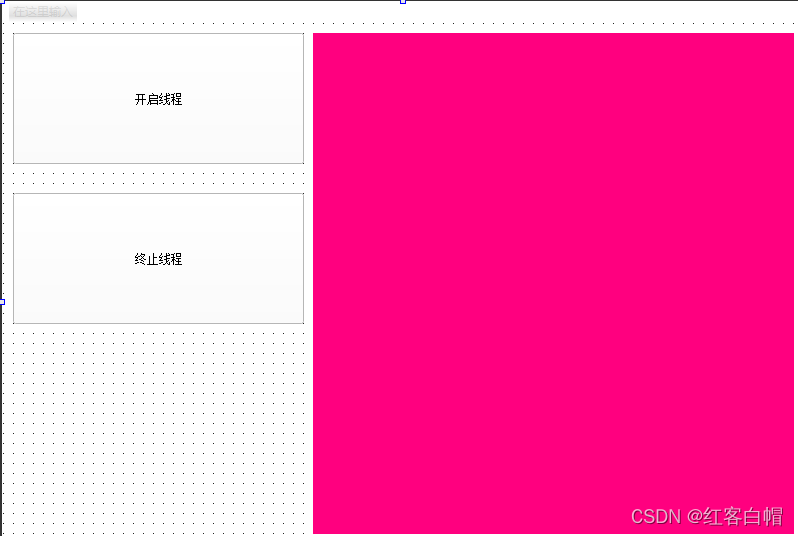
mythread.cpp
#include "mythread.h"
#include <QDebug>
mythread::mythread(QWidget *parent) : QThread(parent)
{
    //在构造函数中添加所有你要显示的图片
    piclist.append("C:/Users/Administrator/Desktop/share/pic/1.jpg");
     piclist.append("C:/Users/Administrator/Desktop/share/pic/2.jpg");
      piclist.append("C:/Users/Administrator/Desktop/share/pic/3.jpg");
       piclist.append("C:/Users/Administrator/Desktop/share/pic/4.jpg");
        piclist.append("C:/Users/Administrator/Desktop/share/pic/5.jpg");
         piclist.append("C:/Users/Administrator/Desktop/share/pic/6.jpg");
          piclist.append("C:/Users/Administrator/Desktop/share/pic/7.jpg");
}

void mythread::run()
{
    int n=0;
    while(1)
    {
        QPixmap mymap(piclist.at(n));
        mymap.scaled(mylb->width(),mylb->height());
        mylb->setScaledContents(true);
        mylb->setPixmap(mymap);
        if(n<6)
             n++;
        else
             n=0;
        QThread::sleep(1);
    }
}
//获取主界面传递过来的参数
void mythread::getLabel(QLabel *lb)
{
    mylb=lb;
}
mythread.h
#ifndef MYTHREAD_H
#define MYTHREAD_H

#include <QThread>
#include <QWidget>
#include <QLabel>
class mythread : public QThread
{
    Q_OBJECT
public:
    explicit mythread(QWidget *parent = nullptr);
    //重写父类的run方法
    void run();
    //定义一个公有方法接收传递过来的参数--》标签
    void getLabel(QLabel *lb);
signals:

private:
    QLabel *mylb; //保存传递过来的标签
    QStringList piclist;

};

#endif // MYTHREAD_H
第三节 多线程实现循环打印helloworld
main.c
#include "mainwindow.h"

#include <QApplication>

int main(int argc, char *argv[])
{
    QApplication a(argc, argv);
    MainWindow w;
    w.show();
    return a.exec();
}
mainwindow.h
#ifndef MAINWINDOW_H
#define MAINWINDOW_H

#include <QMainWindow>
#include "mythread.h"
QT_BEGIN_NAMESPACE
namespace Ui { class MainWindow; }
QT_END_NAMESPACE

class MainWindow : public QMainWindow
{
    Q_OBJECT

public:
    MainWindow(QWidget *parent = nullptr);
    ~MainWindow();

private slots:
    void on_openbt_clicked();

    void on_closebt_clicked();

private:
    Ui::MainWindow *ui;
    mythread *thread;
 };
#endif // MAINWINDOW_H
mainwindow.cpp
#include "mainwindow.h"
#include "ui_mainwindow.h"

MainWindow::MainWindow(QWidget *parent)
    : QMainWindow(parent)
    , ui(new Ui::MainWindow)
{
    ui->setupUi(this);
    thread=new mythread(this); //初始化线程对象
}

MainWindow::~MainWindow()
{
    delete ui;
}

//开启线程
void MainWindow::on_openbt_clicked()
{
    thread->start();  //开启一个线程,线程自动帮我执行run
}
//终止线程
void MainWindow::on_closebt_clicked()
{
    thread->terminate();
}
mainwindow.ui
<?xml version="1.0" encoding="UTF-8"?>
<ui version="4.0">
 <class>MainWindow</class>
 <widget class="QMainWindow" name="MainWindow">
  <property name="geometry">
   <rect>
    <x>0</x>
    <y>0</y>
    <width>800</width>
    <height>600</height>
   </rect>
  </property>
  <property name="windowTitle">
   <string>MainWindow</string>
  </property>
  <widget class="QWidget" name="centralwidget">
   <widget class="QPushButton" name="openbt">
    <property name="geometry">
     <rect>
      <x>160</x>
      <y>70</y>
      <width>291</width>
      <height>131</height>
     </rect>
    </property>
    <property name="text">
     <string>开启线程</string>
    </property>
   </widget>
   <widget class="QPushButton" name="closebt">
    <property name="geometry">
     <rect>
      <x>160</x>
      <y>340</y>
      <width>291</width>
      <height>131</height>
     </rect>
    </property>
    <property name="text">
     <string>终止线程</string>
    </property>
   </widget>
  </widget>
  <widget class="QMenuBar" name="menubar">
   <property name="geometry">
    <rect>
     <x>0</x>
     <y>0</y>
     <width>800</width>
     <height>22</height>
    </rect>
   </property>
  </widget>
  <widget class="QStatusBar" name="statusbar"/>
 </widget>
 <resources/>
 <connections/>
</ui>
ui界面设计: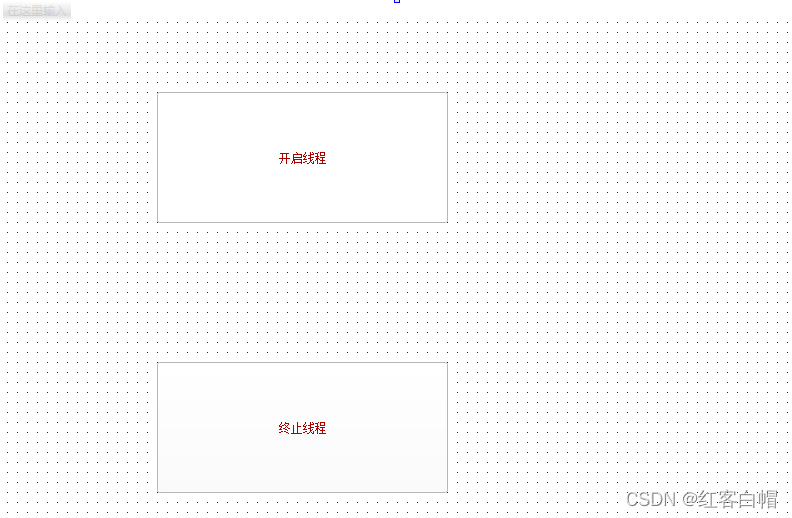
mythread.h
#ifndef MYTHREAD_H
#define MYTHREAD_H

#include <QThread>
#include <QWidget>

class mythread : public QThread
{
    Q_OBJECT
public:
    explicit mythread(QWidget *parent = nullptr);
    //重写父类的run方法
    void run();
signals:

};

#endif // MYTHREAD_H
mythread.cpp
#include "mythread.h"
#include <QDebug>
mythread::mythread(QWidget *parent) : QThread(parent)
{

}

void mythread::run()
{
    while(1)
    {
        qDebug()<<"hello world";
        QThread::sleep(1);
    }
}
第四节 常用的组件
main.c
#include "mainwindow.h"

#include <QApplication>

int main(int argc, char *argv[])
{
    QApplication a(argc, argv);
    MainWindow w;
    w.show();
    return a.exec();
}
mainwindow.h
#ifndef MAINWINDOW_H
#define MAINWINDOW_H

#include <QMainWindow>

QT_BEGIN_NAMESPACE
namespace Ui { class MainWindow; }
QT_END_NAMESPACE

class MainWindow : public QMainWindow
{
    Q_OBJECT

public:
    MainWindow(QWidget *parent = nullptr);
    ~MainWindow();

private slots:
    void on_radioButton_clicked();

    void on_checkBox_clicked();

    void on_comboBox_activated(const QString &arg1);

    void on_fontComboBox_currentFontChanged(const QFont &f);

    void on_spinBox_valueChanged(const QString &arg1);

    void on_timeEdit_userTimeChanged(const QTime &time);

    void on_dial_sliderMoved(int position);

    void on_horizontalScrollBar_sliderMoved(int position);

    void on_calendarWidget_clicked(const QDate &date);


    void on_horizontalSlider_sliderMoved(int position);

private:
    Ui::MainWindow *ui;
};
#endif // MAINWINDOW_H
mainwindow.cpp
#include "mainwindow.h"
#include "ui_mainwindow.h"
#include <QDebug>
#include <QIcon>
MainWindow::MainWindow(QWidget *parent)
    : QMainWindow(parent)
    , ui(new Ui::MainWindow)
{
    ui->setupUi(this);
    //往下拉框中添加列表项
    ui->comboBox->addItem(QIcon("C:/Users/Administrator/Desktop/share/pic/mht.jpg"),"王健林");
    ui->textEdit->setText("我爱中国");
    ui->plainTextEdit->setPlainText("我是中国人");
}

MainWindow::~MainWindow()
{
    delete ui;
}

//单选框,点击男的
void MainWindow::on_radioButton_clicked()
{
    qDebug()<<"点击了男的";
}
 //复选框
void MainWindow::on_checkBox_clicked()
{
    qDebug()<<"点击了长得帅";
}
//你点击了下拉框中的某个列表项
void MainWindow::on_comboBox_activated(const QString &arg1)
{
    qDebug()<<"你点击的下拉框内容是: "<<arg1;
    //删除你点击的列表项
    int n=ui->comboBox->currentIndex();
    ui->comboBox->removeItem(n);
}
//字体下拉框
void MainWindow::on_fontComboBox_currentFontChanged(const QFont &f)
{
    qDebug()<<"你选择的字体是:  "<<f.family();
}
//spinBox数字调节
void MainWindow::on_spinBox_valueChanged(const QString &arg1)
{
    qDebug()<<"现在的数字是:  "<<arg1;
}
//时间调节
void MainWindow::on_timeEdit_userTimeChanged(const QTime &time)
{
    qDebug()<<"现在的时间是:   "<<time.toString("hh:mm:ss");
}
//旋钮转动
void MainWindow::on_dial_sliderMoved(int position)
{
    qDebug()<<position;
}
//水平滑动条
void MainWindow::on_horizontalScrollBar_sliderMoved(int position)
{
    qDebug()<<"滑动位置是:  "<<position;
}
//日历显示
void MainWindow::on_calendarWidget_clicked(const QDate &date)
{
    qDebug()<<"你选择日期是:  "<<date.toString("yyyy-MM-dd");
}
//滑动水平条的时候,进度条跟着一起变动
void MainWindow::on_horizontalSlider_sliderMoved(int position)
{
    //同步设置进度条的值
    ui->progressBar->setValue(position);
}
mainwindow.ui
<?xml version="1.0" encoding="UTF-8"?>
<ui version="4.0">
<class>MainWindow</class>
<widget class="QMainWindow" name="MainWindow">
<property name="geometry">
<rect>
<x>0</x>
<y>0</y>
<width>1500</width>
<height>757</height>
</rect>
</property>
<property name="windowTitle">
<string>MainWindow</string>
</property>
<widget class="QWidget" name="centralwidget">
<widget class="QToolButton" name="toolButton">
<property name="geometry">
<rect>
<x>50</x>
<y>40</y>
<width>91</width>
<height>51</height>
</rect>
</property>
<property name="text">
<string>登录</string>
</property>
</widget>
<widget class="QRadioButton" name="radioButton">
<property name="geometry">
<rect>
<x>200</x>
<y>130</y>
<width>89</width>
<height>16</height>
</rect>
</property>
<property name="text">
<string>男</string>
</property>
</widget>
<widget class="QCheckBox" name="checkBox">
<property name="geometry">
<rect>
<x>80</x>
<y>220</y>
<width>201</width>
<height>51</height>
</rect>
</property>
<property name="text">
<string>长得帅</string>
</property>
</widget>
<widget class="QRadioButton" name="radioButton_2">
<property name="geometry">
<rect>
<x>200</x>
<y>170</y>
<width>89</width>
<height>16</height>
</rect>
</property>
<property name="text">
<string>女</string>
</property>
</widget>
<widget class="QCheckBox" name="checkBox_2">
<property name="geometry">
<rect>
<x>80</x>
<y>280</y>
<width>201</width>
<height>51</height>
</rect>
</property>
<property name="text">
<string>有房有车</string>
</property>
</widget>
<widget class="QCheckBox" name="checkBox_3">
<property name="geometry">
<rect>
<x>80</x>
<y>340</y>
<width>201</width>
<height>51</height>
</rect>
</property>
<property name="text">
<string>有存款>=500万</string>
</property>
</widget>
<widget class="QCheckBox" name="checkBox_4">
<property name="geometry">
<rect>
<x>80</x>
<y>410</y>
<width>201</width>
<height>51</height>
</rect>
</property>
<property name="text">
<string>独生子</string>
</property>
</widget>
<widget class="QCommandLinkButton" name="commandLinkButton">
<property name="geometry">
<rect>
<x>310</x>
<y>40</y>
<width>172</width>
<height>41</height>
</rect>
</property>
<property name="text">
<string>命令按钮</string>
</property>
</widget>
<widget class="QDialogButtonBox" name="buttonBox">
<property name="geometry">
<rect>
<x>310</x>
<y>100</y>
<width>156</width>
<height>23</height>
</rect>
</property>
<property name="standardButtons">
<set>QDialogButtonBox::Cancel|QDialogButtonBox::Ok</set>
</property>
</widget>
<widget class="QComboBox" name="comboBox">
<property name="geometry">
<rect>
<x>300</x>
<y>170</y>
<width>281</width>
<height>41</height>
</rect>
</property>
<item>
<property name="text">
<string>周杰伦</string>
</property>
</item>
<item>
<property name="text">
<string>马化腾</string>
</property>
</item>
</widget>
<widget class="QFontComboBox" name="fontComboBox">
<property name="geometry">
<rect>
<x>300</x>
<y>240</y>
<width>213</width>
<height>22</height>
</rect>
</property>
</widget>
<widget class="QPlainTextEdit" name="plainTextEdit">
<property name="geometry">
<rect>
<x>270</x>
<y>330</y>
<width>104</width>
<height>71</height>
</rect>
</property>
</widget>
<widget class="QTextEdit" name="textEdit">
<property name="geometry">
<rect>
<x>430</x>
<y>330</y>
<width>104</width>
<height>71</height>
</rect>
</property>
</widget>
<widget class="QSpinBox" name="spinBox">
<property name="geometry">
<rect>
<x>640</x>
<y>40</y>
<width>91</width>
<height>51</height>
</rect>
</property>
</widget>
<widget class="QDoubleSpinBox" name="doubleSpinBox">
<property name="geometry">
<rect>
<x>640</x>
<y>130</y>
<width>111</width>
<height>51</height>
</rect>
</property>
</widget>
<widget class="QTimeEdit" name="timeEdit">
<property name="geometry">
<rect>
<x>640</x>
<y>230</y>
<width>118</width>
<height>21</height>
</rect>
</property>
</widget>
<widget class="QDateEdit" name="dateEdit">
<property name="geometry">
<rect>
<x>640</x>
<y>300</y>
<width>110</width>
<height>22</height>
</rect>
</property>
</widget>
<widget class="QDial" name="dial">
<property name="geometry">
<rect>
<x>630</x>
<y>410</y>
<width>111</width>
<height>101</height>
</rect>
</property>
</widget>
<widget class="QDateTimeEdit" name="dateTimeEdit">
<property name="geometry">
<rect>
<x>600</x>
<y>350</y>
<width>194</width>
<height>22</height>
</rect>
</property>
</widget>
<widget class="QScrollBar" name="horizontalScrollBar">
<property name="geometry">
<rect>
<x>290</x>
<y>430</y>
<width>160</width>
<height>16</height>
</rect>
</property>
<property name="orientation">
<enum>Qt::Horizontal</enum>
</property>
</widget>
<widget class="QScrollBar" name="verticalScrollBar">
<property name="geometry">
<rect>
<x>570</x>
<y>360</y>
<width>16</width>
<height>160</height>
</rect>
</property>
<property name="orientation">
<enum>Qt::Vertical</enum>
</property>
</widget>
<widget class="QSlider" name="horizontalSlider">
<property name="geometry">
<rect>
<x>840</x>
<y>340</y>
<width>231</width>
<height>21</height>
</rect>
</property>
<property name="maximum">
<number>100</number>
</property>
<property name="orientation">
<enum>Qt::Horizontal</enum>
</property>
</widget>
<widget class="QCalendarWidget" name="calendarWidget">
<property name="geometry">
<rect>
<x>850</x>
<y>40</y>
<width>248</width>
<height>183</height>
</rect>
</property>
</widget>
<widget class="QProgressBar" name="progressBar">
<property name="geometry">
<rect>
<x>840</x>
<y>290</y>
<width>261</width>
<height>21</height>
</rect>
</property>
<property name="value">
<number>0</number>
</property>
</widget>
<widget class="Line" name="line">
<property name="geometry">
<rect>
<x>260</x>
<y>510</y>
<width>118</width>
<height>16</height>
</rect>
</property>
<property name="orientation">
<enum>Qt::Horizontal</enum>
</property>
</widget>
<widget class="Line" name="line_2">
<property name="geometry">
<rect>
<x>583</x>
<y>10</y>
<width>20</width>
<height>581</height>
</rect>
</property>
<property name="orientation">
<enum>Qt::Vertical</enum>
</property>
</widget>
</widget>
<widget class="QMenuBar" name="menubar">
<property name="geometry">
<rect>
<x>0</x>
<y>0</y>
<width>1500</width>
<height>22</height>
</rect>
</property>
</widget>
<widget class="QStatusBar" name="statusbar"/>
</widget>
<resources/>
<connections/>
</ui>
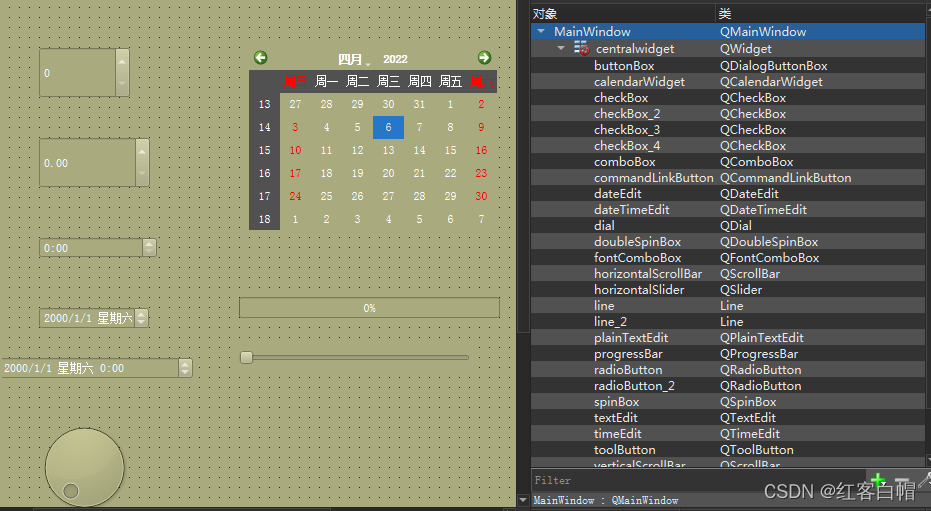
ui界面设计:图片过长,第一章为左半边,第二章为右半边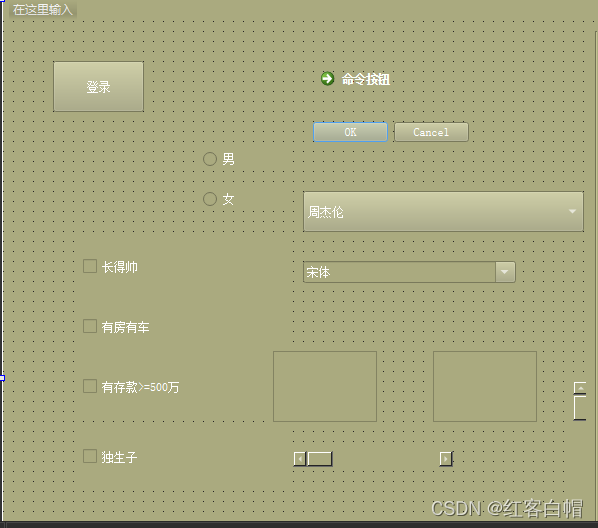
第五节 打包脚本.bat
