初识
- 使用vue/cli搭建的项目可以在vue.config.js中,模拟一个后台(express写法)
- vue.config.js
configureWebpack: {
    devServer: {
        // 模拟后台服务器 express写法
        before(app) {
            app.get('/api/login', function(req, res) {
                const { username, passwd } = req.query;
                console.log(username, passwd);

                if (username === 'admin' && passwd === '123456') {
                    res.json({ code: 1, token: '奇怪的栗子' });
                } else {
                    res
                        .status(401)
                        .json({ code: 0, message: '用户名或密码错误' });
                }
            });
        }
    }
}
前端请求.
- 准备 /src/service/user.js
- 对用户接口进行管理
import axios from 'axios';

export default {
    login(user) {
        return axios.get('/api/login', { params: user })
    }
}
- store.js
import Vue from 'vue'
import Vuex from 'vuex'
import us from './service/user';

Vue.use(Vuex)

export default new Vuex.Store({
    state: {
        isLogin: false
    },
    mutations: {
        setLoginState(state, b) {
            state.isLogin = b;
        }
    },
    actions: {
        login({ commit }, user) {
            // 登录请求
            return us.login(user).then(res => {
                const { code, token } = res.data;
                if (code) {
                    // 登录成功
                    commit('setLoginState', true);
                    localStorage.setItem('token', token);
                }
                return code;
            })
        }
    },
    modules: {}
})
登录组件
- login.vue
- 在其方法里面写(vue 2.x)
 methods: {
    handleLogin(e) {
      // 组织表单的默认提交行为
      e.preventDefault();

      // 登录请求
      this.$store.dispatch('login', this.model)
        .then(code => {
          if (code) {
            // 登录成功,重定向
            const path = this.$route.query.redirect || '/';
            this.$router.push(path);
          }
        })
        .catch(error => {
          // 有错误发生或者登录失败
          const toast = this.$createToast({
            time: 2000,
            txt: error.message || error.response.data.message || '登录失败',
            type: 'error'
          });
          toast.show();
        })
    },
  }
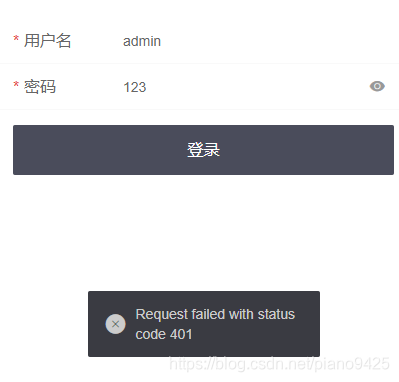
- 故意输入错误的
- 输入正确则跳转
版权声明:本文为piano9425原创文章,遵循CC 4.0 BY-SA版权协议,转载请附上原文出处链接和本声明。