在阿里云购买了一台服务器,并安装了Ubuntu20.04后,使用ssh 远程登录时,报错"server responded "algorithm negotiation failed”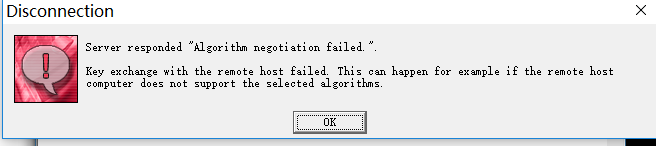
看了网上的解决方法都是在 /etc/ssh/sshd_config 中添加对应一些加密算法,再重启ssh服务。
这方法我信了,结果ssh直接挂了,,,结果阿里云自带的远程都没法连接服务器了,幸好有快照可以恢复、
挂掉的原因是添加的算法中,不是所有算法都可以支持!!(可能是版本问题导致)
使用 sshd -T 可以查看sshd_config配置文件(/etc/ssh/sshd_config)是否配置错误。
Bad SSH2 cipher spec '...'
Bad SSH2 mac spec '...'
Bad SSH2 KexAlgorithms '...'
解决方法:
可以查询当前被支持的加密方法:
ssh -Q cipher
ssh -Q mac
ssh -Q kex
最好是直接使用命令直接将查询结果串接并写入配置文件:
echo 'Ciphers' `ssh -Q cipher | paste -d, -s` >> /etc/ssh/sshd_config
echo 'MACs' `ssh -Q mac | paste -d, -s` >> /etc/ssh/sshd_config
echo 'KexAlgorithms' `ssh -Q kex | paste -d, -s` >> /etc/ssh/sshd_config
写入完成后再重启ssh 服务,查看状态是正常的,使用远程工具也可连接上。
service ssh restart
service ssh status
版权声明:本文为yangjjuan原创文章,遵循CC 4.0 BY-SA版权协议,转载请附上原文出处链接和本声明。