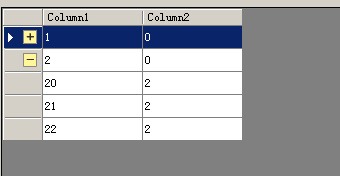
private void Form1_Load(object sender, EventArgs e)
ht = new Hashtable();
ht.Add(1, true);
ht.Add(2, true);//父节点1,2处于展开状态
//添加测试行
dataGridView1.Rows.Add(10, 1);
dataGridView1.Rows.Add(11, 1);
dataGridView1.Rows.Add(12, 1);
dataGridView1.Rows.Add(2, 0);
dataGridView1.Rows.Add(20, 2);
dataGridView1.Rows.Add(21, 2);
dataGridView1.Rows.Add(22, 2);
}
Hashtable ht;//存储父节点状态
private void dataGridView1_RowPostPaint(object sender, DataGridViewRowPostPaintEventArgs e)
{
if ((int)dataGridView1.Rows[e.RowIndex].Cells[1].Value == 0)//当前行为父节点时绘制图标
{
Rectangle rectangle = new Rectangle(e.RowBounds.Location.X + dataGridView1.RowHeadersWidth - 20,
e.RowBounds.Location.Y + 4, 14, 14);
Image img = (bool)ht[(int)dataGridView1.Rows[e.RowIndex].Cells[0].Value]
? Properties.Resources.minus : Properties.Resources.plus;
e.Graphics.DrawImage(img, rectangle);
}
else
{
dataGridView1.Rows[e.RowIndex].Visible = (bool)ht[(int)dataGridView1.Rows[e.RowIndex].Cells[1].Value];
}
}
private void dataGridView1_RowHeaderMouseClick(object sender, DataGridViewCellMouseEventArgs e)
{
int id = (int)dataGridView1.Rows[e.RowIndex].Cells[0].Value;
int parent = (int)dataGridView1.Rows[e.RowIndex].Cells[1].Value;
if (parent == 0)
{
ht[id] = !(bool)ht[id];
//重绘之前要显示所有行,否则隐藏行不会再绘制
foreach (DataGridViewRow gr in dataGridView1.Rows)
{
if (!gr.Visible) gr.Visible = true;
}
dataGridView1.Refresh();
}
}
版权声明:本文为jeremychin原创文章,遵循CC 4.0 BY-SA版权协议,转载请附上原文出处链接和本声明。