一、shiro授权角色、权限
思路:
给用户授予角色
给用户授予权限
做法:
1、拿到账号
2、通过用户账号查询对应的能够看到的那些菜单
3、将这些权限交给shiro管理
授予角色做法:
1、拿到账号
2、通过用户账号查询对应的能够看到的那些角色
3、将这些权限交给shiro管理
mapper.xml
Mapper.java
Service.java
Mapper.xml
 <!--添加通过账号查询用户信息-->
  <select id="queryByName" resultType="com.dhm.model.ShiroUser" parameterType="java.lang.String" >
    select
    <include refid="Base_Column_List" />
    from t_shiro_user
    where username = #{userName}
  </select>

  <select id="getRolesByUserId" resultType="java.lang.String" parameterType="java.lang.Integer">
    select r.roleid from t_shiro_user u,t_shiro_user_role ur,t_shiro_role r
    where u.userid = ur.userid and ur.roleid = r.roleid
      and u.userid = #{userid}
  </select>
  <select id="getPersByUserId" resultType="java.lang.String" parameterType="java.lang.Integer">
    select p.permission from t_shiro_user u,t_shiro_user_role ur,t_shiro_role_permission rp,t_shiro_permission p
    where u.userid = ur.userid and ur.roleid = rp.roleid and rp.perid = p.perid
      and u.userid = #{userid}
  </select>
ShiroUserMapper.java / Service层
public Set<String> getRolesByUserId(@Param("userId") Integer userId);

public Set<String> getPersByUserId(@Param("userId") Integer userId);
imp层实现方法
重写自定义realm中的授权方法
@Override
    protected AuthenticationInfo doGetAuthenticationInfo(AuthenticationToken token) throws AuthenticationException {
        System.out.println("身份认证...");
        //token就是controller中的Login请求,subject.login(token)
        String username = token.getPrincipal().toString();
        String password = token.getCredentials().toString();
        ShiroUser user = shiroUserService.queryByName(username);
//        拿到数据库中的用户信息,放入token凭证中,用于controler进行对比
        AuthenticationInfo info = new SimpleAuthenticationInfo(
                user.getUsername(),
                user.getPassword(),
                ByteSource.Util.bytes(user.getSalt()),
                this.getName()
        );
        return info;
    }
二、注解式开发
常用注解介绍
@RequiresAuthenthentication:表示当前Subject已经通过login进行身份验证;即 Subject.isAuthenticated()返回 true
@RequiresUser:表示当前Subject已经身份验证或者通过记住我登录的
@RequiresGuest:表示当前Subject没有身份验证或者通过记住我登录过,即是游客身份
@RequiresRoles(value = {"admin","user"},logical = Logical.AND):表示当前Subject需要角色admin和user
@RequiresPermissions(value = {"user:delete","user:b"},logical = Logical.OR):表示当前Subject需要权限user:delete或者user:b
注解的使用
AnnotationController
package com.dhm.Controller;

import org.apache.shiro.authz.annotation.Logical;
import org.apache.shiro.authz.annotation.RequiresPermissions;
import org.apache.shiro.authz.annotation.RequiresRoles;
import org.apache.shiro.authz.annotation.RequiresUser;
import org.springframework.stereotype.Controller;
import org.springframework.web.bind.annotation.RequestMapping;

import javax.servlet.http.HttpServletRequest;
@Controller
//需要被Spring-mvc接管
public class AnnotationController {
//    必须登录才能访问
    @RequiresUser
    @RequestMapping("/passUser")
    public String passUser(HttpServletRequest request){
        return "admin/addUser";
    }
//拥有xxx角色才能访问
    @RequiresRoles(value = {"1","4"},logical = Logical.AND)
    @RequestMapping("/passRole")
    public String passRole(HttpServletRequest request){
        return "admin/listUser";
    }
//拥有xxx权限才能访问
    @RequiresPermissions(value = {"user:update","user:view"},logical = Logical.OR)
    @RequestMapping("/passPer")
    public String passPer(HttpServletRequest request){
        return "admin/resetPwd";
    }

    @RequestMapping("/unauthorized")
    public String unauthorized(){
        return "unauthorized";
    }
}
Spring-mvc.xml
<bean id="exceptionResolver" class="org.springframework.web.servlet.handler.SimpleMappingExceptionResolver">
    <property name="exceptionMappings">
        <props>
            <prop key="org.apache.shiro.authz.UnauthorizedException">
                unauthorized
            </prop>
        </props>
    </property>
    <property name="defaultErrorView" value="unauthorized"/>
</bean>
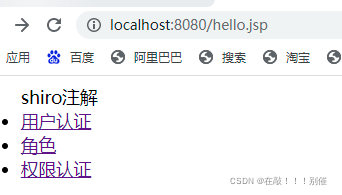
测试
<%--
  Created by IntelliJ IDEA.
  User: zjjt
  Date: 2021/12/25
  Time: 15:51
  To change this template use File | Settings | File Templates.
--%>
<%@ page contentType="text/html;charset=UTF-8" language="java" %>
<html>
<head>
    <title>Title</title>
</head>
<body>
<ul>
    shiro注解
    <li>
        <a href="${pageContext.request.contextPath}/passUser">用户认证</a>
    </li>
    <li>
        <a href="${pageContext.request.contextPath}/passRole">角色</a>
    </li>
    <li>
        <a href="${pageContext.request.contextPath}/passPer">权限认证</a>
    </li>
</ul>
</body>
</html>
预测结果
zs只能查看身份认证的按钮内容
ls、ww可以看权限认证按钮内容
zdm可以看所有按钮的内容
登录访问
---------------------------没有了-----------------------------------
版权声明:本文为m0_60385807原创文章,遵循CC 4.0 BY-SA版权协议,转载请附上原文出处链接和本声明。