本文实例为大家分享了Android表格布局TableLayout的具体代码,供大家参考,具体内容如下
1.TableLayout
TableLayout表格布局模型以行列的形式管理子控件,每一行为一个TableRow的对象, 当然也可以使一个View的对象
2.TableLayout的属性(全局属性)
android:collapseColumns=”1,2”
隐藏从0开始的索引列,列之间必须用逗号隔开1,2
android:shrinkColumns=”1,2”
收缩从0开始的索引列,当可收缩的列太宽(内容太多时)不会被挤出屏幕,列之间
用逗号隔开1,2,你可以通过”*”代替收缩所有列,注意一列能同时表示收缩和拉伸
android:stretchColumns=”1,2”
拉伸从0开始的索引列,以填满剩下的多余空白空间,列之间必须用逗号隔开,1,2,
你可以通过”*”代替收缩所有列,注意一列能同时表示收缩和拉伸
3.TableLayout的局部属性(内部控件所用属性)
android:layout_column=”1” 该控件显示在第1列
android:layout_span=”2” 该控件占据两列
android:layout_width="match_parent" android:layout_height="match_parent"
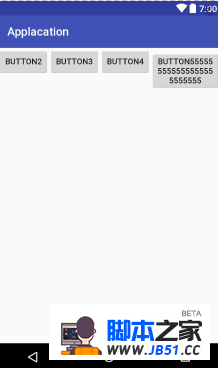
android:collapseColumns="0"
android:shrinkColumns="4">
android:id="@+id/tablerow1"
android:layout_width="wrap_content"
android:layout_height="wrap_content" >
android:id="@+id/button4"
android:layout_width="wrap_content"
android:layout_height="wrap_content"
android:text="Button1" />
android:id="@+id/button5"
android:layout_width="wrap_content"
android:layout_height="wrap_content"
android:text="Button2" />
android:id="@+id/button6"
android:layout_width="wrap_content"
android:layout_height="wrap_content"
android:text="Button3" />
android:id="@+id/button7"
android:layout_width="wrap_content"
android:layout_height="wrap_content"
android:text="Button4" />
android:id="@+id/button8"
android:layout_width="wrap_content"
android:layout_height="wrap_content"
android:text="Button555555555555555555555555" />
android:layout_width="match_parent"
android:layout_height="match_parent"
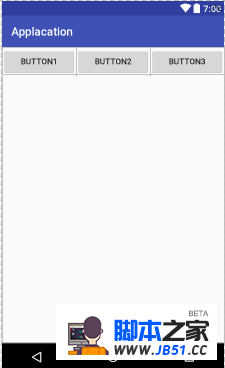
android:stretchColumns="*">
android:id="@+id/tablerow1"
android:layout_width="match_parent"
android:layout_height="match_parent">
android:id="@+id/button4"
android:layout_width="wrap_content"
android:layout_height="wrap_content"
android:text="Button1" />
android:id="@+id/button5"
android:layout_width="wrap_content"
android:layout_height="wrap_content"
android:text="Button2" />
android:id="@+id/button6"
android:layout_width="wrap_content"
android:layout_height="wrap_content"
android:text="Button3" />
以上就是本文的全部内容,希望对大家的学习有所帮助,也希望大家多多支持编程小技巧。
总结
如果觉得编程之家网站内容还不错,欢迎将编程之家网站推荐给程序员好友。
本图文内容来源于网友网络收集整理提供,作为学习参考使用,版权属于原作者。
小编个人微信号 jb51ccc
喜欢与人分享编程技术与工作经验,欢迎加入编程之家官方交流群!