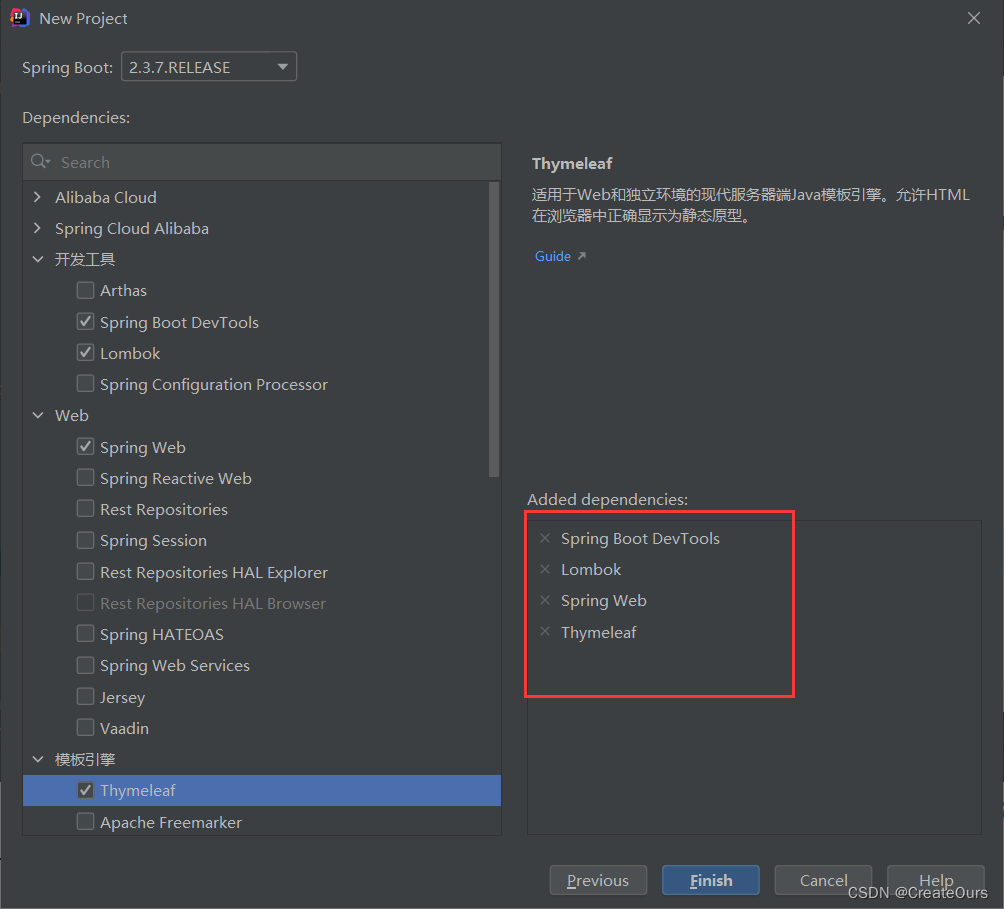
1.创建项目选择基本的骨架(thymeleaf,spring-web)
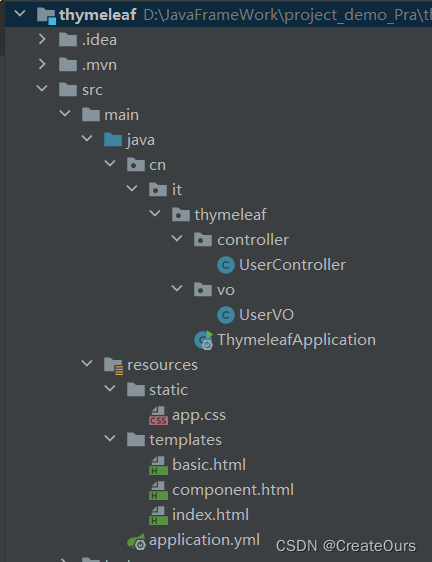
2.项目基本文件列表:
3. 更改application.properties为.yml文件配置并配置端口号,关闭cache缓存
#端口号8080
server:
  port: 8080
#  关闭缓存
spring:
  thymeleaf:
    cache: false
4.在idea中配置 thymeleaf 模板
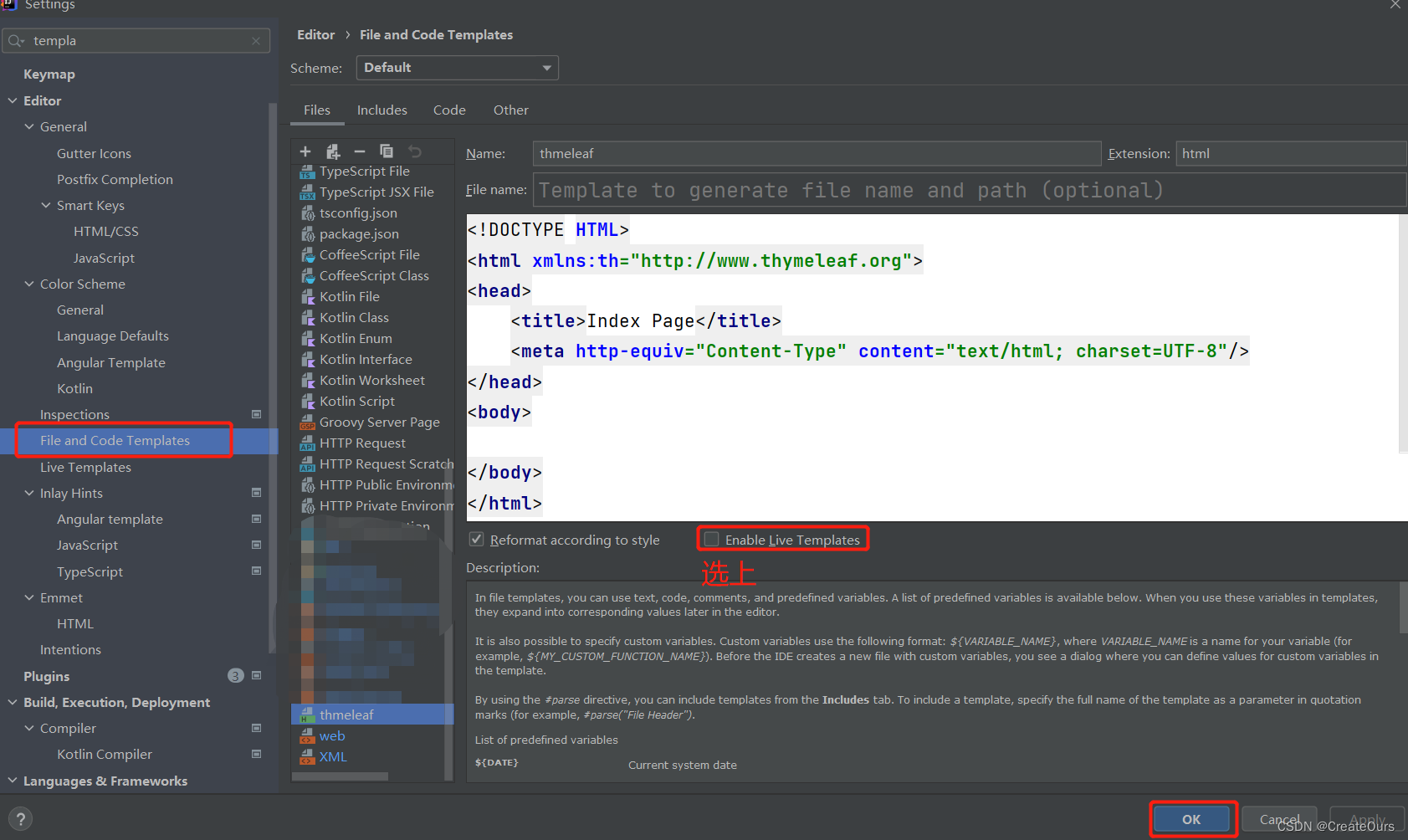
模板代码如下:
<!DOCTYPE HTML>
<html xmlns:th="http://www.thymeleaf.org">
<head>
    <title>Index Page</title>
    <meta http-equiv="Content-Type" content="text/html; charset=UTF-8"/>
</head>
<body>

</body>
</html>
5. 新建UserVO实体类基本数据
@Data
public class UserVO {
    private String userName;
    private int age;
    private Date createTime;
    private char sex;
    private boolean boolVip;
    private List<String> classesList;
}
6. 新建controller层一个类UserController
@Controller
public class UserController {

    @GetMapping("/index")
    public String index(Model model) {
        String title = "动态的title";
        model.addAttribute("title", title);
        return "index";
    }

    @RequestMapping("/basic")
    public String basic(Model model) {
        UserVO user = new UserVO();
        user.setUserName("Tom");
        user.setAge(25);
        user.setCreateTime(new Date());
        user.setSex('1');
        user.setBoolVip(false);
        //数组形式的数据
        user.setClassesList(Arrays.asList("java","php","c#"));

        model.addAttribute("user", user);
        return "basic";
    }

}
7.新建web展示页面
(在resources/templates目录下新建index.html 和 basic.html 和 component.html的thymeleaf模板)
(1) index.html文件中的基本数据传递
<!DOCTYPE HTML>
<html  xmlns:th="http://www.thymeleaf.org">
<head>
    <meta http-equiv="Content-Type" content="text/html; charset=UTF-8"/>
    <title th:text="${title}">默认的标题</title>
</head>

<body>
<!--如果 th:text内无值,那么 默认显示p标签内的静态内容-->
<p th:text="${title}">默认的内容</p>
<p th:text="'拼接的静态内容'+${title}">默认的内容</p>
<!--可以直接使用 || 符号代替拼接动静态的数据-->
<p th:text="|拼接的静态内容${title}|">默认的内容</p>

</body>
</html>
(2) basic.html文件中的 对象形式的数据传递、组件(component)数据传递、JavaScript执行用法、条件判断和循环语句的使用
<!DOCTYPE HTML>
<html xmlns:th="http://www.thymeleaf.org">
<head>
    <title>Index Page</title>
    <meta http-equiv="Content-Type" content="text/html; charset=UTF-8"/>
    <!--这里引入  css文件用thymeleaf的形式 用@ { }符号-->
    <link rel="stylesheet" th:href="@{app.css}"/>
</head>
<style>
    .active {
        color: red;
    }
</style>
<body>
<!--对于User对象;的属性,可以使用getXxx方法和直接 . 属性名-->
<p th:text="${user.userName}">用户名</p>
<p th:text="${user.getUserName()}">用户名</p>

<!--如果是对象形式,一直用user.方式很麻烦-->
<p th:text="${user.age}">年龄</p>
<p th:text="${user.userName}">用户名</p>
<!--那么我们使用 th:object的临时变量的形式包裹对象在div中;
用 符号 *{对象的属性名}   的方式那么我们使用其对象的属性的时候可以直接省略 user.-->
<div th:object="${user}">
    <p th:text="*{userName}">用户名</p>
    <p th:text="*{age}">年龄</p>

    <!-- if语句  可以判断此变量 是否true 则显示此标签内容 否则不显示-->
    <p th:if="*{boolVip}">男</p>
    <p th:if="!*{boolVip}">女</p>
</div>

<ul>
    <!--使用 th:each循环数组集合 并用临时的变量tag接收集合中的值,然后在取出tag的值-->
    <li th:each="tag:${user.classesList}" th:text="${tag}"></li>
</ul>

<!--追加css 中的.active设置的相关属性 -->
<!--th:classappend="active"-->
<!--${stat.last}?active 自定义一个stat命名,  指判断stat是否是最后一个,是true  则执行 css中 .active的属性设置-->
<ul>
    <li th:each="tag,stat:${user.classesList}"
        th:text="${tag}"
        th:classappend="${stat.last}?active"
    ></li>
</ul>

<!--switch语句case: :当user.sex的值是1的时候显示  男...; 符号 *表示: default其它显示为-->
<div th:switch="${user.sex}">
    <p th:case="1">男</p>
    <p th:case="2">女</p>
    <p th:case="*">无性别</p>
</div>
<div class="app">

</div>

<!--组件引入的使1.用fragment形式-->
<!--替换replace com1(也替换掉了 div标签和数据内容)-->
<div th:replace="~{component::com1}">
    replace com1...
</div>

<!--插入(保留原标签)insert com1 : (保留div标签, 同时在div标签内插入组件component的com1的标签和数据内容)-->
<div th:insert="~{component::com1}">
    insert  com1...
</div>

<!--2.以id的形式 insert com2(insert保留div标签和插入 com2的标签和数据内容)-->
<div th:insert="~{component::#com2}">
    insert com2...
</div>

</body>
<!--javascript动态渲染,如果/**/没有写动态值,就会显示{} 里面的静态值-->
<script th:inline="javascript">
    <!--输出user到控制台-->
    const user = /*[[${user}]]*/ {};
    console.log(user)
</script>
</html>
(3) component.html文件 这里使用fragment(碎片,片段)用于在basic.html文件引入component.html文件中的指定的标签+数据
<!DOCTYPE HTML>
<html xmlns:th="http://www.thymeleaf.org">
<head>
    <title>Index Page</title>
    <meta http-equiv="Content-Type" content="text/html; charset=UTF-8"/>
</head>
<body>
<!--fragment : 片段-->
<footer th:fragment="com1">
    com1
</footer>
<foot id="com2">
    com2
</foot>


</body>
</html>
(4) 展示component组件的替换(th:replace)和插入(th:insert)的两种不同效果
前端的原代码:
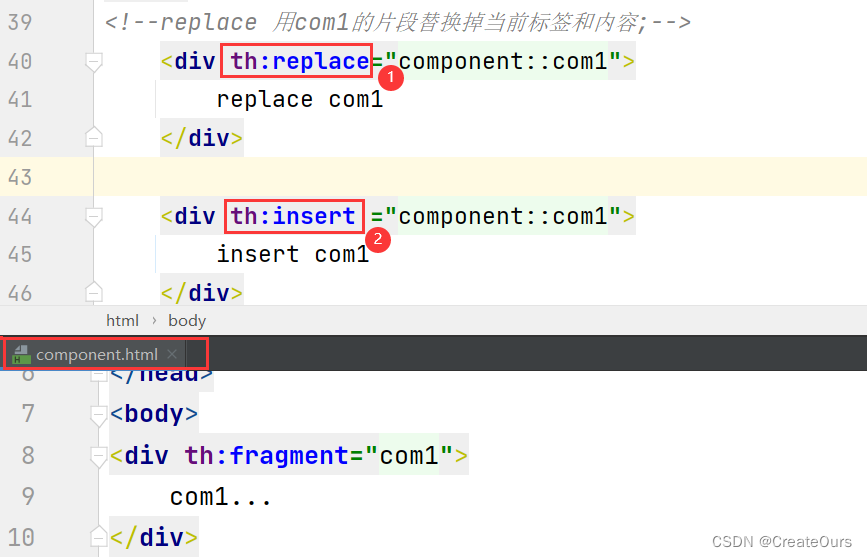
浏览器检查(F12)显示的代码
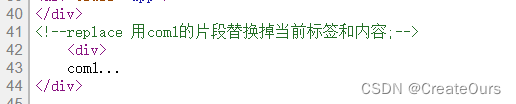
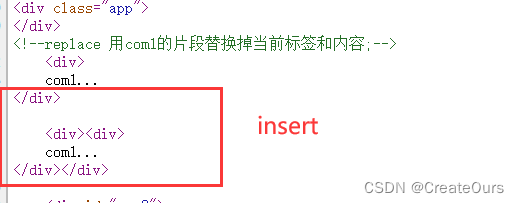
注意:其实根据标签的id 的形式来替换(th:replace)或插入(th:insert)当前标签处更改标签和数据
形式和fragment类似 ,代码如下:
    <!--根据 id的值,找到组件片段,进行替换(replace)当前片段,insert也如此-->
    <div th:replace="component::#com2">
       内容..
</div>版权声明:本文为qq_42474576原创文章,遵循CC 4.0 BY-SA版权协议,转载请附上原文出处链接和本声明。