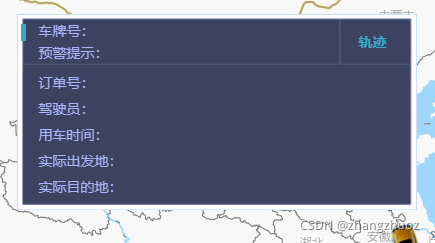
Css
.BMap_bottom {
  display: none;
}
.BMap_pop {
  > div,
  > img:nth-child(10) {
    display: none;
    overflow: unset;
  }
  > div:nth-child(9) {
    display: block;
    overflow: unset;
  }
  > div:nth-child(8) {
    /*display: block;*/
  }
  .BMap_top {
    display: none;
  }
  .BMap_center {
    background: transparent;
    border: none;
    position: sticky !important;
    height: 100%;
  }
}
.BMap_bubble_content {
  width: 400px !important;
  height: 196px !important;
  background-image: url(./img/baiduMapPopUp.png) !important;
  background-size: 100% !important;
  padding: 6px;
  .baiduPopBox {
    display: flex;
    flex-direction: column;
    color: rgb(170, 182, 249);
    padding-left: 16px;

    .boxTop {
      display: flex;
      flex-direction: row;
      justify-content: space-between;
      margin-bottom: 6px;

      .boxTop-left {
        display: flex;
        flex-direction: column;

        .carNO::before {
          content: '';
          width: 5px;
          height: 17px;
          position: absolute;
          top: 10px;
          left: 4px;
          background: rgb(57, 169, 195);
        }
      }
      .locusButton {
        border: none !important;
        background: none !important;
        color: rgb(58, 173, 200) !important;
        font-weight: bold;
        padding-right: 24px;
      }
    }
    .boxBottom {
      display: flex;
      flex-direction: column;

      span {
        line-height: 26px;
      }
    }
  }
}
.BMap_shadow {
  display: none;
}
JS
 // 弹窗
  createInfoWindow = () => {
    var opts = {
      width: 400, // 信息窗口宽度
      height: 196, // 信息窗口高度
    };
    window.showTrack = () => {
      this.showTrack();
    };
    var infoWindow = new BMap.InfoWindow(
      `<div class="baiduPopBox">
      <div class="boxTop">
      <div class="boxTop-left">
       <div class="carNO">车牌号:</div>
      <span>预警提示:</span></div>
       <input class="locusButton" type="button" value="轨迹" οnclick="showTrack()"/>
      </div>
      <div class="boxBottom">
      <span>订单号:</span>
      <span>驾驶员:</span>
      <span>用车时间:</span>
      <span>实际出发地:</span>
      <span>实际目的地:</span>
      </div>
    </div>`,
      opts
    ); // 创建信息窗口对象
    infoWindow.addEventListener('open', function(type, target, point) {
      // 窗口打开是,隐藏自带的关闭按钮
      $('.BMap_pop>img').hide();
    });
    return infoWindow; // 创建信息窗口对象
  };
版权声明:本文为zhangzhuo1130原创文章,遵循CC 4.0 BY-SA版权协议,转载请附上原文出处链接和本声明。