由于SpringBoot搭建项目的便捷性,被越来越多的开发者使用。所以我觉得每个人都应该掌握如何用SpringBoot快速搭建一个java web项目框架。
全文概要:
一、项目框架搭建
- 创建Maven项目
- 包的层级结构
- 将项目跑起来
- 接口的两种返回形式
- rest接口
- thymeleaf页面渲染
正文内容:
一、用Maven创建工程
1、file --> new -- > project -- > maven

2、指定GroupId和ArtifactId

3、选择Maven配置文件,不勾选就是使用默认的Maven配置文件;勾选的话,需要自己去指定Maven配置文件。

4、指定工程的存放地址,点击finish完成

二、创建好工程后,工程目录

创建后,整个项目是一个module,java包是写源代码的地方,其中的controller、service和dao包表示三层架构负责不同的任务。MainApplication作为启动类,它在项目文件夹的根目录上。resource包是存放资源的例如:HTML文件。
三、写接口代码
1、修改pom文件,引入依赖

parent标签是springboot的基本依赖,下面的dependency都是继承自它。2是引入开发web项目必要的jar包,3是thymeleaf模板的依赖。
2、添加启动类

启动工程需要有入口,要自己创建一个启动类。该类位于工程包的根目录下,用该类的类对象作为参数传入main函数中。同时在类上添加@SpringBootApplication注解。
3、rest接口形式返回

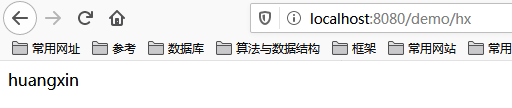
controller类中创建一个类,类名上带有Controller便于识别。类中的每个方法对应一个url,类上和方法上的@RequestMapping共同制定这个url。@RestController表明该类中的所有方法均返回方法的返回值。
浏览器输入 http://localhost:8080/demo/hx 返回结果:
4、利用Thymeleaf模板放回html文件
主要步骤:
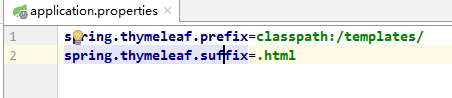
- 修改全局配置文件application.properties ,指定 thymeleaf访问文件的前缀和后缀。
- 在templates包下创建name.html 文件
- controller层写方法,访问name.html
a、添加thymeleaf配置文件,指明HTML文件的前缀和后缀
b、创建name.html文件

c、controller代码

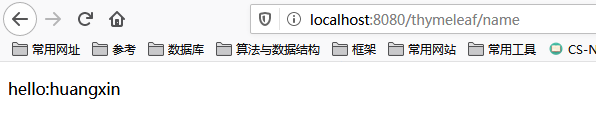
不能使用RestController注解,它会返回rest接口形式,想要返回resources中的文件用@Controller注解。用Model对象将name.html 中的 name赋值为“huangxin,最后返回该接口返回name.html文件。
调用url的返回结果:
项目源码:
项目GitHub地址: XXXX
1、pom文件
<?xml version="1.0" encoding="UTF-8"?>

<project xmlns="http://maven.apache.org/POM/4.0.0" xmlns:xsi="http://www.w3.org/2001/XMLSchema-instance"
  xsi:schemaLocation="http://maven.apache.org/POM/4.0.0 http://maven.apache.org/xsd/maven-4.0.0.xsd">
  <modelVersion>4.0.0</modelVersion>

  <groupId>com_item</groupId>
  <artifactId>miaosha_idea</artifactId>
  <version>1.0-SNAPSHOT</version>

  <name>miaosha_idea</name>
  <!-- FIXME change it to the project's website -->
  <url>http://www.example.com</url>

  <properties>
    <project.build.sourceEncoding>UTF-8</project.build.sourceEncoding>
    <maven.compiler.source>1.7</maven.compiler.source>
    <maven.compiler.target>1.7</maven.compiler.target>
  </properties>

  <!--基础依赖,包括jdk版本-->
  <parent>
    <groupId>org.springframework.boot</groupId>
    <artifactId>spring-boot-starter-parent</artifactId>
    <version>1.5.6.RELEASE</version>
    <relativePath/> <!-- lookup parent from repository -->
  </parent>

  <dependencies>
      <!--上边引入的parent指定了版本,下边无需指定-->
      <!--包含mvc、aop等jar资源-->
      <dependency>
          <groupId>org.springframework.boot</groupId>
          <artifactId>spring-boot-starter-web</artifactId>
      </dependency>

      <!-- 模板引擎 thymeleaf -->
      <dependency>
          <groupId>org.springframework.boot</groupId>
          <artifactId>spring-boot-starter-thymeleaf</artifactId>
      </dependency>


  </dependencies>

  <build>
    <pluginManagement><!-- lock down plugins versions to avoid using Maven defaults (may be moved to parent pom) -->
      <plugins>
        <!-- clean lifecycle, see https://maven.apache.org/ref/current/maven-core/lifecycles.html#clean_Lifecycle -->

              <plugin>
                  <groupId>org.springframework.boot</groupId>
                  <artifactId>spring-boot-maven-plugin</artifactId>
              </plugin>

      </plugins>
    </pluginManagement>
  </build>
</project>
2、配置文件(application.properties)
spring.thymeleaf.prefix=classpath:/templates/
spring.thymeleaf.suffix=.html
3、启动类(MainApplication)
package com_item.miaosha;

import org.springframework.boot.SpringApplication;
import org.springframework.boot.autoconfigure.SpringBootApplication;

@SpringBootApplication
public class MainApplication {
    public static void main(String[] args) {
        SpringApplication.run(MainApplication.class, args);
    }


}
4、controller层接口
package com_item.miaosha.controller;

import org.springframework.web.bind.annotation.RequestMapping;
import org.springframework.web.bind.annotation.RestController;

@RequestMapping("/demo")
@RestController
public class SimpleController {

    //方法
    @RequestMapping("/int")
    public int hello() {
        return 45;
    }

    @RequestMapping("/hx")
    public String name() {
        return "huangxin";
    }
}
package com_item.miaosha.controller;
import org.springframework.stereotype.Controller;
import org.springframework.ui.Model;
import org.springframework.web.bind.annotation.RequestMapping;
@RequestMapping("/thymeleaf")
@Controller
public class ThymeleafController {
@RequestMapping("/name")
public String ThymeleafName(Model model) {
model.addAttribute("name", "huangxin");
return "name"; //返回的是templates中的 name.html
}
}
5、资源文件(resource的templates文件夹下的name.html)
<!DOCTYPE HTML>
<html xmlns:th="http://www.thymeleaf.org">
<head>
    <title>hello</title>
    <meta http-equiv="Content-Type" content="text/html; charset=UTF-8" />
</head>
<body>
<p th:text="'hello:'+${name}" ></p>
</body>
</html>