调试caffe,用已有的网络训练自己的数据集的时候(我这里做的是二分类)。在生成均值文件之后,开始train,发现出现了这个问题。
1,路径正确,却读不到图片。
[db_lmdb.hpp:15]Check failed: mdb_status == 0 (2 vs. 0) No such file or directory
我发现这check failed的上面有一句话:就是loading file form :data/ilsvrc12/imagenet_mean.binaryproto
这说明是在找均值文件的时候没找到。然后,我们看看那些地方涉及到了这个信息。
我发现,只有这几个地方涉及到了均值文件。打开 train_val.prototxt把均值文件改为绝对路径。这下肯定出不了错误。最好不用相对路径描述文件。因为caffe中很多错误是由于路径问题。
在这之中cat_data是我的诗句存储的地方。就像mnist一样。是个文件夹。
再次运行,
可以运行了。




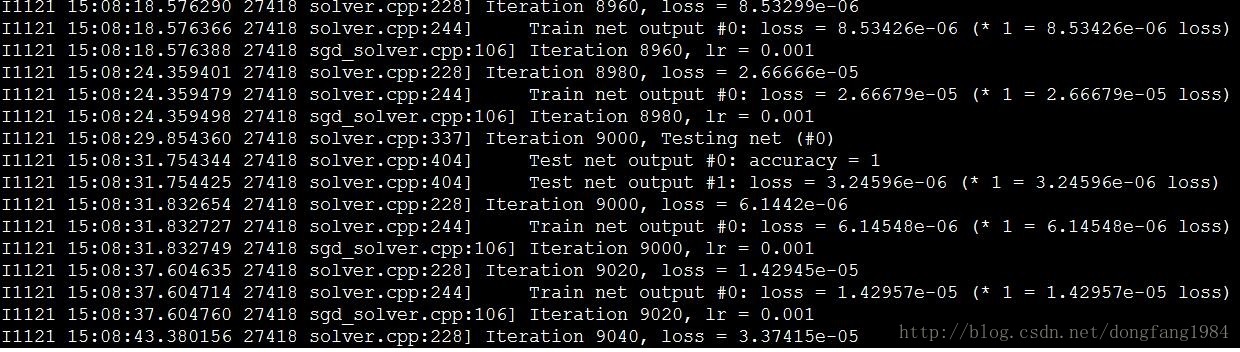
2、磁盘空间不足
Check failed: proto.SerializeToOstream(&output)
解决办法:查看磁盘空间

我的caffe目录就在home下。因此,是由于在训练的时候存储snapshot没有了空间。
释放掉以一些空间,继续运行。
3、明明有文件列表,却说为空。
image_data_layer.cpp:51] Check failed: !lines_.empty() File is empty *** Check failure stack trace: ***
训练prototxt 文件如下:
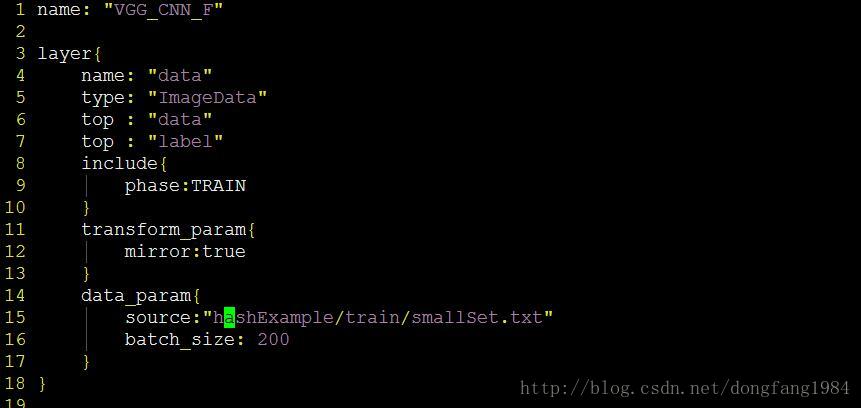
而且txt文件明明有东西。原因在这个图片。仔细看看发现:data_param有问题。改了image_data_param 即可。
4、Expected integer or identifier
[1] Error parsing text-format caffe.NetParameter: 382:9: Expected integer or identifier
[2] Check failed: ReadProtoFromTextFile(param_file, param) Failed to parse NetParameter file: NUS/VGG_CNN_F_train_test.prototxt
打开我的VGG_CNN_F_train_test.prototxt。找到329,发现没错误。
解决方法:
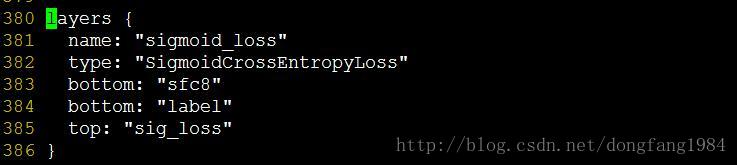
从stackoverflow 上查到了答案。 Your prototxt is malformed with both layer and layers messages.
发现果然,我的prototxt中新加的一层写成了layers应该为layer。这是新老caffe版本转换过程中的一个容易出现的问题。
5、CUBLAS_STATUS_SUCCESS (1 vs. 0) CUBLAS_STATUS_NOT_INITIALIZED
Check failed: status == CUBLAS_STATUS_SUCCESS (1 vs. 0) CUBLAS_STATUS_NOT_INITIALIZED
【解决方案】:检查你的caffe编译cuda库的版本与链接库的版本可能不一致。
很有可能是你用一个版本的编译,然后用另外一个版本连接。 在Makefile.config中的
6、/usr/bin/ld: cannot find -lhdf5_hl cannot find -lhdf5 或 hdf5_serial_hl hdf5_serial
问题分析:可能你已经装了hdf5.但是为什么还是报错呢?在Makefile中有如下一行

- 如果你装的是 serial版本。那么请使用
LIBRARIES += glog gflags protobuf boost_system boost_filesystem m hdf5_serial_hl hdf5_serial
- 如果你装的不是serial版本。那么请使用
LIBRARIES += glog gflags protobuf boost_system boost_filesystem m hdf5_hl hdf5
在不行就是需要做一个软连接在完成。
7 blas 问题
mac 上 ld: cannot link directly with /System/Library/Frameworks//vecLib.framework/vecLib for architecture x86_64
clang: error: linker command failed with exit code 1 (use -v to see invocation)
解决
# 用brew安装blas,一般是openblas
# 是blas出了问题,打开Makefile.config 将blas添加在 INCLUDE_DIRS,LIBRARY_DIRS之后即可
# Whatever else you find you need goes here.
INCLUDE_DIRS := $(PYTHON_INCLUDE) /usr/local/include /usr/local/Cellar/opencv@2/2.4.13.6/include /usr/local/Cellar/openblas/0.2.20/include
LIBRARY_DIRS := $(PYTHON_LIB) /usr/local/lib /usr/lib /usr/local/Cellar/opencv@2/2.4.13.6/lib /usr/local/Cellar/openblas/0.2.20/lib