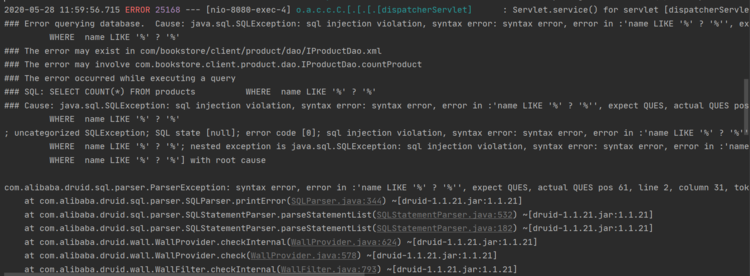
使用Druid数据源后,模糊查询抛出异常如下
Druid版本如下:
<dependency>
	<groupId>com.alibaba</groupId>
	<artifactId>druid</artifactId>
	<version>1.1.21</version>
</dependency>
Spring Boot中关于Druid的配置如下
#数据源基本配置
spring.datasource.driver-class-name=com.mysql.cj.jdbc.Driver
spring.datasource.url=...
spring.datasource.username=...
spring.datasource.password=...
#将Spring Boot默认数据源改为Druid数据源
spring.datasource.type=com.alibaba.druid.pool.DruidDataSource

#数据源其他配置
spring.datasource.initialSize=5
spring.datasource.minIdle=5
spring.datasource.maxActive=20
spring.datasource.maxWait=60000
spring.datasource.timeBetweenEvictionRunsMillis=60000
spring.datasource.minEvictableIdleTimeMillis=300000
spring.datasource.validationQuery=SELECT 1 FROM DUAL
spring.datasource.testWhileIdle=true
spring.datasource.testOnBorrow=false
spring.datasource.testOnReturn=false
spring.datasource.poolPreparedStatements=true

#配置监控统计拦截的filters,去掉后监控界面sql无法统计,'wall'用于防火墙
spring.datasource.filters=stat,wall,log4j
spring.datasource.maxPoolPreparedStatementPerConnectionSize=20
spring.datasource.useGlobalDataSourceStat=true
spring.datasource.connectionProperties=druid.stat.mergeSql=true;druid.stat.slowSqlMillis=500
映射文件如下
<select id="findOrders" resultMap="order">
        SELECT * FROM orders
        <where>
            <if test="id != '' and id != null">
                id LIKE '%' #{id} '%'
            </if>
            <if test="receiverName != '' and receiverName != null">
                AND receiverName = #{receiverName}
            </if>
        </where>
</select>
myatis这边连接mysql进行模糊查询,并未更改xml文件中的sql语句。也就是说,同样的sql,在spring boot集成了druid之前是完全支持可以查询的,集成之后查询出错,报错如最上面。
Druid数据源的问题,解决方式如下
方法一:
<select id="findOrders" resultMap="order">
        SELECT * FROM orders
        <where>
            <if test="id != '' and id != null">
                id LIKE '%${id}%'
            </if>
            <if test="receiverName != '' and receiverName != null">
                AND receiverName = #{receiverName}
            </if>
        </where>
    </select>
方法二:
<select id="findOrders" resultMap="order">
        SELECT * FROM orders
        <where>
            <if test="id != '' and id != null">
                id LIKE '%' #{id,jdbcType=VARCHAR} '%'
            </if>
            <if test="receiverName != '' and receiverName != null">
                AND receiverName = #{receiverName}
            </if>
        </where>
    </select>
方法三:关闭Druid SQL监控
在配置文件中注释以下配置
#配置监控统计拦截的filters,去掉后监控界面sql无法统计,'wall'用于防火墙
#spring.datasource.filters=stat,wall,log4j
#spring.datasource.maxPoolPreparedStatementPerConnectionSize=20
#spring.datasource.useGlobalDataSourceStat=true
#spring.datasource.connectionProperties=druid.stat.mergeSql=true;druid.stat.slowSqlMillis=500
版权声明:本文为qq_55968769原创文章,遵循CC 4.0 BY-SA版权协议,转载请附上原文出处链接和本声明。