小序 spring
小记:本来是在暑假的时候学完ssm,然后开学做东西的时候完全瓦解,所以重新第二轮学习,边复习边记录,文章没有什么价值,纯属个人学习。
理解:
1、spring就是一个容器,把所有的类注入到池子里面,需要用的时候就从池子里面根据指定的id获取想要的类。
2、通过applicationContext.xml文件配置好东西,当需要用的时候可以通过注解或是文件配置获取。
3、获取的类的对象不用再显示的new出,而是在池子里面拿去所需就可
环境使用的是eclipse,感觉xml文件的配置可以直接勾选命名特别舒服。(初学者都这样吧,hhh)
有一些很基础的看书就可以解决,这里就不再赘述了
这个是本片所用的项目地址 https://gitee.com/huang_siting/javalearning
有一些版本啥的乱七八糟的每个人不一样,该怎么改就怎么改
下图本篇文章所需要的jar包,没有设置maven项目。。。
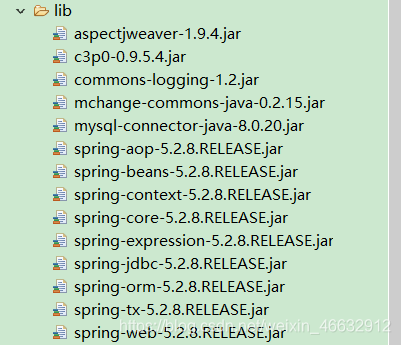
一、以下的是spring的一些步骤
- 首先当然是要有一个spring的插件支持,具体是啥自己找吧,有了这个插件eclipse才会支持xml文件的注入
- 新建一个Dynamic Web project项目,所有的东西都在src里面做
在src下面新建一个spring配置文件,有了上述说的插件就可以直接点击命名空间,不用再去网上到处找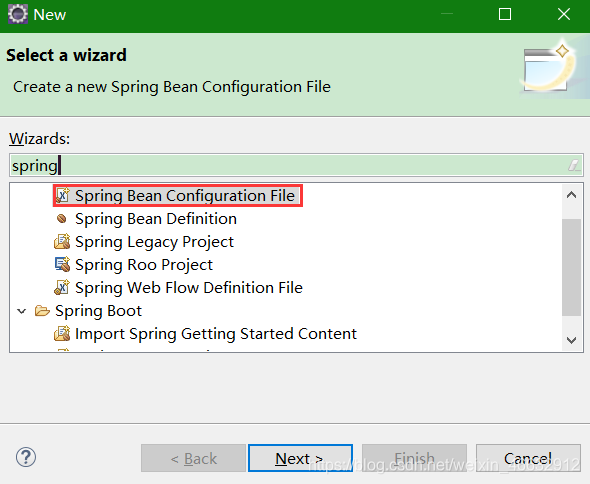
配置文件简单的配置
<?xml version="1.0" encoding="UTF-8"?>
<beans xmlns="http://www.springframework.org/schema/beans"
	xmlns:xsi="http://www.w3.org/2001/XMLSchema-instance"
	xmlns:context="http://www.springframework.org/schema/context"
	xsi:schemaLocation="http://www.springframework.org/schema/beans http://www.springframework.org/schema/beans/spring-beans.xsd
		http://www.springframework.org/schema/context http://www.springframework.org/schema/context/spring-context-4.3.xsd">
	<bean class="com.dgut.spring.hello.HelloImpl" id="helloImpl"></bean>
	<!-- 自动扫描包 base-package的路径到src,根据你的建包的路径设置-->
	<!-- 扫面包下面的所有东西-->
	<context:component-scan base-package="com.dgut.spring"/>
</beans>
- 文件结构
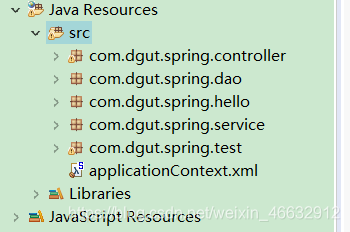
- 创建好包后就要在里面写类,根据MVC又有不同注释方式,有了这些注释就相当于把类放入spring池子里面
dao层:@Repository
service层:@Service
controller层:@Controller
这里拿dao层做个例子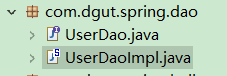;
}
dao实现类
@Repository
public class UserDaoImpl implements UserDao {

	@Override
	public void sayHello() {
		System.out.println("Hello UserDaoImpl");
	}

}
其他的以此类推
- 根据mvc原则,controller层调用service层,service层调用dao层,当我们需要调用的时候,需要从池子里面拿取所需的类作为自己的属性。
比如说controller层需要调用service层,使用注释@Autowired注释。
@Controller
public class HelloController {

	@Autowired
	private UserService userService;
	public void sayHello() {
		userService.sayHello();
	}
}
- 然后在unit单元测试中检测有无就可啦
class SpringTest {
	private ApplicationContext context = new ClassPathXmlApplicationContext("applicationContext.xml");

	@Before
	 public void getContext() {
		context = new ClassPathXmlApplicationContext("applicationContext.xml");
	}

	@AfterEach
	public void closeContext() {
		((ConfigurableApplicationContext)context).close();
	}

	@Test
	void test() {
		HelloImpl hello = context.getBean("helloImpl",HelloImpl.class);
		hello.sayHello();
	}

	@Test
	void test1() {
		HelloController hello = context.getBean("helloController",HelloController.class);
		hello.sayHello();
	}
}
二、AOP
我的看法是:当我们的方法已经全部写好的时候,如果想要增加一些功能,每个方法都添加代码是不实际的,所以有了需要有AOP
这里使用的是基于注解开发Aspect J
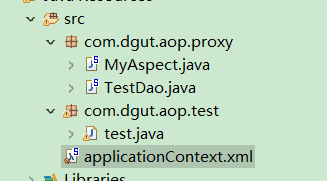
- 文件结构
这里可以看见文件的图标有一个S,代表该类已经注入池子里面
- applicationContext.xml配置扫面包和开启aop
<?xml version="1.0" encoding="UTF-8"?>
<beans xmlns="http://www.springframework.org/schema/beans"
	xmlns:xsi="http://www.w3.org/2001/XMLSchema-instance"
	xmlns:aop="http://www.springframework.org/schema/aop"
	xmlns:context="http://www.springframework.org/schema/context"
	xsi:schemaLocation="http://www.springframework.org/schema/beans http://www.springframework.org/schema/beans/spring-beans.xsd
		http://www.springframework.org/schema/aop http://www.springframework.org/schema/aop/spring-aop-4.3.xsd
		http://www.springframework.org/schema/context http://www.springframework.org/schema/context/spring-context-4.3.xsd">

	<context:component-scan base-package="com.dgut.aop.proxy"/>
	<aop:aspectj-autoproxy/>
</beans>
- MyAspect.java作为切面类,是TestDao.java的补充代码
TestDao.java
@Repository
public class TestDao {
	public void sayHello() {
		System.out.println("TestDao");
	}
}
MyAspect.java
这里的切面类需要有@Aspect注释
@Aspect
@Component
public class MyAspect {
	@Pointcut("execution(* com.dgut.aop.proxy.*.*(..)) ")
	private void myPoint() {

	}

	@Before("myPoint()")
	public void before(JoinPoint jp) {
		System.out.println("前置通知"+jp.getTarget()+"  方法"+jp.getSignature().getName());
	}

}
- 测试的时候直接测的是被切面的类就可
public class test {
	@Test
	public void test() {
		ApplicationContext context = new ClassPathXmlApplicationContext("applicationContext.xml");
		TestDao testDao = context.getBean("testDao",TestDao.class);
		testDao.sayHello();
	}

}
三、事务管理
事务应该具有4个属性:原子性、一致性、隔离性、持久性。
如果你的数据库设计得好,直接给你报错,否则你必须设置事务,让一些错误的sql语句不能执行
这块的学习需要连接数据库
- applicationContext.xml配置开启事务
emmm…具体在说什么去看书吧…
<?xml version="1.0" encoding="UTF-8"?>
<beans xmlns="http://www.springframework.org/schema/beans"
xmlns:xsi="http://www.w3.org/2001/XMLSchema-instance"
xmlns:context="http://www.springframework.org/schema/context"
xmlns:tx="http://www.springframework.org/schema/tx"
xsi:schemaLocation="http://www.springframework.org/schema/beans http://www.springframework.org/schema/beans/spring-beans.xsd
http://www.springframework.org/schema/context http://www.springframework.org/schema/context/spring-context-4.3.xsd
http://www.springframework.org/schema/tx http://www.springframework.org/schema/tx/spring-tx-4.3.xsd">
<context:component-scan base-package="com.dgut.spring"></context:component-scan>
<bean id="dataSourse" class="org.springframework.jdbc.datasource.DriverManagerDataSource">
<property name="driverClassName" value="com.mysql.cj.jdbc.Driver"></property>
<property name="url" value="jdbc:mysql://localhost:3306/mybatis?serverTimezone=Hongkong&useSSL=false"></property>
<property name="password" value="123456"></property>
<property name="username" value="root"></property>
</bean>
<bean id="jdbcTemplate" class="org.springframework.jdbc.core.JdbcTemplate">
<property name="dataSource" ref="dataSourse"></property>
</bean>
<bean id="txManager" class="org.springframework.jdbc.datasource.DataSourceTransactionManager">
<property name="dataSource" ref="dataSourse"></property>
</bean>
<tx:annotation-driven transaction-manager="txManager"/>
</beans>
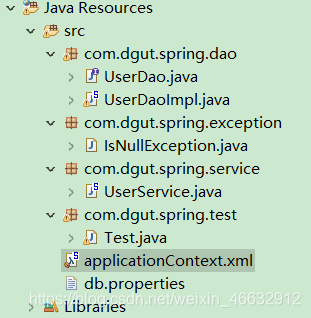
- 文件结构
- dao层的sql语句执行不通过抛出错误
@Repository
public class UserDaoImpl implements UserDao {

	@Autowired
	private JdbcTemplate template;

	@Override
	public String changePWD(int id) {
		String sqlString = "select pwd from user where id = ?";
		String resultString = template.queryForObject(sqlString, String.class,id);
		if(resultString == null) {
			throw new IsNullException("pwd is null");
		}
		return resultString;
	}
}
- service层设置事务,当有错误抛出的时候回滚
@Service
@Transactional
public class UserService {
	@Autowired
	private UserDaoImpl userDaoImpl;
	public void changePWD(int id) {
		userDaoImpl.changePWD(id);
	}
}
版权声明:本文为weixin_46632912原创文章,遵循CC 4.0 BY-SA版权协议,转载请附上原文出处链接和本声明。