环境:证书认证 https://blog.csdn.net/weixin_56892849/article/details/118964835
准备docker-compose
mv docker-compose /usr/local/bin/
chmod +x docker-compose
检查docker-compose是否安装成功
[root@server1 bin]# docker-compose --version
docker-compose version 1.21.1, build 5a3f1a3
准备harbor
- 解压harbor到 /usr/local
[root@server1 ~]# tar zxf harbor-offline-installer-v1.10.1.tgz -C /usr/local/
- 修改配置文件
[root@server1 harbor]# pwd
/usr/local/harbor
[root@server1 harbor]# ls
common.sh  harbor.v1.10.1.tar.gz  harbor.yml  install.sh  LICENSE  prepare
[root@server1 harbor]# vim harbor.yml
[root@server1 harbor]#

  5 hostname: reg.westos.org
 17   certificate: /data/certs/westos.org.crt
 18   private_key: /data/certs/westos.org.key
 27 harbor_admin_password: westos
启动harbor
[root@server1 data]# mkdir certs
[root@server1 ~]# cp -r /root/certs /data/

[root@server1 harbor]# ./install.sh
[root@server1 harbor]# ./install.sh

[Step 0]: checking if docker is installed ...

Note: docker version: 19.03.15

[Step 1]: checking docker-compose is installed ...

Note: docker-compose version: 1.21.1

[Step 2]: loading Harbor images ...
Loaded image: goharbor/clair-adapter-photon:v1.0.1-v1.10.1
Loaded image: goharbor/harbor-jobservice:v1.10.1
Loaded image: goharbor/redis-photon:v1.10.1
Loaded image: goharbor/notary-server-photon:v0.6.1-v1.10.1
Loaded image: goharbor/clair-photon:v2.1.1-v1.10.1
Loaded image: goharbor/harbor-log:v1.10.1
Loaded image: goharbor/registry-photon:v2.7.1-patch-2819-2553-v1.10.1
Loaded image: goharbor/notary-signer-photon:v0.6.1-v1.10.1
Loaded image: goharbor/chartmuseum-photon:v0.9.0-v1.10.1
Loaded image: goharbor/harbor-registryctl:v1.10.1
Loaded image: goharbor/nginx-photon:v1.10.1
Loaded image: goharbor/harbor-migrator:v1.10.1
Loaded image: goharbor/prepare:v1.10.1
Loaded image: goharbor/harbor-portal:v1.10.1
Loaded image: goharbor/harbor-core:v1.10.1
Loaded image: goharbor/harbor-db:v1.10.1


[Step 3]: preparing environment ...

[Step 4]: preparing harbor configs ...
prepare base dir is set to /usr/local/harbor
Clearing the configuration file: /config/log/logrotate.conf
Clearing the configuration file: /config/log/rsyslog_docker.conf
Clearing the configuration file: /config/nginx/nginx.conf
Clearing the configuration file: /config/core/env
Clearing the configuration file: /config/core/app.conf
Clearing the configuration file: /config/registry/config.yml
Clearing the configuration file: /config/registryctl/env
Clearing the configuration file: /config/registryctl/config.yml
Clearing the configuration file: /config/db/env
Clearing the configuration file: /config/jobservice/env
Clearing the configuration file: /config/jobservice/config.yml
Generated configuration file: /config/log/logrotate.conf
Generated configuration file: /config/log/rsyslog_docker.conf
Generated configuration file: /config/nginx/nginx.conf
Generated configuration file: /config/core/env
Generated configuration file: /config/core/app.conf
Generated configuration file: /config/registry/config.yml
Generated configuration file: /config/registryctl/env
Generated configuration file: /config/db/env
Generated configuration file: /config/jobservice/env
Generated configuration file: /config/jobservice/config.yml
loaded secret from file: /secret/keys/secretkey
Generated configuration file: /compose_location/docker-compose.yml
Clean up the input dir


Note: stopping existing Harbor instance ...
Stopping registryctl   ... done
Stopping harbor-portal ... done
Stopping redis         ... done
Stopping harbor-db     ... done
Stopping harbor-log    ... done
Removing registryctl   ... done
Removing harbor-portal ... done
Removing redis         ... done
Removing harbor-db     ... done
Removing harbor-log    ... done
Removing network harbor_harbor


[Step 5]: starting Harbor ...
Creating network "harbor_harbor" with the default driver
Creating harbor-log ... done
Creating registry      ... done
Creating harbor-db     ... done
Creating redis         ... done
Creating harbor-portal ... done
Creating registryctl   ... done
Creating harbor-core   ... done
Creating nginx             ... done
Creating harbor-jobservice ... done
✔ ----Harbor has been installed and started successfully.----
编辑daemin.json并重启docker服务
[root@server1 harbor]# vim /etc/docker/daemon.json
[root@server1 harbor]# cat /etc/docker/daemon.json
{
  "registry-mirrors": ["https://reg.westos.org"]
}
[root@server1 harbor]# systemctl restart docker.service
在物理机中解析
[root@foundation12 ~]# vim /etc/hosts
172.25.12.1     server1 reg.westos.org
输入https://reg.westos.org输入账号密码进入harbor


配置harbor
新建项目
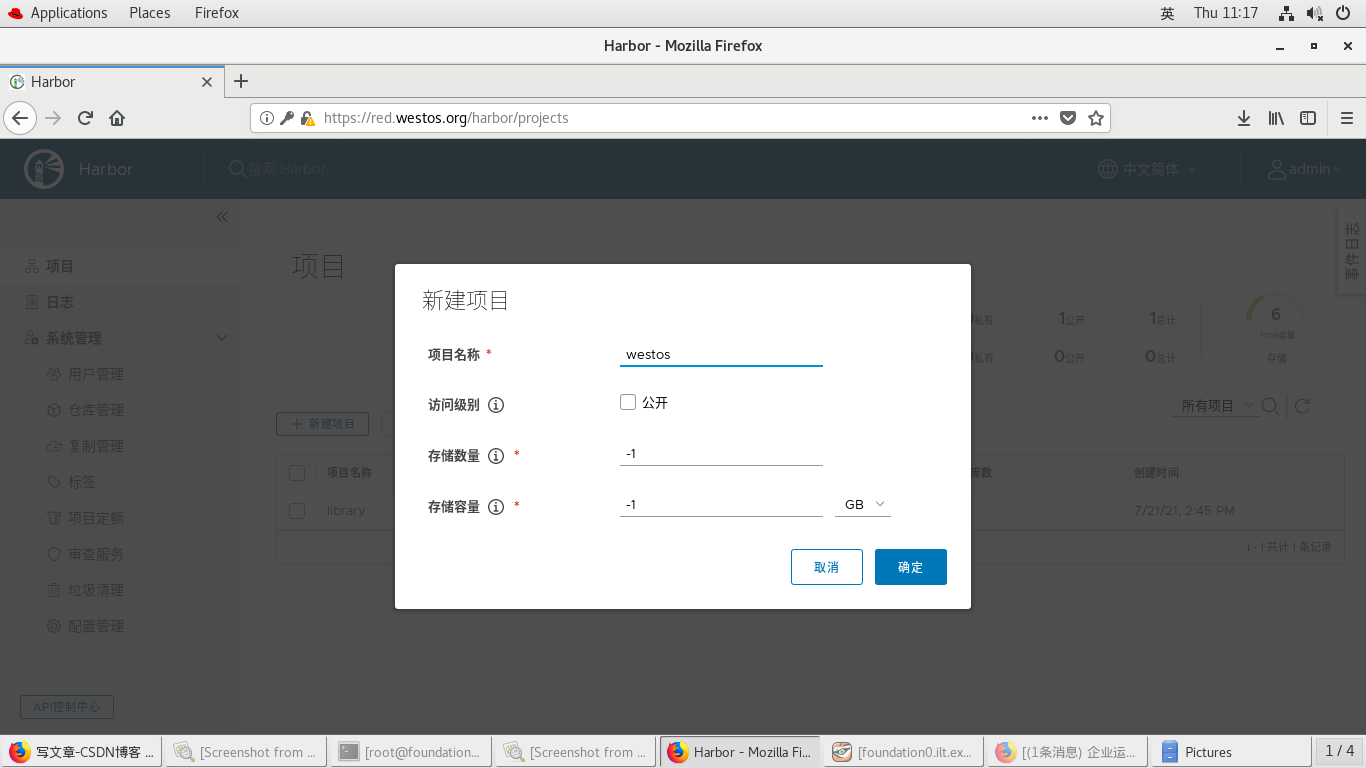
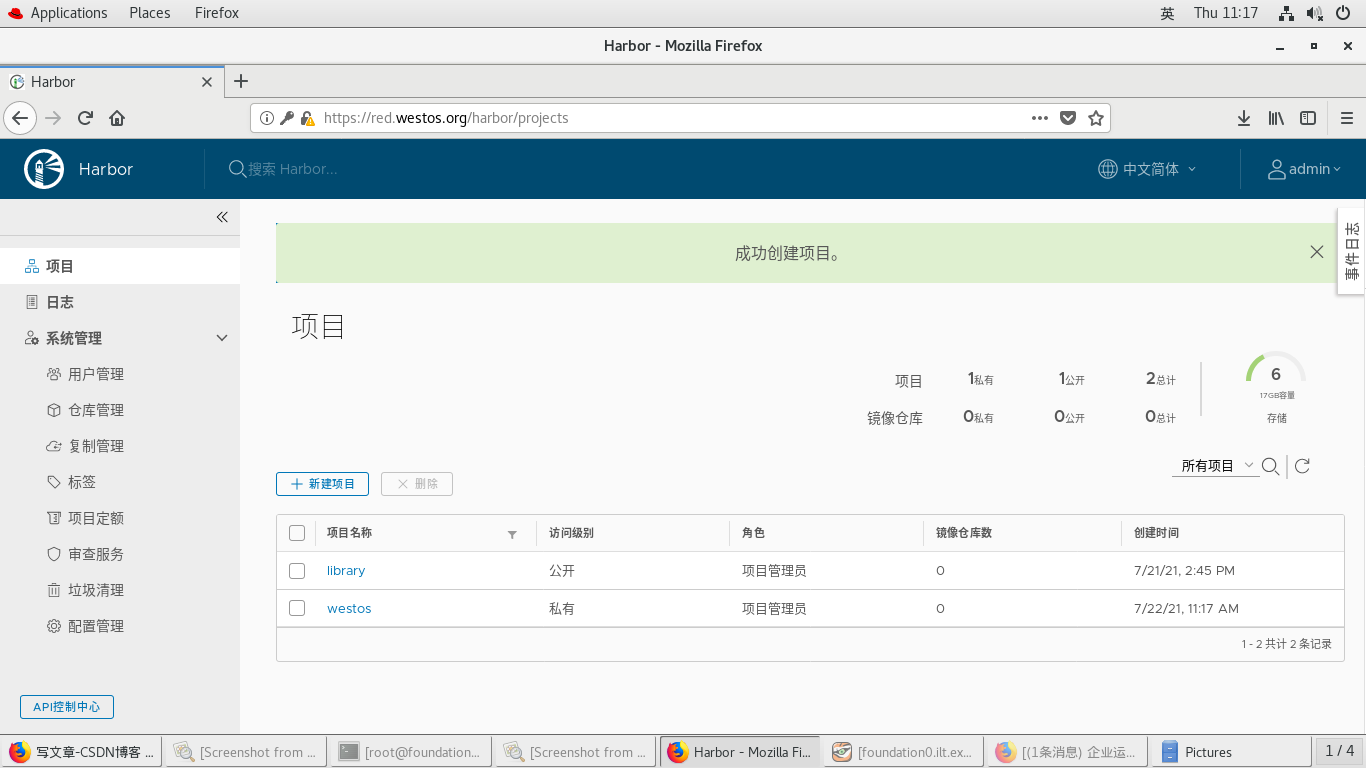
添加镜像
[root@server1 sysctl.d]# docker game2048:latest red.westos.org/westos/game2048:latest
[root@server1 sysctl.d]# docker push red.westos.org/westos/game2048:latest
The push refers to repository [red.westos.org/westos/game2048]
88fca8ae768a: Pushed
6d7504772167: Pushed
192e9fad2abc: Pushed
36e9226e74f8: Pushed
011b303988d2: Pushed
latest: digest: sha256:8a34fb9cb168c420604b6e5d32ca6d412cb0d533a826b313b190535c03fe9390 size: 1364
点开westos-镜像仓库
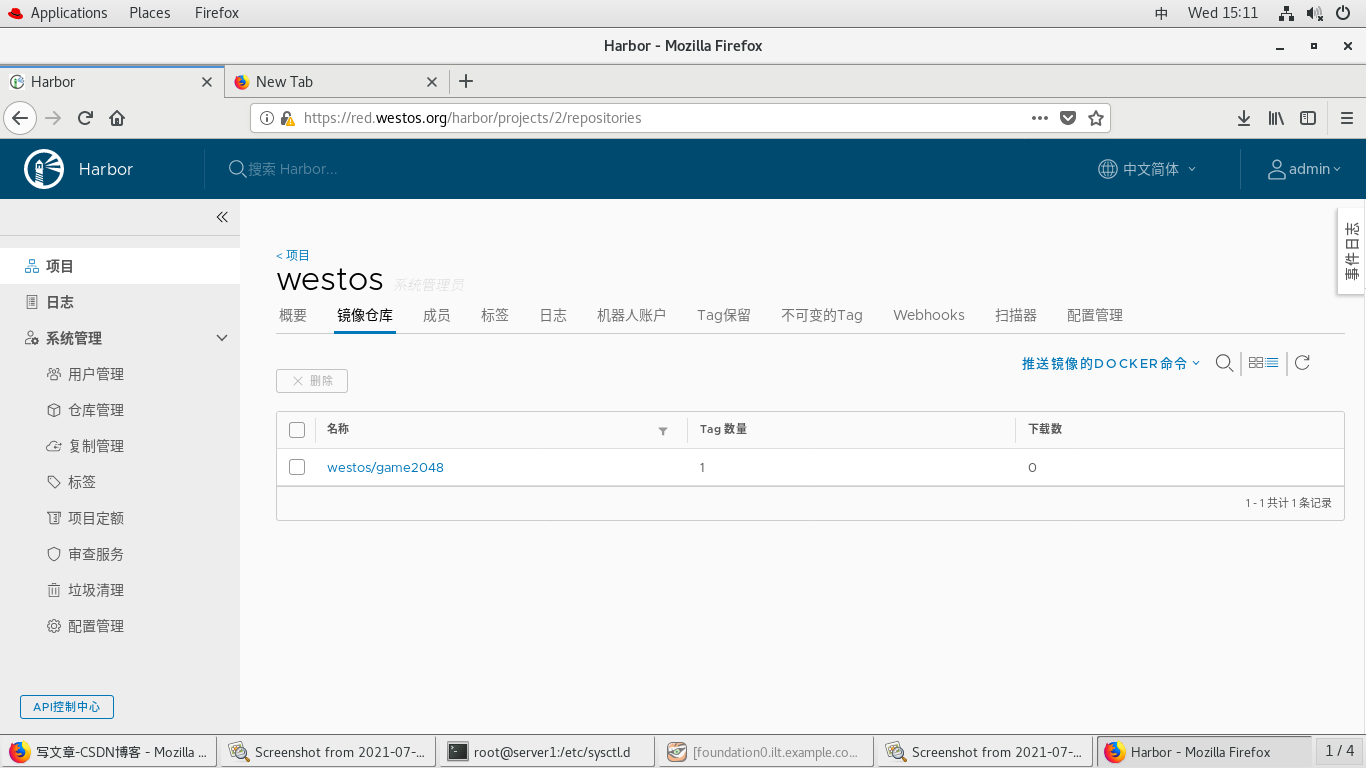
版权声明:本文为weixin_56892849原创文章,遵循CC 4.0 BY-SA版权协议,转载请附上原文出处链接和本声明。