Spring Security基础
持续更新…
基本概念
何为认证?
用户认证就是判断一个用户的身份是否合法的过程,用户去访问系统资源时系统要求验证用户的身份信息,身份合法可继续访问,不合法则拒绝访问。常见的用户身份认证方式有:用户密码登录、二维码登录、手机短信登录、指纹认证等方式。
何为会话?
用户认证通过后,为了避免用户每次操作都进行认证可将用户的信息保存在会话中。会话就是系统为了保持当前用户的登录状态所提供的机制,常见的有基于session方式、基于token方式等。
基于session的方式
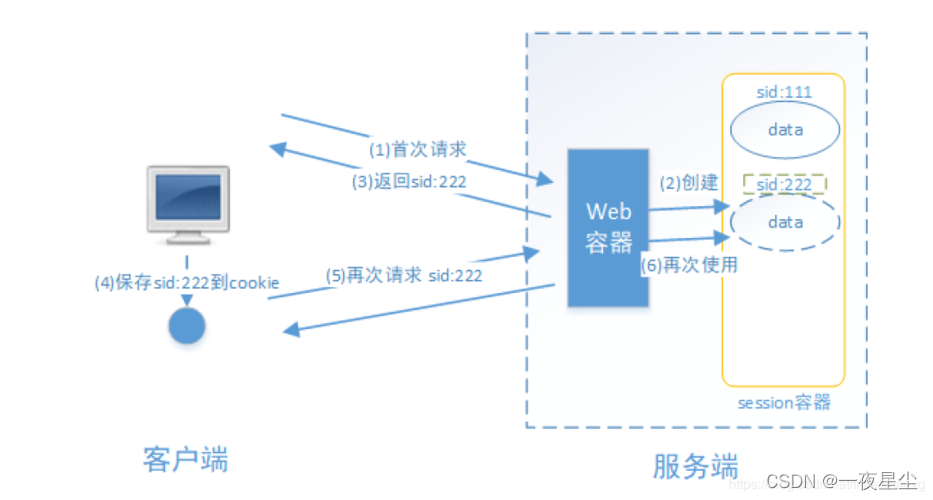
交互流程为:用户认证成功后,在服务端生成用户相关的数据保存在session中,发给用户客户端的sessionID存放到cookie中,这样用户客户端请求时带上sessionID就可以验证服务器端是否存在session数据,以此来完成用户的合法检验,当用户退出系统或session过期销毁时,客户端sessionID也就会无效。
基于token的方式
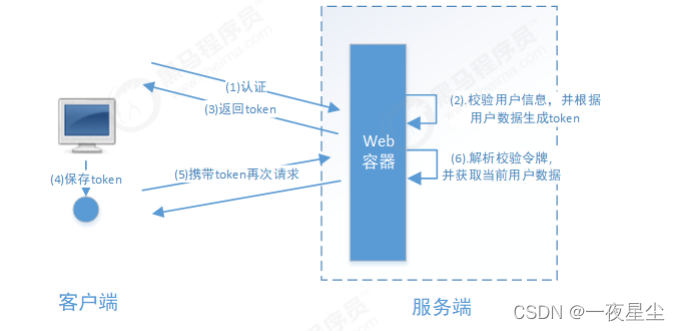
交互流程为:用户认证后,服务端生成一个token发给客户端,客户端可以将其存入cookie或LocalStorage等存储中,每次请求时携带token,服务端收到token通过验证后即可确认用户身份。
何为授权?
授权是用户认证通过根据用户的权限来控制用户访问资源的过程,拥有资源的访问权限则正常访问,没有权限则拒绝访问。
授权的数据模型
合并权限和资源表
RBAC
- 基于角色的访问
RBAC基于角色的访问控制是按角色进行授权- 基于资源的访问(推荐)
RBAC基于资源的访问控制是按资源进行授权
基本概念
Spring Security本质上是一个过滤器链
- 第一种方式
通过配置文件实现- 第二种方式
通过配置类- 第三种方式
自定义编写实现类
OAuth2基础
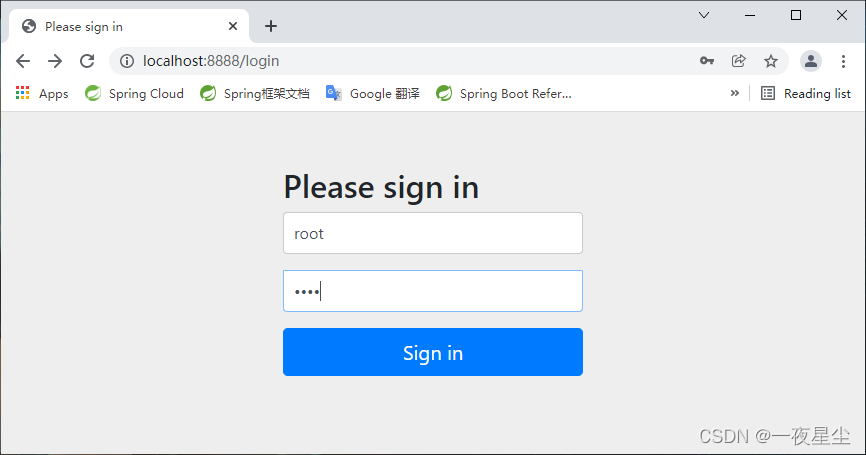
spring security 简单入门项目
- 这里首先采用的是非前后端分离来作为基础(一步一步来,慢慢打好基础…),实现不同权限能访问到的页面是不同的(基于权限控制,该实例不具有admin权限)…
引入主要依赖
<dependency>
    <groupId>org.springframework.boot</groupId>
    <artifactId>spring-boot-starter-security</artifactId>
    <version>2.6.1</version>
</dependency>
<dependency>
    <groupId>org.springframework.boot</groupId>
    <artifactId>spring-boot-starter-web</artifactId>
    <version>2.5.1</version>
</dependency>
<dependency>
    <groupId>mysql</groupId>
    <artifactId>mysql-connector-java</artifactId>
    <version>8.0.22</version>
</dependency>
<dependency>
    <groupId>com.baomidou</groupId>
    <artifactId>mybatis-plus-boot-starter</artifactId>
    <version>3.4.2</version>
</dependency>
添加application.yml配置
server:
  port: 8888
spring:
  datasource:
    url: jdbc:mysql://192.168.50.248:3306/DB_1?serverTimezone=UTC
    username: root
    password: root
    driver-class-name: com.mysql.cj.jdbc.Driver
新建持久化层
package cn.wu.mapper;

import cn.wu.entities.User;
import com.baomidou.mybatisplus.core.mapper.BaseMapper;
import org.springframework.stereotype.Repository;

@Repository
public interface UserMapper extends BaseMapper<User> {
}
新建配置类
package cn.wu.config;

import org.springframework.beans.factory.annotation.Autowired;
import org.springframework.beans.factory.annotation.Qualifier;
import org.springframework.context.annotation.Bean;
import org.springframework.context.annotation.Configuration;
import org.springframework.security.config.annotation.authentication.builders.AuthenticationManagerBuilder;
import org.springframework.security.config.annotation.web.builders.HttpSecurity;
import org.springframework.security.config.annotation.web.configuration.WebSecurityConfigurerAdapter;
import org.springframework.security.core.userdetails.UserDetailsService;
import org.springframework.security.crypto.bcrypt.BCryptPasswordEncoder;
import org.springframework.security.crypto.password.PasswordEncoder;

// 继承WebSecurityConfigurerAdapter类
@Configuration
public class MyConfig extends WebSecurityConfigurerAdapter {

    private UserDetailsService userDetailsService;
    @Autowired
    @Qualifier("myUserDetailServiceBean") // 注入service对象
    public void setUserDetailsService(UserDetailsService myUserDetailsService) {
        this.userDetailsService = myUserDetailsService;
    }

    @Override
    public void configure(AuthenticationManagerBuilder auth) throws Exception {
        // 设置自定义密码配置
        auth.userDetailsService(userDetailsService).passwordEncoder(passwordEncoder());
    }

    @Bean
    PasswordEncoder passwordEncoder() {
        return new BCryptPasswordEncoder();
    }
    @Override
    protected void configure(HttpSecurity http) throws Exception {
        // 自定义登录页面设置以及接口
        http.formLogin().loginPage("/login.html").loginProcessingUrl("/login")
                // 自定义前端表单传入的用户名和密码名称
                .usernameParameter("username")
                .passwordParameter("password")
                // 登录成功后跳转的页面
                .successForwardUrl("/toMain")
                .failureForwardUrl("/toError");

        // 放行/login.html页面,不需要认证
        http.authorizeRequests()
                .antMatchers("/error.html").permitAll() // 允许在未认证的前提下通过
                .antMatchers("/login.html").permitAll() // 允许在未认证的前提下通过
                // 权限控制
                .antMatchers("/admin.html").hasAuthority("admin") // 访问admin.html需要admin的权限
                .antMatchers("/user.html").hasAnyAuthority("user") // 访问user.html需要user的权限
                .antMatchers("/visitor.html").hasAnyAuthority("visitor","user") // 访问visitor.html需要visitor或者user的权限
                // 所有的请求必须要认证
                .anyRequest().authenticated();
        // 关闭跨域请求伪造防护
        http.csrf().disable();
    }
}
新建业务层
package cn.wu.service;


import cn.wu.mapper.UserMapper;
import com.baomidou.mybatisplus.core.conditions.query.QueryWrapper;
import org.springframework.beans.factory.annotation.Autowired;
import org.springframework.security.core.GrantedAuthority;
import org.springframework.security.core.authority.AuthorityUtils;
import org.springframework.security.core.userdetails.User;
import org.springframework.security.core.userdetails.UserDetails;
import org.springframework.security.core.userdetails.UserDetailsService;
import org.springframework.security.core.userdetails.UsernameNotFoundException;
import org.springframework.security.crypto.password.PasswordEncoder;
import org.springframework.stereotype.Service;

import java.util.List;

// 这里继承UserDetailService接口
@Service("myUserDetailServiceBean")
public class MyUserDetailService implements UserDetailsService {
    private PasswordEncoder passwordEncoder;
    @Autowired
    public void setPasswordEncoder(PasswordEncoder passwordEncoder) {
        this.passwordEncoder = passwordEncoder;
    }

    private UserMapper userMapper;
    @Autowired
    public void setUserMapper(UserMapper userMapper) {
        this.userMapper = userMapper;
    }

    public UserDetails loadUserByUsername(String username) throws UsernameNotFoundException {
        // Mybatis-Plus查询用户数据库
        QueryWrapper<cn.wu.entities.User> wrapper = new QueryWrapper<cn.wu.entities.User>();
        wrapper.eq("username",username);
        cn.wu.entities.User user = userMapper.selectOne(wrapper);
        if( user == null ) {
            throw new UsernameNotFoundException("未找到用户名… ");
        }
        // 添加权限
        List<GrantedAuthority> auths = AuthorityUtils.
                // 通过逗号分割来分配权限 该实例赋予了user和visitor的权限
                commaSeparatedStringToAuthorityList("user,visitor");
        // 设置用户名,密码以及权限
        return new User(user.getUsername(),passwordEncoder.encode(user.getPassword()),auths);
    }
}
新建控制层
package cn.wu.controller;

import org.springframework.stereotype.Controller;
import org.springframework.web.bind.annotation.PostMapping;

@Controller
public class TestController {
    @PostMapping("/toMain")
    public String main() {
        return "redirect:main.html";
    }
    @PostMapping("/toError")
    public String error() {
        return "redirect:error.html";
    }
}
此时,登录认证成功后,可以访问user.html和visitor.html的网页,只有admin.html的网页不能被访问…
基于角色的控制
修改业务层,添加角色
List<GrantedAuthority> auths = AuthorityUtils.
// 赋予visitor角色权限
commaSeparatedStringToAuthorityList("ROLE_visitor");
修改配置类
http.authorizeRequests()
    .antMatchers("/error.html").permitAll() // 允许在未认证的前提下通过
    .antMatchers("/login.html").permitAll() // 允许在未认证的前提下通过
    // 角色控制
    .antMatchers("/admin.html").hasRole("admin") // 访问admin.html需要admin的角色
    .antMatchers("/user.html").hasAnyRole("user","admin") // 访问user.html需要user或者admin的角色
    .antMatchers("/visitor.html").hasAnyRole("visitor","user","admin") // 访问visitor.html需要visitor、user或者admin的角色
此时由于只赋予了visitor权限,因此结果只能访问visitor.html页面…
实现记住我功能
修改配置类
package cn.wu.config;

import org.springframework.beans.factory.annotation.Autowired;
import org.springframework.beans.factory.annotation.Qualifier;
import org.springframework.context.annotation.Bean;
import org.springframework.context.annotation.Configuration;
import org.springframework.security.config.annotation.authentication.builders.AuthenticationManagerBuilder;
import org.springframework.security.config.annotation.web.builders.HttpSecurity;
import org.springframework.security.config.annotation.web.configuration.WebSecurityConfigurerAdapter;
import org.springframework.security.core.userdetails.UserDetailsService;
import org.springframework.security.crypto.bcrypt.BCryptPasswordEncoder;
import org.springframework.security.crypto.password.PasswordEncoder;
import org.springframework.security.web.authentication.rememberme.JdbcTokenRepositoryImpl;
import org.springframework.security.web.authentication.rememberme.PersistentTokenRepository;

import javax.sql.DataSource;

// 继承WebSecurityConfigurerAdapter类
@Configuration
public class MyConfig extends WebSecurityConfigurerAdapter {

    private UserDetailsService userDetailsService;
    @Autowired
    @Qualifier("myUserDetailServiceBean") // 注入service对象
    public void setUserDetailsService(UserDetailsService myUserDetailsService) {
        this.userDetailsService = myUserDetailsService;
    }
    private DataSource dataSource;
    @Autowired
    public void setDataSource(DataSource dataSource) {
        this.dataSource = dataSource;
    }
    private PersistentTokenRepository persistentTokenRepository;
    @Autowired
    public void setPersistentTokenRepository(PersistentTokenRepository persistentTokenRepository) {
        this.persistentTokenRepository = persistentTokenRepository;
    }

    @Override
    public void configure(AuthenticationManagerBuilder auth) throws Exception {
        // 设置自定义密码配置
        auth.userDetailsService(userDetailsService).passwordEncoder(passwordEncoder());
    }

    @Bean
    public PasswordEncoder passwordEncoder() {
        return new BCryptPasswordEncoder();
    }
    @Bean
    public PersistentTokenRepository persistentTokenRepository() {
        JdbcTokenRepositoryImpl jdbcTokenRepository = new JdbcTokenRepositoryImpl();
        // 设置数据源
        jdbcTokenRepository.setDataSource(dataSource);
        // 自动建表  只需要建立一次表,重复建表会报错
        jdbcTokenRepository.setCreateTableOnStartup(true);
        return jdbcTokenRepository;
    }
    @Override
    protected void configure(HttpSecurity http) throws Exception {
        // 自定义登录页面设置以及接口
        http.formLogin().loginPage("/login.html").loginProcessingUrl("/login")
                // 自定义前端表单传入的用户名和密码名称
                .usernameParameter("username")
                .passwordParameter("password")
                // 登录成功后跳转的页面
                .successForwardUrl("/toMain")
                .failureForwardUrl("/toError");
        // 记住我选项
        http.rememberMe()
                .tokenRepository(persistentTokenRepository)
                // 自定义remember参数
                .rememberMeParameter("remember")
                // 设置存活时间 以秒为单位
                .tokenValiditySeconds(60)
                // 自定义登录逻辑
                .userDetailsService(userDetailsService);
        // 放行/login.html页面,不需要认证
        http.authorizeRequests()
                .antMatchers("/error.html").permitAll() // 允许在未认证的前提下通过
                .antMatchers("/login.html").permitAll() // 允许在未认证的前提下通过
//                // 角色控制
//                .antMatchers("/admin.html").hasRole("admin") // 访问admin.html需要admin的角色
//                .antMatchers("/user.html").hasAnyRole("user","admin") // 访问user.html需要user或者admin的角色
//                .antMatchers("/visitor.html").hasAnyRole("visitor","user","admin") // 访问visitor.html需要visitor、user或者admin的角色
                // 所有的请求必须要认证
                .anyRequest().authenticated();
        // 关闭跨域请求伪造防护
        http.csrf().disable();
    }
}
退出登录直接使用/logout
http.logout()
     // 自定义退出登录后界面
     .logoutSuccessUrl("/login.html");
基于注解的访问控制
首先在启动类开启全局注解
package cn.wu;

import org.mybatis.spring.annotation.MapperScan;
import org.springframework.boot.SpringApplication;
import org.springframework.boot.autoconfigure.SpringBootApplication;
import org.springframework.security.config.annotation.method.configuration.EnableGlobalMethodSecurity;

@SpringBootApplication
@EnableGlobalMethodSecurity(securedEnabled = true) // 开启security注解@Secured
@MapperScan("cn.wu.mapper")
public class MyApplication {
    public static void main(String[] args) {
        SpringApplication.run(MyApplication.class,args);
    }
}
控制层启用注解(此接口只能由visitor角色访问…)
@PostMapping("/toMain")
@Secured("ROLE_visitor")
public String main() {
    return "redirect:main.html";
}
- @PreAuthorize 表示访问方法或类在执行之前先判断权限,值为权限表达式
- @PostAuthorize 表示方法或类执行结束后判断权限
// 主启动类上启动
@EnableGlobalMethodSecurity(prePostEnabled = true) // 开启security注解
// 控制层上添加
@PostMapping("/toMain")
@PreAuthorize("hasRole('ROLE_visitor')")
public String main() {
  return "redirect:main.html";
}
何为跨域请求伪造(Cross-site request forgery)?
跨域请求伪造,通常缩写为CSRF或者XSRF,是一种挟持用户在当前已登录的Web应用程序上执行非本意的攻击方式,简单地说,跨站请求攻击,是攻击者通过一些技术手段欺骗用户浏览器去访问一个自己曾经认证过的网站并运行一些操作(如发邮件,发消息,甚至财产操作如转账和购买商品)。由于浏览器曾经认证过,所以被访问的网站会认为是真正的用户操作而去运行。这利用了web中用户身份验证的一个漏洞:简单的身份验证只能保证请求发自某个用户的浏览器,却不能保证本身是用户自愿发出的。
开启csrf防护
为了能将服务器后端传来的token从前端取出并将其发传回服务器后端,所以需要动态页面(这儿已经事先引入thymeleaf依赖)…
<Input type="hidden" name="_csrf" th:value="${_csrf.token}" />
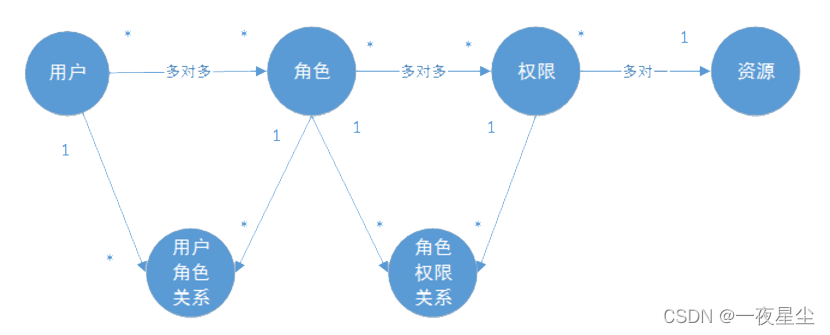
权限管理数据模型
- 权限表
- 角色表
- 用户表
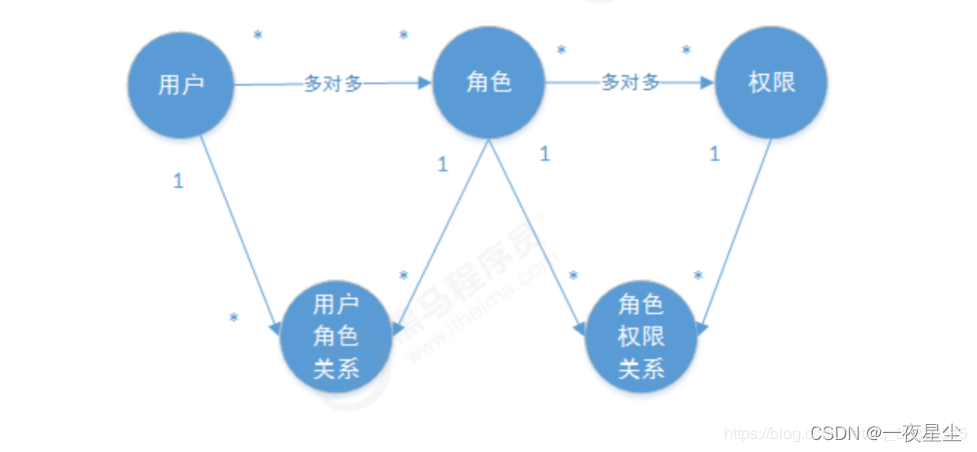
权限表和角色表之间是多对多的关系,因此需要建立一张中间表,同样用户表和角色表也是多对多关系,也需要建立一张中间表。
Oauth2简介
第三方认证方案最主要是解决认证协议的通用标准,因为要考虑跨系统认证,各系统之间要遵循一定的接口协议。
Oauth协议为用户资源的授权提供了一个安全的、开放而又简易的标准。同时任何第三方都可以使用Oauth认证服务,任何服务提供商都可以实现自身的Oauth认证服务,因而Oauth是开放的。业界提供了Oauth的多种实现如PHP、JavaScript、Java、Ruby等各种语言开发包,大大节约了程序员的时间,因而Oauth是简易的。
授权码模式
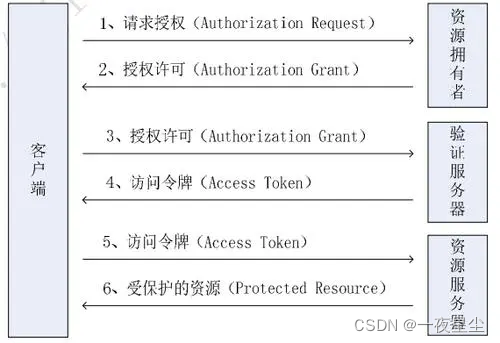
OAuth2认证架构
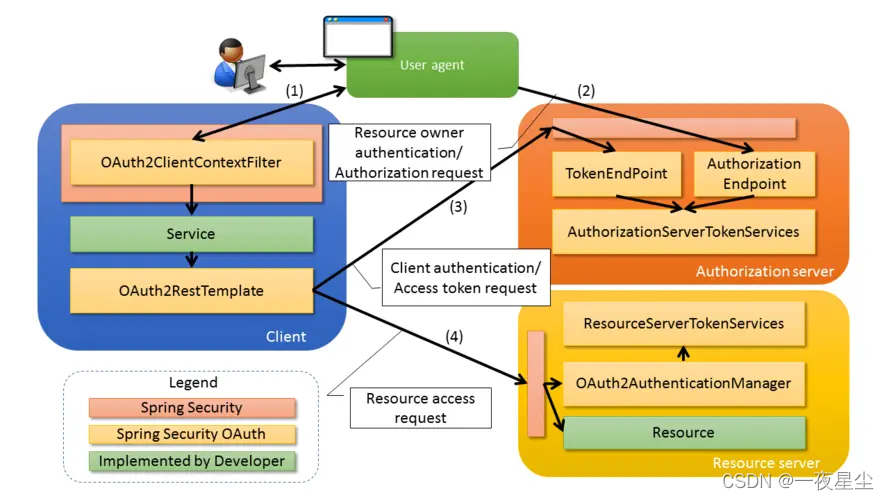
模拟授权码模式
AuthorzeationServerConfig.java
package cn.wu.config;

import org.springframework.beans.factory.annotation.Autowired;
import org.springframework.context.annotation.Configuration;
import org.springframework.security.crypto.password.PasswordEncoder;
import org.springframework.security.oauth2.config.annotation.configurers.ClientDetailsServiceConfigurer;
import org.springframework.security.oauth2.config.annotation.web.configuration.AuthorizationServerConfigurerAdapter;
import org.springframework.security.oauth2.config.annotation.web.configuration.EnableAuthorizationServer;

// 授权服务器配置
@Configuration
@EnableAuthorizationServer // 开启授权服务器
public class AuthorizationServerConfig extends AuthorizationServerConfigurerAdapter {
    private PasswordEncoder passwordEncoder;
    @Autowired
    public void setPasswordEncoder(PasswordEncoder passwordEncoder) {
        this.passwordEncoder = passwordEncoder;
    }

    @Override
    public void configure(ClientDetailsServiceConfigurer clients) throws Exception {
        clients.inMemory()
                .withClient("client") // 用户ID,唯一
                .secret(passwordEncoder.encode("root"))// 密钥
                .redirectUris("http://www.baidu.com")
                .scopes("all")
                .authorizedGrantTypes("authorization_code"); // 授权模式类型为 授权码模式
    }
}
ResourceServerConfig.java
package cn.wu.config;

import org.springframework.context.annotation.Configuration;
import org.springframework.security.config.annotation.web.builders.HttpSecurity;
import org.springframework.security.oauth2.config.annotation.web.configuration.EnableResourceServer;
import org.springframework.security.oauth2.config.annotation.web.configuration.ResourceServerConfigurerAdapter;

@Configuration
@EnableResourceServer
public class ResourceServerConfig extends ResourceServerConfigurerAdapter {
    @Override
    public void configure(HttpSecurity http) throws Exception {
        http.authorizeRequests()
                .anyRequest().authenticated()
                .and()
                .requestMatchers()
                .antMatchers("/user/**"); // 放行所有的/user资源
    }
}
SecurityConfig.java
package cn.wu.config;

import org.springframework.context.annotation.Bean;
import org.springframework.context.annotation.Configuration;
import org.springframework.security.config.annotation.web.builders.HttpSecurity;
import org.springframework.security.config.annotation.web.configuration.EnableWebSecurity;
import org.springframework.security.config.annotation.web.configuration.WebSecurityConfigurerAdapter;
import org.springframework.security.crypto.bcrypt.BCryptPasswordEncoder;
import org.springframework.security.crypto.password.PasswordEncoder;

@Configuration
@EnableWebSecurity
public class SecurityConfig extends WebSecurityConfigurerAdapter {
    @Bean
    public PasswordEncoder passwordEncoder() {
        return new BCryptPasswordEncoder();
    }

    @Override
    protected void configure(HttpSecurity http) throws Exception {
        http.authorizeRequests()
                .antMatchers("/oauth/**","/login.html","/error.html").permitAll()
                .anyRequest().authenticated().and()
                .formLogin().permitAll().and()
                // 关闭跨域认证
                .csrf().disable();
    }
}
UserService.java
package cn.wu.service;

import cn.wu.mapper.UserMapper;
import com.baomidou.mybatisplus.core.conditions.query.QueryWrapper;
import org.springframework.beans.factory.annotation.Autowired;
import org.springframework.security.core.GrantedAuthority;
import org.springframework.security.core.authority.AuthorityUtils;
import org.springframework.security.core.userdetails.User;
import org.springframework.security.core.userdetails.UserDetails;
import org.springframework.security.core.userdetails.UserDetailsService;
import org.springframework.security.core.userdetails.UsernameNotFoundException;
import org.springframework.security.crypto.password.PasswordEncoder;
import org.springframework.stereotype.Service;

import java.util.List;

@Service
public class UserService implements UserDetailsService {

    private PasswordEncoder passwordEncoder;
    @Autowired
    public void setPasswordEncoder(PasswordEncoder passwordEncoder) {
        this.passwordEncoder = passwordEncoder;
    }
    private UserMapper userMapper;

    @Autowired
    public void setUserMapper(UserMapper userMapper) {
        this.userMapper = userMapper;
    }

    @Override
    public UserDetails loadUserByUsername(String username) throws UsernameNotFoundException {
        QueryWrapper<cn.wu.entities.User> wrapper = new QueryWrapper<>();
        wrapper.eq("username",username);
        cn.wu.entities.User user = userMapper.selectOne(wrapper);
        if( user == null ) {
            throw new UsernameNotFoundException("用户名未找到… ");
        }
        List<GrantedAuthority> auths = AuthorityUtils
                .commaSeparatedStringToAuthorityList("user,admin");


        return new User(user.getUsername(),passwordEncoder.encode(user.getPassword()),auths);
    }
}
模拟密码模式
修改授权服务器以及SecurityConfig配置
package cn.wu.config;

import cn.wu.service.UserService;
import org.springframework.beans.factory.annotation.Autowired;
import org.springframework.context.annotation.Configuration;
import org.springframework.security.authentication.AuthenticationManager;
import org.springframework.security.crypto.password.PasswordEncoder;
import org.springframework.security.oauth2.config.annotation.configurers.ClientDetailsServiceConfigurer;
import org.springframework.security.oauth2.config.annotation.web.configuration.AuthorizationServerConfigurerAdapter;
import org.springframework.security.oauth2.config.annotation.web.configuration.EnableAuthorizationServer;
import org.springframework.security.oauth2.config.annotation.web.configurers.AuthorizationServerEndpointsConfigurer;

// 授权服务器配置
@Configuration
@EnableAuthorizationServer // 开启授权服务器
public class AuthorizationServerConfig extends AuthorizationServerConfigurerAdapter {
    private PasswordEncoder passwordEncoder;
    @Autowired
    public void setPasswordEncoder(PasswordEncoder passwordEncoder) {
        this.passwordEncoder = passwordEncoder;
    }
    private AuthenticationManager authenticationManager;
    @Autowired
    public void setAuthenticationManager(AuthenticationManager authenticationManager) {
        this.authenticationManager = authenticationManager;
    }
    private UserService userService;
    @Autowired
    public void setUserService(UserService userService) {
        this.userService = userService;
    }

    @Override
    public void configure(ClientDetailsServiceConfigurer clients) throws Exception {
        clients.inMemory()
                .withClient("client") // 用户ID,唯一
                .secret(passwordEncoder.encode("root"))// 密钥
                .redirectUris("http://www.baidu.com")
                .scopes("all")
                .authorizedGrantTypes("authorization_code","password"); // 授权模式类型为 授权码模式和密码模式
    }

    @Override
    public void configure(AuthorizationServerEndpointsConfigurer endpoints) throws Exception {
        endpoints.authenticationManager(authenticationManager)
                .userDetailsService(userService);

    }
}
...
package cn.wu.config;

import org.springframework.context.annotation.Bean;
import org.springframework.context.annotation.Configuration;
import org.springframework.security.authentication.AuthenticationManager;
import org.springframework.security.config.annotation.web.builders.HttpSecurity;
import org.springframework.security.config.annotation.web.configuration.EnableWebSecurity;
import org.springframework.security.config.annotation.web.configuration.WebSecurityConfigurerAdapter;
import org.springframework.security.crypto.bcrypt.BCryptPasswordEncoder;
import org.springframework.security.crypto.password.PasswordEncoder;

@Configuration
@EnableWebSecurity
public class SecurityConfig extends WebSecurityConfigurerAdapter {
    @Bean
    public PasswordEncoder passwordEncoder() {
        return new BCryptPasswordEncoder();
    }

    @Override
    protected void configure(HttpSecurity http) throws Exception {
        http.authorizeRequests()
                .antMatchers("/oauth/**","/login.html","/error.html").permitAll()
                .anyRequest().authenticated().and()
                .formLogin().permitAll().and()
                // 关闭跨域认证
                .csrf().disable();
    }
    @Bean
    @Override
    public AuthenticationManager authenticationManager() throws Exception {
        return super.authenticationManager();
    }
}
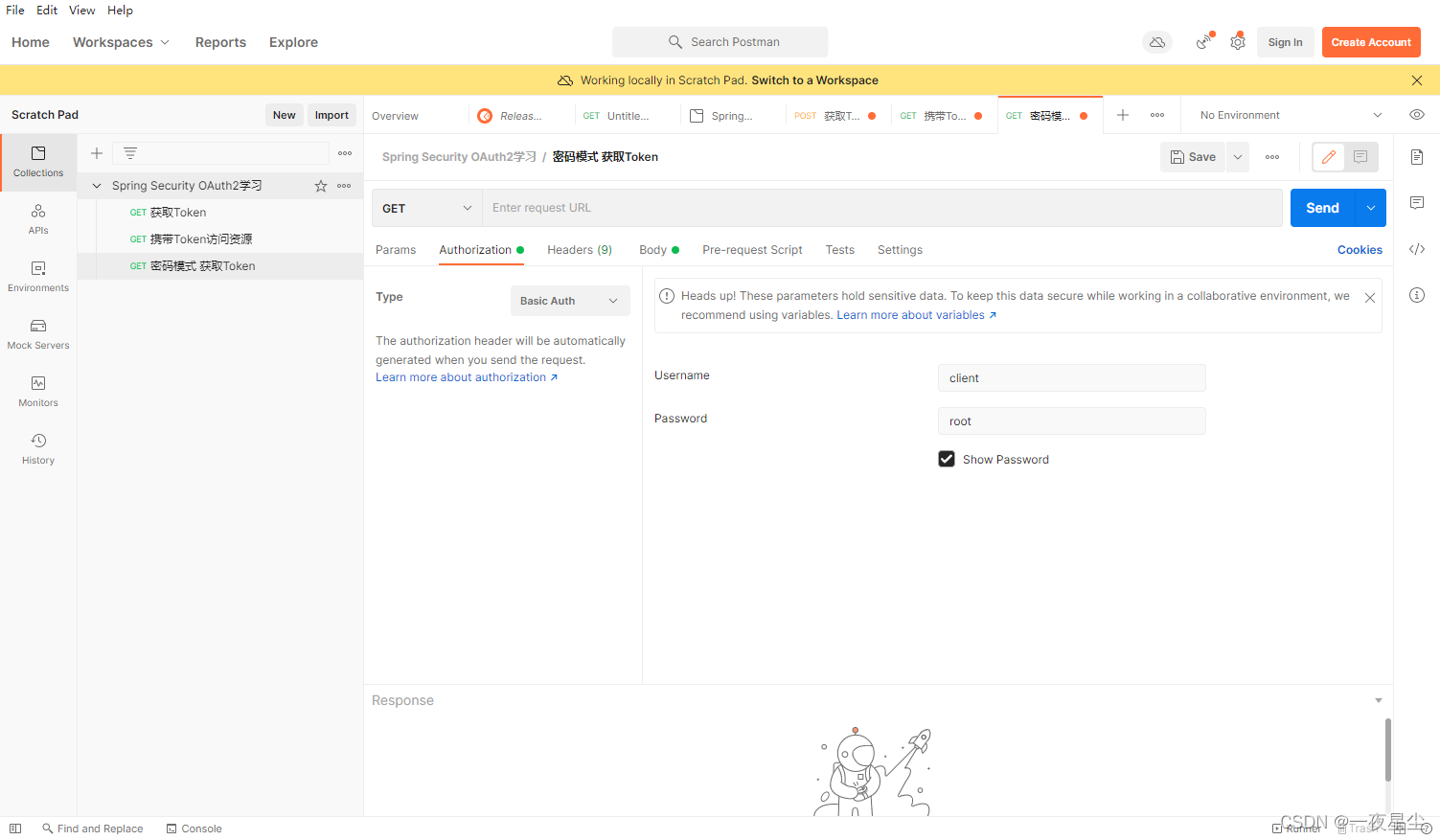
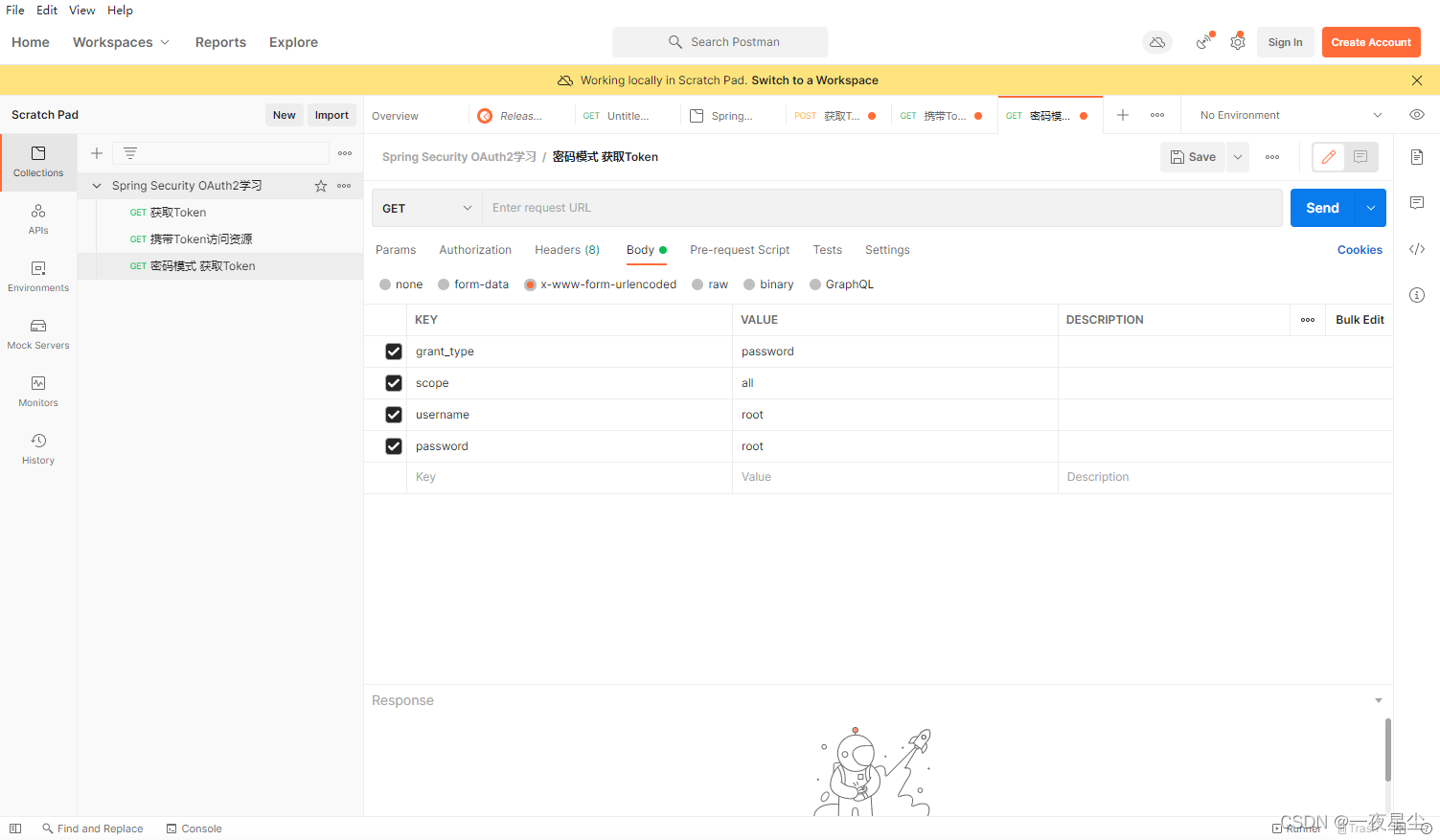
返回结果如下(此时Token已经获取到)…
{
    "access_token": "e2f45174-a63c-47e5-aafd-b9dfae73e0bd",
    "token_type": "bearer",
    "expires_in": 43199,
    "scope": "all"
}
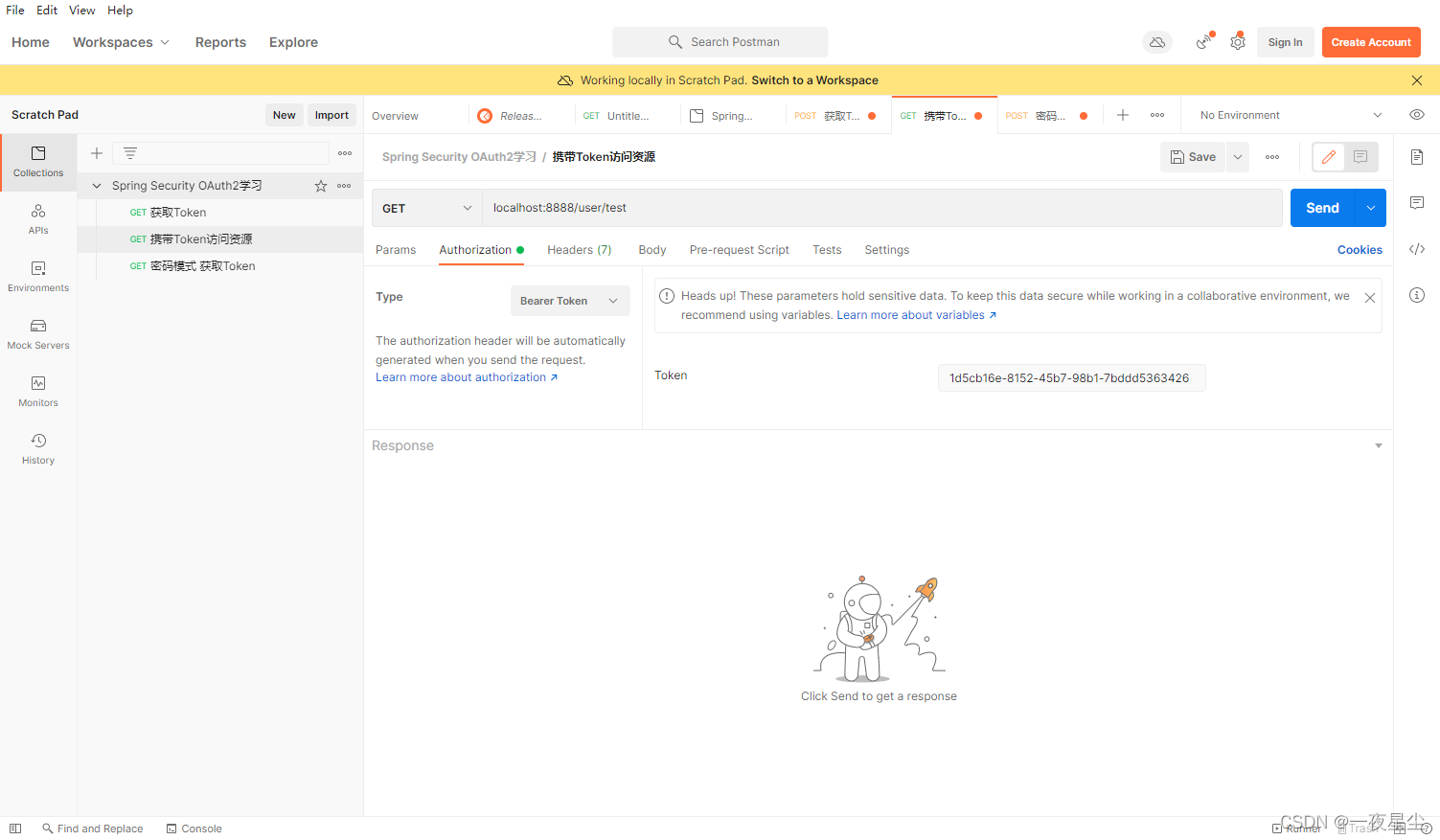
携带Token访问资源…
{
    "code": "200",
    "message": "请求成功… ",
    "data": {
        "authorities": [
            {
                "authority": "admin"
            },
            {
                "authority": "user"
            }
        ],
        "details": {
            "remoteAddress": "0:0:0:0:0:0:0:1",
            "sessionId": null,
            "tokenValue": "1d5cb16e-8152-45b7-98b1-7bddd5363426",
            "tokenType": "Bearer",
            "decodedDetails": null
        },
        "authenticated": true,
        "userAuthentication": {
            "authorities": [
                {
                    "authority": "admin"
                },
                {
                    "authority": "user"
                }
            ],
            "details": {
                "grant_type": "password",
                "scope": "all",
                "username": "root"
            },
            "authenticated": true,
            "principal": {
                "password": null,
                "username": "root",
                "authorities": [
                    {
                        "authority": "admin"
                    },
                    {
                        "authority": "user"
                    }
                ],
                "accountNonExpired": true,
                "accountNonLocked": true,
                "credentialsNonExpired": true,
                "enabled": true
            },
            "credentials": null,
            "name": "root"
        },
        "oauth2Request": {
            "clientId": "client",
            "scope": [
                "all"
            ],
            "requestParameters": {
                "grant_type": "password",
                "scope": "all",
                "username": "root"
            },
            "resourceIds": [],
            "authorities": [],
            "approved": true,
            "refresh": false,
            "redirectUri": null,
            "responseTypes": [],
            "extensions": {},
            "grantType": "password",
            "refreshTokenRequest": null
        },
        "principal": {
            "password": null,
            "username": "root",
            "authorities": [
                {
                    "authority": "admin"
                },
                {
                    "authority": "user"
                }
            ],
            "accountNonExpired": true,
            "accountNonLocked": true,
            "credentialsNonExpired": true,
            "enabled": true
        },
        "credentials": "",
        "clientOnly": false,
        "name": "root"
    }
}
Redis存储Token
添加相关依赖…
 <!-- 引入redis依赖 -->
 <dependency>
     <groupId>org.springframework.boot</groupId>
     <artifactId>spring-boot-starter-data-redis</artifactId>
 </dependency>
 <!-- 对象连接池依赖 -->
 <dependency>
     <groupId>org.apache.commons</groupId>
     <artifactId>commons-pool2</artifactId>
 </dependency>
修改授权服务器AuthorizationServerConfig配置…
package cn.wu.config;

import cn.wu.service.UserService;
import org.springframework.beans.factory.annotation.Autowired;
import org.springframework.beans.factory.annotation.Qualifier;
import org.springframework.context.annotation.Configuration;
import org.springframework.security.authentication.AuthenticationManager;
import org.springframework.security.crypto.password.PasswordEncoder;
import org.springframework.security.oauth2.config.annotation.configurers.ClientDetailsServiceConfigurer;
import org.springframework.security.oauth2.config.annotation.web.configuration.AuthorizationServerConfigurerAdapter;
import org.springframework.security.oauth2.config.annotation.web.configuration.EnableAuthorizationServer;
import org.springframework.security.oauth2.config.annotation.web.configurers.AuthorizationServerEndpointsConfigurer;
import org.springframework.security.oauth2.provider.token.TokenStore;

// 授权服务器配置
@Configuration
@EnableAuthorizationServer // 开启授权服务器
public class AuthorizationServerConfig extends AuthorizationServerConfigurerAdapter {
    private PasswordEncoder passwordEncoder;
    @Autowired
    public void setPasswordEncoder(PasswordEncoder passwordEncoder) {
        this.passwordEncoder = passwordEncoder;
    }
    private AuthenticationManager authenticationManager;
    @Autowired
    public void setAuthenticationManager(AuthenticationManager authenticationManager) {
        this.authenticationManager = authenticationManager;
    }
    private UserService userService;
    @Autowired
    public void setUserService(UserService userService) {
        this.userService = userService;
    }
    private TokenStore redisTokenStore;
    @Autowired
    @Qualifier("redisTokenStore")
    public void setRedisTokenStore(TokenStore redisTokenStore) {
        this.redisTokenStore = redisTokenStore;
    }

    @Override
    public void configure(ClientDetailsServiceConfigurer clients) throws Exception {
        clients.inMemory()
                .withClient("client") // 用户ID,唯一
                .secret(passwordEncoder.encode("root"))// 密钥
//                .redirectUris("http://www.baidu.com")
                .scopes("all")
                .authorizedGrantTypes("password"); // 授权模式类型为 授权码模式和密码模式
    }

    /**
     * 密码模式配置
     * @param endpoints
     * @throws Exception
     */
    @Override
    public void configure(AuthorizationServerEndpointsConfigurer endpoints) throws Exception {
        endpoints.authenticationManager(authenticationManager)
                .userDetailsService(userService)
                .tokenStore(redisTokenStore); // Redis存储Token配置
    }
}
添加RedisConfig配置…
package cn.wu.config;

import org.springframework.beans.factory.annotation.Autowired;
import org.springframework.context.annotation.Bean;
import org.springframework.context.annotation.Configuration;
import org.springframework.data.redis.connection.RedisConnectionFactory;
import org.springframework.security.oauth2.provider.token.TokenStore;
import org.springframework.security.oauth2.provider.token.store.redis.RedisTokenStore;

// Redis配置
@Configuration
public class RedisConfig {
    private RedisConnectionFactory redisConnectionFactory;
    @Autowired
    public void setRedisConnectionFactory(RedisConnectionFactory redisConnectionFactory) {
        this.redisConnectionFactory = redisConnectionFactory;
    }
    @Bean
    public TokenStore redisTokenStore() {
        return new RedisTokenStore(redisConnectionFactory);
    }
}
此时尝试通过post方式获取Token后,Redis数据库的内容已经发生了改变…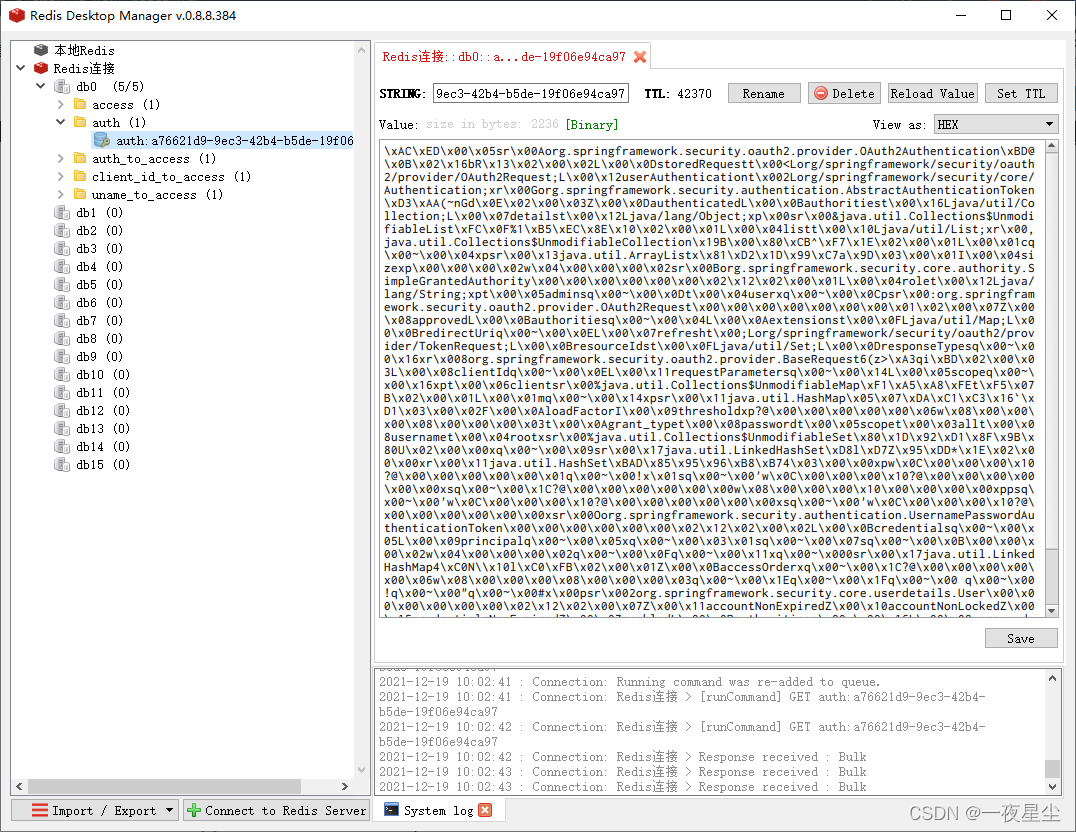
通过JWT创建Token
何为JWT?
JSON Web Token,通过数字签名的方式,以JSON对象作为载体,在不同的服务终端之间安全传输信息。
引入主要依赖
<dependency>
    <groupId>org.springframework.boot</groupId>
    <artifactId>spring-boot-starter-web</artifactId>
</dependency>
<!-- JWT依赖 -->
<dependency>
    <groupId>io.jsonwebtoken</groupId>
    <artifactId>jjwt</artifactId>
    <version>0.9.1</version>
</dependency>
<dependency>
    <groupId>org.springframework.boot</groupId>
    <artifactId>spring-boot-starter</artifactId>
</dependency>
<dependency>
    <groupId>org.springframework.boot</groupId>
    <artifactId>spring-boot-starter-test</artifactId>
</dependency>
测试入门
package cn.wu;

import io.jsonwebtoken.Claims;
import io.jsonwebtoken.JwtBuilder;
import io.jsonwebtoken.Jwts;
import io.jsonwebtoken.SignatureAlgorithm;
import org.junit.Test;
import org.springframework.boot.test.context.SpringBootTest;

import java.util.Date;

@SpringBootTest
public class SpringTest {
    /**
     * 生成JWT
     */
    @Test
    public void createJwt() {
        long date = System.currentTimeMillis();
        // 设置过期时间为60秒
        long exp  = date + 60 * 1000;

        JwtBuilder jwtBuilder = Jwts.builder()
                // 设置唯一ID {"id":"jwt_id"}
                .setId("id")
                // 面向的用户 {"sub":"jwt"}
                .setSubject("subject")
                // 设置签发时间 {"iat":"时间"}
                .setIssuedAt(new Date())
                // 确认签名的加密算法以及密钥(盐值)
                .signWith(SignatureAlgorithm.HS256,"yiyexingchen")
                // 设置签发人
                .setIssuer("yiyexingchen")
                // 设置过期时间
                .setExpiration(new Date(exp))
                // 设置自定义声明
                .claim("name","张三")
                .claim("age",20);
//                .setClaims(map对象)
        // 生成token
        String token = jwtBuilder.compact();
        System.out.println("token为:"+token);
    }

    /**
     * 解析Jwt
     */
    @Test
    public void parseToken() {
        String token = "eyJhbGciOiJIUzI1NiJ9.eyJqdGkiOiJpZCIsInN1YiI6InN1YmplY3QiLCJpYXQiOjE2Mzk5NjY2NjQsImlzcyI6InlpeWV4aW5nY2hlbiIsImV4cCI6MTYzOTk2NjcyNCwibmFtZSI6IuW8oOS4iSIsImFnZSI6MjB9.BYK6DoFM-DO3PdFkaKboDEt3nFy3GZXErXSEoivCfFY";
        Claims claims = (Claims) Jwts.parser()
                // 设置验签
                .setSigningKey("yiyexingchen")
                .parse(token)
                .getBody();
        System.out.println("id="+claims.getId());
        System.out.println("sub="+claims.getSubject());
        System.out.println("iat="+claims.getIssuedAt());
        System.out.println("name="+claims.get("name"));
        System.out.println("age="+claims.get("age"));
    }
}
Spring Security OAuth2整合JWT
添加Jwt配置类
package cn.wu.config;

import org.springframework.context.annotation.Bean;
import org.springframework.context.annotation.Configuration;
import org.springframework.security.oauth2.provider.token.TokenStore;
import org.springframework.security.oauth2.provider.token.store.JwtAccessTokenConverter;
import org.springframework.security.oauth2.provider.token.store.JwtTokenStore;

@Configuration
public class JwtConfig {
    @Bean
    public TokenStore jwtTokenStore() {
        return new JwtTokenStore(jwtAccessTokenConverter());
    }
    @Bean
    public JwtAccessTokenConverter jwtAccessTokenConverter() {
        JwtAccessTokenConverter jwtAccessTokenConverter = new JwtAccessTokenConverter();
        // 设置Jwt的密钥
        jwtAccessTokenConverter.setSigningKey("YiYeXingChen");
        return jwtAccessTokenConverter;
    }
    @Bean
    public JwtTokenEnhancer jwtTokenEnhancer() {
        return new JwtTokenEnhancer();
    }
}
添加Jwt增强配置类
package cn.wu.config;

import org.springframework.security.oauth2.common.DefaultOAuth2AccessToken;
import org.springframework.security.oauth2.common.OAuth2AccessToken;
import org.springframework.security.oauth2.provider.OAuth2Authentication;
import org.springframework.security.oauth2.provider.token.TokenEnhancer;

import java.util.HashMap;
import java.util.Map;

public class JwtTokenEnhancer implements TokenEnhancer {

    @Override
    public OAuth2AccessToken enhance(OAuth2AccessToken oAuth2AccessToken, OAuth2Authentication oAuth2Authentication) {
        Map<String,Object> claims = new HashMap<>();
        // 自定义声明设置
        claims.put("name","张三");
        claims.put("age",20);
        ((DefaultOAuth2AccessToken)oAuth2AccessToken).setAdditionalInformation(claims);
        return oAuth2AccessToken;
    }
}
修改授权服务器配置类
package cn.wu.config;

import cn.wu.service.UserService;
import org.springframework.beans.factory.annotation.Autowired;
import org.springframework.beans.factory.annotation.Qualifier;
import org.springframework.context.annotation.Configuration;
import org.springframework.security.authentication.AuthenticationManager;
import org.springframework.security.crypto.password.PasswordEncoder;
import org.springframework.security.oauth2.config.annotation.configurers.ClientDetailsServiceConfigurer;
import org.springframework.security.oauth2.config.annotation.web.configuration.AuthorizationServerConfigurerAdapter;
import org.springframework.security.oauth2.config.annotation.web.configuration.EnableAuthorizationServer;
import org.springframework.security.oauth2.config.annotation.web.configurers.AuthorizationServerEndpointsConfigurer;
import org.springframework.security.oauth2.provider.token.TokenEnhancer;
import org.springframework.security.oauth2.provider.token.TokenEnhancerChain;
import org.springframework.security.oauth2.provider.token.TokenStore;
import org.springframework.security.oauth2.provider.token.store.JwtAccessTokenConverter;
import org.springframework.security.oauth2.provider.token.store.JwtTokenStore;

import java.util.ArrayList;
import java.util.List;

// 授权服务器配置
@Configuration
@EnableAuthorizationServer // 开启授权服务器
public class AuthorizationServerConfig extends AuthorizationServerConfigurerAdapter {
    private PasswordEncoder passwordEncoder;
    @Autowired
    public void setPasswordEncoder(PasswordEncoder passwordEncoder) {
        this.passwordEncoder = passwordEncoder;
    }
    private AuthenticationManager authenticationManager;
    @Autowired
    public void setAuthenticationManager(AuthenticationManager authenticationManager) {
        this.authenticationManager = authenticationManager;
    }
    private UserService userService;
    @Autowired
    public void setUserService(UserService userService) {
        this.userService = userService;
    }
//    private TokenStore redisTokenStore;
//    @Autowired
//    @Qualifier("redisTokenStore")
//    public void setRedisTokenStore(TokenStore redisTokenStore) {
//        this.redisTokenStore = redisTokenStore;
//    }
    private TokenStore jwtTokenStore;
    @Autowired
    @Qualifier("jwtTokenStore")
    public void setJwtTokenStore(TokenStore jwtTokenStore) {
        this.jwtTokenStore = jwtTokenStore;
    }
    private JwtAccessTokenConverter jwtAccessTokenConverter;
    @Autowired
    public void setJwtAccessTokenConverter(JwtAccessTokenConverter jwtAccessTokenConverter) {
        this.jwtAccessTokenConverter = jwtAccessTokenConverter;
    }
    private TokenEnhancer jwtTokenEnhancer;
    @Autowired
    @Qualifier("jwtTokenEnhancer")
    public void setTokenEnhancer(TokenEnhancer tokenEnhancer) {
        this.jwtTokenEnhancer = tokenEnhancer;
    }

    @Override
    public void configure(ClientDetailsServiceConfigurer clients) throws Exception {
        clients.inMemory()
                // 设置用户id
                .withClient("client") // 用户ID,唯一
                // 设置密钥
                .secret(passwordEncoder.encode("root"))
//                .redirectUris("http://www.baidu.com")
                .scopes("all")
                // 失效时间设置为60秒
                .accessTokenValiditySeconds(60)
                .authorizedGrantTypes("password"); // 授权模式类型为 密码模式
    }

    /**
     * 密码模式配置
     * @param endpoints
     * @throws Exception
     */
    @Override
    public void configure(AuthorizationServerEndpointsConfigurer endpoints) throws Exception {
        // 设置JWT增强内容
        TokenEnhancerChain tokenEnhancerChain = new TokenEnhancerChain();
        List<TokenEnhancer> tokenEnhancers = new ArrayList<>();
        tokenEnhancers.add(jwtTokenEnhancer);
        tokenEnhancers.add(jwtAccessTokenConverter);
        tokenEnhancerChain.setTokenEnhancers(tokenEnhancers);

        endpoints.authenticationManager(authenticationManager)
                .userDetailsService(userService)
//                .tokenStore(redisTokenStore); // Redis存储Token配置
                // 整合jwt方式 转化为Jwttoken
                .tokenStore(jwtTokenStore)
                .accessTokenConverter(jwtAccessTokenConverter)
                .tokenEnhancer(tokenEnhancerChain);
    }
}
修改控制层
package cn.wu.controller;

import cn.wu.utils.ResponseBody;
import io.jsonwebtoken.Jwts;
import io.jsonwebtoken.SignatureException;
import org.springframework.beans.factory.annotation.Autowired;
import org.springframework.security.core.Authentication;
import org.springframework.web.bind.annotation.GetMapping;
import org.springframework.web.bind.annotation.RequestMapping;
import org.springframework.web.bind.annotation.RestController;

import javax.servlet.http.HttpServletRequest;
import java.nio.charset.StandardCharsets;

@RestController
@RequestMapping("/user")
public class UserController {
    private ResponseBody responseBody;
    @Autowired
    public void setResponseBody(ResponseBody responseBody) {
        this.responseBody = responseBody;
    }

    @GetMapping("/test")
    public ResponseBody test(Authentication authentication, HttpServletRequest request){
        String header  = request.getHeader("Authorization"); // 请求头获取token
        String token = header.substring(header.lastIndexOf("bearer") + 7); // 获取Token剩余的主要内容

        responseBody.setCode("200");
        responseBody.setMessage("请求成功… ");
        try{
            responseBody.setData(Jwts.parser().
                    // 这儿有坑,要记得用UTF-8作为编码格式…
                    setSigningKey("YiYeXingChen".getBytes(StandardCharsets.UTF_8)).
                    parse(token).getBody());
        }catch(SignatureException signatureException){
            System.out.println("错误信息为:"+signatureException);
            responseBody.setCode("500");
            responseBody.setMessage("请求失败… ");
        }
        return responseBody;
    }
}
