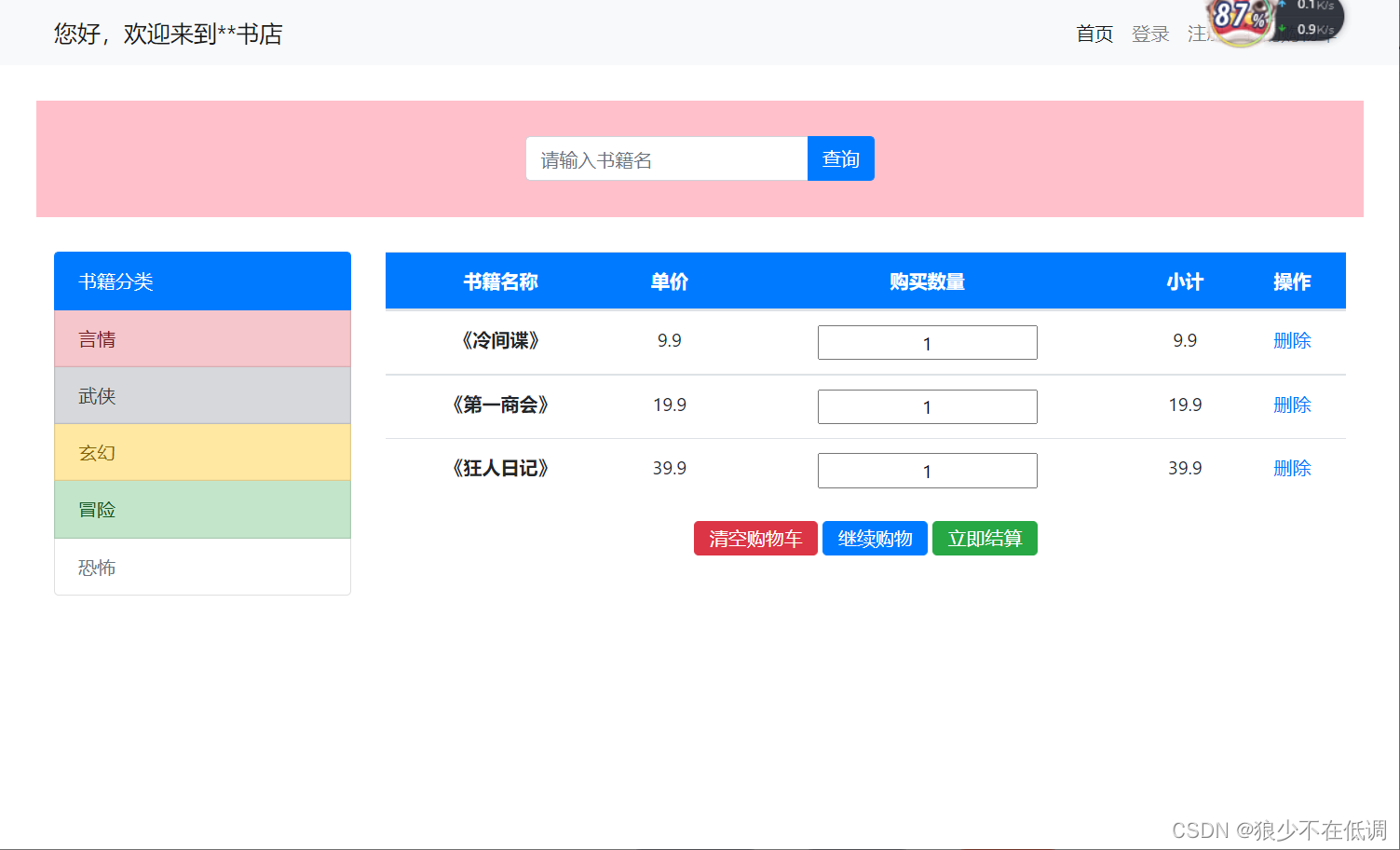
结算功能代码实现
<!DOCTYPE html>
<html>
<head>
<meta charset="utf-8">
<title>实现购物车页面布局</title>
<!-- 支持手机端 -->
<meta name="viewport" content="width=device-width,initial-scale=1,minimum-scale=1,maximum-scale=1,user-scalable=no" />
<!-- 引入Bootstrap -->
<link rel="stylesheet" type="text/css" href="css/bootstrap.css" />
<style type="text/css">
.navbar-collapse {
flex-grow: 0;
/*在固定容器中 如果是1代表弹性扩大,占用父容器剩余空间 0代表不占用*/
}
.form-group {
width: 300px;
margin-left: auto;
margin-right: auto;
/*自动*/
margin-top: 31px;
}
.ss {
height: 100px;
margin-top: 30px;
background-color: #DCDCDC;
}
.list-group,
.table-hover {
margin-top: 30px;
}
.table-hover thead {
/*头部*/
color: white;
text-align: center;
}
.table-hover tbody tr,.table-hover tbody tr td input{
text-align: center;
}
.a{
text-align: center;/*内容居中*/
}
.a button{
height: 30px;
line-height: 10px;
}
</style>
</head>
<body>
<!-- 导航区域 导航条组件 -->
<nav class="navbar navbar-expand-lg navbar-light bg-light">
<div class="container ">
<a class="navbar-brand" href="#">您好,欢迎来到**书店</a>
<button class="navbar-toggler" type="button" data-toggle="collappse" data-target="#navbar">
<span class="navbar-toggler-icon"></span>
</button>
<div class="collapse navbar-collapse" id="navbarNav">
<ul class="navbar-nav">
<li class="nav-item active">
<a class="nav-link" href="#">首页<span class="sr-only">(current)</span></a>
</li>
<li class="nav-item">
<a class="nav-link" href="#">登录</a>
</li>
<li class="nav-item">
<a class="nav-link" href="#">注册</a>
</li>
<li>
<a class="nav-link" disabled="">我的购物车</a>
</li>
</ul>
</div>
</div>
</nav>
<!-- 栅格 搭建主页框架-->
<div class="container">
<!-- 第一行 1列-->
<div class="row ss" style="background-color: pink;">
<div class="col">
<!-- 搜索区域 -->
<form>
<div class="form-group">
<!-- 输入框组合 -->
<div class="input-group mb-3">
<input type="text" class="form-control" placeholder="请输入书籍名" />
<div class="input-group-append">
<button class="btn btn-primary" type="button" id="button-addon2">查询</button>
</div>
</div>
</div>
</form>
</div>
</div>
<!-- 第二行 -->
<div class="row">
<div class="col-3">
<!-- 左三为书籍分类 -->
<div class="list-group">
<button type="button" class="list-group-item list-group-item-action active" aria-current="true">
书籍分类
</button>
<button type="button" class="list-group-item list-group-item-action list-group-item-danger">言情</button>
<button type="button" class="list-group-item list-group-item-action list-group-item-secondary">武侠</button>
<button type="button" class="list-group-item list-group-item-action list-group-item-warning">玄幻</button>
<button type="button" class="list-group-item list-group-item-action list-group-item-success">冒险</button>
<button type="button" class="list-group-item list-group-item-action" disabled>恐怖</button>
</div>
</div>
<div class="col-9">
<!-- 右九为轮播图 购物车-->
<table class="table table-hover">
<thead class="bg-primary">
<tr>
<th scope="col">书籍名称</th>
<th scope="col">单价</th>
<th scope="col">购买数量</th>
<th scope="col">小计</th>
<th scope="col">操作</th>
</tr>
</thead>
<tbody>
<tr>
<th scope="row">《冷间谍》</th>
<td>9.9</td>
<td><input value="1" /></td>
<td>9.9</td>
<td><a href="#">删除</a></td>
</tr>
<tr>
<th scope="row">《第一商会》</th>
<td>19.9</td>
<td><input value="1" /></td>
<td>19.9</td>
<td><a href="#">删除</a></td>
</tr>
<tr>
<th scope="row">《狂人日记》</th>
<td>39.9</td>
<td><input value="1" /></td>
<td>39.9</td>
<td><a href="#">删除</a></td>
</tr>
</tbody>
</table>
<p class="a">
<button class="btn btn-danger">清空购物车</button>
<button class="btn btn-primary">继续购物</button>
<button class="btn btn-success">立即结算</button>
</p>
</div>
</div>
</div>
<!-- 引入 -->
<script src="js/jquery-3.3.1.js" type="text/javascript" charset="utf-8"></script>
<script src="js/bootstrap.js" type="text/javascript" charset="utf-8"></script>
</body>
</html>