安装配置好UCM时,到登陆页面后出现以下提示:
"The weblayout directory is on a filesystem with 8dot3 semantics. Legacy 16-bit 8dot3 filenames conflict with revision labels and will cause file loss. Disable 8dot3 semantics by running "Installer DisableNtfs8dot3" and then restarting Windows."

解决方法:
打开注册表,展开到下列项
HKEY_LOCAL_MACHINE\SYSTEM\CurrentControlSet\Control\FileSystem
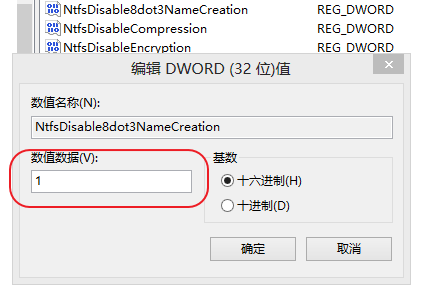
将NtfsDisable8dot3NameCreation的默认值2改为1。
重启计算机即可。
相关文档
http://docs.oracle.com/cd/E28280_01/relnotes.1111/e10132/ucm.htm#ASIRN3583
版权声明:本文为ygj26原创文章,遵循CC 4.0 BY-SA版权协议,转载请附上原文出处链接和本声明。