网络中的进程
socket解决的是网络中进程间的通信,其首要解决的就是如何在网络中找到目标进程,这就要求进程拥有唯一性的索引,方便查找连接。
一台机器上,进程与进程之间通行,以PID作为唯一标识。但是在网络中,不同的机器,PID可能重复。
然而,网络层的IP 可以唯一标识主机,传输层的 tcp协议和端口号 则能够唯一标识主机中的进程。
因此: ip地址+协议+端口 = 网络中的一个进程
socket
就目前而言,几乎所有的应用程序都是采用socket,而现在又是网络时代,网络中进程通信是无处不在,这就是我为什么说“一切皆socket”。
socket位于应用层和传输层之间的一个抽象层,封装传输层的各种复杂操作,提供几个简单的接口供应用层调用。
socket的主要作用是实现在网络中 进程之间的通信。
服务端和客户端 统一使用 socket提供的api进行通信。
socket三次握手 (TCP)
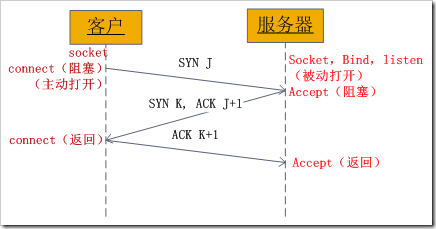
client客户端调用 connect() 方法时,即开始进行建立tcp连接(三次握手)中的 第一次握手(阻塞等待服务端的第二次握手)。
server服务端开始调用 accept() 方法,完成 第二次握手(阻塞等待客户端的第三次握手)。
client客户端 connect() 方法收到第二次握手,进行 第三次握手 ,connect() 方法完成执行。
server服务端 accept() 方法收到第三次握手,完成执行。
通信
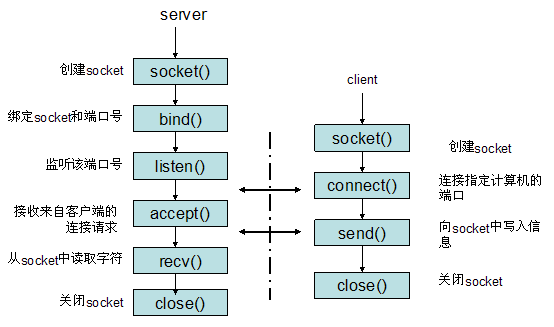
socket使用的 “ 打开 -> 读写 -> 关闭 ” 这种模式进行的操作。
这种模式将socket看成一个特殊的 “文件”,提供一些函数对其进行 “IO操作”。
服务端和客户端通过读取这个中间 “文件” 来进行通信。
具体的I/O操作函数有一下几种方式
read()/write()
recv()/send()
readv()/writev()
recvmsg()/sendmsg()
recvfrom()/sendto()
node中的socket编程
node中跟socket相关的网络模块有两个:
net
http
net为最底层,以事件驱动机制将socket的接口进行封装,提供socket的相关操作。
http在net的基础上,基于http协议进行再一次封装,将请求分成http头和http体,提供基于request和response的基本操作。
net模块
net模块是node的原生模块,是对tcp层的封装(socket)。
提供了两个类的定义:
net.Socket (实现node中的socket操作)
- 事件: ‘lookup’
- 事件: ‘connect’
- 事件: ‘data’
- 事件: ‘end’
- 事件: ‘timeout’
- 事件: ‘drain’
- 事件: ‘error’
- 事件: ‘close’
net.Server (基于socket,再次封装成服务端API)
- 事件: ‘listening’
- 事件: ‘connection’
- 事件: ‘close’
- 事件: ‘error’
提供了一些基于两个类的基本操作
net.createServer([options], [connectionListener])
net.connect(options, [connectionListener])
net.createConnection(options, [connectionListener])
net.connect(port, [host], [connectListener])
net.createConnection(port, [host], [connectListener])
net.connect(path, [connectListener])
net.createConnection(path, [connectListener])
服务端使用
var net = require('net');

var server = net.createServer(function(clientSocket){
    ...
})

server.listen(10000,'127.0.0.1',function(){
    console.log('监听开始')
})
客户端使用
var net = require('net');

var clientSocket = net.connect({
    port:10000,
    host:'127.0.0.1'
},function(){
    console.log('tcp连接建立成功');
})
...
其中具体的通信使用事件驱动机制。
clientSocket.on('data',function(){
    ...
})
...
http模块
http模块在net的基础上,提供针对应用层http协议的专门API。
http模块以request和response为基本操作单位,封装net.Socket,将获取到的数据data,分成请求头和请求体。
提供了五个类的定义:
http.Server (基于net.Server的再次封装)
- 事件: ‘request’
- 事件: ‘connection’
- 事件: ‘close’
- 事件: ‘checkContinue’
- 事件: ‘connect’
- 事件: ‘upgrade’
- 事件: ‘clientError’
http.ServerResponse (基于net.Socket的再次封装)
- 事件:’close’
http.ClientRequest (基于net.Socket的再次封装)
- 事件: ‘response’
- 事件: ‘socket’
- 事件: ‘connect’
- 事件: ‘upgrade’
- 事件: ‘continue’
http.Agent
http.IncomingMessage
服务端使用
var http = require('http');

var server = http.createServer(function(request,response){
    ...
})

// 或者

var server = new http.Server();
server.on('request',function(request,response){
    ...
})

server.listen(10000,'127.0.0.1',function(){
    console.log('监听开始')
})
客户端使用
var http = require('http');

var request = http.request({
    host : '127.0.0.1',
    method : 'GET',
    path: '/'
    ..
})

request.on('response',function(response){
    ...
})
url模块
url模块常常配合http模块,对url进行处理。
                               url.parse(string).query
                                           |
           url.parse(string).pathname      |
                       |                   |
                       |                   |
                     ------ -------------------
http://localhost:8888/start?foo=bar&hello=world
                                ---       -----
                                 |          |
                                 |          |
              querystring(string)["foo"]    |
                                            |
                         querystring(string)["hello"]
通过url模块,可以创建一个路由机制
var http = require('http');
var url = require('url');
var querystring = require('querystring');

var routeHandle = {};

routeHandle['/'] = function(response){
    ...
}

routeHandle['/upload'] = function(response){
    ...
}


http.createServer(function(request,response){

    var pathname = url.parse(request.url).pathname;

    route(routeHandle,pathname,request,response);

}).listen(10000,'127.0.0.1');


function route(handle,pathname,request,response){
    if (typeof handle[pathname] === 'function') {
        handle[pathname](response);
    } else {
        console.log("该路由没有处理器: " + pathname);
    }
}
静态文件处理
一个完整的http服务器,除了几个特定的url路径处理之外(即后台action),还应该对静态文件请求做处理。
var http = require('http');
var url = require('url');
var path = require('path');
var fs = require('fs');

var MIME = {

  "css": "text/css",

  "gif": "image/gif",

  "html": "text/html",

  "ico": "image/x-icon",

  "jpeg": "image/jpeg",

  "jpg": "image/jpeg",

  "js": "text/javascript",

  "json": "application/json",

  "pdf": "application/pdf",

  "png": "image/png",

  "svg": "image/svg+xml",

  "swf": "application/x-shockwave-flash",

  "tiff": "image/tiff",

  "txt": "text/plain",

  "wav": "audio/x-wav",

  "wma": "audio/x-ms-wma",

  "wmv": "video/x-ms-wmv",

  "xml": "text/xml"

}

...

function route(handle,pathname,request,response){
    // path.extname(relPath) 获取文件后缀名
    if(path.extname(pathname)){
        // 静态文件 处理
        doStaticFile(pathname,response);
    }
    else{
        // action 处理
        ...
    }
}

function doStaticFile(relPath,response){

    fs.exists(relPath,function(exists){
        if(!exists){
            response.writeHead(404, {'Content-Type': 'text/plain'});

            response.write("请求的路径不存在:" + relPath);

            response.end();
        }else{
            fs.readFile(relPath,'binary',function(err,file){
                if(err){
                    // 服务器异常
                    response.writeHead(500, {'Content-Type': 'text/plain'});

                    response.end();
                }else{
                    // 返回静态文件
                    var suffix = path.extname(realPath);

                    // 由于extname返回值包含”.”,所以通过slice方法来剔除掉”.”
                    var mime = MIME[suffix.slice(1)] || 'text/plain';

                    response.writeHead(200, {'Content-Type': mime});

                    response.write(file, "binary");

                    response.end();
                }
            })
        }
    })

}

http.createServer(function(request,response){

    var pathname = url.parse(request.url).pathname;

    route(routeHandle,pathname,request,response);

}).listen(10000,'127.0.0.1');
这里就基本实现了一个http服务器,但在静态文件的处理上还有所欠缺。
对于静态资源的请求,每次都是通过读取文件,当请求过多时,会损坏硬盘IO。
因此需要使用缓存,从而减轻硬盘的IO损坏。
参考博文: