第一步:安装
npm install echarts --save
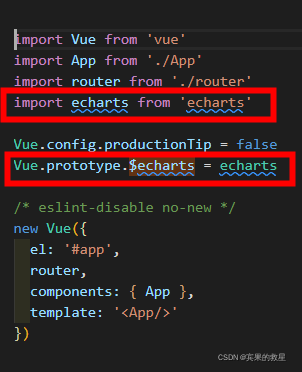
第二步:main.js中注册全局变量$echarts
第三步:组件内使用
<div id="main" style="height: 500px;width:500px;"></div><script>
export default {
data () {
return {
chart: null
}
},
mounted () {
this.setChart()
// 自适应窗口大小
window.addEventListener('resize', () => {
this.chart.resize()
})
},
methods: {
setChart () {
this.chart = this.$echarts.init(document.getElementById('main'))
var option = {
xAxis: {
type: 'category',
data: ['Mon', 'Tue', 'Wed', 'Thu', 'Fri', 'Sat', 'Sun']
},
yAxis: {
type: 'value'
},
series: [
{
data: [150, 230, 224, 218, 135, 147, 260],
type: 'line'
}
]
}
this.chart.setOption(option)
}
},
beforeDestroy() {
this.chart.dispose();
this.chart = null;
},
}
</script>最终效果:

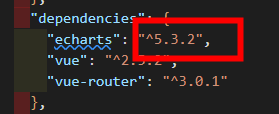
报错:"export 'default' (imported as 'echarts') was not found in 'echarts'

当前版本
解决方案
npm install echarts@4.9.0
版权声明:本文为wuli_youhouli原创文章,遵循CC 4.0 BY-SA版权协议,转载请附上原文出处链接和本声明。