首先需要从cocoa pods导入
pod 'ShareSDK3'
pod 'MOBFoundation'
pod 'ShareSDK3/ShareSDKUI'
pod 'ShareSDK3/ShareSDKPlatforms/WeChat'
这个类用来初始化shareSDK,
classShareHelperInfo:NSObject{
classfuncregisterApp(){
ShareSDK.registerApp("你的APPkey",
activePlatforms: [
SSDKPlatformType.TypeWechat.rawValue,
SSDKPlatformType.TypeSMS.rawValue,
SSDKPlatformType.TypeMail.rawValue,
SSDKPlatformType.TypeCopy.rawValue,
],
onImport: {(platform :SSDKPlatformType) ->Voidin
switchplatform{
caseSSDKPlatformType.TypeWechat:
ShareSDKConnector.connectWeChat(WXApi.classForCoder())
break
caseSSDKPlatformType.TypeSMS:
break
caseSSDKPlatformType.TypeMail:
break
caseSSDKPlatformType.TypeCopy:
break
default:
break
}
},
onConfiguration: {(platform : SSDKPlatformType,appInfo : NSMutableDictionary!) -> Voidin
switchplatform {
caseSSDKPlatformType.TypeWechat:
//设置微信应用信息
appInfo.SSDKSetupWeChatByAppId("你的微信id", appSecret:"你的 Appsecret"
break
default:
break
}
})
}
这个类方法需要写在这个方法里面(初始化Sharesdk)
#import<ShareSDK/ShareSDK.h>
#import<ShareSDKUI/ShareSDK+SSUI.h>
//自定义分享菜单栏需要导入的头文件
#import<ShareSDKUI/SSUIShareActionSheetStyle.h>
@implementationShareHelper
-(void)share:(NSString*)shareText shareUrl:(NSString*)shareUrl shareTitle:(NSString*)shareTitle {
NSArray* imageArray = @[[UIImageimageNamed:@"LaunchImage.png"]];
if(imageArray) {
NSMutableDictionary*shareParams = [NSMutableDictionarydictionary];
[shareParamsSSDKSetupShareParamsByText:shareText
images:imageArray
url:[NSURLURLWithString:shareUrl]
title:shareTitle
type:SSDKContentTypeAuto];
//2、分享(可以弹出我们的分享菜单和编辑界面)
[ShareSDKshowShareActionSheet:nil
items:nil
shareParams:shareParams
onShareStateChanged:^(SSDKResponseStatestate,SSDKPlatformTypeplatformType,NSDictionary*userData,SSDKContentEntity*contentEntity,NSError*error,BOOLend) {
switch(state) {
caseSSDKResponseStateSuccess:
{
UIAlertView*alertView = [[UIAlertViewalloc]initWithTitle:@"分享成功"
message:nil
delegate:nil
cancelButtonTitle:@"确定"
otherButtonTitles:nil];
[alertViewshow];
break;
}
caseSSDKResponseStateFail:
{
UIAlertView*alert = [[UIAlertViewalloc]initWithTitle:@"分享失败"
message:[NSStringstringWithFormat:@"%@",error]
delegate:nil
cancelButtonTitle:@"OK"
otherButtonTitles:nil,nil];
[alertshow];
break;
}
default:
break;
}}];
}
}
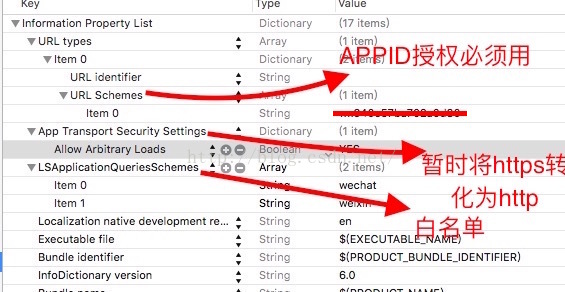
配置info.plist 按照自己的APP如果出现 这个app不允许访问微信数据那是自己的白名单没有配置好,即分享列表中没有微信这个APP只有系统的或者不需要白名单的应用
出现不能打开微信分享失败时候,这个ID没有授权是因为urltype没有配置好,只需手动添加urltype,在手动添加urlschemes,就可以成功打开微信了
ps:折腾了一天,发现这个还是超级简单的就是配置plist文件什么的麻烦点,不过其他还好,以后陆续会出环信,个推等APP 的集成使用
2016年07月06日16:39:30